1. Bubuka
Thank you for choosing the Sceptre 32-inch Class FHD (1080P) LED TV with Built-in DVD, Model E325BD-FSR. This manual provides essential information for the proper setup, operation, and maintenance of your new television. Please read this manual thoroughly before using the product and retain it for future reference.
2. Émbaran Kasalametan
Pikeun mastikeun operasi anu aman sareng nyegah karusakan, punten perhatikeun pancegahan kaamanan ieu:
- Baca sadaya parentah sateuacan ngajalankeun TV.
- Simpen manual ieu kanggo rujukan ka hareup.
- Perhatikeun sadaya peringatan dina alat sareng dina petunjuk operasi.
- Turutan sagala parentah.
- Ngabersihan ngan ku kaén garing.
- Pastikeun ventilasi anu leres. Ulah meungpeuk sagala bukaan ventilasi.
- Nangtayungan kabel kakuatan tina keur leumpang dina atawa pinched.
- Cabut colokan TV nalika badai kilat atanapi nalika henteu dianggo kanggo waktos anu lami.
- Rujuk sadayana jasa ka tanaga jasa anu mumpuni.
3. Eusi Paket
Mangga cék kotak pikeun item di handap ieu:
- Sceptre 32-inch Class FHD (1080P) LED TV with Built-in DVD (Model E325BD-FSR)
- Ngadeg TV
- Kadali jauh
- Kabel listrik
- 6ft Indoor 3-Outlet Extension Cord
- Manual pangguna (dokumén ieu)
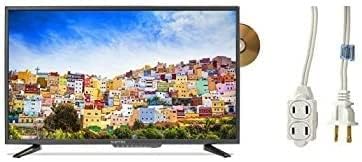
Image: The Sceptre 32-inch Class FHD LED TV with its built-in DVD player visible on the side, accompanied by a 6ft indoor 3-outlet extension cord.
4. Setélan
4.1 Pamasangan nangtung
- Teundeun layar TV sacara saksama dina permukaan anu lemes sareng bersih pikeun nyegah goresan.
- Sejajarkeun dudukan TV sareng liang pemasangan di handapeun TV.
- Ngamankeun stand ngagunakeun screws disadiakeun. Ulah overighten.
4.2 Nyambungkeun Daya
Plug the power cord into the TV's power input, then connect the other end to a standard electrical outlet. Use the included 6ft indoor 3-outlet extension cord if additional outlets are needed.
4.3 Nyambungkeun Alat éksternal
Your TV features various input ports for connecting external devices:
- HDMI: For high-definition video and audio from devices like Blu-ray players, game consoles, or cable/satellite boxes.
- Antenna/Cable (RF): Pikeun nyambungkeun anteneu pikeun siaran over-the-air atawa sambungan TV kabel.
- USB: Pikeun playback média tina alat panyimpenan USB.
Sambungkeun alat Anjeun ka port nu cocog dina tonggong atawa sisi TV.
5. Parentah Operasi
5.1 Daya Hurung/Pareuman
Pencét éta POWER button on the remote control or on the TV itself to turn the TV on or off.
5.2 Pilihan Sumber Input
Pencét éta INPUT or SUMBER button on the remote control to cycle through available input sources (e.g., TV, HDMI1, HDMI2, DVD, USB).
5.3 Channel Scan (TV Input)
If using an antenna or cable connection, select the 'TV' input source. Navigate to the TV's menu, find the 'Channel' or 'Setup' section, and initiate an 'Auto Scan' or 'Auto Program' to find available channels.
5.4 Built-in DVD Player Operation
- Ensure the TV is powered on and the input source is set to 'DVD'.
- Gently insert a DVD disc into the disc slot on the side of the TV, label side facing up. The TV will automatically detect the disc and begin playback.
- Use the DVD control buttons on your remote control (Play, Pause, Stop, Fast Forward, Rewind, Skip) to manage playback.
- Pikeun ngaluarkeun disk, pencét tombol EJECT tombol dina kadali jauh atawa TV.
5.5 Navigasi Menu
Pencét éta MENU button on the remote control to access the TV's settings. Use the arrow buttons to navigate and the Asupkeun or OK tombol pikeun milih pilihan. Pencét KALUAR or MENU deui pikeun nutup menu.
6. Pangropéa
6.1 Ngabersihan Layar
Lembut usap layar nganggo lawon anu lemes, garing, teu aya serat. Pikeun tanda pengkuh, enteng dampen lawon jeung cai atawa cleaner layar husus. Ulah menyemprot cairan langsung kana layar.
6.2 Ngabersihan Exterior
Wipe the TV's exterior with a soft, slightly damp lawon. Ulah nganggo bahan kimia anu kasar, pembersih anu abrasif, atanapi pangleyur, sabab ieu tiasa ngaruksak lapisan akhir.
6.3 Panyimpenan
If storing the TV for an extended period, unplug it from the power outlet and store it in a cool, dry place, preferably in its original packaging.
7. Cara ngungkulan
Sateuacan ngahubungi dukungan palanggan, cobian solusi ieu pikeun masalah umum:
- Henteu aya kakuatan: Pastikeun kabel listrik dicolokkeun sacara aman kana TV sareng stop kontak listrik. Pariksa lamun stop kontak boga kakuatan.
- Taya Gambar: Verify the correct input source is selected. Check all cable connections (HDMI, antenna) are secure.
- Henteu aya sora: Check the volume level and ensure the TV is not muted. Verify audio settings in the menu.
- Remote Control Teu Gawé: Ganti batréna. Pastikeun teu aya halangan antara jauh sareng sénsor IR TV.
- DVD Playback Issues: Ensure the disc is clean and free of scratches. Verify the disc is inserted correctly. Confirm the input source is set to 'DVD'.
8. Spésifikasi
| Modél | E325BD-FSR |
| Ukuran layar | 31.5 inci |
| Resolusi | 1080p (HD lengkep) |
| Fitur husus | Flat Screen, Built-in DVD Player |
| Téhnologi Tuner | ATSC |
| Métode kontrol | Jauh |
| Beungeut layar | Herang |
| Year (Manufacturing) | 2017 |
| Dirojong jasa Internét | Blockbuster |
9. Garansi jeung Rojongan
Your Sceptre TV is covered by a manufacturer's warranty. For specific warranty details, please refer to the warranty card included with your product or visit the official Sceptre website. For technical assistance, troubleshooting beyond this manual, or warranty claims, please contact Sceptre customer support.


