Bubuka
The Amazfit Stratos A1619 is a premium multisport GPS smartwatch designed for active individuals. It features 5 ATM water resistance, VO2max fitness level analysis, a heart rate sensor, and a reflective always-on color touch display. The watch is built with a rugged carbon fiber design case, a polished ceramic bezel, scratch-resistant 2.5D Corning Gorilla glass, and three stainless steel physical buttons for easy navigation. It comes with an exchangeable 22mm durable silicone watch strap.

Image: The Amazfit Stratos A1619 smartwatch, highlighting its carbon fiber housing, scratch-resistant glass, ceramic bezel, physical buttons, and sunlight-readable LCD screen.
This manual provides detailed instructions for setting up, operating, and maintaining your Amazfit Stratos A1619 smartwatch to ensure optimal performance and longevity.
Fitur konci
- Multisport GPS Tracking: Supports running, walking, cycling, swimming, elliptical machine, mountaineering, trail running, triathlon, tennis, soccer, and golfing.
- 5 ATM Tahan Cai: Suitable for swimming and other water activities.
- Advanced Fitness Metrics: Measures maximum oxygen consumption (VO2max), exercise load (TD), and recovery time through Firstbeat partnership.
- Ngawaskeun Laju haté: Integrated heart rate sensor for continuous tracking.
- Bewara pinter: Receive emails, text messages, calls, and other app notifications directly on your wrist.
- Desain awét: Carbon fiber case, polished ceramic bezel, 2.5D Corning Gorilla glass, and stainless steel physical buttons.
- Tampilan Salawasna Dihurungkeun: Reflective color touch display for clear visibility in various lighting conditions.
- Hirup batré anu panjang: Up to 5 days of typical use, 35 hours with continuous GPS tracking.
- Panyimpenan Musik: 4GB flash storage for phone-free music playback via Bluetooth headphones.
Naon dina Box
- Amazfit Stratos A1619 Smartwatch
- Base ngecas
- Pitunjuk pangguna (dokumén ieu)
Guide Setup
1. Ngecas Awal
Before first use, fully charge your Amazfit Stratos smartwatch. Connect the charging base to a USB power source and place the watch onto the charging pins. The watch screen will indicate charging status. A full charge typically takes approximately 2 hours.
2. Ngahurungkeun sareng Masangkeun
Press and hold the top physical button to power on the watch. Once powered on, the watch will display a QR code. Download and install the Amazfit Watch App on your smartphone (available on iOS App Store and Google Play Store). Open the app and follow the on-screen instructions to scan the QR code and pair your watch with your phone.
3. Basic Settings and Customization
After successful pairing, the app will guide you through initial settings such as language, time zone, and personal profile. You can customize watch faces directly from the watch or through the Amazfit Watch App. Explore the app for additional settings and features.
Parentah Operasi
Napigasi
The Amazfit Stratos features a touch-sensitive display and three physical buttons on the right side for navigation:
- Layar cabak: Gesek ka luhur, ka handap, ka kénca, atanapi ka katuhu pikeun nganapigasi ménu sareng widget. Ketok pikeun milih item.
- Tombol luhur: Short press to return to the previous screen or watch face. Long press to power on/off or access quick settings.
- Tombol Tengah: Short press to enter the main menu or confirm selections.
- Tombol handap: Short press to access a customizable shortcut (e.g., start a workout).

Gambar: Sisi view of the Amazfit Stratos A1619, highlighting the carbon fiber detailed housing, ceramic bezel, and three physical buttons for navigation.
Olahraga nyukcruk
The watch supports detailed tracking for 14 different sports modes. To start a workout:
- From the watch face, press the middle button to enter the main menu.
- Select "Workout" or "Sports".
- Choose your desired activity (e.g., Running, Cycling, Swimming).
- Wait for GPS signal acquisition (if applicable) and heart rate detection.
- Tap "GO" or press the middle button to start the activity.
The watch utilizes built-in GPS + GLONASS for accurate outdoor activity tracking. Post-workout data can be viewed on the watch and synced to the Amazfit Watch App, and further to platforms like Strava.
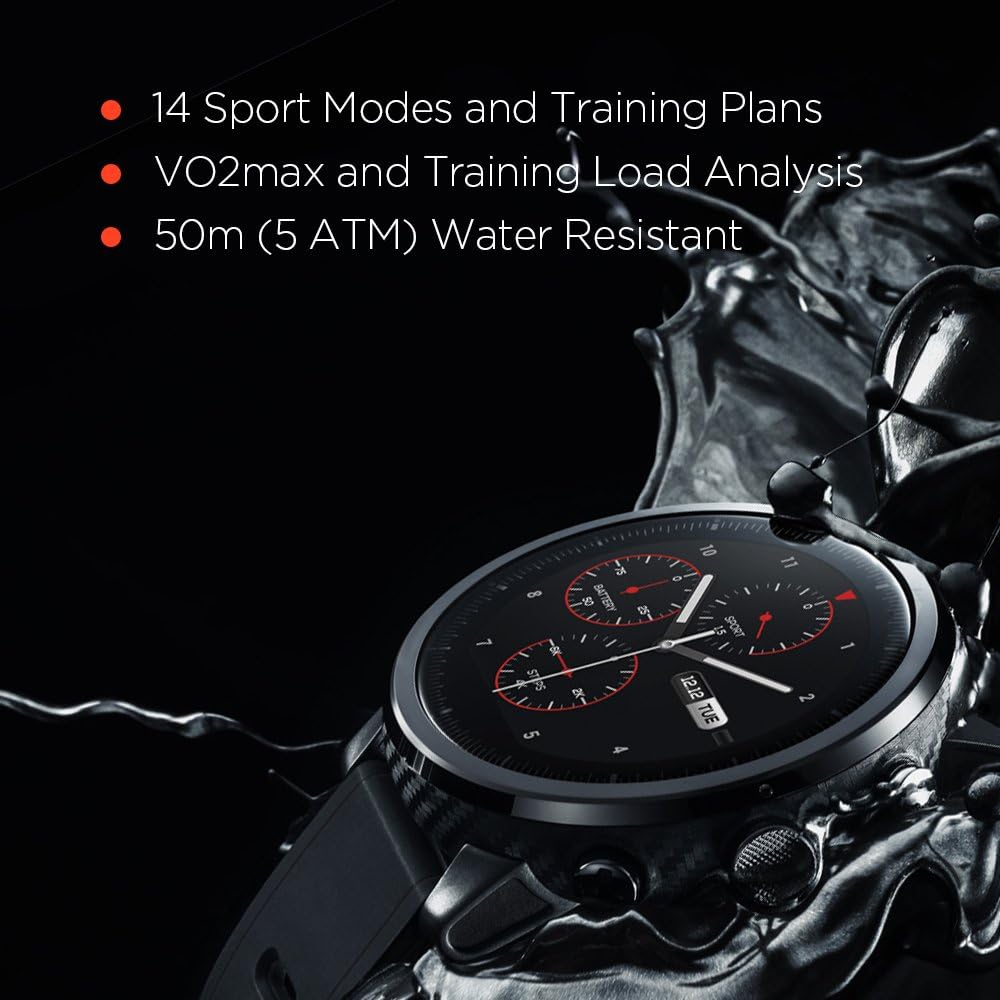
Image: The Amazfit Stratos A1619 watch face, illustrating its capability to display 14 sport modes and training plans, along with VO2max and Training Load Analysis.
Pangimeutan Laju Jantung
The Amazfit Stratos continuously monitors your heart rate using an optical sensor on the back of the watch. Ensure the watch is worn snugly on your wrist for accurate readings. You can view your current heart rate and historical data on the watch or in the Amazfit Watch App.

Gambar: Tukangeun view of the Amazfit Stratos A1619, showing the optical heart rate sensor and charging contacts, along with GPS + GLONASS capabilities.
Bewara pinter
Once paired with your smartphone, the watch can display notifications for incoming calls, text messages, emails, and other app alerts. Configure which app notifications you wish to receive through the Amazfit Watch App settings.

Image: The Amazfit Stratos A1619 watch face showing mobile call and app notifications, customizable watch faces, and phone-free music functionality.
Puterkeun Musik
The Amazfit Stratos has 4GB of internal storage, allowing you to store music directly on the watch. Connect Bluetooth headphones to the watch for phone-free music listening during workouts or daily activities. Transfer music files to the watch via a USB connection to your computer.
Tahan Cai (5 ATM)
The watch is rated 5 ATM, meaning it can withstand pressures equivalent to a depth of 50 meters. This makes it suitable for swimming and showering. Avoid using the physical buttons underwater, as this can compromise the water seal.
Pangropéa
Ngabersihan Smartwatch Anjeun
Regularly clean your watch to prevent skin irritation and maintain functionality. Use a soft, lint-free cloth to wipe the screen and watch body. For stubborn dirt, slightly dampen the cloth with water. Avoid using harsh chemicals or abrasive materials. Ensure the charging contacts on the back of the watch are clean and dry before charging.
Ngecas Prakték Pangalusna
- Use only the provided charging base.
- Avoid exposing the charging base or watch to extreme temperatures during charging.
- Do not charge if the watch or charging base is wet.
Ngaganti Tali
The Amazfit Stratos uses a standard 22mm watch strap. To replace the strap, locate the quick-release pins on the underside of the strap where it connects to the watch body. Slide the pin to detach the strap. Attach a new 22mm strap by reversing the process, ensuring the pins are securely seated.
Pamérésan masalah
Lalajo Teu Powering On
- Pastikeun arloji dicas pinuh. Sambungkeun ka pangkalan ngecas sareng sumber listrik sahenteuna sahenteuna 30 menit.
- Try pressing and holding the top physical button for 10-15 seconds to force a restart.
Masalah Konektipitas Bluetooth
- Pastikeun Bluetooth diaktipkeun dina smartphone sareng jam tangan anjeun.
- Pastikeun arlojina aya dina jangkauan telepon anjeun.
- Balikan deui jam tangan sareng smartphone anjeun.
- In your phone's Bluetooth settings, forget the Amazfit Stratos and re-pair it through the Amazfit Watch App.
- Check if the Amazfit Watch App is running in the background and has necessary permissions.
Bacaan Detak Jantung Anu Teu Akurat
- Pastikeun yén arloji dipaké pas dina pigeulang anjeun, henteu ketat teuing atanapi longgar teuing.
- Bersihkeun sénsor denyut jantung di tukang jam tangan.
- Avoid excessive movement during passive heart rate monitoring.
GPS Signal Acquisition Slow or Unreliable
- Pastikeun anjeun aya di daérah luar anu kabuka kalayan jelas view ti langit.
- Wait a few minutes for the watch to acquire a signal before starting your activity.
- Ensure the watch firmware is up to date via the Amazfit Watch App.
Hirup batré pondok
- Frequent GPS usage, continuous heart rate monitoring, and high screen brightness can significantly reduce battery life.
- Adjust settings in the Amazfit Watch App to optimize battery consumption.
- Pastikeun euweuh aplikasi latar tukang dina jam tangan anu ngonsumsi daya anu kaleuleuwihi.
spésifikasi
| Fitur | Rincian |
|---|---|
| Nomer modél | A1619 |
| tampilan | 1.34 Inches, OLED, 390 x 390 resolution |
| Konektipitas | Bluetooth, Wi-Fi (802.11b, 802.11g) |
| GPS | GPS bawaan + GLONASS |
| Tahan cai | 5 ATM (nepi ka 50 méter) |
| Jenis Batré | Litium Polimér (kaasup) |
| Kapasitas Panyimpenan Mémori | 4 GB |
| Item Beurat | 2.4 ons (kira-kira 68 gram) |
| Dimensi produk | 10 x 1.99 x 0.6 inci (kira-kira 25.4 x 5.05 x 1.52 cm) |
| Input Antarmuka Manusa | Tombol, Layar rampa |
Garansi sareng Rojongan
Garansi Produsén
The Amazfit Stratos A1619 is covered by a manufacturer's warranty. Please refer to the warranty card included with your product or visit the official Amazfit websitus pikeun istilah jeung kaayaan jaminan lengkep. Simpen bukti pameseran anjeun pikeun klaim garansi.
Rojongan Palanggan
For technical assistance, troubleshooting, or further inquiries, please visit the official Amazfit support website or contact their customer service. You can usually find contact information on the Amazfit website or within the Amazfit Watch App.


