1. Bubuka
The UNI-T UT315A is a portable LCD Vibration Tester designed for measuring acceleration, velocity, and displacement. It features a long and short external probe for versatile applications, USB connectivity for data transfer, a Max mode for peak value capture, and PC software for advanced analysis. This manual provides detailed instructions for the safe and effective use of your UT315A device.
2. Émbaran Kasalametan
Please read and understand all safety warnings and operating instructions before using this instrument. Failure to follow these instructions may result in injury or damage to the device.
- Do not operate the device in explosive atmospheres or in the presence of flammable gases or vapors.
- Ensure the probe is securely connected before taking measurements.
- Avoid dropping the instrument or subjecting it to severe impact.
- Ulah nyobian muka atanapi ngarobih alat; rujuk sadaya servis ka tanaga anu mumpuni.
- Buang batré nurutkeun peraturan lokal.
3. Produk Langkungview
The UT315A Vibration Tester consists of a main unit with an LCD display and control buttons, and an external vibration probe connected via a cable. The device is powered by batteries and includes a USB interface for PC communication.
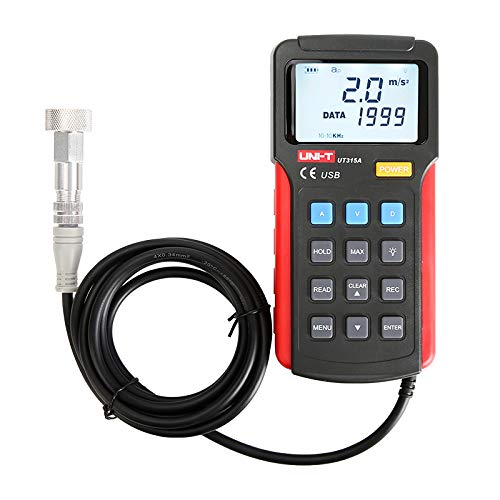
Gambar 1: Hareupeun view of the UNI-T UT315A Vibration Tester with its external probe and cable. The LCD screen displays '2.0 m/s²' and 'DATA 1999'. Buttons for A, V, D, HOLD, MAX, READ, CLEAR, REC, MENU, and ENTER are visible.
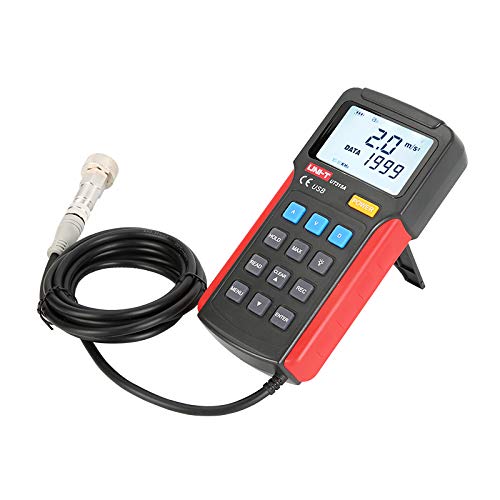
Gambar 2: Sisi view of the UNI-T UT315A Vibration Tester, showing the integrated kickstand extended for desktop use. The external probe and cable are also visible.
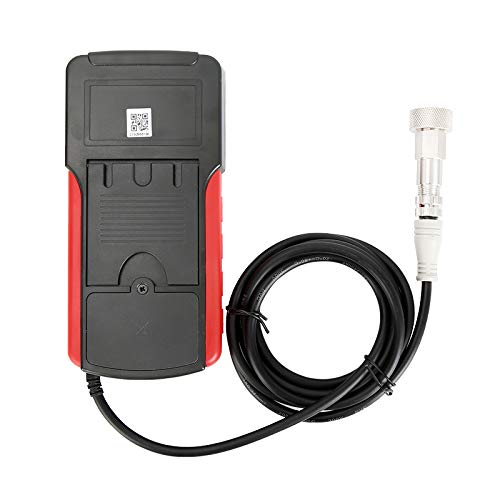
Gambar 3: Balik view of the UNI-T UT315A Vibration Tester, showing the battery compartment cover and a QR code. The external probe cable is connected to the top of the unit.
4. Setélan
4.1 Ngabongkar bungkusan
Carefully unpack the UNI-T UT315A Vibration Tester and check for any damage. The package should contain:
- UNI-T UT315A Main Unit
- External Vibration Probe (long and short options)
- Kabel USB
- CD Software PC (atanapi tautan unduh)
- Manual pamaké
4.2 Pamasangan batré
The UT315A is battery-powered. To install or replace batteries:
- Panggihan kompartemen batréna di tukang alat (tingali Gambar 3).
- Buka panutup kompartemen batré.
- Pasangkeun batré anu diperyogikeun, pastikeun polaritasna leres (+/-).
- Tutup panutup kompartemen batré aman.
4.3 Sambungan Panyilidikan
Connect the external vibration probe to the designated port on the top of the main unit. Ensure the connection is firm and secure to prevent inaccurate readings.
4.4 Daya Hurung/Pareuman
Pencét éta POWER button located on the front panel to turn the device on or off.
5. Parentah Operasi
5.1 Milih Modeu Pangukuran
The UT315A can measure acceleration, velocity, and displacement. Use the dedicated buttons to switch between modes:
- Pencét A for Acceleration (m/s²).
- Pencét V for Velocity (cm/s).
- Pencét D for Displacement (mm).
5.2 Nyandak Pangukuran
- Pastikeun alatna dihurungkeun sareng probena disambungkeun.
- Select the desired measurement mode (Acceleration, Velocity, or Displacement).
- Carefully place the tip of the external probe firmly against the surface of the object whose vibration you wish to measure.
- Baca nilai pangukuran nu dipintonkeun dina layar LCD.
5.3 Fungsi nyekel
Pikeun ngabekukeun bacaan ayeuna dina tampilan, pencét TAHAN button. Press it again to release and resume live measurements.
5.4 MAX Mode
To capture the maximum vibration value during a measurement period, press the MAX button. The display will show the peak value detected. Press again to exit MAX mode.
5.5 Data Recording (REC)
The UT315A allows for data recording. Refer to the detailed instructions in the full user manual for specific steps on initiating, stopping, and reviewing recorded data using the REC button and navigation keys.
5.6 PC Software and USB Connection
To transfer data to a computer or perform advanced analysis:
- Install the provided PC software from the CD or download it from the UNI-T websitus.
- Connect the UT315A to your computer using the supplied USB cable.
- Launch the PC software and follow its instructions to establish communication with the device and manage data.
6. Pangropéa
6.1 beberesih
Ngusap alat ku lemes, damp lawon. Ulah nganggo pembersih atanapi pangleyur anu abrasif. Pastikeun teu aya cairan anu asup kana alat.
6.2 Panyimpenan
Lamun teu dipaké pikeun période nambahan, cabut accu pikeun nyegah leakage. Simpen alat dina tempat anu tiis, garing, jauh tina sinar panonpoé langsung sareng suhu anu ekstrim.
6.3 Kalibrasi
For optimal accuracy, periodic calibration by a qualified service center is recommended. Refer to UNI-T's official support for calibration services.
7. Cara ngungkulan
- Alat teu hurung: Pariksa pamasangan batré sareng pastikeun batréna henteu béak. Ganti upami diperyogikeun.
- Bacaan teu akurat: Ensure the probe is firmly in contact with the surface. Check for any damage to the probe or cable.
- Masalah sambungan USB: Verify the USB cable is correctly connected to both the device and the PC. Ensure PC software drivers are installed correctly.
- Display shows 'OL' or 'OVER': The measurement value exceeds the device's range for the selected mode.
Upami masalah masih aya, hubungi dukungan palanggan UNI-T.
8. Spésifikasi
| Parameter | Nilai |
|---|---|
| Nomer modél | UT315A |
| Acceleration Measurement Range | 0.1 ~ 199.9 m/s² |
| Rentang Ukur Laju | 0.01 ~ 19.99 cm/s |
| Displacement Measurement Range | 0.001 ~ 1.999 mm |
| Sumber Daya | Batré Powered |
| Item Beurat | 3.31 pon |
| Produsén | UNI-T |
| UPC | 666354108580 |
9. Garansi jeung Rojongan
For warranty information, technical support, or service inquiries, please contact UNI-T directly or refer to their official websitus. Simpen resi pameseran anjeun salaku bukti pameseran.
Manufacturer: UNI-T
Pikeun pitulung salajengna, buka di Toko UNI-T di Amazon.