
Bubuka
This manual provides detailed instructions for the safe and effective use, setup, operation, and maintenance of your Streamlight ProTac HPL USB Flashlight, Model 88076. Please read this manual thoroughly before operating the device and retain it for future reference.
Émbaran Kasalametan
PERHATOSAN:
- Do not look directly into the LED light. The intense beam can cause temporary vision impairment or eye damage.
- Use only approved batteries. Incorrect battery types or improper installation can lead to fire, explosion, or personal injury.
- Jauhkeun batré tina jangkauan barudak.
- Produk ieu ngandung bahan kimia anu dipikanyaho Nagara California pikeun nyababkeun kanker sareng cacad kalahiran atanapi cilaka réproduktif sanés.
- The flashlight may become hot during prolonged use, especially on high settings. Handle with care.
Eusi pakét
Pastikeun yén sadaya item aya dina pakét anjeun:
- Streamlight ProTac HPL USB Flashlight (Model 88076)
- Kabel Ngecas USB
- Sarung
- Two CR123A Lithium Batteries (included)
- Klip Kantong Anu Tiasa Dicabut
Disetél
1. Pamasangan batré
The ProTac HPL USB can operate with either two CR123A lithium batteries or one Streamlight 18650 USB rechargeable battery (P/N 74175).
- Buka tutup buntut senter ku cara muterkeunana sabalikna jarum jam.
- Insert the batteries with the positive (+) end facing towards the head of the flashlight. Ensure correct polarity.
- Pasang deui tutup buntutna searah jarum jam nepi ka pageuh.

Gambar: Ngabeledug view showing battery compartment and other components.
2. Charging the 18650 USB Battery (if applicable)
If using the Streamlight 18650 USB rechargeable battery, it can be charged directly via a USB port.
- Slide the collar of the flashlight head back to expose the micro-USB charging port.
- Connect the supplied USB charging cord to the flashlight's micro-USB port and to a powered USB source (e.g., computer, wall adapter).
- The charging indicator light on the battery will show charging status (typically red for charging, green for charged).
- Once charging is complete, disconnect the USB cord and slide the collar forward to protect the port.
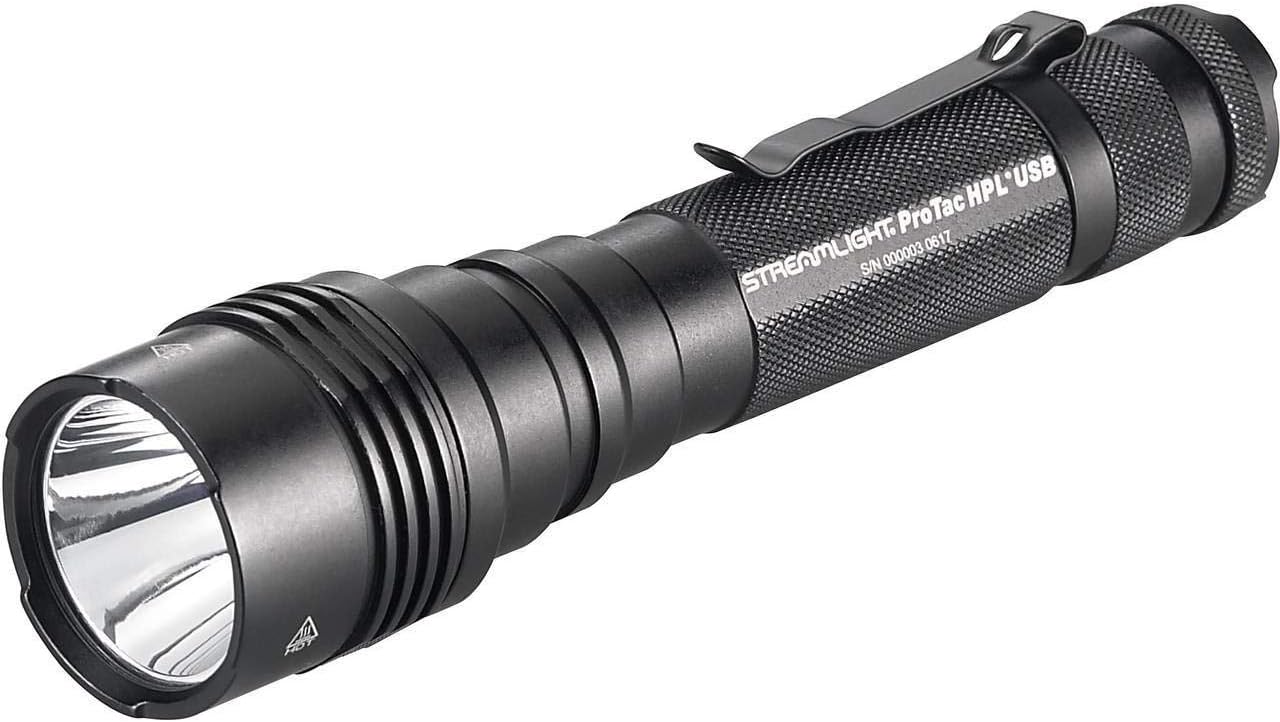
Image: Flashlight head with the collar slid back, revealing the USB charging port.
3. Ngapasangkeun Klip Saku
The flashlight comes with a removable pocket clip for secure carrying. Slide the clip onto the body of the flashlight in the desired orientation.
Parentah Operasi
The ProTac HPL USB features a multi-function, push-button tail switch for one-handed operation and TEN-TAP programming to select different operating modes.
1. Basic Operation (Factory Default: High/Strobe/Low)
- Sakedap Hurung: Pencét enteng saklar buntut. Leupaskeun pikeun mareuman.
- Konstan On: Pencét saklar buntut nepi ka ngaklik. Pencét deui pikeun mareuman.
- Modeu Aksés: From momentary or constant on, quickly tap the switch to cycle through modes (High → Strobe → Low). Pause for more than 0.2 seconds to select the current mode.

Gambar: Pinuh view of the Streamlight ProTac HPL USB Flashlight.
2. TEN-TAP Programming
The TEN-TAP programming allows users to select one of three different operating programs:
- Program 1 (Baku Pabrik): High / Strobe / Low
- Program 2: Luhur Wungkul
- Program 3: Lemah / Sedeng / Luhur
Pikeun ngarobah program:
- Ensure the flashlight is OFF.
- Tap the tail switch rapidly 9 times (within 0.4 seconds per tap).
- On the 10th tap, hold the switch down. The light will cycle through the available programs.
- Release the switch when the desired program is indicated by the number of flashes (1 flash for Program 1, 2 flashes for Program 2, 3 flashes for Program 3).
Pangropéa
- beberesih: Clean the lens with a soft, clean cloth. For the body, use a damp lawon sareng sabun hampang upami diperyogikeun. Hindarkeun pembersih anu abrasif.
- O-Ring: Periodically inspect the O-rings for wear and tear. Apply a thin coat of silicone grease to maintain water resistance. Replace damaged O-rings promptly.
- Perawatan batré: Remove batteries from the flashlight if it will not be used for an extended period to prevent leakage. Store batteries in a cool, dry place.
Pamérésan masalah
| Masalah | Mungkin Cukang lantaranana | Solusi |
|---|---|---|
| Lampu henteu hurung. | Batré maot atanapi henteu leres dipasang. | Replace batteries or ensure correct polarity. Charge 18650 battery if applicable. |
| Cahya taram atawa kedip-kedip. | Low battery charge or loose connections. | Replace or recharge batteries. Ensure tail cap and head are fully tightened. |
| Ngecas USB teu jalan. | USB port not fully exposed, faulty cable, or power source issue. | Ensure collar is fully slid back. Try a different USB cable or power source. |
spésifikasi
- model: 88076
- Sumber cahaya: LED
- Caang: Up to 1000 Lumens (High)
- Sumber Daya: 2 x CR123A Lithium Batteries or 1 x Streamlight 18650 USB Rechargeable Battery
- Bahan: Durable, anodized machined aircraft aluminum construction
- Tahan cai: Tahan cai
- Item Ukuran (L x W x H): 1 x 1 x 1 inci
- Beurat barang: 0.27 pon
- Fitur husus: Multi-function push-button tail switch, TEN-TAP programming, USB rechargeable (with 18650 battery), Removable pocket clip, Anti-roll head, O-ring sealed glass lens.
Émbaran jaminan
Streamlight warrants its products to be free of defects for a lifetime of use, with the exception of batteries and bulbs, abuse and normal wear. For full warranty details and service, please visit the official Streamlight websitus atanapi ngahubungan rojongan customer maranéhanana.
Note: This is a general statement. Always refer to the manufacturer's official warranty policy for specific terms and conditions.
Rojongan Palanggan
For technical assistance, parts, or service, please contact Streamlight customer support directly. You can typically find contact information on the official Streamlight websitus:
Nalika ngahubungi dukungan, punten gaduh nomer modél produk anjeun (88076) sareng tanggal pameseran sayogi.