1. Bubuka
Hatur nuhun pikeun meuliasing the Sharp HT-SB140MT 2.0 150W Soundbar. This soundbar is designed to enhance your audio experience, providing clear and powerful sound for your television, music, and other media. With its sleek design and versatile connectivity options, including Bluetooth, HDMI ARC/CEC, Optical, and Auxiliary inputs, it integrates seamlessly into any home entertainment setup. This manual provides essential information for safe and effective use, including setup, operation, maintenance, and troubleshooting.
2. Émbaran Kasalametan
- Sumber Daya: Pastikeun catu daya voltage matches the requirements specified on the soundbar. Use only the provided power cable.
- Ventilasi: Do not block any ventilation openings. Maintain adequate space around the soundbar for proper airflow.
- Cai sareng Uap: Do not expose the soundbar to dripping or splashing water. Do not place objects filled with liquids, such as vases, on the apparatus.
- Panas: Do not place the soundbar near heat sources such as radiators, heat registers, stoves, or other apparatus (including ampLiifiers) anu ngahasilkeun panas.
- beberesih: Unplug the soundbar from the power outlet before cleaning. Use a dry, soft cloth for cleaning. Do not use liquid cleaners or aerosol cleaners.
- Palayanan: Entong nyobian ngalayanan produk ieu nyalira. Rujuk sadayana ngalayanan ka tanaga jasa anu mumpuni.
- Batré: The remote control uses a CR2 battery. Ensure correct polarity when inserting batteries. Do not mix old and new batteries.
3. Eusi Paket
Punten parios yén sadaya barang aya dina pakét:
- Sharp HT-SB140MT Soundbar
- Kadali jauh
- Kabel Daya
- Manual pangguna (dokumén ieu)
4. Produk Langkungview

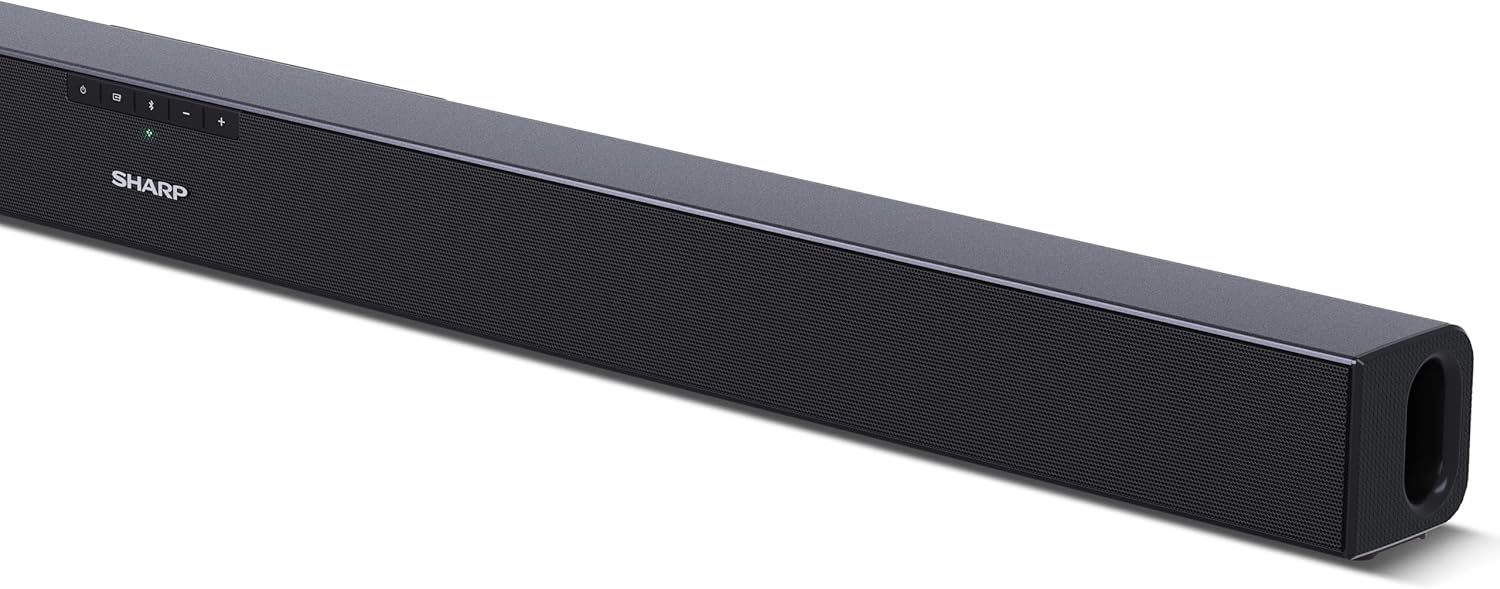
Gambar 4.1: Hareupeun View
The front of the soundbar features the Sharp logo and LED indicators for source selection and status. Control buttons for power, input, and volume are located on the top panel.
Gambar 4.2: Tukangeun View (Sambungan)
The rear panel provides all necessary connection ports: HDMI ARC, Optical (S/PDIF), and Auxiliary (3.5mm) input, along with the power input.

angka 4.3: kadali jauh
The included remote control allows for convenient operation of the soundbar, including power, input selection, volume, bass, and treble adjustments.
5. Setélan
5.1 Nempatkeun
The Sharp HT-SB140MT Soundbar can be placed on a flat surface, such as a TV stand, or wall-mounted. Its slim profile of 6 cm allows it to fit easily under most TV screens without obstructing the view.

Figure 5.1: Soundbar Placement
The soundbar is ideally positioned directly in front of your television for optimal sound projection.
5.2 Nyambungkeun ka TV Anjeun
Pilih salah sahiji metodeu sambungan ieu:
- HDMI ARC/CEC (Recommended): Connect an HDMI cable (not included) from the HDMI ARC port on your TV to the HDMI ARC port on the soundbar. This allows your TV remote to control the soundbar's volume and power. Ensure HDMI ARC/CEC is enabled in your TV's settings.
- Digital Optical Audio (S/PDIF): Connect an optical cable (not included) from the Optical Out port on your TV to the OPTICAL IN port on the soundbar. Select the Optical input on the soundbar.
- Bantu (AUX): Connect a 3.5mm audio cable (not included) from the headphone jack or AUX Out port on your TV to the AUX IN port on the soundbar. Select the AUX input on the soundbar.
5.3 Sambungan Daya
After connecting the audio cable, plug the power cable into the soundbar's power input and then into a wall outlet (220-240V / 50Hz).
6. Parentah Operasi
6.1 Daya Hurung/Pareuman
Pencét tombol Daya dina bar sora atanapi kadali jauh pikeun ngaktipkeun atanapi mareuman unit.
6.2 Pamilihan Sumber
Press the Input button on the soundbar or the remote control repeatedly to cycle through the available input sources: HDMI ARC, Optical, AUX, and Bluetooth. The LED indicator on the soundbar will change to reflect the selected source.
6.3 Volume adjustment
Anggo tombol Volume Naék (+) sareng Volume Turun (-) dina soundbar atanapi remote control pikeun nyaluyukeun tingkat sora.
6.4 Nyapasangkeun Bluetooth
Pikeun nyambungkeun alat Bluetooth:
- Select Bluetooth input on the soundbar. The Bluetooth LED indicator will flash, indicating pairing mode.
- Dina alat pinter anjeun (smartphone, tablet, jsb.), aktipkeun Bluetooth sareng milarian alat anu sayogi.
- Select "SHARP HT-SB140MT" from the list of devices.
- Once connected, the Bluetooth LED indicator will stop flashing and remain solid. You can now stream audio wirelessly to the soundbar.
6.5 Sound Modes (Equalizer)
The soundbar features an equalizer with different sound modes to optimize audio for various content types. Use the EQ button on the remote control to cycle through these modes (e.g., Movie, Music, News). You can also adjust Bass and Treble levels using dedicated buttons on the remote.
7. Pangropéa
7.1 beberesih
To clean the soundbar, unplug it from the power outlet. Use a soft, dry, lint-free cloth to wipe down the surfaces. Do not use abrasive cleaners, waxes, or solvents as they may damage the finish.
7.2 Panyimpenan
If you plan to store the soundbar for an extended period, disconnect it from the power supply and store it in a cool, dry place, away from direct sunlight and extreme temperatures.
8. Cara ngungkulan
Upami anjeun mendakan masalah sareng soundbar anjeun, tingal masalah sareng solusi umum ieu:
| Masalah | Mungkin Cukang lantaranana | Solusi |
|---|---|---|
| Taya sora tina soundbar. | Soundbar pareum atawa dipareuman. Sumber input salah dipilih. Cables are not connected properly. Setelan kaluaran audio TV teu bener. | Pastikeun soundbar hurung sareng henteu dibisukeun. Select the correct input source (HDMI ARC, Optical, AUX). Check all cable connections (HDMI, Optical, AUX). Verify your TV's audio output settings are set to external speakers or the correct digital output. |
| Alat Bluetooth teu bisa nyambung. | Soundbar is not in pairing mode. Alat kaluar tina jangkauan. Interferensi ti alat sejen. | Ensure the soundbar is in Bluetooth input mode and the LED is flashing. Pindahkeun alat Bluetooth anjeun ngadeukeutan bar sora (dina 10 meter). Pareuman alat Bluetooth séjén anu aya di caket dieu. Coba leupaskeun pasangan teras pasangkeun deui. |
| Kadali jauh teu jalan. | Battery is low or inserted incorrectly. Halangan antara jarak jauh sareng soundbar. Remote control is faulty. | Replace the CR2 battery and ensure correct polarity. Remove any obstructions between the remote and the soundbar's sensor. Lamun masalah persist, kontak rojongan customer. |
9. Spésifikasi
| Ngaran modél | HT-SB140(MT) |
| Tipe Speaker | Soundbar |
| Konfigurasi Saluran Sakuliling Sora | 2.0 |
| Maksimum Speaker Kaluaran Power | 150 Watt |
| Réspon Frékuénsi | 60 Hz |
| Téhnologi konektipitas | Bluetooth, HDMI ARC/CEC, Digital Optical Audio (S/PDIF), 3.5mm Auxiliary (AUX) |
| Téknologi Komunikasi Nirkabel | Bluetooth |
| Jarak Maksimum (Bluetooth) | 10 méter |
| Métode kontrol | Kadali jauh |
| Sumber Daya | AC (Mains) |
| Masukan Voltage | 220-240 Volt |
| Warna | Hideung |
| Bahan | Plastik, Logam |
| Tipe Pamasangan | Tembok Gunung, Tabletop |
| Ukuran produk (L x W x H) | 95 x 6 x 6 cm |
| Item Beurat | 1.5 kg |
| Komponén Kaasup | Kadali jauh |
| Batré Dibutuhkeun | 1 batre CR2 |
| Tahan cai | No |
| Kasadiaan suku cadang | 5 Taun |
| Software Apdet Dijamin Dugi | Inpormasi henteu sayogi |
10. Garansi jeung Rojongan
The Sharp HT-SB140MT Soundbar comes with a Limited Warranty. Please refer to the warranty card included in your package for specific terms and conditions. Spare parts are available for up to 5 years from the date of purchase.
For technical support, service, or warranty claims, please contact Sharp customer service through their official website or the contact information provided in your product documentation. When contacting support, please have your product model number (HT-SB140(MT)) and purchase details ready.


