1. Bubuka
The Universal Audio OX Amp Top Box is a premium reactive load box and guitar recording system designed to deliver studio-miked amplifier sounds from your tube amplifier. It allows users to play and record their amplifier at optimal tonal settings, from clean tones to fully cranked, at any volume level. The OX features Universal Audio's Dynamic Speaker Modeling technology, which accurately emulates speaker drive, breakup, and cone cry, providing a realistic amppangalaman liifier.

Gambar 1: Hareupeun view of the Universal Audio OX Amp Kotak Luhur.
2. Fitur konci
- Premium Reactive Load Box: Provides a no-compromise analog reactive load for tube guitar amplifiers, preserving tone, dynamics, and feel.
- Guitar Recording System: Offers instant, album-quality microphone and speaker cabinet tones via front-panel RIG control.
- Dynamic Speaker Modeling: Emulates speaker drive, breakup, and cone cry, essential for authentic tube amp nada.
- Adjustable Attenuation: Features five finely-tuned guitar amp attenuation levels, from completely silent to full band volume.
- Kontrol Aplikasi: Software application for iPad, Mac, or Windows 10 computers provides intuitive control over RIG settings, allowing users to tweak, store, and recall hundreds of presets.
- Latihan jempé: Includes a front-panel headphone jack for silent practice with a cranked tube amppangagung.
- Kaluaran serbaguna: Equipped with S/PDIF RCA and optical TOSLINK digital stereo outputs, as well as balanced TRS stereo line outputs with front panel level control.

Figure 2: The OX Amp Top Box allows for versatile playing and recording scenarios.
3. Setup jeung Sambungan
To set up your OX Amp Top Box, follow these steps:
- Connect your tube amplifier's speaker output to the OX's input.
- Connect the OX's output to your speaker cabinet (if using a physical cabinet).
- For silent practice, connect headphones to the front-panel headphone jack.
- For recording or live mixing, utilize the S/PDIF RCA, optical TOSLINK digital stereo outputs, or balanced TRS stereo line outputs.
- Connect a one, two, or three-button footswitch to toggle studio-quality effects on and off.
- Download the OX software app for iPad, Mac, or Windows 10 computer and connect via Wi-Fi for advanced control and preset management.
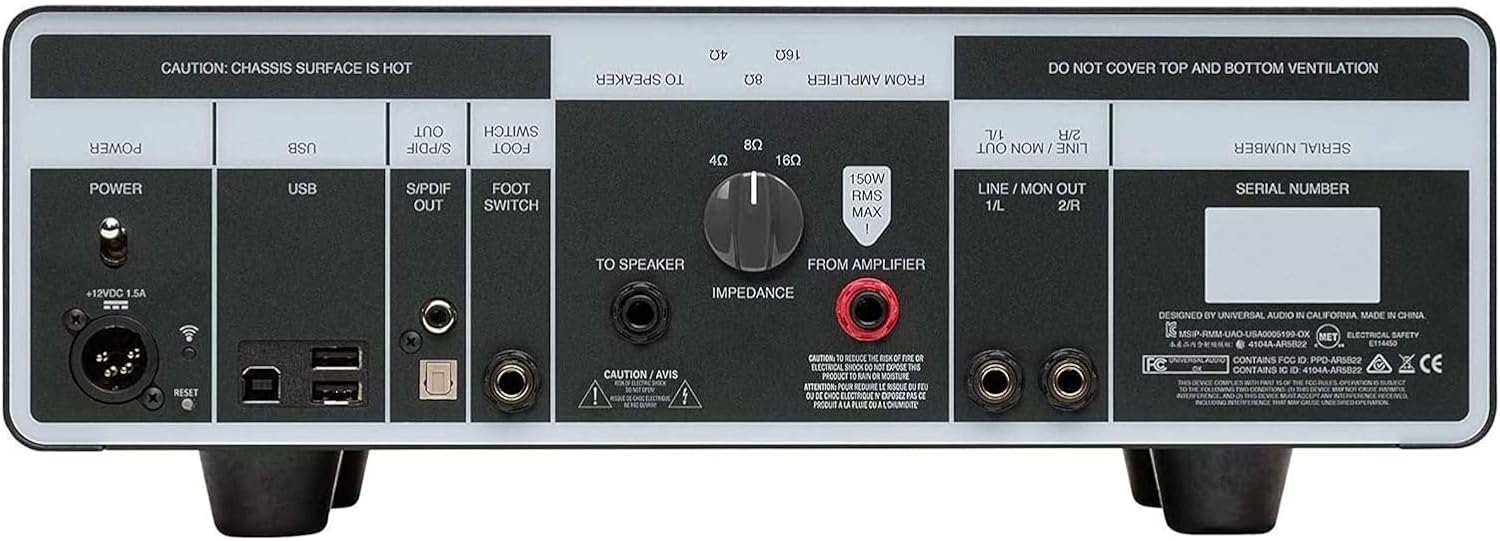
Figure 3: Rear panel connections of the OX Amp Kotak Luhur.
4. Parentah Operasi
The OX Amp Top Box offers intuitive controls for shaping your amplifier's tone and recording experience.
- Front-Panel RIG Control: Use the six-position RIG control to quickly select from complete setups, including 22 vintage and modern cabinets with iconic speakers, close mics, ambient room mics, and up to four simultaneous studio effects.
- Dynamic Speaker Modeling (App): Adjust the Speaker Breakup knob within the OX app to control harmonics and sonic complexity, emulating real speaker cabinet behavior.
- App-Based Control: The OX software app provides simple, intuitive control over all RIG settings via Wi-Fi. You can tweak, store, and recall hundreds of presets from your iPad, Mac, or Windows 10 computer.
- Preset Recall: Save your six favorite sounds onto the OX's front-panel RIG knob for instant recall during studio sessions or live performances.

Figure 4: Front panel controls for quick adjustments.

Figure 5: The OX control app provides detailed sound customization.
5. Pangropéa
Proper maintenance ensures the longevity and optimal performance of your Universal Audio OX Amp Kotak Luhur.
- beberesih: Anggo kaén anu garing sareng lemes pikeun ngabersihan bagian luar unit. Hindarkeun pembersih abrasive atanapi pangleyur.
- Ventilasi: Ensure proper ventilation around the unit. Do not cover the top and bottom ventilation openings. The chassis surface can become hot during operation.
- Panyimpenan: Store the unit in a dry environment, away from extreme temperatures and humidity.
- Penanganan: Ati-ati dina ngurus alat ieu. Ulah nepi ka murag atawa kakeunaan dampak anu kuat.
6. Cara ngungkulan
If you encounter issues with your OX Amp Top Box, consider the following common troubleshooting steps:
- Taya Kaluaran Sora:
- Check all cable connections (amplifier to OX, OX to cabinet/headphones/outputs).
- Pastikeun amplifier dihurungkeun sareng fungsina leres.
- Verify that the OX's volume controls (Speaker Volume, Line Out, Headphone) are not set to minimum.
- Confirm the correct impedance setting on the OX matches your ampkaluaran liifier urang.
- Sora distort:
- Reduce the input level from your amplifier to the OX.
- Check the Speaker Breakup knob setting in the app; excessive settings can introduce distortion.
- Pastikeun sadaya kabel dina kaayaan anu saé sareng nyambung kalayan leres.
- Masalah Konektipitas Aplikasi:
- Verify that the OX is powered on and its Wi-Fi indicator is active.
- Ensure your control device (iPad, Mac, Windows 10) is connected to the OX's Wi-Fi network.
- Restart both the OX and your control device.
7. Spésifikasi Téknis
| Item Beurat | 20 pon |
| Dimensi produk | 8 x 15 x 4.5 inci |
| Nomer Modél Item | OX |
| Tanggal Kahiji Sadia | Pébruari 27, 2018 |
| Warna | hideung |
| Alat nu cocog | Gitar |
| Tipe Panyambung | 6.35mm Jack |
| Jenis Bahan | Poliuretana |
| Kaluaran Wattage | 10 Watt |
| Sumber Daya | Kabel Listrik |
8. Garansi jeung Rojongan
Warranty information for the Universal Audio OX Amp Top Box is typically provided with the product packaging or can be found on the official Universal Audio website. For technical support, product registration, and additional resources, please visit the Universal Audio support page.
Optional protection plans may be available for purchase separately, offering extended coverage beyond the standard manufacturer's warranty.


