1. Bubuka
This user manual provides comprehensive instructions for the installation, operation, maintenance, and troubleshooting of the IP-COM G3224P 24-Port Managed PoE Switch. Please read this manual thoroughly before using the device to ensure proper and safe operation.
The IP-COM G3224P is a high-performance managed Power over Ethernet (PoE) switch designed for small to medium-sized businesses and enterprise networks. It offers 24 Gigabit Ethernet ports with PoE+ capabilities and additional SFP ports for fiber uplinks, providing flexible and scalable network solutions.
2. Produk Langkungview
2.1 Eusi pakét
- IP-COM G3224P 24-Port Managed PoE Switch
- Kabel listrik
- Pakakas Rak (braket sareng sekrup)
- Suku Karét (pikeun panempatan méja)
- Guide Instalasi Gancang
2.2 Pedaran Panel hareup
The front panel of the IP-COM G3224P switch features various ports and LED indicators for status monitoring.
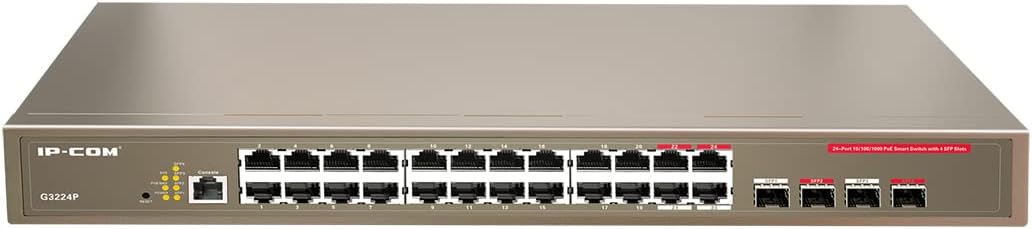
Figure 2.1: IP-COM G3224P Front Panel Layout
This image displays the front panel of the IP-COM G3224P switch. On the left, the IP-COM logo and model number G3224P are visible. To the right, there are LED indicators for SYS, PoE MAX, and individual port status. A console port is also present. The main section features 24 Gigabit Ethernet RJ45 ports, arranged in two rows, with port numbers 1 through 24. On the far right, there are four SFP ports labeled SFP1, SFP2, SFP3, and SFP4, which are used for fiber optic uplinks.
2.3 Indikator LED
| Indikator LED | Status | Katerangan |
|---|---|---|
| SYS | Héjo (Padet) | Sistem operasi normal. |
| SYS | Héjo (Blinking) | System is booting up or firmware is being upgraded. |
| POE MAX | Beureum (Padet) | PoE power budget is nearing or exceeding its limit. |
| Link/Act (Per Port) | Héjo (Padet) | Port disambungkeun. |
| Link/Act (Per Port) | Héjo (Blinking) | Port is transmitting or receiving data. |
| PoE (Per Port) | Konéng (Padet) | Daya PoE keur disayogikeun ka alat anu nyambung. |
3. Setup jeung Instalasi
3.1 Pancegahan Kasalametan
- Pastikeun catu daya voltage matches the switch's requirements (240V as per specifications).
- Entong meungpeung lawang angin.
- Jauhkeun alat tina cai, seuneu, sareng suhu anu luhur.
- Ulah nyobian muka atawa ngalereskeun alat sorangan.
3.2 Pamasangan Rackmount
- Attach the provided rackmount brackets to the sides of the switch using the included screws.
- Pasangkeun saklar kana rak peralatan standar 19 inci nganggo sekrup rak anu pas (teu kalebet).
- Ensure adequate airflow around the switch for proper cooling.
3.3 Instalasi Desktop
- Pasang suku karét anu disayogikeun ka handapeun saklar.
- Place the switch on a flat, stable surface with sufficient ventilation.
3.4 Nyambungkeun Saklar
- Sambungan Daya: Connect the power cord to the power inlet on the rear panel of the switch and then to a grounded power outlet.
- Alat Jaringan: Connect network devices (e.g., computers, servers, IP cameras, VoIP phones) to the RJ45 ports (1-24) on the front panel using standard Ethernet cables.
- Alat PoE: For PoE-powered devices, simply connect them to any of the RJ45 ports. The switch will automatically detect and provide power if the device is PoE compliant.
- Sambungan Uplink: Use the SFP ports (SFP1-SFP4) for fiber optic uplinks to other network devices or the core network. Insert compatible SFP transceivers into the SFP slots before connecting fiber optic cables.
- Sambungan Konsol (Opsional): For initial configuration or advanced management, connect a console cable from your computer to the console port on the switch.
4. Parentah Operasi
4.1 Daya Awal Hurung
After connecting the power cord, the switch will automatically power on. Observe the SYS LED indicator. It will blink during boot-up and turn solid green once the system is ready.
4.2 Konéktivitas Jaringan Dasar
Once powered on, the switch will automatically detect connected devices. The Link/Act LED for each connected port will illuminate solid green, indicating a successful link. It will blink when data is being transmitted or received.
4.3 PoE Operation
When a PoE-compatible device is connected to a port, the switch will negotiate power delivery. The PoE LED for that port will turn yellow, indicating that power is being supplied. Monitor the PoE MAX LED; if it turns red, the total PoE power budget is being approached or exceeded, and you may need to reduce the number of PoE devices or use a higher-capacity power source.
4.4 Aksés Manajemén
The IP-COM G3224P is a managed switch, offering various configuration options via a web-based GUI, CLI (Command Line Interface) via the console port, or SNMP. Refer to the detailed management guide (usually available on the manufacturer's website) for advanced configuration, including VLANs, QoS, port mirroring, and security settings.
- Web GUI: Aksés saklar web interface by typing its default IP address (check the Quick Installation Guide or manufacturer's documentation) into a web browser.
- CLI: Connect via the console port using a terminal emulator (e.g., PuTTY) with appropriate serial port settings.
5. Pangropéa
5.1 beberesih
- Regularly clean the exterior of the switch with a soft, dry cloth.
- Entong nganggo pembersih cair atanapi aerosol.
- Pastikeun bukaan ventilasi bébas tina lebu sareng halangan.
5.2 Apdet firmware
Periodically check the IP-COM official websitus pikeun apdet firmware. Ngajaga firmware tetep mutahir mastikeun kinerja, kaamanan, sareng aksés kana fitur-fitur anyar anu optimal. Turutan pitunjuk anu disayogikeun sareng pakét apdet firmware kalayan saksama.
5.3 Pertimbangan Lingkungan
Ensure the switch operates within its specified environmental conditions (temperature, humidity) to prevent damage and ensure longevity.
6. Cara ngungkulan
| Masalah | Mungkin Cukang lantaranana | Solusi |
|---|---|---|
| No power / SYS LED off | Kabel listrik teu nyambung atanapi stop kontakna rusak. | Pariksa sambungan kabel listrik. Coba stop kontak anu béda. |
| No link on a port (Link/Act LED off) | Cable issue, device off, or incorrect port. | Check Ethernet cable. Ensure connected device is powered on. Try a different port or cable. |
| PoE device not powering on (PoE LED off) | Device not PoE compliant, cable issue, or power budget exceeded. | Verify device is PoE compliant. Check cable. Check PoE MAX LED; if red, reduce PoE load. |
| Masalah kinerja jaringan | Cable quality, network congestion, or incorrect configuration. | Use high-quality Ethernet cables. Check for network loops. Review switch configuration (VLANs, QoS). |
| Teu bisa ngakses web panganteur manajemén | Incorrect IP address, network settings, or firewall. | Verify the switch's IP address. Ensure your computer is on the same subnet. Disable temporary firewalls. |
If problems persist, consult the full product documentation or contact IP-COM technical support.
7. Spésifikasi
| Fitur | Rincian |
|---|---|
| Modél | G3224P |
| Palabuhan | 24 x 10/100/1000Base-T (RJ45) with PoE+, 4 x 1000Base-X (SFP) |
| Ngalihkeun Kamampuh | 56 Gbps |
| Neraskeun Laju | 41.66 Mpps |
| Standar Poe | IEEE 802.3af / di |
| Masukan Voltage | 240 volt |
| Ukuran (L x W x H) | 29 x 44 x 44 cm |
| Beurat | 15 kg |
| Rackmount | Sumuhun |
| Manajemén | Diurus (Web GUI, CLI, SNMP) |
Catetan: Spésifikasi tiasa robih tanpa aya bewara sateuacana.
8. Garansi sareng Rojongan Téknis
8.1 Émbaran jaminan
IP-COM products typically come with a limited warranty. Please refer to the warranty card included with your product or visit the official IP-COM websitus kanggo syarat sareng katangtuan garansi anu lengkep khusus pikeun wilayah anjeun sareng tanggal pameseran.
8.2 Rojongan Téknis
For technical assistance, product inquiries, or troubleshooting beyond the scope of this manual, please contact IP-COM technical support. Support contact information can usually be found on the official IP-COM websitus atanapi dina bungkusan produk.
IP-COM Official Websitus: www.ip-com.com.cn


