1. Produk Langkungview
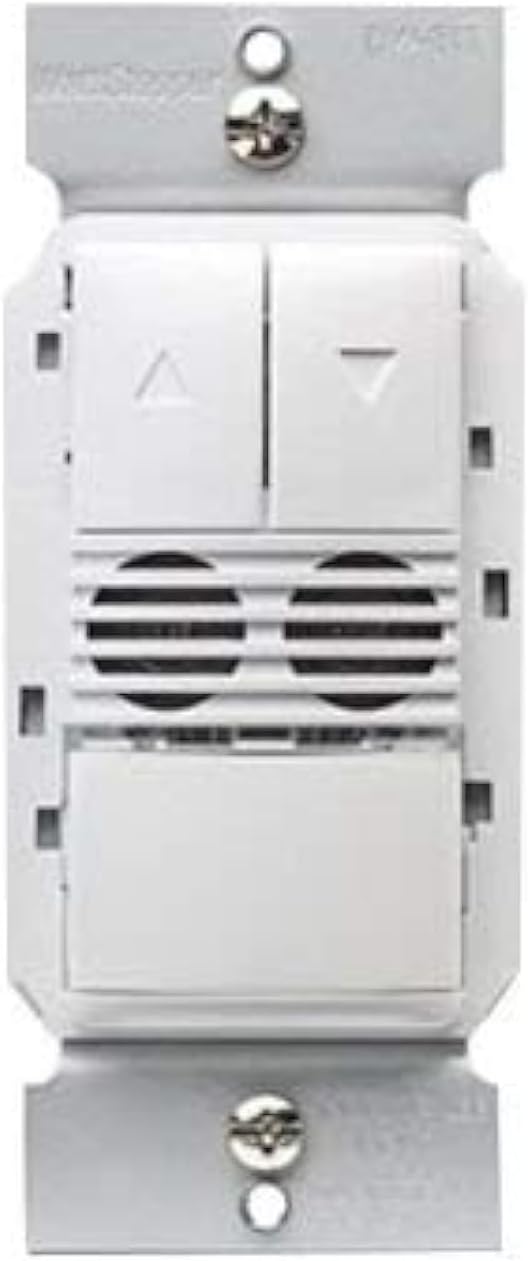
The Legrand Wattstopper DW-311-W is a state-of-the-art dual technology dimming wall switch occupancy sensor designed for efficient lighting control. This device combines passive infrared (PIR) and ultrasonic (US) technologies to accurately detect occupancy, ensuring lights are only on when needed. It operates on 120/277 Volt AC and provides dimming control, making it suitable for various commercial and residential applications. The sensor is designed to enhance energy savings and convenience by automatically turning lights on and off based on room occupancy and ambient light levels.

2. Émbaran Kasalametan
WARNING: Risk of Electric Shock. Improper installation can lead to serious injury or death.
- Always turn off power at the circuit breaker or fuse(s) before installing or servicing the device.
- This device is intended for installation in accordance with the National Electrical Code and local regulations.
- Pamasangan kedah dilakukeun ku tukang listrik anu mumpuni.
- Paké kawat tambaga wungkul.
- Do not touch wires or terminals when the circuit breaker is ON.
3. Pakakas Diperlukeun
- Obeng (disarankeun sirah Phillips)
- Kawat Stripper
- Voltage Tester (Electroprobe)
- Electrical Tape (optional, for labeling)
4. Pamasangan
Follow these steps carefully to install your new dimming occupancy sensor. Ensure power is OFF at the circuit breaker before beginning.
- Pareuman Daya: Locate the circuit breaker controlling the switch you are replacing and turn it OFF. Verify power is off using a voltage panguji.
- Hapus saklar anu aya: Unscrew and carefully pull the existing wall plate and switch out of the wall box.
- Identipikasi Kawat: With the power temporarily turned ON (exercise extreme caution), use a voltage tester to identify the HOT wire (line wire) and the LOAD wire. The HOT wire will cause the tester to light up or beep. The LOAD wire should not have power when the light switch is off. Label these wires if desired. Turn power OFF at the circuit breaker again before proceeding.
- Identify Neutral and Ground Wires: The NEUTRAL wire is typically white. The GROUND wire is typically bare copper or green.
- Identify 0-10V Dimming Wires (if applicable): For 0-10V dimming systems, you will also have two low voltage wires, typically purple (positive) and grey (negative), connected to the ballast.
- Cabut Saklar Lawas: Detach all wires from the old switch.
- Wire the New Sensor: Refer to the wiring diagram below and the general wiring instructions for a dual technology dimming sensor.
4.1 Sambungan Wiring
- Nyambungkeun Kawat hideung from the sensor to the HOT (Line) wire from the wall box.
- Nyambungkeun Kawat beureum from the sensor to the LOAD wire from the wall box.
- Nyambungkeun Kawat bodas from the sensor to the Kawat NETRAL from the wall box.
- Nyambungkeun Kawat héjo from the sensor to the GROUND kawat from the wall box.
- For 0-10V dimming: Connect the Kawat ungu from the sensor to the Positive (+) 0-10V dimming wire from the ballast.
- For 0-10V dimming: Connect the Kawat kulawu from the sensor to the Negative (-) 0-10V dimming wire from the ballast.
Secure all connections with wire nuts, ensuring no bare wire is exposed.
- Pasang sénsor: Carefully push the wired sensor back into the wall box. Secure it with the provided screws.
- Pasang Plat Tembok: Attach the wall plate over the sensor.
- Mulangkeun Daya: Hurungkeun kakuatan deui ON di circuit breaker.
5. Operasi
The DW-311-W sensor operates in either Occupancy Mode (lights turn ON automatically when motion is detected) or Vacancy Mode (lights must be turned ON manually, but turn OFF automatically). It also features dimming control.
- Manual ON/OFF: Press the main paddle button to manually turn lights ON or OFF.
- Kontrol dimming: Use the UP (▲) and DOWN (▼) buttons to adjust the light intensity.
- Operasi otomatis: In Occupancy Mode, lights will turn on automatically when motion is detected and turn off after a set time delay when the area is vacant. In Vacancy Mode, lights are turned on manually and turn off automatically.
6. Programming and Settings
The sensor offers adjustable settings for optimal performance. These settings are typically accessed by removing the push buttons on the face of the device to reveal adjustment dials.
- Tunda waktos: Adjusts how long the lights remain ON after the last detected motion. Common settings include 15 seconds, 5 minutes, 10 minutes, 15 minutes, 20 minutes, or 30 minutes.
- Sensor Sensitivity Range: Controls the detection range of the motion sensor. Adjust this based on the size of the room and desired coverage.
- Light Level (Ambient Light Sensor): Determines the ambient light threshold at which the sensor will allow lights to turn ON automatically. This helps prevent lights from turning on if there is already sufficient natural light.
6.1 Switching Occupancy and Vacancy Modes
You can change the device's operating mode between Occupancy and Vacancy:
- To change to Occupancy Mode: Press and hold down both the UP (▲) and DOWN (▼) buttons for approximately 5 seconds until the LED indicator flashes 2 times.
- To change to Vacancy Mode: Press and hold down both the UP (▲) and DOWN (▼) buttons for approximately 5 seconds until the LED indicator flashes 4 times.
7. Spésifikasi
| Fitur | Rincian |
|---|---|
| Modeu Operasi | Otomatis |
| Operasi Voltage | 120/277 Volt (AC) |
| Tipe Kontak | Biasana Buka |
| Tipe Panyambung | Kawat kabel |
| merek | Legrand |
| Terminal | sekrup |
| Jinis Sirkuit | 1-jalan |
| Tipe Aktuator | Dimmer |
| Bahan Kontak | Copper, Brass, Stainless Steel |
| Jumlah Jabatan | 2 |
| Métode kontrol | Toél |
| Protokol konektipitas | Wifi |
| Warna | BODAS |
| Wattage | 1200 watt |
| Jumlah Unit | 1.0 Ngitung |
| Produsén | Wattstopper |
| Tipe Kontrol | Dimming and Occupancy Control |
| UPC | 754182939428 |
| Ukuran Paket | 5.08 x 3.07 x 2.6 inci |
| Item Beurat | 7.8 ons |
| Nomer modél barang | DW-311-W |
| Tanggal Kahiji Sadia | 2 Agustus 2017 |