1. Bubuka
This manual provides detailed instructions for the installation, operation, and maintenance of the MOXA EDS-508A 8-Port Managed Ethernet Switch. The EDS-508A is designed for industrial applications, offering robust performance and advanced network management features including VLAN, IGMP Snooping, Port Trunking, RMON, and Quality of Service (QoS). Please read this manual thoroughly before operating the device to ensure proper usage and optimal performance.
2. Émbaran Kasalametan
- Sasayogian tanaga: Pastikeun catu daya voltage is within the specified range for the device. Use only approved power adapters.
- Lingkungan: Install the switch in a well-ventilated area, away from direct sunlight, heat sources, and excessive moisture.
- Grounding: Proper grounding is essential for safe operation and protection against electrical surges.
- Pangropéa: Ulah nyobian muka atawa ngalereskeun alat sorangan. Rujuk sadayana jasa ka tanaga anu mumpuni.
- Kabel: Use appropriate Ethernet cables (e.g., Cat5e or better) for reliable network connections.
3. Eusi Paket
Pariksa yén pakét anjeun ngandung barang-barang ieu:
- MOXA EDS-508A 8-Port Managed Ethernet Switch
- Guide Instalasi Gancang
- Documentation CD (or link to online resources)
- Blok terminal pikeun input kakuatan
- Wall mounting kit (if applicable)
If any of these items are missing or damaged, please contact your vendor immediately.
4. Produk Langkungview
The MOXA EDS-508A is an industrial-grade managed Ethernet switch featuring 8 10/100BaseTx ports. It supports a wide range of advanced network management functions, making it suitable for demanding industrial environments.
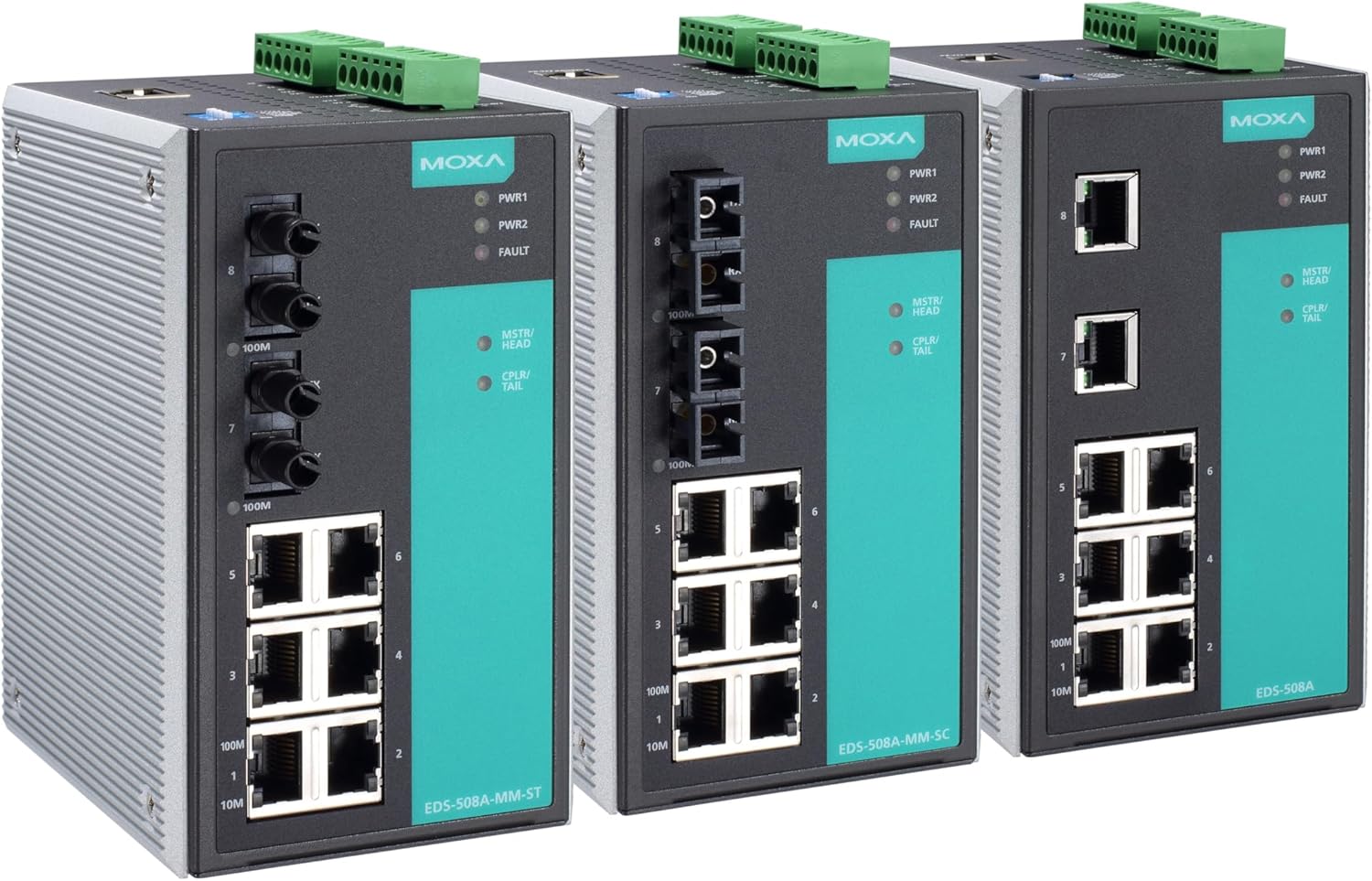
Figure 4.1: MOXA EDS-508A Series Switches. This image displays three variants of the MOXA EDS-508A industrial Ethernet switch. From left to right, the first switch (EDS-508A-MM-ST) features 6 RJ45 10/100BaseTx ports and 2 100M ST fiber ports. The middle switch (EDS-508A-MM-SC) has 6 RJ45 10/100BaseTx ports and 2 100M SC fiber ports. The third switch (EDS-508A) is equipped with 8 RJ45 10/100BaseTx ports. All models include dual power inputs (PWR1, PWR2) and a fault indicator, along with MSTR/HEAD and CPLR/TAIL indicators for redundancy features.
Fitur konci:
- 8 10/100BaseTx Ethernet Ports
- Advanced Network Management: VLAN, IGMP Snooping, Port Trunking
- Traffic Management: RMON, Quality of Service (QoS)
- Industrial Design: Wide operating temperature, redundant power inputs
- Easy Deployment: DIN-rail or wall mounting options
5. Setélan
5.1 Instalasi fisik
- Pamasangan: Securely mount the EDS-508A on a DIN-rail or to a wall using the provided mounting kit. Ensure adequate space for ventilation and cable routing.
- Sambungan Daya: Connect the primary and secondary DC power sources to the terminal block on the top of the switch. The EDS-508A supports redundant power inputs for enhanced reliability. Ensure correct polarity.
- Grounding: Connect the grounding wire from the switch to a proper earth ground. This is crucial for electrical safety and EMI protection.
5.2 Sambungan Jaringan
- Port Ethernet: Connect your network devices (e.g., PCs, PLCs, IP cameras) to the 10/100BaseTx RJ45 ports using standard Cat5e or Cat6 Ethernet cables.
- Fiber Ports (if applicable): For models with fiber optic ports (e.g., EDS-508A-MM-ST, EDS-508A-MM-SC), connect appropriate fiber optic cables to extend network reach over longer distances.
5.3 Konfigurasi Awal
- Daya Hurung: Apply power to the switch. The PWR1 and PWR2 LEDs should illuminate, indicating successful power-up.
- Alamat IP: The switch typically comes with a default IP address (refer to the Quick Installation Guide for the specific default IP). Connect a PC directly to one of the switch's Ethernet ports and configure your PC's IP address to be in the same subnet.
- WebManajemén dumasar: Buka a web browser on your PC and enter the switch's default IP address. Log in using the default username and password (consult the Quick Installation Guide).
- Setélan Dasar: Change the default IP address, username, and password for security. Configure basic network settings such as system time and SNMP.
6. Nyuping
6.1 Indikator LED
- PWR1/PWR2: Solid green indicates power input is active.
- SALAH: Solid red indicates a system fault or power failure.
- MSTR/HEAD: Indicates the switch's role in a redundant ring topology (e.g., Turbo Ring).
- CPLR/TAIL: Indicates the switch's role in a redundant ring topology.
- Port LEDs: Solid green indicates a link is established. Blinking green indicates data activity.
6.2 Advanced Features Configuration
Aksés ka web-based management interface or console port to configure the following features:
- VLAN (Virtual Local Area Network): Segment your network into logical groups to improve security and performance.
- IGMP Snooping: Optimize multicast traffic delivery, preventing flooding of multicast packets to all ports.
- Port Trunking (Link Aggregation): Gabungkeun sababaraha tautan fisik kana hiji tautan logis pikeun ningkatkeun bandwidth sareng redundansi.
- RMON (Remote Monitoring): Monitor network traffic and performance statistics for diagnostic purposes.
- QoS (Kualitas Palayanan): Prioritize critical network traffic (e.g., industrial control data, video streams) to ensure consistent performance.
- Redundancy Protocols: Configure Moxa's Turbo Ring, Turbo Chain, or other industry-standard redundancy protocols for network resilience.
7. Pangropéa
7.1 Apdet firmware
Periodically check the Moxa website for the latest firmware updates. Firmware updates can provide new features, performance improvements, and security patches. Follow the instructions provided with the firmware package for a safe update process.
7.2 beberesih
Ensure the switch remains free of dust and debris. Use a soft, dry cloth to clean the exterior. Do not use liquid cleaners or solvents. Ensure power is disconnected before cleaning.
7.3 Konfigurasi Nyadangkeun
Regularly back up your switch's configuration settings. This allows for quick restoration of settings in case of a device replacement or accidental configuration changes.
8. Cara ngungkulan
Bagian ieu nyayogikeun solusi pikeun masalah umum anu anjeun tiasa patepang.
- No Power (PWR LEDs Off):
- Check power cable connections to the terminal block and power source.
- Pariksa sumber daya aktip sareng nyayogikeun voltase anu lerestage.
- Ensure the terminal block is securely fastened.
- No Link on Port (Port LED Off):
- Pastikeun kabel Ethernet parantos nyambung kalayan pageuh di dua tungtungna.
- Check the cable for damage. Try a different cable.
- Pastikeun alat nu disambungkeun dihurungkeun tur fungsina bener.
- Check port settings (e.g., speed/duplex) on both the switch and the connected device.
- Teu Bisa Aksés Web panganteur:
- Ensure your PC's IP address is in the same subnet as the switch.
- Verify the switch's IP address.
- Pariksa konflik alamat IP dina jaringan.
- Try pinging the switch's IP address.
- If all else fails, consider resetting the switch to factory defaults (refer to the Quick Installation Guide for procedure).
- Masalah Kinerja Jaringan:
- Pariksa lalulintas jaringan anu kaleuleuwihi atanapi badai siaran.
- Review QoS settings to ensure critical traffic is prioritized.
- Inspect cable quality and length.
- Utilize RMON data for traffic analysis.
9. Spésifikasi
| Fitur | Katerangan |
|---|---|
| merek | Moxa |
| Modél | EDS-508A |
| Jumlah Palabuhan | 8 |
| Palabuhan Tipe | 10/100 BaseTx (RJ45) |
| Managed Features | VLAN, IGMP Snooping, Port Trunking, RMON, QoS |
| Ukuran Paket | 14.49 x 8.86 x 3.94 inci |
| Item Beurat | 3.05 pon (1.39 Kilogram) |
| ASIN | B079C7Q34H |
| UPC / GTIN | 613739924624 |
| Produsén | Moxa Nyarita. |
| Tanggal Kahiji Sadia | 26 Januari 2018 |
10. Garansi jeung Rojongan
Moxa products are designed for reliability and come with a standard warranty. For specific warranty terms and conditions, please refer to the warranty information included with your product or visit the official Moxa websitus.
For technical support, product documentation, and software downloads, please visit the Moxa support portal: www.moxa.com/support.
When contacting support, please have your product model (EDS-508A) and serial number ready.


