
Bubuka
The Superior Electronics Simply Numeric SUPTLB002 is a simplified universal remote control designed for ease of use. It features large, easily identifiable buttons and the ability to control up to two devices through a learning function. This manual provides detailed instructions for setting up, operating, and maintaining your remote control.

Image: The Superior Electronics Simply Numeric remote control, highlighting its simple design and branding.
Émbaran Kasalametan
- Jauhkeun kadali jauh tina cai sareng kalembaban anu kaleuleuwihan.
- Avoid exposing the remote to direct sunlight or extreme temperatures.
- Entong nyobian ngabongkar atanapi ngarobih kadali jauh.
- Buang batré anu dipaké sacara tanggung jawab nurutkeun peraturan lokal.
Eusi pakét
Bungkusan kedah ngandung:
- 1 x Superior Electronics Simply Numeric SUPTLB002 Universal Remote Control
- 1 x Manual Instruksi (Dokumén ieu)
Note: 2 x 1.5V AAA batteries are not included and must be purchased separately.
Produk Leuwihview
The SUPTLB002 remote control features a minimalist design with essential buttons for common functions. It is designed to be intuitive and easy to handle.
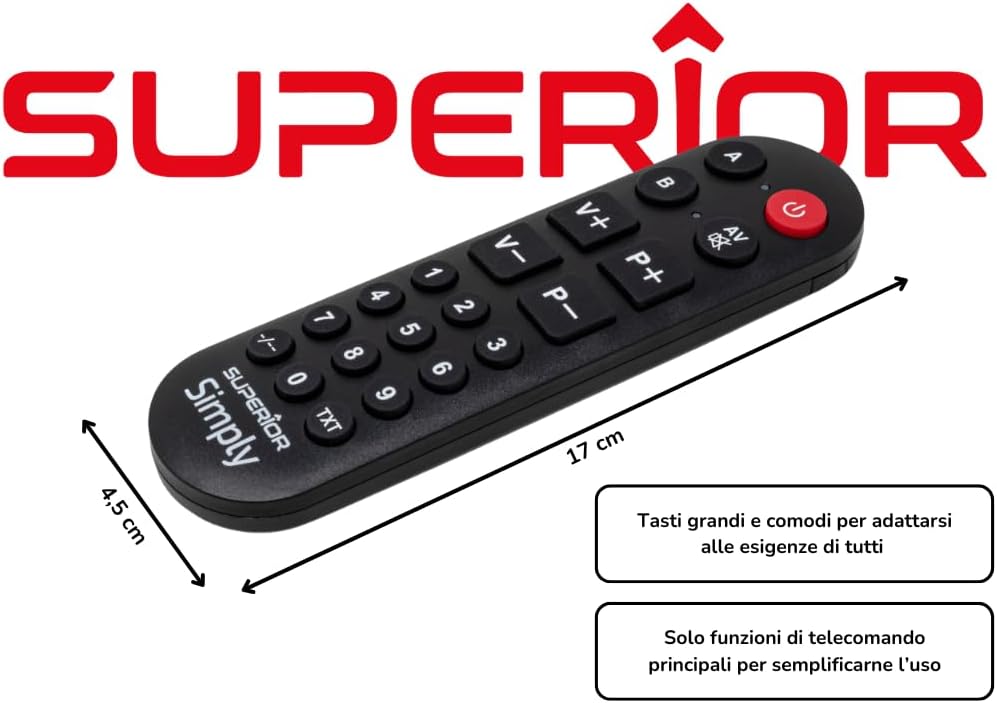
Gambar: Hareupeun view of the Simply Numeric remote control, showing the layout of its 20 buttons.

Gambar: Sisi view of the Simply Numeric remote control, illustrating its ergonomic profile.
The remote includes buttons for power, volume up/down, channel up/down, AV input, and numeric keys (0-9, -/--, TXT). It also features two dedicated buttons, A and B, for controlling different devices.
Pamasangan batré
- Teangan tempat panutup kompartemen batré dina tonggong kadali jauh.
- Geser panutup ka handap atawa pencét kancing pikeun mukakeunana.
- Insert two 1.5V AAA batteries, ensuring the correct polarity (+ and -) as indicated inside the compartment.
- Ganti panutup kompartemen batré nepi ka ngaklik aman kana tempatna.
Programming the Remote Control (Learning Function)
The Simply Numeric remote uses a learning function to copy signals from your original remote control. This process takes less than a minute per button.

Image: The Simply Numeric remote control with key features highlighted, including its learning function and compatibility.
Pertimbangan penting:
- Anjeun kedah gaduh a functional original remote control for the device you wish to control. This remote cannot be programmed if your original remote is not working.
- The Simply Numeric remote is compatible with most infrared (IR) televisions and electronic devices.
Step-by-Step Programming:
- Prepare Remotes: Place the Simply Numeric remote and your original remote control on a flat surface, facing each other, with their infrared emitters aligned at a distance of approximately 1-3 cm (0.4-1.2 inches).
- Lebetkeun Modeu Diajar: Pencét jeung tahan tombol POWER button on the Simply Numeric remote for approximately 5 seconds until the red LED indicator light starts blinking slowly. This indicates it is in learning mode.
- Pilih Tombol pikeun Program: Press the button on the Simply Numeric remote that you wish to program (e.g., 'Volume Up'). The LED will blink faster, waiting for a signal.
- Sinyal Pangiriman: Pencét jeung tahan the corresponding button on your original remote control (e.g., 'Volume Up') for several seconds. Continue holding until the LED on the Simply Numeric remote blinks rapidly three times and then stays solid. This confirms the signal has been learned.
- Balikan deui pikeun tombol-tombol anu sanés: Repeat steps 3 and 4 for all other buttons you wish to program (e.g., Channel Up/Down, Numeric keys, AV).
- Kaluar tina Modeu Diajar: Once all desired buttons are programmed, press the POWER button on the Simply Numeric remote again to exit learning mode. The LED indicator will turn off.
Tip: If the LED does not blink rapidly three times and stay solid, the signal may not have been learned correctly. Ensure the remotes are properly aligned and try again, holding the original remote's button for a longer duration (up to 5 seconds or until the Simply Numeric remote's LED stops blinking).
Programming for Two Devices (A/B Buttons):
The remote can control two different devices by utilizing the 'A' and 'B' buttons. Each button acts as a selector for a different set of programmed commands.
- To program commands for Device 1, follow the steps above, but before selecting a button to program (step 3), press the A button. The LED next to 'A' will light up.
- To program commands for Device 2, follow the steps above, but before selecting a button to program (step 3), press the B button. The LED next to 'B' will light up.
- You can program different functions for the same physical button (e.g., 'Volume Up') under the 'A' and 'B' profiles, allowing you to control two distinct devices (e.g., TV and Set-top Box).
Ngoperasikeun Remote Control
After successful programming, point the Simply Numeric remote control towards your device and press the desired button. The remote will transmit the learned infrared signal.
- To control Device 1 (e.g., TV), ensure the LED next to the A button is lit. If not, press A.
- To control Device 2 (e.g., Set-top Box), ensure the LED next to the B button is lit. If not, press B.
- The large buttons are designed for easy identification and comfortable use, especially for users who prefer a minimalist interface.
Pangropéa sareng Perawatan
- Bersihkeun kadali jauh sacara teratur nganggo lawon anu lembut sareng garing. Ulah make cleaners cair atawa bahan abrasive.
- Upami jarak jauh henteu dianggo kanggo waktos anu panjang, cabut batréna pikeun nyegah bocor.
- Ulah ngaleupaskeun remot kontrol atawa ngabalukarkeun dampak anu kuat.
Pamérésan masalah
| Masalah | Mungkin Cukang lantaranana | Solusi |
|---|---|---|
| Remote does not respond after programming. | Incorrect programming; batteries are low or inserted incorrectly. |
|
| Cannot enter learning mode (LED does not blink). | Batteries are dead; power button not held long enough. |
|
| Remote does not work with my device. | Device is not IR-compatible; original remote is not functional; device is too new/old for learning function. |
|
| Buttons A/B do not switch devices. | Device selection not correctly made. |
|
spésifikasi
- merek: Éléktronik Unggul
- Jumlah modél: SUPTLB002
- warna: Beureum
- Téknologi konektipitas: Infrabeureum
- Fitur husus: Universal, Fungsi Diajar
- Alat anu cocog: Television (and other IR-controlled devices)
- Maximum Supported Devices: 2
- Jumlah Kancing: 20
- Jenis Controller: Tombol Pencét, Kadali Jarak Jauh
- Rentang maksimum: 10 méter
- ukuran: 17.0 x 4.8 x 1.5 cm (kira-kira 6.7 x 1.9 x 0.6 inci)
- beurat: 104 g (kira-kira 3.7 oz)
- Batré: 2 x 1.5V AAA (teu kalebet)

Image: The Simply Numeric remote control displaying its approximate dimensions.
Garansi sareng Rojongan
This Superior Electronics product comes with a 2-taun jaminan produsén urang ti tanggal beuli. Garansi ieu nyertakeun cacad dina bahan sareng pagawean dina panggunaan normal.
For warranty claims or technical support, please contact Superior Electronics customer service through their official website or the retailer where the product was purchased. Please have your proof of purchase and product model number (SUPTLB002) ready when contacting support.