Produk Leuwihview
The Moman AZ-310 Travel Camera Tripod is a versatile and portable support system designed for photographers and videographers. Constructed from durable aluminum alloy, it offers exceptional stability and flexibility for various shooting scenarios, including quick conversion to a monopod. Its compact folding design makes it an ideal companion for travel and outdoor adventures.

The Moman AZ-310 Travel Camera Tripod in its folded state, showcasing desain kompak na.
Fitur konci
- Lightweight and Heavy Duty: Constructed from aluminum alloy to ensure lightness and stability, preventing camera shake.
- Unique Axis Inversion Design: Provides various shooting angles, perfect for macro photography, and can also function as an alpenstock.
- Remarkable Folding Design: Folds to a compact 13.78 inches (35 cm) in length and 3.15 inches (8 cm) in width for convenient portability.
- Human-friendly Features: Includes an anti-slip quick loading plate, anti-slip and warm sponge handheld grip, and a retractable shaft hook for added stability.
- Hulu Bal Panoramik 360°: Allows for easy adjustment of your DSLR camera at different angles to achieve the best shooting view.
- Extendable Sections: Features four extendable leg sections, allowing height adjustment from 13.8 inches (35 cm) to 61.4 inches (156 cm).
- Max Payload: Capable of supporting equipment up to 33.7 lbs (15.3 kg).
Parentah Setup
Ngabongkar Tripod
- Locate the leg angle adjustment buttons at the top of each tripod leg.
- Press these buttons to release the legs and extend them outwards.
- Twist the spiral locking rings on each leg section counter-clockwise to unlock, extend the sections to your desired height, then twist clockwise to lock securely.
- Ensure all leg locks and angle adjustments are securely fastened before proceeding.
This video demonstrates the process of unfolding the Moman Travel Camera Tripod and adjusting its legs and ball head.

The Moman Travel Camera Tripod fully extended, showing the leg sections and ball head.
Ngalampirkeun Kaméra Anjeun
- Pastikeun pelat pelepasan gancang napel pageuh kana handapeun kaméra anjeun.
- Align the quick release plate with the receiver on the ball head.
- Geser pelat kana panarima nepi ka ngaklik kana tempatna.
- Tighten the locking knob on the ball head to secure the camera.

A DSLR camera securely mounted on the Moman Travel Camera Tripod, ready for use.
Parentah Operasi
Nyaluyukeun Kepala Bola
The 360° panoramic ball head allows for precise camera positioning.
- Loosen the main locking knob to adjust the ball head's angle.
- Loosen the panning knob for 360° horizontal rotation.
- For vertical shooting, tilt the camera into the designated vertical slot on the ball head and tighten the main locking knob.
- Always ensure all knobs are tightened before leaving your camera unattended.

A lengkep view of the ball head, highlighting the locking knobs and quick release plate.
Konvérsi Monopod
One of the tripod legs can be detached and converted into a monopod.
- Identify the leg with the foam grip, which is designed for monopod conversion.
- Cabut suku ieu tina awak tripod.
- Detach the ball head from the main tripod column and screw it onto the top of the detached leg.
- Extend the monopod sections to the desired height using the twist locks.
This video illustrates the quick conversion of the Moman Travel Camera Tripod into a monopod.

The Moman tripod with one leg detached and configured as a monopod.
Ningkatkeun Stabilitas
For increased stability, especially in windy conditions or when using heavier equipment, utilize the retractable shaft hook located at the bottom of the center column.
- Pull down the hook.
- Hang a weight (e.g., a camera bag, sandbag) from this hook to lower the center of gravity and improve the tripod's stability.

A close-up of the retractable hook on the tripod's center column, used for adding weight to enhance stability.
spésifikasi
| Fitur | Rincian |
|---|---|
| Ngaran produk | Moman AZ-310 |
| Nomer modél | 893436 |
| Beurat produk | 1.01 pon (0.46 kg) |
| Bahan | Aluminium, Serat Karbon |
| Jangkungna Minimum | 13.8 inci (35 cm) |
| Jangkungna maksimum | 61.4 inci (156 cm) |
| Jangkungna dilipat | 13.78 inci (35 cm) |
| Dilipet Lebar | 3.15 inci (8 cm) |
| Wates Beurat (Muatan) | 33.7 lbs (15.3 kg) |
| Tipe Kepala Tripod | Ball Head (360° Panoramic) |
| Alat nu cocog | DSLR, SLR, Mirrorless Cameras (Canon, Nikon, Pentax, Sony, Olympus) |
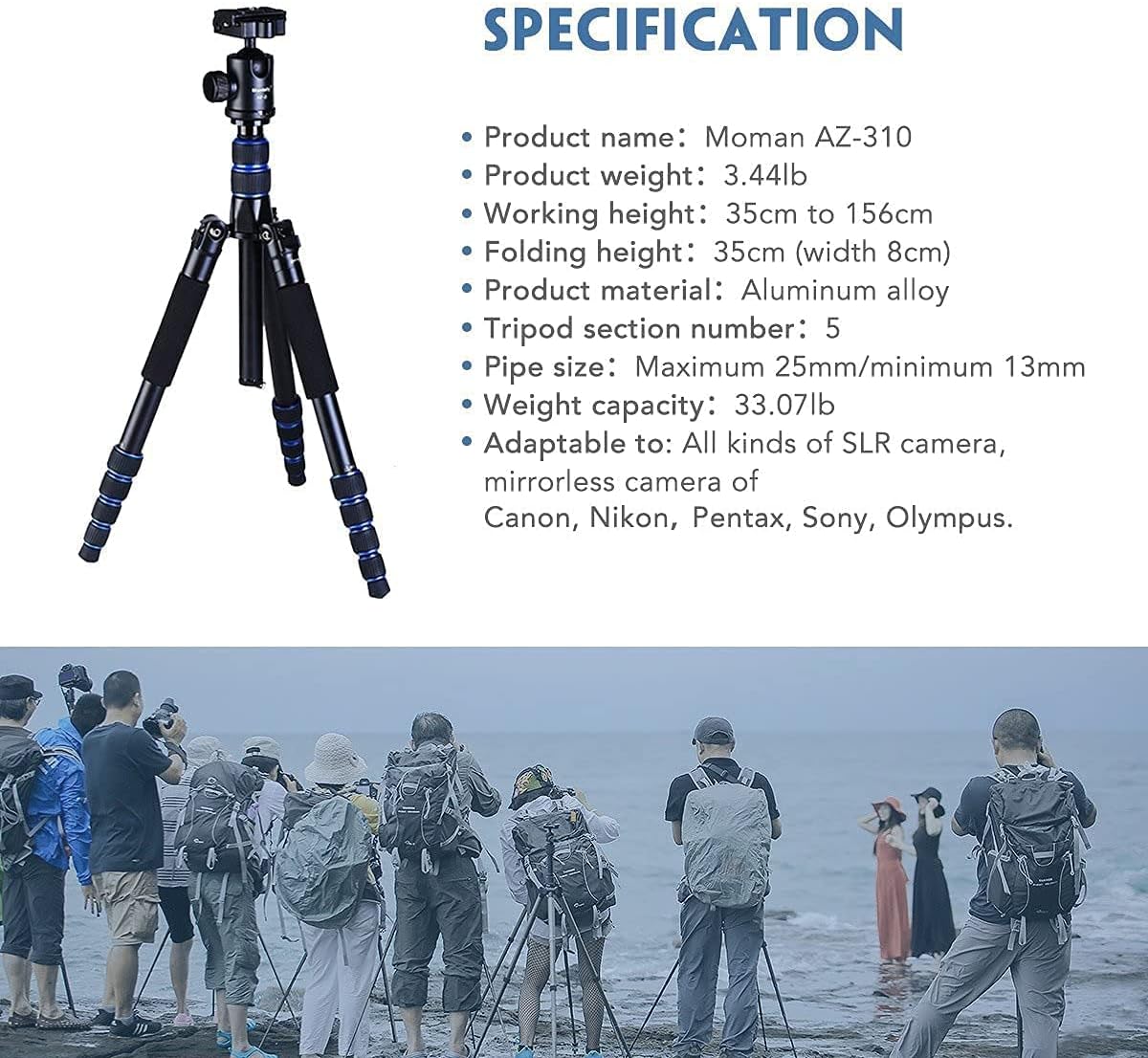
An image displaying the detailed specifications of the Moman AZ-310 Travel Camera Tripod.
Pangropéa
- Regularly clean the tripod legs and locking mechanisms to prevent dust and debris buildup.
- Use a soft, dry cloth for cleaning. Avoid harsh chemicals or abrasive materials.
- Periodically check all screws and joints for tightness and re-tighten if necessary to maintain stability.
- Store the tripod in its padded case when not in use to protect it from damage and environmental elements.
Pamérésan masalah
- Legs not extending/retracting smoothly: Check for debris in the locking mechanisms and clean them thoroughly. Ensure twist locks are fully disengaged before attempting to extend/retract.
- Ball head movement is stiff: Ensure all locking knobs on the ball head are fully loosened. Avoid over-tightening, which can cause wear.
- Tripod feels unstable: Ensure all leg sections are fully extended and securely locked. Verify that the leg angle adjustment buttons are engaged. Consider adding weight to the retractable shaft hook for improved stability.
Garansi sareng Rojongan
For detailed warranty information, product registration, or technical support, please refer to the manufacturer's official website or contact Moman customer service directly. Keep your purchase receipt as proof of purchase for any warranty claims.


