1. Bubuka
Thank you for choosing the PRUNUS Mini Portable Radio J-908. This compact and versatile device offers AM/FM radio reception, MP3 playback from Micro SD/TF cards and USB drives, and an integrated LED flashlight. This manual provides detailed instructions to help you get the most out of your radio.
2. Émbaran Kasalametan
- Jauhkeun tina cai: This device is not water resistant. Avoid exposure to water or high humidity to prevent damage.
- Kasalametan batré: Use only the specified 1200mAh rechargeable and replaceable battery (BL-5C type). Do not expose the battery to excessive heat or direct sunlight.
- Ngecas: Use a DC5V/500mA-1A USB adapter, computer, car charger, or power bank for charging. Avoid overcharging.
- beberesih: Cabut daya sateuacan dibersihkeun. Anggo lawon anu lemes sareng garing. Entong nganggo pembersih cair atanapi semprotan aerosol.
- Pembongkaran: Do not attempt to disassemble or repair the radio yourself. Refer all servicing to qualified personnel.
3. Eusi Paket
- PRUNUS Mini Portable Radio J-908 (Blue)
- Kabel Ngecas USB
- 1200mAh Rechargeable Battery (BL-5C)
- Manual Pamilik
4. Produk Langkungview jeung Fitur
The PRUNUS J-908 is designed for portability and ease of use, offering a range of features for an enhanced listening experience.

Hareupeun view of the PRUNUS Mini Portable Radio J-908, showcasing desain kompak na panel kontrol.

Fitur ditingkatkeun: Includes a 1200mAh rechargeable battery for extended playtime, folder switching function for MP3s, and clear low battery/charging indicators.
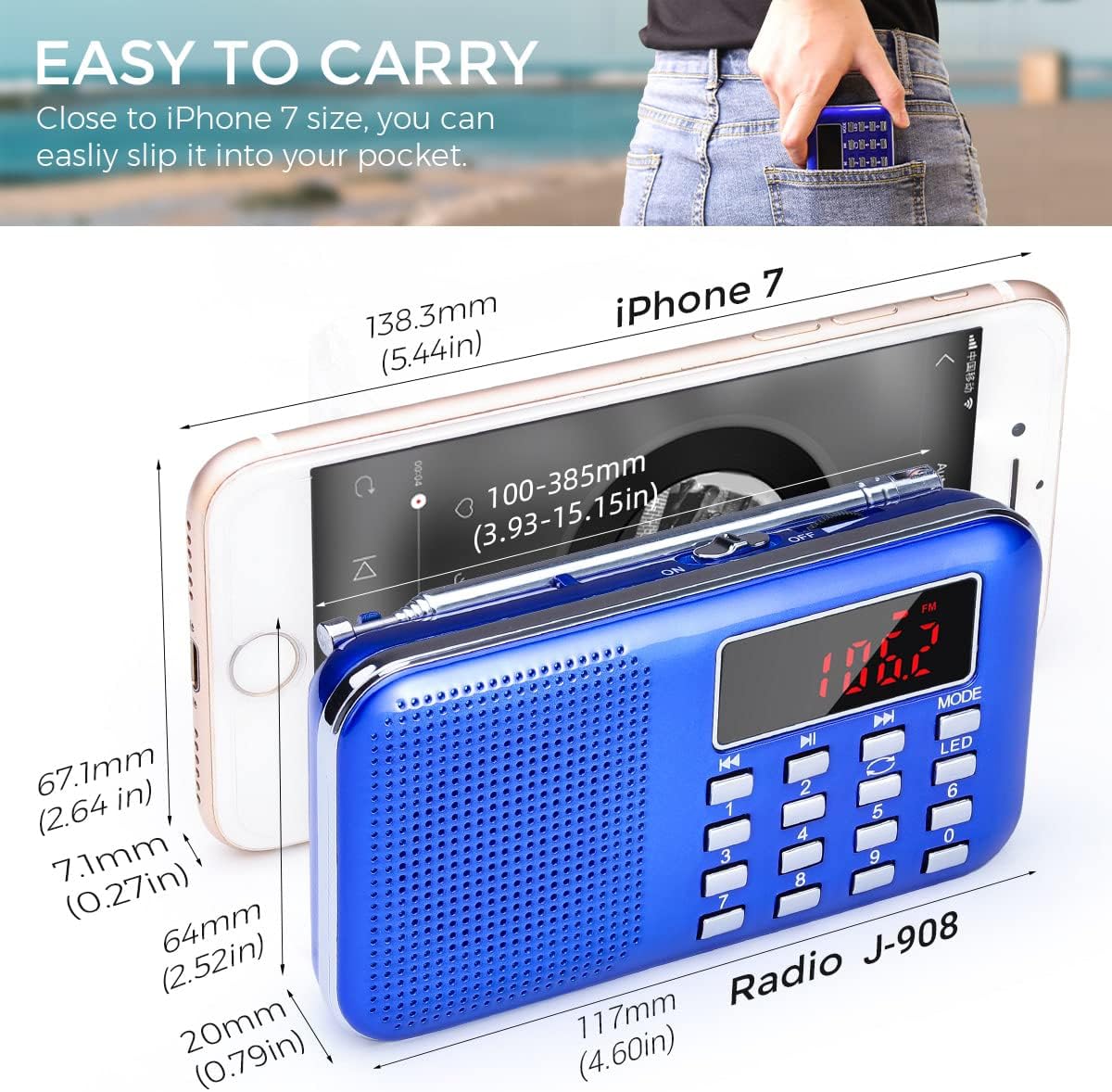
Desain portabel: With dimensions of 4.61"L x 0.79"W x 2.52"H and a weight of 6.4 ounces, it's designed to be easily carried in a pocket or bag. A gray carrying strap is included, which can also be used as a stand.

Kasaluyuan Universal: Supports FM/AM radio, MP3 playback from Micro SD/TF cards (up to 64GB) and USB flash drives (up to 64GB), and features an AUX jack for external audio input.

Sora Jelas: Equipped with a 3W built-in high-quality magnetic speaker, providing reliable deep bass and smooth treble for an enjoyable listening experience.
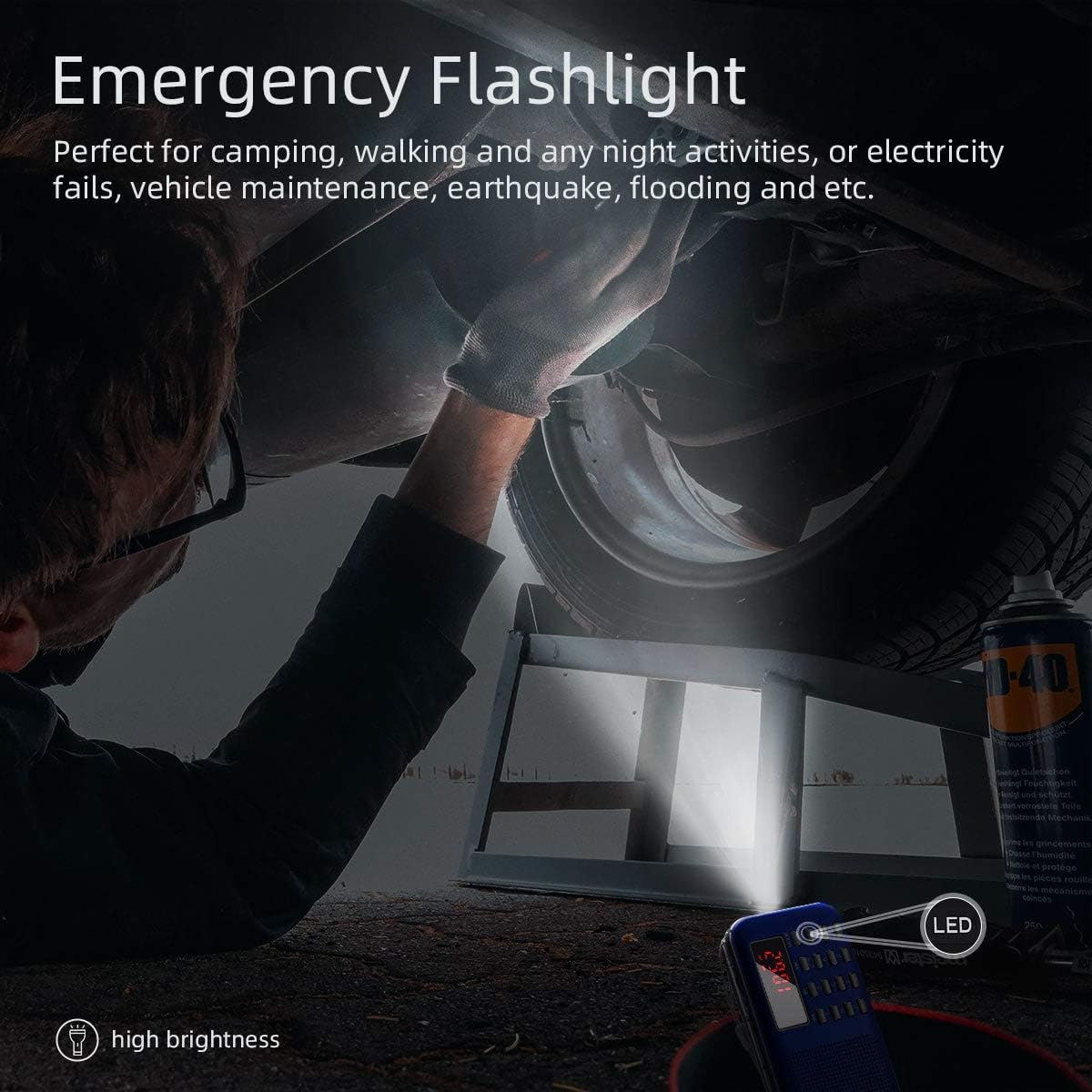
Senter Darurat: Features a bright LED flashlight, useful for camping, night activities, power outages, or emergency situations.

Folder Switching: When playing MP3s, you can switch between different folders (e.g., albums or genres) stored on your memory card or USB drive.

J-908 Improvements: The J-908 model features a larger 1200mAh battery for longer playtime, the ability to switch between music folders, and an improved LED flashlight function compared to older versions.
5. Setélan
5.1 Pamasangan batré
- Tangtukeun lokasi kompartemen batré dina tonggong radio.
- Buka panutup kompartemen batré.
- Insert the provided 1200mAh BL-5C Lithium Ion battery, ensuring the contacts align correctly.
- Tutup panutup kompartemen batré aman.
5.2 Ngecas Awal
- Connect the small end of the USB charging cable to the radio's charging port.
- Connect the larger end of the USB cable to a DC5V/500mA-1A USB power source (e.g., USB adapter, computer USB port, power bank).
- The charging indicator light will illuminate. A low battery indicator will also be present when charging is needed.
- Charge the radio for 3-5 hours for a full charge. The indicator light will change or turn off when fully charged. You can use the radio while it is charging.

The radio features an easy-to-use USB charging port.
6. Parentah Operasi
6.1 Daya Hurung/Pareuman
- To power on the radio, slide the power switch to the 'ON' position.
- Pikeun mareuman, geser saklar daya ka posisi 'OFF'.
6.2 Operasi Radio (AM/FM)
- Manjangkeun anteneu teleskopik pikeun panarimaan optimal.
- Press the 'MODE' button to switch between FM and AM bands. The display will show the current frequency.
- Pindai sareng Simpen Otomatis: Press and hold the 'PLAY/PAUSE' button (often labeled with a play/pause icon or 'SCAN'). The radio will automatically scan for available stations and store them in numerical order. Note: The order of stations cannot be changed after auto-scanning.
- Navigate Stored Stations: Use the 'PREVIOUS' (|<) and 'NEXT' (>> |) buttons to cycle through the stored stations.
- Tuning Manual (upami aya): If your model supports it, use the number pad to directly enter a frequency or use the tuning knob/buttons for fine-tuning.

One-key operation for automatic scanning and saving of radio stations.
6.3 MP3 Playback (USB/TF Card)
- Insert a Micro SD/TF card or USB flash drive (formatted to FAT32) containing MP3 audio files into the corresponding slot. The radio will automatically detect and begin playing the MP3 files.
- Puter / Reureuh: Press the 'PLAY/PAUSE' button to pause or resume playback.
- Lagu Salajengna / Saméméhna: Use the 'PREVIOUS' (|<) and 'NEXT' (>> |) buttons to skip to the next or previous track.
- Maju gancang / Mundur: Press and hold the 'PREVIOUS' (|<) or 'NEXT' (>> |) buttons to fast forward or rewind within a track.
- Folder Switching: Press the 'MODE' button repeatedly until the folder switching mode is activated (if available). Use the number pad or navigation buttons to select a specific folder.
- Repeat Modes: Some models may offer repeat modes (e.g., repeat one, repeat all, repeat folder). Consult the on-screen display or specific button labels for these functions.
6.4 Operasi senter
- Press the 'LED' button (or designated flashlight button) to turn the LED flashlight on.
- Press the 'LED' button again to turn the flashlight off.
6.5 Volume adjustment
- Rotate the volume knob (typically on the side) to increase or decrease the audio volume.
6.6 Paké headphone
- Insert 3.5mm headphones (not included) into the headphone jack for private listening. The speaker will automatically mute when headphones are connected.
7. Pangropéa
- beberesih: Ngusap radio ku lawon lemes, garing. Ulah make cleaners abrasive atawa pangleyur.
- Perawatan batré: To prolong battery life, avoid fully discharging the battery frequently. Recharge the battery when the low battery indicator appears. If storing the radio for an extended period, charge the battery periodically.
- Panyimpenan: Simpen radio dina tempat anu tiis sareng garing jauh tina sinar panonpoé langsung sareng suhu anu ekstrim.
8. Cara ngungkulan
| Masalah | Mungkin Cukang lantaranana / Solusi |
|---|---|
| Radio teu hurung. | Battery is low or depleted. Charge the battery. Ensure the battery is correctly installed. |
| panarimaan radio goréng. | Extend the telescopic antenna fully. Try repositioning the radio. Interference from other electronic devices. |
| MP3 files teu maén. | Ensure the Micro SD/TF card or USB drive is formatted to FAT32. Only MP3 format files are supported. Check if the card/drive is inserted correctly. |
| Cannot change the order of stored radio stations. | The radio automatically stores stations in numerical order during auto-scan, and this order cannot be manually rearranged. |
| Radio suddenly shuts off. | Battery is depleted. Recharge the battery. |
| Teu aya sora tina speaker nalika headphone dicabut. | Ensure headphones are fully unplugged from the jack. Check volume level. |
9. Spésifikasi
| Fitur | Spésifikasi |
|---|---|
| merek | PRUNUS |
| Nomer modél | CARADIO908CB |
| Warna | Biru |
| Ukuran (L x W x H) | 4.61" x 0.79" x 2.52" (117mm x 20mm x 64mm) |
| Item Beurat | 6.4 ons (181g) |
| Sumber Daya | Batré Powered |
| Jenis Batré | 1200mAh Lithium Ion (BL-5C, included) |
| Téhnologi konektipitas | USB |
| Pita Radio Dirojong | FM, AM |
| Kaluaran Speaker | 3W |
| Rojongan Media | Micro SD/TF Card (up to 64GB), USB Flash Drive (up to 64GB) |
| Format Audio | MP3 only |
| Fitur husus | Portable, LED Flashlight |
| Tingkat Résistansi Cai | Henteu Tahan Cai |
10. Garansi jeung Rojongan
PRUNUS offers a 1-year warranty for this product. Additionally, a 30-day no-questions-asked return policy is typically available through your retailer.
For any questions, concerns, or technical support, please contact PRUNUS customer service. Refer to your purchase documentation or the PRUNUS official websitus pikeun inpo kontak panganyarna.


