1. Bubuka
The ReSound Multi Mic is an advanced assistive listening device designed to enhance speech understanding and focus on desired sounds, particularly in challenging acoustic environments. It extends the hearing range and offers versatile connectivity options to integrate with various audio sources.
Fitur konci:
- Extends the hearing range by up to 25 meters (80 feet).
- Functions as both a remote microphone and a table microphone.
- Connects with loop and FM systems.
- Includes a mini-jack input for direct audio streaming to hearing aids, effectively turning them into headphones.
- Slim and portable design.
2. Produk Langkungview
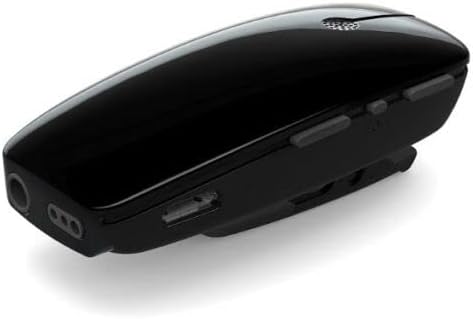
Figure 2.1: ReSound Multi Mic Device. This image displays the compact, black ReSound Multi Mic, highlighting its sleek design and the various control buttons and input/output ports located along its sides.

Figure 2.2: Multi Mic and Accessories. This image shows the ReSound Multi Mic alongside its essential accessories, including a USB charging cable, an audio input cable (mini-jack), and a power adapter, all necessary for its operation and connectivity.
3. Setélan
3.1 Ngecas Awal
Before first use, ensure the ReSound Multi Mic is fully charged. Connect the device to the provided power adapter using the USB charging cable. The charging indicator light will provide status feedback.
3.2 Pairing with Hearing Aids
- Ensure your ReSound hearing aids are turned on and in pairing mode (refer to your hearing aid manual for specific instructions).
- Turn on the ReSound Multi Mic.
- Follow the pairing instructions provided with your hearing aids to establish a connection with the Multi Mic. A successful pairing is typically indicated by an audible tone in your hearing aids.
3.3 Activating via ReSound Smart 3D App
After initial pairing, it is often necessary to activate the Multi Mic through the ReSound Smart 3D application on your smartphone. Open the app and locate the Multi Mic icon on the home screen. Tap or click this icon to ensure the device is recognized and fully functional with your hearing aids. This step is crucial for proper audio transmission.
4. Parentah Operasi
4.1 Using as a Remote Microphone
For one-on-one conversations, the Multi Mic can be worn by the speaker. It features a directional microphone to capture the speaker's voice clearly while minimizing background noise.
- Clip-on Use: Attach the Multi Mic to the speaker's clothing, ensuring the microphone opening is pointed towards their mouth. Position it approximately 10-20 cm (4-8 inches) from the mouth for optimal sound capture.
- Paké lanyard: If clipping is not suitable, use the provided lanyard to wear the Multi Mic around the speaker's neck. Adjust the lanyard length to position the microphone appropriately.

Figure 4.1: Multi Mic in Use. This image illustrates the ReSound Multi Mic being used in a real-world scenario, clipped to a person's clothing during a conversation, demonstrating its application as a remote microphone.
4.2 Using as a Table Microphone
In group settings, the Multi Mic can be placed horizontally on a table. In this orientation, it automatically switches to an omnidirectional mode, capturing sound from all directions around the table. Place it centrally among the speakers for best results.
4.3 Audio Streaming via Mini-Jack Input
The Multi Mic features a 3.5 mm mini-jack input, allowing you to connect external audio devices such as MP3 players, computers, or televisions. This streams audio directly to your hearing aids, effectively turning them into wireless headphones.
- Connect one end of the provided audio cable to the mini-jack input on the Multi Mic.
- Connect the other end of the audio cable to the headphone output of your desired audio device.
- The Multi Mic should automatically switch to in-line audio streaming mode. If not, manually select this mode via the ReSound Smart 3D app or the device's controls if available.
4.4 Connecting with Loop and FM Systems
The Multi Mic can also connect to existing loop and FM systems, providing enhanced audio reception in public venues or educational settings equipped with these technologies. Refer to the specific instructions for the loop or FM system for connection details.
5. Pangropéa sarta perawatan
5.1 beberesih
Wipe the Multi Mic regularly with a soft, dry cloth to remove dust and debris. Do not use harsh chemicals, cleaning solvents, or abrasive materials, as these can damage the device. Avoid exposing the device to excessive moisture.
5.2 Émbaran batré
The ReSound Multi Mic contains a non-replaceable internal battery. The expected lifespan of the battery is typically several years under normal usage conditions. If the battery performance significantly degrades, the device may need to be replaced. Do not attempt to open or replace the battery yourself.
5.3 Panyimpenan
When not in use, store the Multi Mic in a cool, dry place, away from direct sunlight and extreme temperatures. Keep it protected from physical impact.
6. Cara ngungkulan
6.1 Pairing Issues / No Sound After Pairing
- Verify App Activation: Ensure you have activated the Multi Mic through the ReSound Smart 3D app after pairing. The device may pair successfully but require activation within the app to transmit audio.
- Pasangkeun deui Alat: If issues persist, try unpairing and then re-pairing the Multi Mic with your hearing aids.
- Check Hearing Aid Status: Confirm your hearing aids are functioning correctly and are in the appropriate program for accessory use.
6.2 In-Line Mode Not Activating Automatically
When connecting an audio source via the mini-jack input, the Multi Mic should automatically switch to in-line mode. If no sound is heard:
- Pariksa sambungan kabel: Ensure the audio cable is fully inserted into both the Multi Mic and the audio source.
- Pilihan Manual: Manually select the in-line streaming mode within the ReSound Smart 3D app.
- Audio Source Volume: Verify the volume on the connected audio source is turned up.
6.3 Excessive Environmental Noise
While the Multi Mic is designed to reduce background noise, very noisy environments can still present challenges.
- Optimalkeun Penempatan: When using as a remote mic, ensure it is as close as possible to the speaker's mouth. When using as a table mic, try to position it away from direct noise sources.
- Adjust Hearing Aid Settings: Consult your audiologist about adjusting your hearing aid programs for optimal performance with the Multi Mic in various environments.
7. Spésifikasi
| Fitur | Spésifikasi |
|---|---|
| Nomer modél | 787688556905 |
| ASIN | B078BJFKC5 |
| merek | ReSound |
| Warna | Hideung |
| Bahan | palastik |
| Item Beurat | 8.2 ons |
| Ukuran Paket | 6.89 x 4.37 x 2.32 inci |
| Téhnologi konektipitas | Pambantu |
| Tipe Panyambung | 3.5 mm Jack |
| Alat nu cocog | Headphone (via mini-jack input) |
| Pola Polar | Unidirectional (remote mic), Omnidirectional (table mic) |
| Rasio Signal-to-Noise | 80 dB |
| Sumber Daya | Listrik Kabel (pikeun ngecas) |
8. Garansi jeung Rojongan
Specific warranty details for the ReSound Multi Mic are not provided within this manual. For information regarding warranty coverage, terms, and conditions, please refer to the documentation included with your purchase or contact ReSound customer support directly.
For technical assistance, troubleshooting beyond the scope of this manual, or further inquiries, please contact ReSound customer service or your authorized ReSound hearing care professional.
ReSound Official Websitus: www.resound.com


