1. Bubuka
This manual provides essential information for the installation, operation, maintenance, and troubleshooting of your Juniper Networks EX3400-48P Ethernet Switch. The EX3400-48P is designed to deliver a high-performance, flexible, and cost-effective solution for demanding data, voice, and video enterprise access environments. It supports Juniper Networks Virtual Chassis technology for simplified network operations.
2. Émbaran Kasalametan
Please read and understand all safety instructions before installing or operating the device. Failure to follow these guidelines may result in injury or damage to the equipment.
- Pastikeun grounding ditangtoskeun tina alat.
- Ulah ngoperasikeun saklar dina kaayaan baseuh atawa garing.amp kaayaan.
- Use only the power supply provided or approved by Juniper Networks.
- Ulah meungpeuk bukaan ventilasi pikeun nyegah overheating.
- Refer to qualified service personnel for any servicing not described in this manual.
3. Produk Langkungview
The Juniper Networks EX3400-48P is a 48-port Power over Ethernet (PoE+) capable Ethernet switch. It features a compact design suitable for rack mounting and offers various connectivity options.
3.1. Komponén fisik
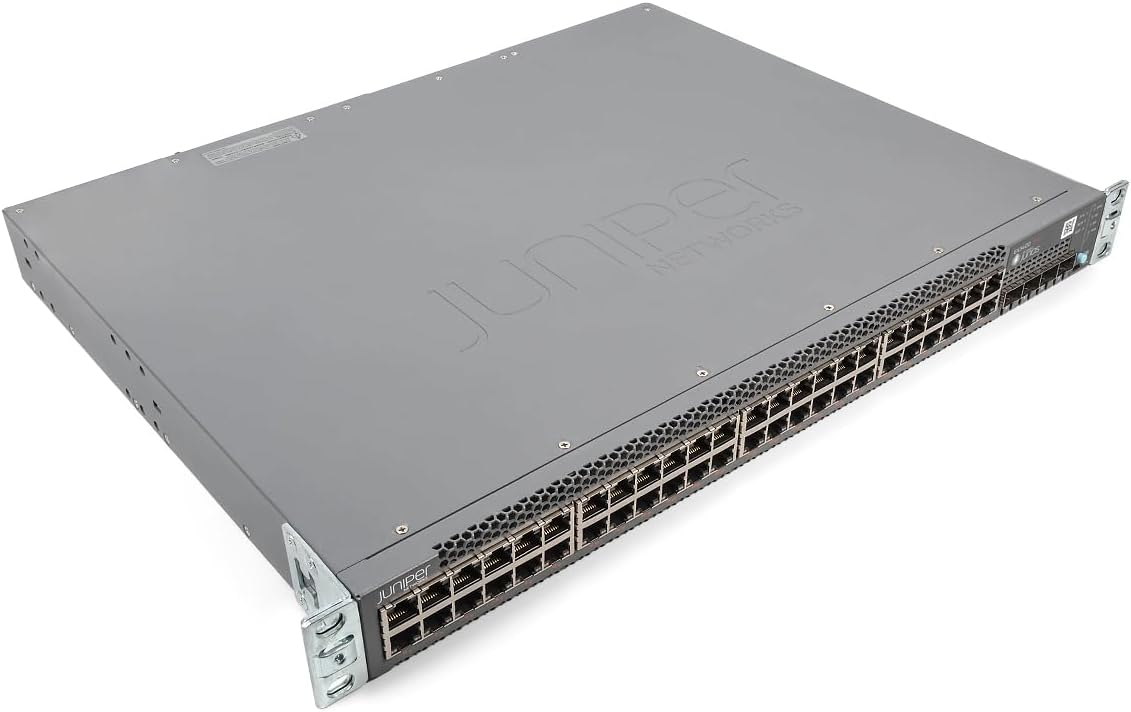
Gambar 1: Angled view of the Juniper EX3400-48P Ethernet Switch, showing the top and front panels with the Juniper Networks logo.

Gambar 2: Hareupeun view of the EX3400-48P switch, highlighting the 48 Ethernet ports, uplink ports, and status LEDs.

Gambar 3: Tukangeun view of the EX3400-48P, displaying the modular power supply bay, fan modules, management (MGMT) port, and console (CON) port.

Gambar 4: Patukang tonggong view of the EX3400-48P, showing the power supply unit partially extracted, illustrating its modular design.
3.2. Fitur Panel hareup
- 48 x 10/100/1000BASE-T Port Ethernet: For connecting network devices.
- Palabuhan Uplink: SFP/SFP+ ports for high-speed connections to other switches or routers.
- LED Status: Indicators for system status, port activity, and PoE status.
3.3. Fitur Panel Tukang
- Power Supply Bay: Houses the modular power supply unit.
- Modul kipas: Provide cooling for the system.
- Management (MGMT) Port: An out-of-band Ethernet port for device management.
- Console (CON) Port: For local serial console access.
4. Setélan
4.1. Unpacking jeung Inspection
Carefully remove the switch from its packaging. Inspect the device for any signs of physical damage. Report any damage to your supplier immediately.
4.2. Rak Pamasangan
The EX3400-48P is designed for standard 19-inch rack installation. Use the provided rack-mount brackets and screws to secure the switch in the rack. Ensure adequate space for airflow around the unit.
4.3. Sambungan Daya
- Pastikeun saklar kakuatan dina panel pungkur dina posisi OFF.
- Connect the power cord to the power supply unit on the rear of the switch.
- Colokkeun tungtung kabel listrik anu sanés ka stop kontak listrik AC anu dibumikeun.
- Flip the power switch to the ON position. The system status LED should illuminate.
4.4. Konfigurasi awal
For initial configuration, connect a console cable from your computer to the console port on the rear of the switch. Use a terminal emulation program (e.g., PuTTY, Tera Term) with the following settings:
- Laju baud: 9600
- Bit data: 8
- Parity: Euweuh
- Stop bit: 1
- Kontrol aliran: Euweuh
Follow the on-screen prompts to set up basic network parameters such as IP address, subnet mask, and default gateway.
5. Nyuping
5.1. Powering on / Pareum
- Daya Hurung: After connecting the power cord, press the power switch to the ON position. The switch will perform a power-on self-test (POST).
- Pareum listrik: To power off, press the power switch to the OFF position. For a controlled shutdown, it is recommended to save the configuration and issue a shutdown command via the command-line interface (CLI) before physically powering off.
5.2. Indikator LED
The front panel LEDs provide visual status of the switch's operation:
- SYS LED: Indicates overall system status (e.g., green for normal operation, amber for warning, red for critical error).
- LED ALM: Nunjukkeun status alarem.
- LED PoE: Indicates Power over Ethernet status.
- Port LEDs: Indicate link status and activity for each Ethernet port.
5.3. Konfigurasi Jaringan
The EX3400-48P can be configured via its command-line interface (CLI) or a web-based graphical user interface (GUI) if enabled. Common configurations include:
- VLAN creation and assignment.
- Port security settings.
- Routing protocols.
- Quality of Service (QoS) settings.
- Spanning Tree Protocol (STP) configuration.
Refer to the Juniper Networks documentation for detailed configuration guides specific to Junos OS.
6. Pangropéa
6.1. Apdet firmware
Rutin pariksa dukungan Juniper Networks website for the latest Junos OS firmware updates. Keeping the firmware up-to-date ensures optimal performance, security, and access to new features. Follow the instructions provided with the firmware package for the update procedure.
6.2. beberesih
Keep the switch clean and free of dust. Use a soft, dry cloth to wipe the exterior. For ventilation openings, use compressed air to remove dust buildup. Ensure the switch is powered off before cleaning.
6.3. Modular Component Replacement
The EX3400-48P features modular power supplies and fan trays. If a component fails, it can be replaced without powering down the entire switch (hot-swappable). Refer to the Juniper Networks hardware guide for specific replacement procedures.
7. Cara ngungkulan
Bagian ieu nyayogikeun solusi pikeun masalah umum anu anjeun tiasa patepang.
7.1. Taya Daya
- Pastikeun kabel listrik disambungkeun sacara aman ka saklar sareng stopkontak.
- Pariksa naha stop kontak listrik fungsina.
- Ensure the power switch on the rear panel is in the ON position.
- Inspect the power supply unit for any fault indicators.
7.2. Taya Tumbu on Port
- Pariksa sambungan kabel Ethernet dina duanana tungtung.
- Pastikeun alat nu disambungkeun dihurungkeun tur fungsina bener.
- Try a different port on the switch.
- Verify the cable is not damaged and meets specifications (e.g., Cat5e or higher).
7.3. Masalah Konektipitas Jaringan
- Verify IP address, subnet mask, and gateway settings on the switch and connected devices.
- Pariksa konfigurasi VLAN upami tiasa.
- Use diagnostic tools like
pingjeungtraceroutefrom the switch CLI. - Consult system logs for error messages.
8. Spésifikasi
The following table outlines the technical specifications for the Juniper Networks EX3400-48P Ethernet Switch:
| Fitur | Spésifikasi |
|---|---|
| Nomer modél | EX3400-48P |
| Jumlah Palabuhan | 48 |
| Tipe panganteur | SFP / SFP + |
| Laju Mindahkeun Data | 336 Gigabit per detik |
| Voltage | 48 Volt (DC) |
| Bahan Kasus | logam |
| Peunteun Suhu luhur | 50 Derajat Celcius |
| Dimensi produk | 17.2 x 13.78 x 1.73 inci |
| Item Beurat | 12.65 pon |
| Produsén | Juniper |
| UPC | 832938071001 |
9. Garansi jeung Rojongan
9.1. Garansi produk
This product is typically covered by a manufacturer's warranty. Please refer to the specific warranty terms provided at the time of purchase or on the official Juniper Networks website. A 30-day return policy may apply depending on the vendor.
9.2. Rojongan Téknis
For technical assistance, documentation, software downloads, and further support, please visit the official Juniper Networks support website. You may also contact your authorized Juniper Networks reseller for local support options.