
BenQ EX3501R
BenQ EX3501R Ultrawide Curved Gaming Monitor User Manual
Model: EX3501R
1. Setélan
1.1 Ngabongkar Bungkusan Monitor
Sacara saksama miceun sadaya komponén tina bungkusan. Pastikeun sadaya item anu didaptarkeun di handap aya:
- BenQ EX3501R Monitor
- Stand Monitor (Dasar sareng Beuheung)
- Adaptor kakuatan
- Kabel listrik
- Kabel HDMI
- Kabel DisplayPort
- Kabel USB-C
- Manual pangguna (dokumén ieu)
1.2 Ngarakit Stand
Turutan léngkah ieu pikeun ngagantelkeun stand ka monitor anjeun:
- Teundeun monitor nyanghareupan handap dina lawon beresih jeung lemes pikeun nyegah goresan.
- Attach the stand neck to the back of the monitor. Ensure it clicks securely into place.
- Connect the stand base to the neck, tightening any screws as indicated in the quick start guide.

Gambar 1: Hareupeun view of the BenQ EX3501R monitor with its stand.
1.3 Nyambungkeun Kabel
Connect the necessary cables to the monitor and your computer. The monitor supports various input options:
- kakuatan: Sambungkeun adaptor kakuatan ka monitor teras ka stopkontak.
- Video Input: Use either the HDMI, DisplayPort, or USB-C cable to connect your computer to the monitor.
- USB-C: The USB-C port supports video, data transfer, and power delivery, allowing for a single-cable connection with compatible devices.
- Port USB 3.0: Utilize the integrated USB 3.0 ports for connecting peripherals.
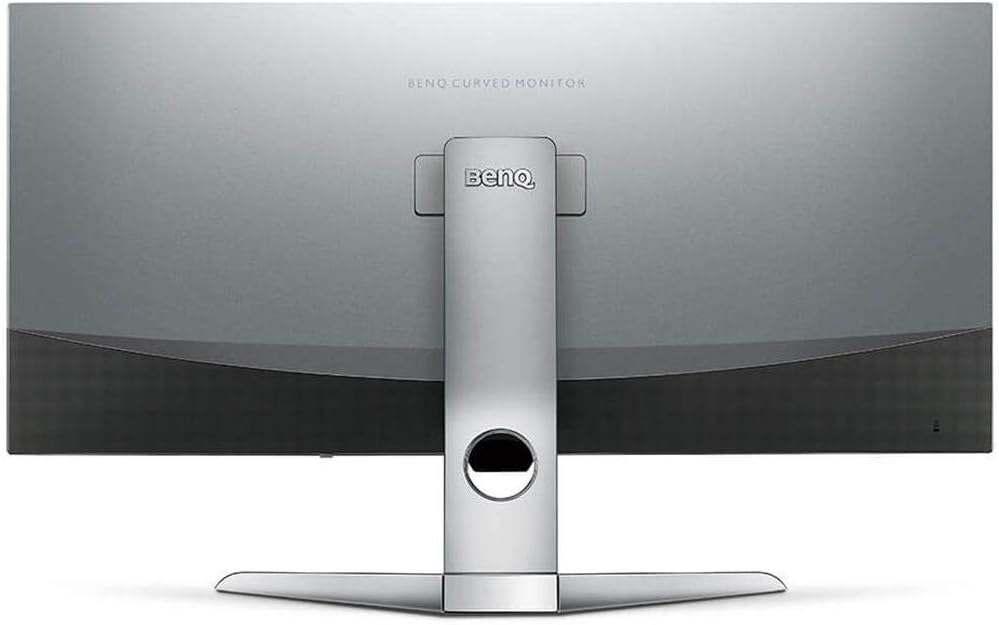
Gambar 2: Tukangeun view of the monitor displaying the connectivity ports.
2. Ngoperasikeun Monitor
2.1 Daya Hurung/Pareuman
Press the power button, usually located on the bottom right side of the monitor, to turn it on or off. The power indicator light will illuminate when the monitor is active.
2.2 Napigasi dina-layar (OSD).
Use the joystick or buttons located on the monitor's underside to navigate the On-Screen Display (OSD) menu. This menu allows you to adjust various settings such as brightness, contrast, color modes, and input sources.
2.3 Display Features and Eye-Care Technology
The BenQ EX3501R incorporates several technologies designed to enhance viewpangalaman sareng ngirangan galur panon:
- Brightness Intelligence Plus (BI+): This patented technology automatically senses ambient lighting conditions and adjusts the screen's brightness and color temperature to provide optimal viewing comfort and protect your eyes during extended use.
- Cahaya Biru Rendah: Filters out harmful blue light emissions to reduce eye fatigue. Multiple levels of blue light reduction are available.
- ZeroFlicker™: Eliminates screen flickering at all brightness levels, further reducing eye strain and discomfort.
- HDR (Rentang Dinamis Tinggi): Offers enhanced brightness and contrast, bringing greater detail and vibrancy to HDR video content.
Video 1: Hiji leuwihview of BenQ's Eye-Care technology, including Low Blue Light, ZeroFlicker, and Brightness Intelligence Plus, demonstrating how these features work to reduce eye strain and adjust screen settings automatically based on ambient light.
2.4 Resolusi jeung Laju Anyarkeun
The monitor features a QHD (3440x1440) resolution and a 100Hz refresh rate, providing a smooth and detailed visual experience. The 21:9 ultrawide aspect ratio offers ample screen space for multitasking, such as viewing multiple documents side-by-side without needing a second monitor.
2.5 AMD FreeSync
For a fluid gaming experience, the monitor supports AMD FreeSync technology, which synchronizes the monitor's refresh rate with your graphics card's frame rate to eliminate screen tearing and stuttering.
3. Pangropéa
3.1 Ngabersihan Monitor
To maintain optimal performance and appearance, regularly clean your monitor:
- layar: Lap layar sacara lalaunan nganggo lawon anu lemes sareng henteu ngaganggu. Pikeun noda anu bandel, anggo larutan pembersih khusus monitor anu diterapkeun kana lawon, sanés langsung kana layar.
- Luar: Use a soft, dry cloth to wipe dust and debris from the monitor casing and stand.
Ulah nganggo pembersih abrasif, lilin, atanapi pangleyur sabab tiasa ngaruksak permukaan monitor.
3.2 Tips Kamanusaan sarta Studi umum
- Ulah ngahalangan liang ventilasi dina monitor.
- Hindarkeun nempatkeun monitor dina sinar panonpoé langsung atanapi caket sumber panas.
- Nanganan monitor kalayan ati-ati pikeun nyegah karusakan fisik.
4. Cara ngungkulan
If you encounter issues with your BenQ EX3501R monitor, refer to the following common troubleshooting steps:
4.1 Teu Aya Layar atanapi Layar Hideung
- Pastikeun kabel daya disambungkeun sacara aman ka monitor sareng stopkontak.
- Verify that the video cable (HDMI, DisplayPort, or USB-C) is firmly connected to both the monitor and your computer.
- Pariksa lamun sumber input bener dipilih dina menu OSD monitor.
- Balikan deui komputer anjeun.
4.2 Gambar Kedip-kedip atawa Teu Stabil
- Ensure the ZeroFlicker™ feature is enabled in the OSD menu.
- Check for loose video cable connections.
- Apdet supir kartu grafik anjeun ka versi panganyarna.
- Upami nganggo AMD FreeSync, pastikeun éta leres dikonpigurasi dina setélan kartu grafik anjeun.
4.3 Color or Brightness Issues
- Saluyukeun setélan kacaangan, kontras, sareng warna ngalangkungan menu OSD.
- Enable or disable Brightness Intelligence Plus (B.I.+) to see if it resolves the issue.
- Laksanakeun reset pabrik ngalangkungan menu OSD.
5. Spésifikasi
Key technical specifications for the BenQ EX3501R monitor:
| Fitur | Spésifikasi |
|---|---|
| Ukuran layar | 35 inci |
| Resolusi layar Max | 3440 x 1440 Piksel (QHD Ultrawide) |
| Rasio Aspék | 21:9 |
| Refresh Laju | 100 Hz |
| Curvature | 1800R |
| Tipe Panel | VA (Alignment Vertikal) |
| Konektipitas | USB-C, HDMI, DisplayPort |
| Fitur husus | AMD FreeSync, Brightness Intelligence Plus, Low Blue Light, ZeroFlicker |
| Item Beurat | 21.3 pon |
| Dimensi produk | 6.88 x 3.47 x 12.93 inci |
6. Garansi jeung Rojongan
6.1 Garansi Produk
The BenQ EX3501R monitor typically comes with a 3-year manufacturer's warranty. Please refer to the warranty card included in your product packaging for specific terms and conditions, or visit the official BenQ websitus kanggo inpormasi garansi lengkep.
6.2 Rojongan Palanggan
For further assistance, technical support, or warranty claims, please contact BenQ customer service. You can find contact information and support resources on the official BenQ websitus: www.benq.com/en-us/support.html
Ask a question about this manual
Ask about setup, troubleshooting, compatibility, parts, safety, or missing instructions. Manuals+ will review the question and use this page’s manual context to help answer it.