1. Bubuka
This manual provides detailed instructions for the installation, operation, and maintenance of your Compustar CS4900-S 2-Way Remote Start and Keyless Entry System. Please read this manual thoroughly before using the product to ensure proper function and safety. This system offers a 3000-ft range for remote start and keyless entry functionalities.
The Compustar CS4900-S system is designed for automatic transmission vehicles and is diesel-engine safe. Professional installation is highly recommended to ensure correct setup and optimal performance. Additional parts may be required for certain vehicle models and are sold separately.
2. Eusi Paket
The Compustar CS4900-S system includes the following components:
- 2 x 4-Button Remotes (one 2-Way G15 FM Remote, one 1-Way G15 FM 4-Button Remote)
- 1 x CM900-S Remote Start Control Module
- 1 x ANT-2WFMX 2-Way FMX Antenna
- Wiring Harnesses and Connectors

Gambar: Leuwihview of the Compustar CS4900-S system components, showing the main box, two remote fobs, the antenna, and various wiring harnesses.

Image: Close-up of the two 2-Way G15 FM remote controls, highlighting their design and buttons.

Image: A visual breakdown of the main components included with the CS4900-S: the two remote types, the CM900-S control module, and the ANT-2WFMX antenna.
3. Setup jeung Instalasi
Pamasangan profésional disarankeun: Due to the complexity of vehicle electrical systems, professional installation by an authorized Compustar dealer is strongly advised. Incorrect installation can lead to vehicle damage or system malfunction.
3.1. Komponen Tambahan anu Diperlukeun
Many vehicles require an immobilizer bypass module for remote start functionality. The Compustar CS4900-S is "Blade-AL Ready," meaning it is compatible with iDatalink Blade-AL or ADS-ALCA bypass modules, which are sold separately.
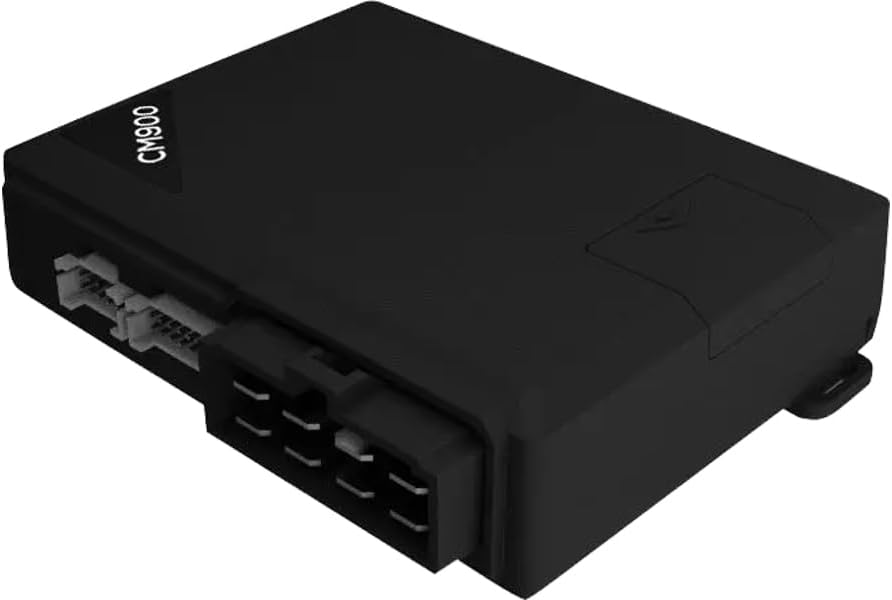
Image: The CM900-S control module showing the slot for the optional Blade-AL bypass module, which is sold separately.

Image: Packaging for the iDatalink Blade-AL module, an optional component for immobilizer bypass.
3.2. Wiring Schematic (Remote Start)
The following diagram illustrates the wiring connections for the CM900-S Remote Start Control Module. This is for reference and should be handled by a qualified installer.

Image: Detailed wiring schematic for the CM-900 Remote Start Control Module, indicating connections for main harness, Blade harness, antenna, temperature sensor, RS232 ports, and lock connector.
3.3. Module Flashing and Firmware Update
The Blade-AL bypass module and the Compustar controller may require flashing and firmware updates for compatibility with your specific vehicle. This process typically involves connecting the module to a computer via an ADS-USB cable and using the iDatalink Weblink software.
Video: This video demonstrates the process of flashing and updating the iDatalink BLADE Remote Start/Security Bypass Module. It shows how to connect the module to a computer and use the Weblink software for firmware updates and feature configuration.
4. Parentah Operasi
The Compustar CS4900-S system utilizes 4-button remotes for various functions. The primary functions are Lock, Unlock, Trunk Release, and Remote Start/Stop.
4.1. Remote Control Functions (2-Way G15 FM Remote)

Image: A close-up of the Compustar 2-Way G15 FM remote control, highlighting the four main function buttons.
- Konci: Press the lock button once to lock the vehicle doors and arm the security system.
- Buka konci: Press the unlock button once to unlock the vehicle doors and disarm the security system. Depending on your setup, a single press may unlock the driver's door, and a second press unlocks all doors.
- Pelepasan Batang: Press and hold the trunk release button for approximately 3 seconds to open the vehicle's trunk or hatch.
- Mimitian Jauh: Press and hold the remote start/stop button for approximately 3 seconds to start the vehicle's engine. The remote will provide confirmation once the engine has started.
- Eureun Jarak Jauh: While the vehicle is running via remote start, press and hold the remote start/stop button for approximately 3 seconds to turn off the engine.
- Mariksa Status: Tap the remote start/stop button once to check the vehicle's status (e.g., locked/unlocked, engine running, interior temperature).
Video: This video demonstrates the basic operation of a Compustar 2-Way remote, including locking, unlocking, remote starting, and stopping the vehicle. It also shows how to check the vehicle's status and navigate remote features.
Video: video ieu nyadiakeun leuwihview of the basic operation of the Compustar Prime T9 remote, covering functions such as locking, unlocking, trunk release, and remote start. It highlights the remote's side buttons and LCD screen feedback.
4.2. Entering the Vehicle After Remote Start
To enter and drive your vehicle after remote starting:
- Unlock the vehicle using your remote.
- Open the door and enter the vehicle. The engine will remain running.
- Insert your vehicle's key into the ignition and turn it to the "ON" or "RUN" position (do not turn to "START").
- Pencét pedal rem. Sistem start jarak jauh bakal pegat, sareng kendaraan bakal pindah ka kontrol konci.
- You can now drive the vehicle as normal.
penting: If the brake pedal is pressed before the key is in the "ON" position, the engine will shut off. Simply restart the vehicle with the key as usual.
Video: This video demonstrates the convenience of using Compustar long-range remote starters to warm up or cool down a vehicle before entry. It shows the remote start function and entering the vehicle while the engine is running.
4.3. Smartphone Control (Optional)
For enhanced control, you can integrate your Compustar system with a smartphone app (e.g., DroneMobile). This allows you to control your vehicle from virtually anywhere, providing functions like remote start, lock/unlock, and vehicle tracking.
Video: This short preview video highlights the benefits of Compustar remote starters, including the ability to start your vehicle and set the desired temperature from a distance, and the option for smartphone control.
5. Pangropéa
5.1. Remote Battery Replacement
The 2-Way remote requires batteries for operation. When the battery level is low, the remote's display may indicate a low battery icon. Refer to your remote's specific guide for battery type and replacement instructions.
5.2. System Care
- Keep the remote controls away from extreme temperatures and moisture.
- Avoid dropping the remote controls or subjecting them to strong impacts.
- Bersihkeun remot kontrol nganggo lawon anu lemes sareng garing. Entong nganggo bahan kimia anu keras.
6. Cara ngungkulan
If you experience issues with your Compustar CS4900-S system, consider the following common troubleshooting steps:
- Jauh Teu Ngabales:
- Pariksa batré kadali jauh jeung ngaganti lamun perlu.
- Ensure you are within the system's operating range (up to 3000 ft).
- Verify that the vehicle's battery is not depleted.
- Gagal Start Jarak Jauh:
- Ensure all vehicle doors, hood, and trunk are securely closed.
- Confirm the vehicle is in park (automatic transmission only).
- Check for any active warning lights on the vehicle's dashboard.
- If your vehicle has a manual transmission, ensure the system is properly configured for manual transmission remote start (requires specific setup and safety procedures). The CS4900-S is designed for automatic transmission only.
- Door Locks Not Functioning Correctly:
- Verify the remote control battery.
- Check vehicle's door lock actuators for proper function.
- Consult your installer if priority unlock or double pulse unlock features are not working as expected, as these are configurable options.
For complex issues or if troubleshooting steps do not resolve the problem, contact your authorized Compustar installer or Compustar technical support.
7. Spésifikasi
| Fitur | Spésifikasi |
|---|---|
| Nomer modél | CS4900-S |
| merek | Kompustar |
| Tipe Jauh | 2-Way and 1-Way 4-Button Remotes |
| Rentang Operasi | Nepi ka 3000 suku |
| Transmission Compatibility | Automatic Transmission Only |
| Kasaluyuan engine | Diesel-Engine Safe |
| Modul kontrol | CM900-S |
| Bypass Module Compatibility | iDatalink Blade-AL Ready (sold separately) |
| Ukuran Paket | 7.91 x 5.12 x 3.58 inci |
| Item Beurat | 1.57 pon |
8. Émbaran jaminan
Compustar products are covered by a limited warranty. The specific terms and duration of the warranty may vary depending on the component and region. Please retain your proof of purchase and installation records for warranty claims.
For detailed warranty information, please refer to the official Compustar websitus atanapi hubungi dealer resmi anjeun.
9. Rojongan
For technical assistance, product inquiries, or to locate an authorized installer, please visit the official Compustar websitus atanapi ngahubungi dukungan palangganna:
- Resmi Websitus: www.compustar.com
- iDatalink Weblink: compustar.idatalink.com (for module flashing and firmware updates)
- Bantosan Téknis: Refer to your installation guide or the official website for specific contact numbers.
It is important to note that some advanced configurations and programming require specialized tools and access available only to authorized dealers.


