Bubuka
This manual provides detailed instructions for the setup, operation, and maintenance of your KICKER Bullfrog BF100 Bluetooth Portable Outdoor Speaker. Please read this manual thoroughly to ensure proper use and to maximize the performance of your device. The Bullfrog BF100 is designed for robust outdoor use, featuring 360-degree sound, Bluetooth connectivity, and a durable waterproof and dustproof casing.
Produk Leuwihview
The KICKER Bullfrog BF100 delivers a 360-degree sound field through its unique driver design. It features two 1-5/8 inch full-range drivers and two 2-5/8 inch passive bass radiators, powered by a built-in 16-watt amplifier. The speaker is equipped with Bluetooth for wireless audio streaming and includes a built-in speakerphone for calls.
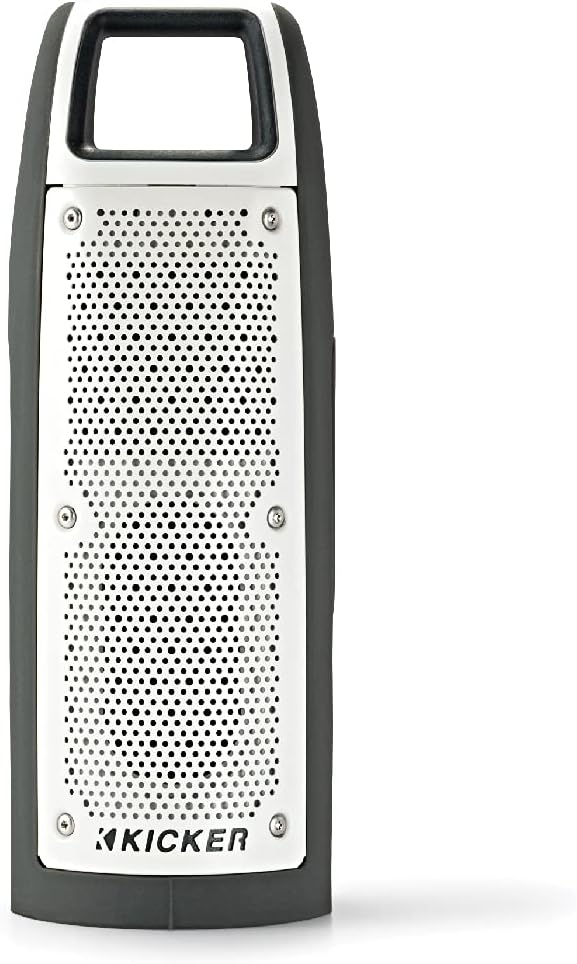
Gambar 1: Hareupeun view of the KICKER Bullfrog BF100 speaker, showcasing desainna anu ringkes sareng awét.
Fitur konci:
- Sora 360-Gelar: Drivers on both sides provide immersive audio.
- Konektipitas Bluetooth: Stream music wirelessly from compatible devices.
- Waterproof & dustproof (IP66 Dipeunteun): Designed for outdoor environments, resistant to dust and water spray.
- Diwangun-di Speakerphone: Answer calls directly from the speaker.
- KICKER Connect App: Customize sound with EQ presets, control volume, and check battery level.
- Pamasangan stereo: Wirelessly connect two BF100 speakers for enhanced stereo sound.
- Hirup batré anu panjang: Up to 12 hours of portable operation.
Idéntifikasi komponén:

Gambar 2: Samping view of the Bullfrog BF100, showing the power, volume, and track control buttons.

Gambar 3: Balik deui view of the Bullfrog BF100, highlighting the AUX IN, CHARGE OUT, and CHARGE IN ports, along with the Reset button.
- Tombol Daya: Ngahurungkeun atanapi mareuman speaker.
- Tombol Luhur / Turun: Nyaluyukeun volume kaluaran spiker.
- Tombol Ngalangkungan Lagu: Skips to the next or previous track during playback.
- Tombol Puter/Reureuh: Controls music playback and answers/ends phone calls.
- Tombol Pasangan: Mimitian mode papasangan Bluetooth.
- Tombol Reset: Resets the speaker to factory settings (located near ports).
- Port AUX IN: For wired audio connection using a 3.5mm cable.
- CHARGE OUT Port: Port USB pikeun ngecas alat éksternal.
- CHARGE IN Port: Micro-USB port for charging the speaker's internal battery.
Disetél
Ngecas awal:
Before first use, fully charge your Bullfrog BF100 speaker. Connect the supplied USB charging cable to the CHARGE IN port on the speaker and to a USB power source (e.g., computer USB port or a USB wall adapter). The charging indicator light will show the charging status.
Gambar 4: Detail of the charging port on the Bullfrog BF100.
Masangkeun Bluetooth:
- Ensure the Bullfrog BF100 is powered on.
- Pencét jeung tahan tombol papasangan button on the speaker until the Bluetooth indicator light begins to flash, indicating it is in pairing mode.
- Dina smartphone anjeun, tablet, atawa alat Bluetooth-diaktipkeun sejen, arahkeun ka setelan Bluetooth.
- Select "KICKER Bullfrog BF100" from the list of available devices.
- Sakali nyambung, lampu indikator Bluetooth dina speaker bakal hurung terus.
KICKER Connect App Installation:
For enhanced control and customization, download the KICKER Connect App from your device's app store (iOS App Store or Google Play Store). The app allows you to adjust EQ settings, manage FM presets, control volume, and monitor battery life.

Gambar 5: The KICKER Connect App provides advanced control over your speaker settings.
Stereo Pairing (Two BF100 Speakers):
To create a two-channel stereo system, you can wirelessly connect two Bullfrog BF100 speakers. Refer to the KICKER Connect App for specific instructions on initiating stereo pairing mode between two units.
Parentah Operasi
Hurungkeun/Pareuman:
- Pencét jeung tahan tombol Kakuatan button for approximately 2 seconds to turn the speaker on or off.
- An audible tone will confirm the power status change.
Kontrol volume:
- Pencét éta Volume Naik (+) tombol pikeun ngaronjatkeun polumeu.
- Pencét éta Volume Turun (-) tombol pikeun ngurangan polumeu.
Puteran musik:
- Pencét éta Play / Reureuh tombol pikeun maénkeun atanapi ngareureuhkeun audio.
- Pencét éta Next Track (>) tombol pikeun skip ka lagu salajengna.
- Pencét éta Previous Track (<) button to go back to the beginning of the current song or to the previous song.
Telepon:
- Nalika aya telepon asup, musik bakal eureun. Pencét tombol Play / Reureuh tombol pikeun ngajawab telepon.
- Pikeun ngeureunkeun telepon, pencét tombol Play / Reureuh tombol deui.
- Pikeun nampik telepon asup, pencét jeung tahan Play / Reureuh kancing.
Using the KICKER Connect App:
Once connected via Bluetooth, open the KICKER Connect App on your device to access additional features:
- EQ prasetél: Select from 5 predefined equalizer settings (Kicker / Outdoor / Voice / Treble / Flat) to optimize sound for different environments or preferences.
- FM prasetél: Create and select your favorite FM radio stations (if FM feature is active).
- Kontrol volume: Adjust the speaker volume directly from the app.
- Tingkat batré: Monitor the current battery charge level of your speaker.
Ngecas sareng Batré
The Bullfrog BF100 is equipped with a rechargeable lithium polymer battery, providing up to 12 hours of playback on a single charge. To charge the speaker:
- Connect the small end of the supplied USB cable to the CHARGE IN port dina spiker.
- Connect the large end of the USB cable to a standard USB power source (e.g., computer, USB wall adapter, or power bank).
- The charging indicator lights will illuminate to show the charging progress.
- Spikerna tiasa dianggo nalika ngecas.
The CHARGE OUT port can be used to provide power to other USB-powered devices, effectively turning your Bullfrog BF100 into a portable power bank.
Pangropéa sareng Perawatan
Fitur waterproof sareng dustproof:
The Bullfrog BF100 has an IP66 rating, meaning it is protected against dust ingress and powerful water jets from any direction. This makes it suitable for use in various outdoor conditions, including near pools, at the beach, or during campdina perjalanan.

Gambar 6: The Bullfrog BF100 is built to withstand outdoor elements.
Instruksi beberesih:
- If the speaker gets dirty, it can be rinsed off with water. Ensure all port covers are securely closed before rinsing.
- Do not use harsh chemicals or abrasive cleaners, as these may damage the speaker's finish or seals.
- Wipe the speaker dry with a soft cloth after cleaning.
Perawatan Umum:
- Avoid exposing the speaker to extreme temperatures for prolonged periods.
- Simpen spéker dina tempat anu tiis sareng garing upami henteu dianggo.
- Ulah nyobian ngabongkar atawa ngalereskeun speaker sorangan, sabab ieu bakal batal jaminan.
Pamérésan masalah
| Masalah | Mungkin Cukang lantaranana | Solusi |
|---|---|---|
| Taya kakuatan | Batré béak. | Ngecas spéker nganggo kabel USB anu disayogikeun. |
| Teu bisa masangkeun via Bluetooth | Speaker henteu dina mode papasangan; alat jauh teuing; gangguan. | Ensure speaker is in pairing mode (flashing light). Move device closer. Turn off other Bluetooth devices. Try resetting the speaker. |
| Taya sora | Volume teuing leutik; alat teu nyambung; masalah sumber audio. | Increase speaker and device volume. Re-establish Bluetooth connection. Check audio source playback. |
| Kualitas sora goréng | Low battery; device too far; audio file kualitas. | Charge the speaker. Move device closer. Use high-quality audio files. Adjust EQ settings via KICKER Connect App. |
| Spiker teu ngaréspon | Software glitch. | Panggihan lokasina Reset button (refer to Figure 3) and use a small pointed object (like a paperclip) to press it. This will restart the speaker. |
If you encounter issues not listed here or if the suggested solutions do not resolve the problem, please contact KICKER customer support for further assistance.
spésifikasi
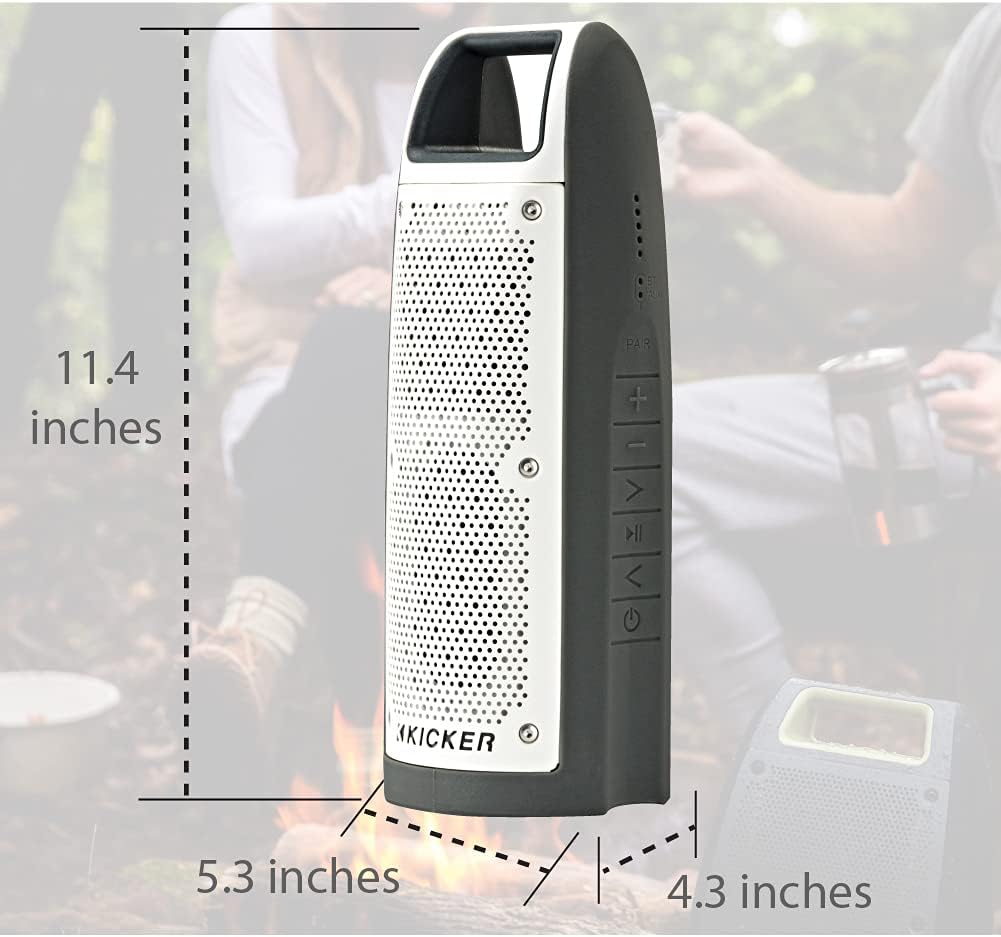
Gambar 7: Dimensions of the KICKER Bullfrog BF100 speaker.
| Fitur | Rincian |
|---|---|
| Ngaran modél | Bullfrog BF100 |
| Nomer Modél Item | 44BF100GY |
| Ukuran (H x W x D) | 11.4 x 5.3 x 4.3 inci |
| Item Beurat | 1.81 pon |
| Tipe Speaker | Luar, Speaker Bluetooth Portabel |
| Mode Kaluaran Audio | Stereo |
| Speaker Maksimum Kaluaran Power | 16 Watt |
| Téknologi Komunikasi Nirkabel | Bluetooth |
| Rentang Bluetooth | 100 suku |
| Téhnologi konektipitas | Bluetooth, Bantu (3.5mm) |
| Tingkat Résistansi Cai | IP66 (Tahan cai sareng Debu) |
| Sumber Daya | Batré Powered (1 batré Litium Polimér kaasup) |
| Kahirupan batré | Nepi ka 12 jam |
| Métode kontrol | Buttons, App (KICKER Connect) |
| Bahan | Plastik atawa Metal |
Garansi sareng Rojongan
Inpormasi Garansi:
The KICKER Bullfrog BF100 comes with a Limited Warranty. Please refer to the official KICKER website or your purchase documentation for specific terms and conditions regarding warranty coverage, duration, and claims procedures.
Rojongan Palanggan:
For technical assistance, troubleshooting, or warranty inquiries, please contact KICKER customer support. You can find contact information on the official KICKER websitus: www.kicker.com


