1. Bubuka
This manual provides detailed instructions for the setup, operation, and maintenance of your CHERRY DW 5100 Wireless Keyboard and Mouse Combo. Please read this manual thoroughly before using the product to ensure optimal performance and longevity.
Eusi pakét
The CHERRY DW 5100 package includes the following items:
- CHERRY DW 5100 Wireless Keyboard
- CHERRY DW 5100 Wireless Mouse
- Panarima USB
- 4 x Batré AAA (2 kanggo kibor, 2 kanggo beurit)
- Manual Pitunjuk (dokumén ieu)

Image 1.1: The CHERRY DW 5100 Wireless Keyboard and Mouse Combo. The image displays the full-size black keyboard with a numeric keypad and media keys, alongside the ergonomic black wireless mouse.
2. Setélan
2.1 Pamasangan batré
The CHERRY DW 5100 keyboard and mouse require AAA batteries for operation. Two AAA batteries are needed for the keyboard and two for the mouse.
- Pikeun kibor: Panggihan tempat batréna di handapeun kibor. Buka panutupna, pasang dua batré AAA, pastikeun polaritasna bener (+/-), teras tutup panutupna.
- Pikeun Mouse: Panggihan wadah batréna di handapeun beurit. Buka panutupna, pasang dua batré AAA, pastikeun polaritasna leres (+/-), teras tutup panutupna.

Image 2.1: The CHERRY DW 5100 Wireless Mouse shown with its USB receiver. The receiver is compact and designed to be plugged into a computer's USB port.
2.2 Nyambungkeun Alat
The keyboard and mouse connect wirelessly to your computer via a single USB receiver.
- Selapkeun panarima USB kana port USB sadia dina komputer Anjeun.
- Ensure the keyboard and mouse are powered on (check for an on/off switch, usually on the underside).
- Komputer anjeun kedahna sacara otomatis ngadeteksi sareng masang panggerak anu diperyogikeun. Prosés ieu tiasa nyandak sababaraha waktos.
- Once drivers are installed, the keyboard and mouse are ready for use.
The wireless connection operates on a 2.4 GHz frequency, providing a range of up to 10 meters (approximately 33 feet).
3. Parentah Operasi
3.1 Fungsi kibor
The CHERRY DW 5100 keyboard features a standard QWERTY layout with 10 additional keys for enhanced functionality.
Gambar 3.1: Deukeut view of the CHERRY DW 5100 Wireless Keyboard. This image highlights the full QWERTY layout, numeric keypad, and the additional function keys located above the numeric pad and below the spacebar.
Konci tambahan:
- Kontrol Multimedia: Dedicated keys for volume up, volume down, mute, play/pause, previous track, and next track.
- Application Shortcuts: Keys for launching common applications such as email, web browser, and calculator.
- Modeu Bobo: A key to put your computer into sleep mode.
Refer to your operating system's settings for potential customization of these additional keys.
3.2 Fungsi Mouse
The CHERRY DW 5100 mouse is ergonomically designed for right-handed users and features multiple buttons for efficient navigation.

Gambar 3.2: Luhur view of the CHERRY DW 5100 Wireless Mouse. This image shows the left and right click buttons, the scroll wheel, and the DPI switch button located below the scroll wheel.
- Klik Kénca/Katuhu: Tombol beurit standar.
- Gulung kabayang: Pikeun ngagulung vertikal sareng salaku tombol klik tengah.
- Saklar DPI: Located below the scroll wheel, this button allows you to adjust the mouse's resolution (DPI) on the fly, changing cursor speed and precision. Press the button to cycle through available DPI settings.
- Tombol jempol: Two side buttons located on the left side of the mouse, typically used for "back" and "forward" navigation in web browser jeung file penjelajah.
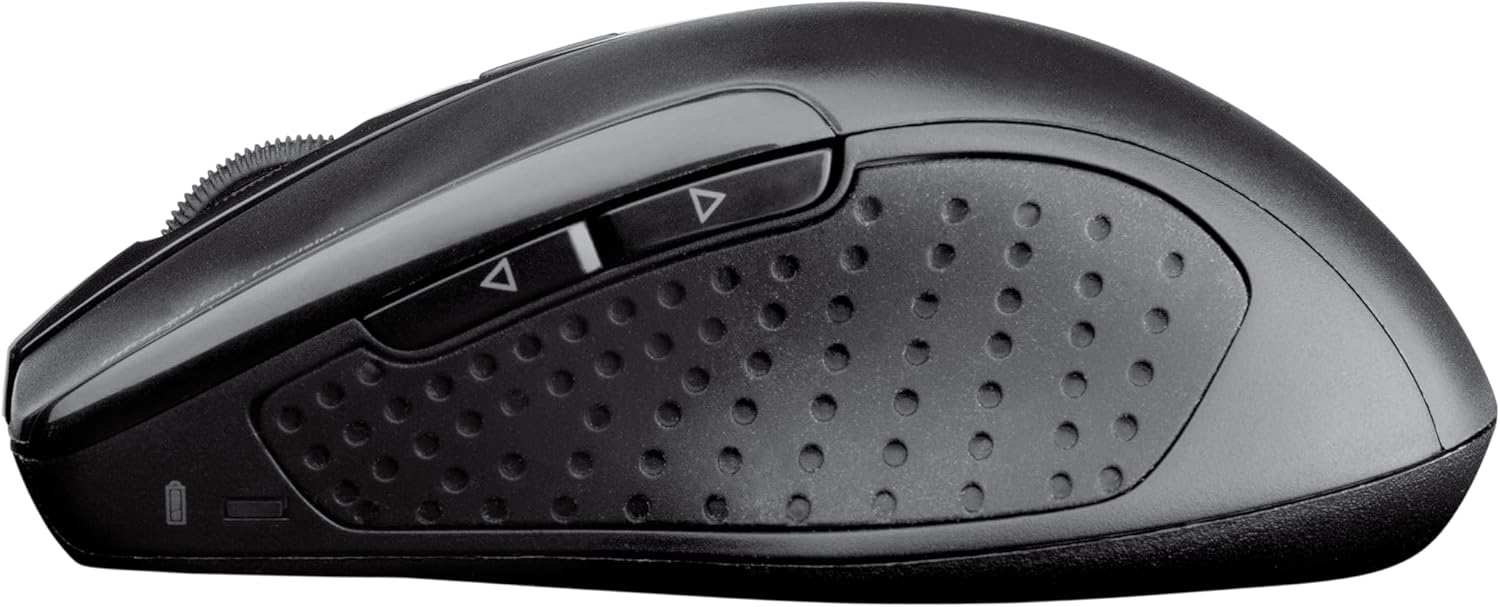
Gambar 3.3: Sisi view of the CHERRY DW 5100 Wireless Mouse. This image clearly shows the two thumb buttons on the left side and the textured rubber grip for enhanced comfort and control.
4. Pangropéa
4.1 beberesih
- Pegatkeun sambungan panarima USB tina komputer anjeun sateuacan diberesihan.
- Make kaen nu lemes, teu aya lint rada dampened with water or a mild cleaning solution to wipe the surfaces of the keyboard and mouse.
- Hindarkeun ngagunakeun bahan kimia anu kasar, pembersih abrasive, atanapi pangleyur, sabab ieu tiasa ngarusak hasil akhir produk.
- For cleaning between keyboard keys, use compressed air to remove dust and debris.
4.2 Ngagantian batré
The CHERRY DW 5100 is designed for a long battery life of up to two years. When batteries are low, the performance may degrade, or the devices may stop responding.
- Ganti batré sakumaha anu dijelaskeun dina Bagian 2.1.
- Always use fresh, high-quality AAA alkaline batteries.
- Buang batré anu dipaké nurutkeun peraturan lokal.
5. Cara ngungkulan
| Masalah | Mungkin Cukang lantaranana | Solusi |
|---|---|---|
| Keyboard / Mouse teu ngabales |
|
|
| Laggy or erratic mouse movement |
|
|
| Keyboard keys not registering |
|
|
6. Spésifikasi
| Fitur | Rincian |
|---|---|
| Ngaran modél | CHERRY DW 5100 |
| Nomer Modél Item | JD-0520EU-2 |
| Téhnologi konektipitas | Nirkabel (2.4 GHz) |
| Range nirkabel | Nepi ka 10 méter (33 suku) |
| Tata perenah kibor | EU Layout, QWERTY |
| Additional Keyboard Keys | 10 multimedia and application keys |
| Tipe Beurit | Ergonomic, Right-handed, 6-button with DPI switch |
| Sumber Daya | Batré Powered |
| Batré Diperlukeun | 4 x AAA (2 for keyboard, 2 for mouse) |
| Diperkirakeun Kahirupan Batré | Nepi ka 2 taun |
| Sistem Operasi cocog | Windows 10, Windows 7, Windows 8 |
| Platform hardware | PC, Laptop |
| Warna | Hideung |
| Ukuran Produk (Keyboard) | Kira-kira 18.43 x 6.7 x 0.87 inci (46.8 x 17 x 2.2 cm) |
| Item Beurat | Kira-kira 2.05 pon (0.93 kg) |
| Produsén | BUAH CHERRY |
7. Garansi jeung Rojongan
For warranty information and technical support, please refer to the official Cherry websitus atanapi ngahubungan departemén layanan palanggan maranéhna. Rincian biasana tiasa dipendakan dina bungkusan produk atanapi dina bungkusan produsén websitus.
Pabrikan: BUAH CHERRY
Websitus: www.cherry.de/en/ (General Cherry websitus, tautan dukungan khusus tiasa bénten-bénten dumasar kana daérah)


