
1. Bubuka
This SkyTech 1001T/LCD-A remote control system provides convenient operation for your gas fireplace. It allows you to manually turn the fireplace on or off, or set a timer for automatic shutdown. The transmitter features an LCD screen that displays the room temperature in either Fahrenheit or Celsius. The system operates on radio frequencies within a 20-foot range, utilizing non-directional signals.
Fitur konci:
- Hand-held 4-button On/Off/Timer/Set Transmitter
- Battery Operated Receiver
- LCD Display Room Temperature in °F or °C
- 3-hour Countdown Timer
- Flame Icon and Low Battery Indicator
2. Eusi Paket
Please ensure all components are present and in good condition before proceeding with installation. The typical package includes:
- Remote Control Transmitter (1001T/LCD-A)
- Kotak panarima
- Wiring Harness with spade connectors
- Wall Plate (for receiver, if applicable)
- Pemasangan Hardware (sekrup)
- 4 AA batteries (for receiver)

Gambar: Leuwihview of the remote control kit components.
3. Setup jeung Instalasi
3.1. Fireplace Compatibility Check
Before installation, determine if your fireplace is remote-ready. Look for a wall switch or terminals on the gas valve. Terminals marked 'TH', 'TP', or 'TH/TP' indicate compatibility. If you have an electronic gas valve, refer to specific instructions for IPI systems.
Video: Guide on how to determine if your fireplace is remote ready by checking for switches or gas valve terminals.
3.2. Pamasangan batré
Install the required batteries into both the remote transmitter and the receiver box. The receiver requires 4 AA batteries (included). The transmitter typically requires 2 AAA batteries (not included).
Video: Demonstrates the installation of batteries into the remote control receiver and transmitter.
3.3. Nyambungkeun panarima
Connect the receiver box to your fireplace's gas valve terminals (TH/TP) using the provided wiring harness. Ensure connections are secure. The receiver can be installed behind the fireplace louvers or within the fireplace's control area.

Image: The receiver box with its wiring connections.

Image: Close-up of the spade connectors for wiring.
3.4. Pairing the Remote Transmitter with the Receiver
To establish communication between the transmitter and receiver, follow these steps:
- Locate the 'LEARN' button on the receiver box.
- Press and hold the 'LEARN' button until you hear a long series of beeps (typically 3 beeps).
- Within 10 seconds, press either the 'ON' or 'OFF' button on the remote transmitter.
- You will hear several short beeps from the receiver, indicating successful pairing.
Video: Detailed steps on how to pair the remote control transmitter with the receiver unit.
4. Parentah Operasi
4.1. Operasi Manual
- Tombol ON: Press the 'ON' button to turn the fireplace on.
- Tombol OFF: Press the 'OFF' button to turn the fireplace off.
4.2. Fungsi Timer
The timer function allows you to set a duration for the fireplace to remain on before automatically turning off.
- Press the 'TIMER' button. The LCD will display the current timer setting.
- Use the 'SET' button to adjust the timer in 15-minute increments, up to a maximum of 3 hours.
- The fireplace will automatically turn off once the set time has elapsed.
4.3. Suhu Témbong
The LCD screen on the transmitter displays the current room temperature. You can switch between Fahrenheit (°F) and Celsius (°C) by following the instructions in the full user guide.
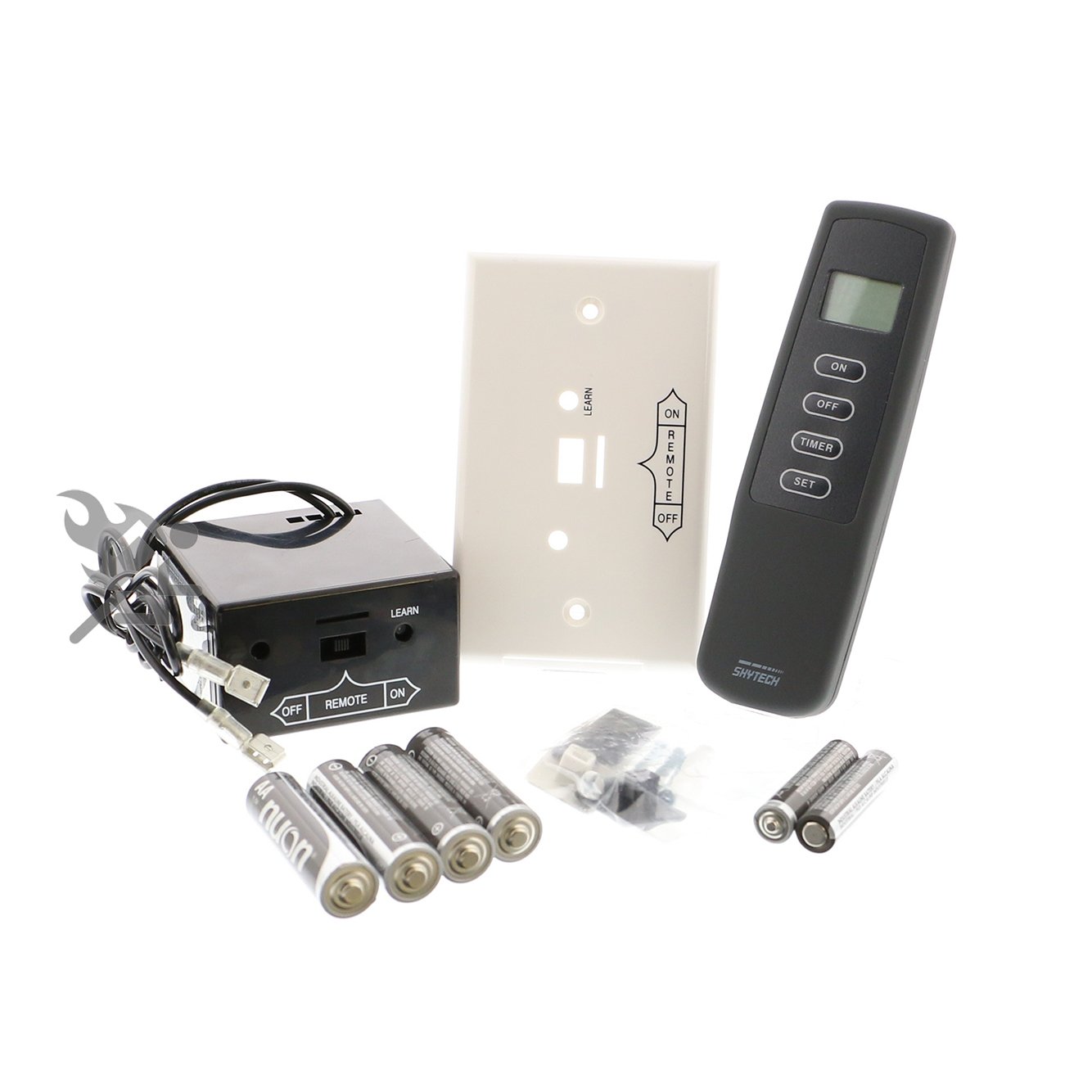
Image: The remote control transmitter with its LCD screen and control buttons.
5. Pangropéa
5.1. Ngagantian batré
When the low battery indicator appears on the LCD, replace the batteries in both the transmitter and receiver. Use fresh, high-quality batteries to ensure optimal performance and prevent corrosion. Battery corrosion can void the product warranty.
5.2. beberesih
Clean the remote transmitter and receiver with a soft, dry cloth. Do not use abrasive cleaners or immerse the units in water.
6. Cara ngungkulan
If you experience issues with your SkyTech remote control, consider the following common solutions:
- Jauh teu ngabales: Check and replace batteries in both the transmitter and receiver. Ensure the receiver is set to 'REMOTE' mode. Re-pair the transmitter and receiver if necessary.
- Teu aya seuneu: Verify that the fireplace's main gas supply is on. Check the pilot light. Ensure all wiring connections to the receiver and gas valve are secure.
- Tampilan suhu anu salah: Ensure the transmitter is placed in an area with good air circulation and away from direct heat sources.
For further assistance, please refer to the detailed user manual or contact technical support.
7. Spésifikasi
| Nomer modél | 1001T/LCD-A |
| Ukuran Paket | 5.24 x 3.62 x 3.43 inci |
| Item Beurat | 12 ons |
| Batteries (Receiver) | 4 batré AA (kaasup) |
| Rentang Operasi | Up to 20 feet (radio frequency) |
8. Garansi jeung Rojongan
For technical support or any inquiries regarding your SkyTech product, please contact us:
- Telepon Rojongan Téknis: 855-498-8324
- Jam: Monday - Friday, 8 AM - 5 PM Eastern Standard Time
Please note that battery corrosion can void the product warranty. Always use fresh batteries and replace them promptly when indicated.