Émbaran Kasalametan penting
Mangga baca sareng ngartos sadaya parentah kaamanan sateuacan nganggo produk ieu. Tetep parentah ieu pikeun rujukan hareup.
- Ulah ngalaan speaker kana hujan atanapi kalembaban pikeun nyegah seuneu atanapi sengatan listrik.
- Ulah meungpeuk sagala bukaan ventilasi. Pasang saluyu sareng parentah produsén.
- Nangtayungan kabel listrik tina leumpang atawa diciwit, utamana dina colokan, wadah merenah, jeung titik dimana aranjeunna kaluar tina aparat.
- Ngan anggo kantétan/aksésori anu ditunjuk ku produsén.
- Cabut colokan alat ieu nalika badai kilat atanapi nalika henteu dianggo kanggo waktos anu lami.
- Rujuk sadayana ngalayanan ka tanaga jasa anu mumpuni. Pelayanan diperyogikeun nalika aparat parantos rusak sagala cara.
- Ulah muka wadah spiker. Teu aya bagian anu tiasa diservis ku pangguna di jerona.
Eusi pakét
Pastikeun yén sadaya item anu didaptarkeun di handap kalebet kana pakét anjeun:
- Kaiser MSA-9908BT AmpDipikagaduh Speaker
- 1 x Mikropon Kabel
- 1 x Kadali Jauh
- 1 x Power Adapter/Charging Cable

Image showing the Kaiser MSA-9908BT speaker along with its included wired microphone, remote control, and power cable.
Produk Leuwihview
Familiarize yourself with the main components and controls of your Kaiser MSA-9908BT speaker.
Hareupeun View

The front of the speaker features a protective metal grille with the Kaiser logo at the bottom.
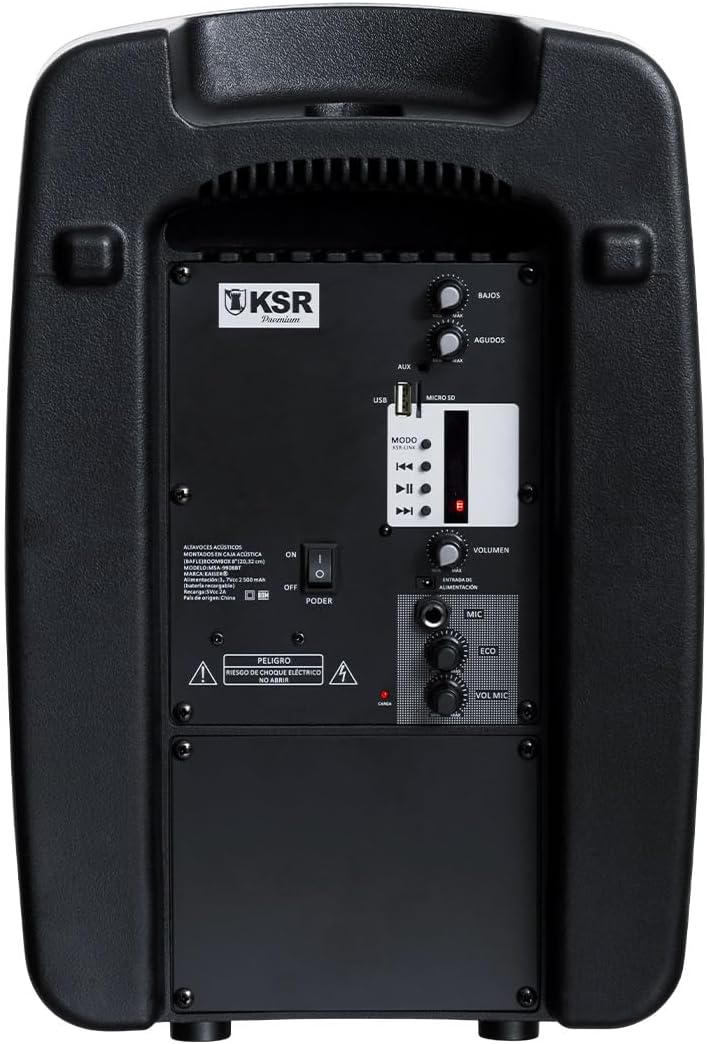
Kontrol sareng Port Panel Tukang

Diwincik view of the rear control panel, including audio inputs, volume controls, and media playback options.
- BASS / AGUDOS (Treble) Knobs: Saluyukeun tingkat bass sareng treble.
- Port USB: Pikeun playback USB flash drive.
- MICRO SD Slot: Pikeun playback kartu Micro SD.
- Input AUX: 3.5mm input bantu pikeun alat audio éksternal.
- Tombol MODE: Switches between input modes (Bluetooth, USB, Micro SD, FM).
- Kadali Puteran: Maénkeun/Pareuman, Lagu Saméméhna, Lagu Salajengna.
- VOLUMEN Knob: Kontrol volume utama pikeun spiker.
- MIC Input (6.3mm): For connecting the wired microphone.
- ECO Knob: Nyaluyukeun éfék gema pikeun mikropon.
- VOL MIC Knob: Adjusts the microphone volume independently.
- Saklar Daya: Turns the speaker On or Off.
- Port ngecas: Pikeun nyambungkeun adaptor kakuatan pikeun ngeusi batre internal.
Disetél
Ngecas Awal
Before first use, it is recommended to fully charge the speaker's internal battery. This typically takes approximately 4 hours.
- Connect the provided power adapter to the charging port on the rear panel of the speaker.
- Colokkeun adaptor kana stop kontak listrik standar.
- The charging indicator light (usually red) will illuminate during charging and may change color or turn off when fully charged.
- A muatan pinuh nyadiakeun kira 6 jam waktu playback.

The rear panel showing the charging port and an important reminder to charge the unit for 4 hours before initial use.
Ngahurungkeun/Pareuman
- To turn on the speaker, slide the POWER switch on the rear panel to the 'ON' position.
- To turn off the speaker, slide the POWER switch to the 'OFF' position.
Parentah Operasi
Konektipitas Bluetooth
- Turn on the Kaiser MSA-9908BT speaker. It will automatically enter Bluetooth pairing mode, indicated by a flashing light or an audible prompt.
- Dina telepon pinter, tablet, atanapi alat Bluetooth anu sanés, aktipkeun Bluetooth teras milarian alat anu sayogi.
- Select "MSA-9908BT" from the list of found devices.
- Sakali dipasangkeun kalayan suksés, speaker bakal masihan konfirmasi anu tiasa disada, sareng lampu indikator Bluetooth bakal hurung.
- Anjeun ayeuna bisa muterkeun audio tina alat Anjeun ngaliwatan speaker.
USB / Micro SD Playback
- Selapkeun USB flash drive kana Port USB or a Micro SD card into the MICRO SD Slot on the rear panel. Ensure the media contains compatible audio files (contona, MP3).
- The speaker should automatically switch to USB or Micro SD mode and begin playing audio. If not, press the MODÉ tombol pikeun milih input bener.
- Use the Play/Pause, Previous Track, and Next Track buttons on the speaker or remote control to manage playback.
Operasi Radio FM
- Pencét éta MODÉ button repeatedly until you select FM radio mode.
- The speaker will automatically scan and save available FM stations.
- Use the Previous Track and Next Track buttons to navigate between saved stations.
Ngagunakeun Mikropon Kabel
- Connect the wired microphone to the MIC Input (6.3mm) dina panel pungkur.
- Saluyukeun volume mikropon nganggo tombol VOL MIC kenop.
- Ngagunakeun éta ECO knob to add or reduce the echo effect for the microphone.

Detail of the 6.3mm microphone input jack and its dedicated volume and echo controls.
Fungsi Remote Control
Remote control anu kalebet nyayogikeun aksés anu gampang pikeun rupa-rupa fungsi:

The remote control allows for convenient operation of playback, volume, and mode selection.
- MUTER / Reureuh: Mimitian atanapi ngareureuhkeun playback.
- Saméméhna/salajengna: Luncat ka lagu/stasion saméméhna atawa salajengna.
- VOL-/VOL+: Decrease or increase the master volume.
- CH-/CH+: Change FM radio channels.
- EQ: Balik-balik setélan ékualiser.
- MODÉ: Switch between input sources (Bluetooth, USB, Micro SD, FM, AUX).
- Tombol Numerik (0-9): Pikeun pilihan lagu langsung atanapi input frékuénsi FM.
Pangropéa
- beberesih: Anggo lawon anu lemes sareng garing pikeun ngabersihkeun bagian luar spiker. Entong nganggo pembersih anu abrasif, lilin, atanapi pangleyur.
- Perawatan batré: To prolong battery life, avoid fully discharging the battery frequently. If storing the speaker for an extended period, charge it to about 50% every few months.
- Panyimpenan: Simpen spéker dina tempat anu tiis sareng garing jauh tina sinar panonpoé langsung sareng suhu anu ekstrim.
Pamérésan masalah
| Masalah | Mungkin Cukang lantaranana | Solusi |
|---|---|---|
| Speaker teu hurung. | Batré béak; Pindah daya pareum. | Charge the speaker for at least 4 hours. Ensure the POWER switch is in the 'ON' position. |
| Taya sora tina speaker. | Volume teuing low; modeu input salah; Alat teu nyambung. | Ningkatkeun VOLUMEN knob. Press MODÉ to select the correct input. Ensure your device is properly connected (Bluetooth paired, USB/SD inserted). |
| Papasangan Bluetooth gagal. | Speaker henteu dina mode papasangan; Alat jauh teuing; gangguan. | Ensure speaker is in Bluetooth mode. Move device closer to speaker. Turn off other Bluetooth devices. Try restarting both speaker and device. |
| Mikropon teu jalan. | Microphone not connected; VOL MIC knob is low. | Ensure microphone is fully plugged into the 6.3mm MIC input. Increase the VOL MIC kenop. |
| panarimaan radio FM goréng. | sinyal lemah; Gangguan lingkungan. | Reposition the speaker to improve reception. Extend any external antenna if available. |
spésifikasi
| Fitur | Rincian |
|---|---|
| Modél | MSA-9908BT |
| merek | Kaiser |
| Kaluaran Kakuatan (RMS) | 30W RMS |
| Ukuran Speaker | 8 inci |
| Konektipitas | Bluetooth, USB, Micro SD, AUX (3.5mm), Wired Microphone (6.3mm) |
| Kahirupan batré | Nepi ka 6 jam |
| Waktu Ngecas | Kira-kira. 4 jam |
| Diménsi (D x W x H) | 33 x 27 x 48 cm (kira-kira 13 x 10.6 x 18.9 inci) |
| Beurat | 5.4 kg (kira-kira 11.9 lbs) |
| Bahan | palastik |
| Komponén Kaasup | Speaker, Wired Microphone, Remote Control, Power Adapter |
The speaker's dimensions are approximately 38.5 cm (height), 25.5 cm (width), and 20.5 cm (depth).
Garansi sareng Rojongan
This product is covered by a limited warranty provided by Kaiser. For specific warranty terms and conditions, please refer to the documentation included with your purchase or visit the official Kaiser websitus.
For technical support, troubleshooting assistance, or warranty claims, please contact Kaiser customer service through their official channels. Keep your purchase receipt as proof of purchase.
- Dukungan Online: Visit the Kaiser official websitus pikeun FAQs jeung sumber rojongan.
- Palayanan palanggan: Refer to your product packaging or the Kaiser websitus pikeun inpo kontak.


