Bubuka
The Beats Studio3 Wireless headphones, featuring the Apple W1 chip, redefine your listening experience with seamless connectivity and advanced audio technology. Designed for all-day comfort and superior sound, these headphones offer Active Noise Cancelling (Pure ANC) to block external distractions, ensuring a premium audio experience. With extended battery life and Fast Fuel charging, your music is always ready when you are. Compatible with both iOS and Android devices, the Beats Studio3 provides versatile and high-performance audio.
Naon dina Box
- Beats Studio3 headphone Wireless
- Mawa koper
- 3.5mm RemoteTalk cable
- Universal USB charging cable
- Gancang Mimitian Guide
- Kartu Garansi

Image: Beats Studio3 Wireless Headphones, carrying case, RemoteTalk cable, and USB charging cable.
Produk Leuwihview
Fitur konci
- High-performance wireless noise cancelling headphones.
- Cocog sareng ios sareng alat Android.
- Pure Adaptive Noise Cancelling (Pure ANC) actively blocks external noise.
- Real-time Audio calibration preserves a premium listening experience.
- Up to 22 hours of battery life with noise cancelling on, and up to 40 hours with noise cancelling off.
- Apple's W1 chip and Class 1 Bluetooth technology ensure extended range and fewer drop-outs.
- Fast Fuel: A 10-minute charge provides 3 hours of playback when battery is low.
- Multifunction on-ear controls and microphone for calls, music control, and Siri activation.
- Ergonomic pivoting ear cups and advanced venting for comfort.
Kontrol jeung Indikator
The Beats Studio3 headphones feature intuitive on-ear controls for managing audio playback, volume, and phone calls. The main 'b' button on the ear cup allows for play/pause, track skipping, and call management. Volume controls are integrated around this button. A power button with LED indicators for battery life is located on the bottom of one ear cup.

Gambar: Sisi view of the Beats Studio3 headphones, highlighting the main control button.
Disetél
Ngecas Headphone
Connect the universal USB charging cable to the Micro USB port on the headphone and to a power source. The LED fuel gauge lights will indicate the charging status. For quick power, use Fast Fuel technology: a 10-minute charge provides 3 hours of playback.
Masangkeun sareng Alat
- Daya Hurung: Press and hold the power button on the right ear cup for 1 second to turn on the headphones. The LED fuel gauge lights will illuminate.
- iOS Devices (Apple W1 Chip): Hold the Beats Studio3 headphones near your unlocked iOS device. Follow the on-screen prompts to connect. Once paired, the headphones will automatically connect to other Apple devices signed into your iCloud account.
- Android and Other Bluetooth Devices: Press and hold the power button for 5 seconds until the LED fuel gauge lights flash, indicating pairing mode. Go to your device's Bluetooth settings and select "Beats Studio3" from the list of available devices.

Image: Close-up of the Beats Studio3 ear cup, showing the power button and battery indicator lights.
Parentah Operasi
Active Noise Cancelling (Pure ANC)
Pure ANC is automatically enabled when you power on the Beats Studio3 headphones, continuously calibrating audio to block external noise. To turn Pure ANC off for low power mode (extending battery life up to 40 hours), double-press the power button. Double-press again to re-enable Pure ANC.
Music Playback and Volume
- Puter / Reureuh: Pencét tombol 'b' sakali.
- Langkung ti payun: Pencét tombol 'b' dua kali.
- Luncat ka Mundur: Pencét tombol 'b' tilu kali.
- Volume Up: Press the top part of the ring around the 'b' button.
- Volume Turun: Press the bottom part of the ring around the 'b' button.
Telepon Telepon
- Ngajawab / mungkas Telepon: Pencét tombol 'b' sakali.
- Nolak Telepon: Pencét terus tahan tombol 'b' salami 2 detik.
- Pindah Antara Telepon: Press the 'b' button once to switch between two active calls.
Aktipkeun Asisten Sora (Siri/Asisten Google)
Press and hold the 'b' button for 2 seconds to activate your device's voice assistant.
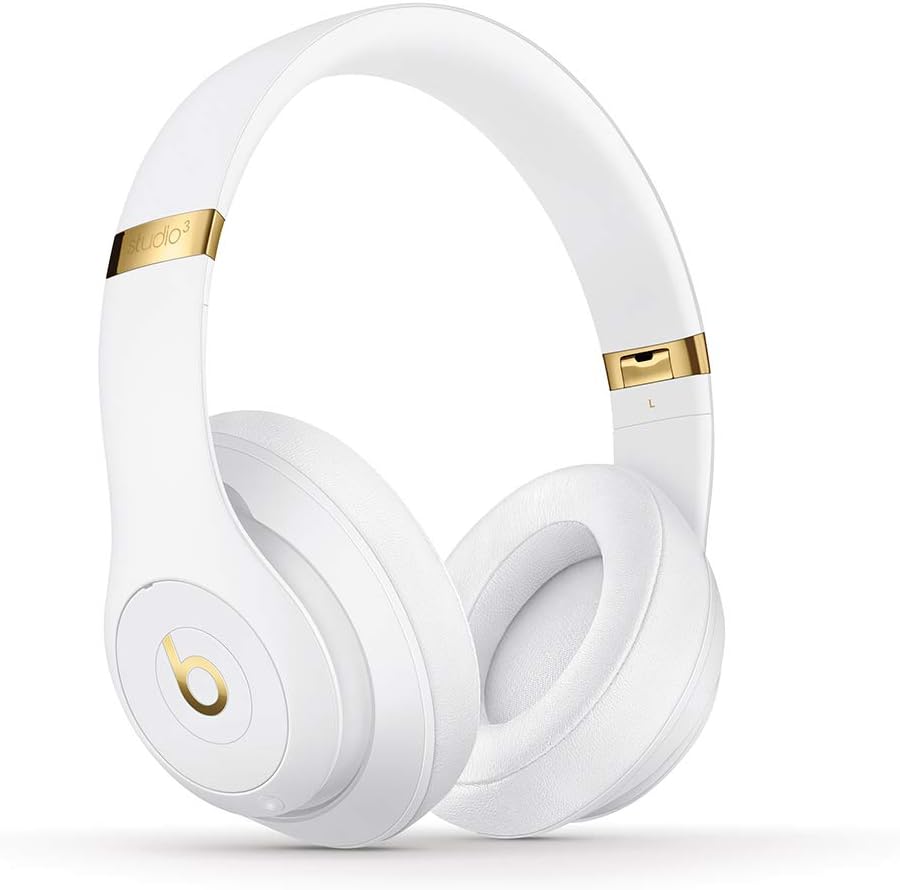
Gambar: Hareupeun view of the Beats Studio3 Wireless Headphones.
Pangropéa
- beberesih: Anggo lawon anu lemes, garing, sareng henteu aya bulu pikeun ngabersihkeun headphone. Entong nganggo pembersih atanapi pangleyur anu abrasif.
- Panyimpenan: When not in use, store the headphones in their provided carrying case to protect them from dust and damage. The headphones fold easily for compact storage.
- Perawatan batré: Pikeun manjangkeun umur batre, ulah miceun headphone sacara sering. Ngeusi batre aranjeunna rutin, sanajan teu di pamakéan konstan.

Image: Beats Studio3 headphones folded, demonstrating their compact storage capability.
Pamérésan masalah
| Masalah | Solusi anu mungkin |
|---|---|
| Headphone moal hurung. | Ensure the headphones are charged. Connect to a power source using the USB charging cable. |
| Teu tiasa dipasangkeun sareng alat. | Make sure Bluetooth is enabled on your device. Place headphones in pairing mode (hold power button for 5 seconds until LEDs flash). Ensure headphones are not already connected to another device. Try restarting both devices. |
| No audio or poor sound quality. | Check volume levels on both headphones and your device. Ensure headphones are properly paired. If using the RemoteTalk cable, ensure it is fully inserted into both the headphones and your device. |
| Pangurangan Bising Aktif teu tiasa dianggo. | Ensure Pure ANC is enabled (double-press power button). Check for any obstructions around the microphones. |
spésifikasi
- Ngaran modél: Beats Studio3 - White (Previous Model)
- Jumlah modél: MQ572LL/A
- Téknologi konektipitas: Bluetooth (Class 1 Wireless)
- Kontrol bising: Pembatalan Noise Aktif (ANC Murni)
- Kahirupan batré: Nepi ka 22 jam (sareng ANC), Nepi ka 40 jam (tanpa ANC)
- Charging Time (Fast Fuel): 10-menit muatan pikeun 3 jam playback
- Jack headphone: USB 2.0 (for charging), 3.5mm (for RemoteTalk cable)
- Faktor Bentuk: Dina Ceuli / Leuwih Ceuli
- Beurat barang: 9.17 oz / 260 g
- Ukuran produk: 6.3 x 4.7 x 8.9 inci
- Pabrikan: Apple Computer (Direct)
- UPC: 190198447128
Garansi sareng Rojongan
For detailed warranty information and customer support, please refer to the Warranty Card included in your product packaging or visit the official Beats websitus. Anjeun oge bisa manggihan rojongan tambahan sarta informasi produk dina Beats Store on Amazon.


