Bubuka
Hatur nuhun pikeun meuliasing the Max Power MPD125L Karaoke DJ Speaker System. This portable 12-inch speaker system is designed to deliver powerful sound and vibrant LED lighting for your entertainment needs. It features a built-in rechargeable battery, multiple connectivity options including USB, SD, AM/FM radio, and Bluetooth, along with a strong amplifier pikeun pangalaman audio immersive.
Please read this manual thoroughly before operating the device to ensure proper use, optimal performance, and to prevent damage.
Émbaran Kasalametan
- Ulah ngalaan unit ka hujan atawa Uap pikeun nyegah seuneu atawa shock listrik.
- Ulah muka casing. Henteu aya bagian anu tiasa dilayanan ku pangguna di jero. Rujuk sadayana jasa ka tanaga anu mumpuni.
- Teundeun unit dina datar, permukaan datar pikeun nyegah ragrag.
- Jauhkeun unit ieu tina sinar panonpoé langsung, sumber panas, sareng lebu anu kaleuleuwihi.
- Pastikeun ventilasi anu leres. Ulah meungpeuk bukaan ventilasi.
- Paké ngan adaptor kakuatan disadiakeun kalawan unit.
- Cabut colokan unit nalika badai kilat atanapi nalika henteu dianggo kanggo waktos anu lami.
- Hindarkeun nempatkeun barang beurat dina kabel listrik.
- Ulah ngasupkeun barang naon waé kana liang unit.
Eusi pakét
Punten parios yén sadaya barang aya sareng dina kaayaan anu saé:
- Max Power MPD125L Karaoke DJ Speaker System
- Mikropon nirkabel
- Kadali Jauh Nirkabel
- adaptor kakuatan / ngecas Cable
- Manual pangguna (dokumén ieu)
Fitur produk
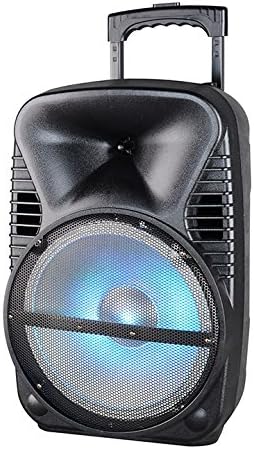
Gambar: Hareupeun view of the Max Power MPD125L Karaoke DJ Speaker System. It is a black, portable speaker with a retractable handle on top and wheels at the bottom. The front features a large speaker grille with blue LED lights illuminating the woofer, indicating its active state.
- Desain portabel: 12-inch speaker with built-in retractable handle and wheels for easy transport.
- Audio anu kuat: 4000W peak power output for loud and clear sound with good bass.
- Batré anu tiasa dieusi deui: Provides up to 4 hours of continuous playback. (Battery size: 12V/2.6A)
- LED Dance Lights: Integrated LED lights that flash, transforming any room into a disco club.
- Sababaraha Pilihan Konektipitas:
- Bluetooth: Wireless streaming from compatible devices (laptops, smartphones).
- Slot USB: Pikeun muter audio files ti USB drive.
- Slot SD: Pikeun muter audio files from SD cards.
- Radio AM/FM: Built-in tuner for radio broadcasts.
- Fungsi Karaoke: Includes a wireless microphone for karaoke sessions.
- Full-Function Wireless Remote Control: Pikeun operasi merenah ti kajauhan.
- Impedansi: 4 ohm.
- Tanggapan Frékuénsi: 40 Hz - 20 kHz.
Disetél
1. Ngecas Speaker
- Locate the DC input port on the speaker (usually on the rear panel).
- Connect the supplied power adapter to the DC input port.
- Colokkeun adaptor kakuatan kana stop kontak listrik standar.
- The charging indicator light (if present) will illuminate, typically red, during charging and turn green when fully charged.
- Allow approximately 4-6 hours for a full charge before first use. The speaker can be used while charging.
2. Setélan Mikropon nirkabel
- Insert appropriate batteries (not included, usually AA) into the wireless microphone.
- Hurungkeun mikropon. Éta kedahna otomatis dipasangkeun sareng spiker.
- Adjust the microphone volume knob on the speaker's control panel to your desired level.
3. Jauh Control Setup
- Insert appropriate batteries (not included, usually AAA) into the wireless remote control.
- Point the remote control towards the speaker's IR receiver (usually on the front panel or near the controls) to operate.
Parentah Operasi
1. Daya Hurung / Pareum
Locate the Power switch (usually a rocker switch) on the speaker's control panel. Flip it to the "ON" position to power on the speaker. Flip it to "OFF" to power off.
2. Pilihan Modeu
Press the "MODE" button on the control panel or remote control to cycle through available input modes: Bluetooth, USB, SD, FM Radio, AM Radio, AUX (if available).
3. Papasangan Bluetooth
- Turn on the speaker and select Bluetooth mode. The speaker will typically announce "Bluetooth Mode" or display "BT" and enter pairing mode (indicated by a flashing Bluetooth indicator).
- On your smartphone, tablet, or laptop, enable Bluetooth and search for new devices.
- Select "MPD125L" (or similar name) from the list of available devices.
- Once paired, the speaker will confirm with an audible tone or a solid Bluetooth indicator light. You can now play audio wirelessly.
4. Putereun USB/SD
- Insert a USB flash drive or SD card (pre-loaded with MP3 or compatible audio files) kana slot anu saluyu.
- The speaker should automatically switch to USB/SD mode and begin playing the first track. If not, press the "MODE" button to select USB or SD mode.
- Use the Play/Pause, Next Track, and Previous Track buttons on the control panel or remote to navigate.
5. Operasi Radio AM/FM
- Select FM or AM radio mode using the "MODE" button.
- Press and hold the Play/Pause button (often labeled "SCAN") to automatically scan and save available radio stations.
- Use the Next Track and Previous Track buttons to switch between saved stations.
- Panjangkeun anteneu teleskopik (upami aya) pikeun nampi panarimaan anu langkung saé.
6. Fungsi Karaoke
Ensure the wireless microphone is powered on and paired. Play your desired music through any input mode (Bluetooth, USB, etc.). Speak or sing into the microphone. Adjust the microphone volume and echo effects (if available) using the dedicated knobs on the control panel.
7. LED Dance Lights
The LED lights typically activate automatically when the speaker is powered on. There may be a dedicated button (e.g., "LIGHT" or "LED") on the control panel or remote to toggle them on/off or change patterns.
8. Volume Control
Adjust the master volume using the main volume knob on the speaker's control panel or the volume buttons on the remote control.
Pangropéa
- beberesih: Use a soft, dry cloth to wipe the exterior of the speaker. Do not use liquid cleaners or abrasive chemicals.
- Panyimpenan: Lamun teu dipaké pikeun période nambahan, nyimpen speaker dina tiis, tempat garing, jauh ti sinar panonpoé langsung jeung hawa ekstrim.
- Perawatan batré: To prolong battery life, avoid fully discharging the battery frequently. Recharge the battery at least once every 3 months if not in regular use.
- Ventilasi: Ensure the speaker's ventilation openings are clear of dust and debris to prevent overheating.
Pamérésan masalah
| Masalah | Mungkin Cukang lantaranana | Solusi |
|---|---|---|
| Speaker teu hurung. | Batré béak. Kabel daya teu nyambung kalawan bener. | Sambungkeun spiker ka stop kontak teras antepkeun ngecas. Ensure the power cable is securely plugged into both the speaker and the outlet. |
| Taya sora tina speaker. | Volume handap teuing. Modeu input anu dipilih salah. Device not properly connected (Bluetooth/USB/SD). | Ningkatkeun volume master. Press the "MODE" button to select the correct input. Re-pair Bluetooth device, re-insert USB/SD, or check AUX cable connection. |
| Alat Bluetooth teu tiasa dipasangkeun. | Speaker henteu dina mode papasangan. Alat jauh teuing tina speaker. Bluetooth dina alat pareum. | Ensure speaker is in Bluetooth mode and indicator is flashing. Move device closer to the speaker (within 10 meters). Aktipkeun Bluetooth dina alat Anjeun. |
| Mikropon teu jalan. | Microphone is off or batteries are dead. Microphone volume is too low. | Turn on the microphone and replace batteries if necessary. Increase the microphone volume knob on the speaker. |
| panarimaan radio goréng. | Sinyal lemah. Anteneu teu diperpanjang. | Pindahkeun spiker ka daérah anu sinyalna langkung saé. Pinuh manjangkeun anteneu teleskopis. |
spésifikasi
| Nomer modél | MPD125L |
| merek | kakuatan MAX |
| Puncak Kaluaran Daya | 4000 Watt |
| Impedansi | 4 ohm |
| Réspon Frékuénsi | 40 Hz - 20 kHz |
| Ukuran batré | 12V / 2.6A |
| Kahirupan batré | Nepi ka 4 jam |
| Ukuran produk (L x W x H) | 33.02 x 38.1 x 58.42 cm (13 x 15 x 23 inci) |
| Beurat produk | 15.88 kg (35 lbs) |
| Alat nu cocog | Laptop, Smartphone |
| Tipe Panyambung | USB |
| UPC | 703510623201 |
Garansi sareng Rojongan
Kanggo inpormasi garansi sareng dukungan téknis, mangga tingal dokuméntasi anu disayogikeun dina waktos ngagaleuh atanapi ngahubungi pangecér anjeun. Simpen bukti pameseran anjeun pikeun klaim garansi.
For further assistance or inquiries, please visit the official MAX POWER websitus atanapi ngahubungan departemén layanan palanggan maranéhna.


