1. Bubuka
Thank you for choosing the Intelbras RC 5003 FRS Radio Communicator. This device is designed for reliable and clear communication, suitable for various applications. This manual provides essential information for the proper setup, operation, and maintenance of your radio communicators. Please read it thoroughly before use.
2. Émbaran Kasalametan
- Ulah neuleumkeun alat dina cai atawa kakeunaan ka beueus kaleuleuwihan.
- Do not attempt to open or modify the radio communicator. Repairs should only be performed by authorized personnel.
- Use only Intelbras approved batteries and charging accessories.
- Jauhkeun alat tina suhu ekstrim sareng sinar panonpoé langsung.
- Buang batré nurutkeun peraturan lokal.
- Avoid using the radio communicator while driving or operating heavy machinery to prevent distractions.
3. Eusi Paket
Mangga parios pakét kanggo barang-barang ieu:
- 3 x Intelbras RC 5003 Radio Communicators
- 3 x adaptor kakuatan
- 3 x Kabel USB
- 3 x Sabuk Klip
- 3 x Earphone
- 1 x Manual Pamaké (dokumén ieu)
4. Produk Langkungview
Familiarize yourself with the main components of your Intelbras RC 5003 radio communicator.
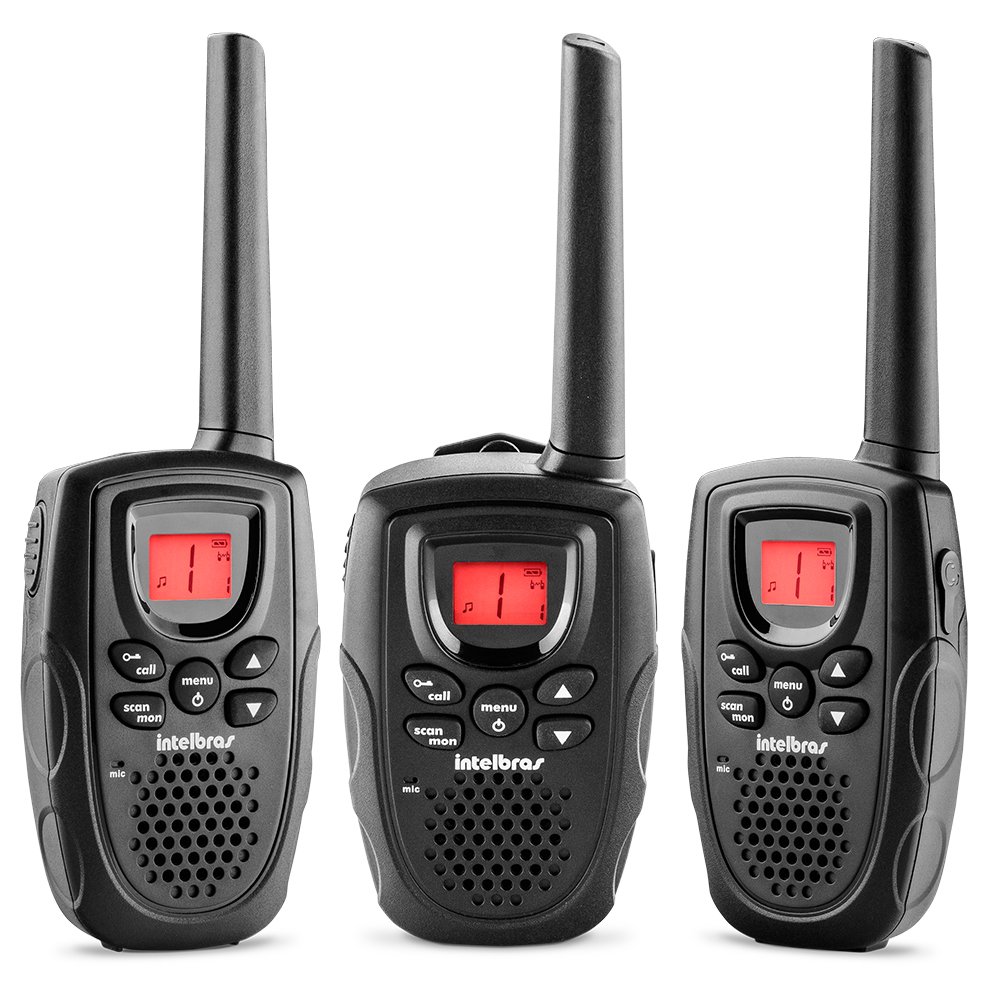
Gambar 1: Hareupeun view of the Intelbras RC 5003 Radio Communicator, showing the display, speaker, microphone, and main control buttons.
Komponén konci:
- anteneu: Pikeun ngirimkeun sareng nampi sinyal.
- Speaker: Kaluaran audio anu ditampi.
- Tampilan bercahaya: Shows channel, battery level, and other status indicators.
- Kenop Daya/Volume: Ngahurungkeun/mareuman unit sareng nyaluyukeun volume.
- Tombol Kaluhur/Turun Saluran: Selects operating channels.
- Tombol PTT (Push-to-Talk): Pencét terus tahan pikeun ngirim, leupaskeun pikeun ngadangukeun.
- Tombol Menu: Accesses settings and features.
- Palabuhan Ngecas USB: For connecting the USB cable for charging.
5. Setélan
5.1. Pamasangan batré
The Intelbras RC 5003 comes with rechargeable batteries pre-installed. If you need to replace them, ensure the radio is off, open the battery compartment cover on the back, insert the new batteries according to the polarity markings, and close the cover securely.
5.2. Ngecas Batré
Before initial use, fully charge the radio communicator's batteries.
- Connect the USB cable to the charging port on the radio communicator.
- Sambungkeun tungtung séjén kabel USB ka adaptor kakuatan disadiakeun.
- Colokkeun adaptor kakuatan kana stop kontak listrik standar.
- The display will indicate charging status. A full charge takes approximately 6 hours.
- Pegatkeun sambungan carjer saatos ngeusi batre.
6. Parentah Operasi
6.1. Hurung/Pareum sareng Pangaluyuan Volume
- Pikeun Ngahurungkeun: Rotate the Power/Volume knob clockwise until you hear a click.
- Pikeun mareuman: Puterkeun kenop Daya/Volume ka arah anu sabalikna tina jarum jam dugi ka anjeun ngadangu sora klik.
- Pikeun Nyaluyukeun Volume: Puterkeun kenop Daya/Volume searah jarum jam pikeun ningkatkeun volume sareng berlawanan arah jarum jam pikeun ngirangan volume.
6.2. Pamilihan Saluran
The RC 5003 operates on 26 channels within the frequency range of 462.5625 MHz to 467.7125 MHz.
- Press the Menu button to enter channel selection mode.
- Use the Channel Up/Down buttons to select your desired channel (1-26).
- Press the PTT button or wait a few seconds for the selection to be confirmed.
- Pastikeun sadaya radio dina grup anjeun disetel ka saluran anu sami pikeun komunikasi.
6.3. Nepikeun jeung Narima
- Pikeun ngirimkeun: Press and hold the PTT button. Speak clearly into the microphone. Release the PTT button to finish transmitting.
- Pikeun Nampi: Ensure the PTT button is not pressed. The radio will automatically receive transmissions on the selected channel.
6.4. Fungsi VOX (Pertukaran anu Dioperasikeun ku Sora)
The VOX function allows hands-free transmission by detecting your voice.
- Press the Menu button repeatedly until the VOX setting appears on the display.
- Use the Channel Up/Down buttons to select a sensitivity level (1-3, where 3 is most sensitive).
- Press the PTT button or wait to confirm the setting.
- When VOX is active, the radio will transmit automatically when you speak.
6.5. Call Tones
The RC 5003 offers 10 different call tones to alert other users.
- Press the Menu button repeatedly until the Call Tone setting appears.
- Use the Channel Up/Down buttons to cycle through the 10 available tones.
- Press the PTT button or wait to confirm your selection.
- To send a call tone, briefly press the Call button (if available, or refer to specific button mapping in your device).
6.6. Indikator Level Batré
The luminous display includes an indicator for the current battery level. Recharge the device when the indicator shows low battery to ensure uninterrupted communication.
7. Pangropéa
7.1. beberesih
- Wipe the radio communicator with a soft, damp lawon.
- Entong nganggo bahan kimia kasar atanapi beberesih kasar.
- Ensure the device is dry before charging or storing.
7.2. Panyimpenan
- Simpen alat dina tempat anu tiis sareng garing upami henteu dianggo.
- For long-term storage, ensure batteries are partially charged (around 50%) to prolong their lifespan.
8. Cara ngungkulan
| Masalah | Mungkin Cukang lantaranana | Solusi |
|---|---|---|
| Radio teu hurung. | Batré lemah atawa béak. | Ngecas batré pikeun sahenteuna 6 jam. |
| Teu tiasa ngirim atanapi nampi. | Saluran anu dipilih salah. | Ensure all radios are on the same channel. |
| Kaluar jangkauan. | Move closer to the other radio communicator. | |
| Kualitas audio goréng. | batré lemah. | Ngecas batré. |
| Halangan atawa gangguan. | Move to an open area or away from sources of interference. | |
| VOX teu aktip. | VOX sensitivity too low. | Increase VOX sensitivity level (1-3). |
9. Spésifikasi
- model: RC5003
- Saluran: 26
- Rentang Frékuénsi: 462.5625 MHz nepi ka 467.7125 MHz
- Nada Nelepon: 10
- Fungsi VOX: Yes, with 3 sensitivity levels
- tampilan: Caang
- Indikator batré: Sumuhun
- Ngecas: USB cable, approximately 6 hours for full charge
- Ukuran (L x W x H): 19.6 x 6.65 x 2.7 cm (kira-kira)
- beurat: 300 g (kira-kira)
- Sumber Daya: Rechargeable batteries (included)
10. Garansi jeung Rojongan
For warranty information, technical support, or service inquiries, please refer to the warranty card included with your product or visit the official Intelbras websitus. Simpen bukti pameseran anjeun pikeun klaim garansi.
Intelbras Official Websitus: www.intelbras.com.br


