1. Produk Langkungview
The LG 32MA70HY-P is a 32-inch class (31.5" measured diagonally) Full HD IPS monitor designed for professional use. It offers a 16:9 aspect ratio, true color reproduction, and a fast response time, enhancing visual clarity from various viewing angles. Key features include On-Screen Control for easy settings optimization, Reader Mode for comfortable extended viewing, and Screen Split 2.0 for efficient multi-tasking with up to four windows in 14 possible configurations. The monitor features a refined Arcline design and provides multiple input options.

Gambar 1: Hareupeun view of the LG 32MA70HY-P monitor.
Fitur konci:
- 32-inch Full HD (1920x1080) IPS Display
- Inputs: DisplayPort, HDMI, D-Sub
- On-Screen Control for intuitive monitor settings management
- Screen Split 2.0 for enhanced multi-tasking
- Reader Mode for reduced eye strain
- VESA-compatible for wall mounting (7.9 x 3.9 inches / 200 x 100 mm)
- Windows 10 compatible
2. Eusi Paket
Please check that all components are included in your product box. If any components are missing, contact your retailer.
- LG 32MA70HY-P Monitor
- Stand Monitor (Dasar sareng Beuheung)
- Kabel Daya
- Kabel HDMI
- Manual pangguna (dokumén ieu)
3. Setélan
3.1 Ngarakit Stand
- Taliti teundeun monitor ka handap dina permukaan anu lemes sareng bersih pikeun nyegah goresan.
- Gantelkeun beuheung nangtung ka tukang monitor nepi ka ngaklik kana tempatna.
- Pasangkeun dasar penyangga kana beuheung penyangga teras amankeun nganggo sekrup anu disayogikeun.
The monitor is also VESA-compatible (200 x 100 mm) for wall mounting. Refer to your wall mount instructions for proper installation.
3.2 Nyambungkeun Monitor
Sambungkeun monitor ka komputer Anjeun atawa alat sejenna make kabel nu luyu.
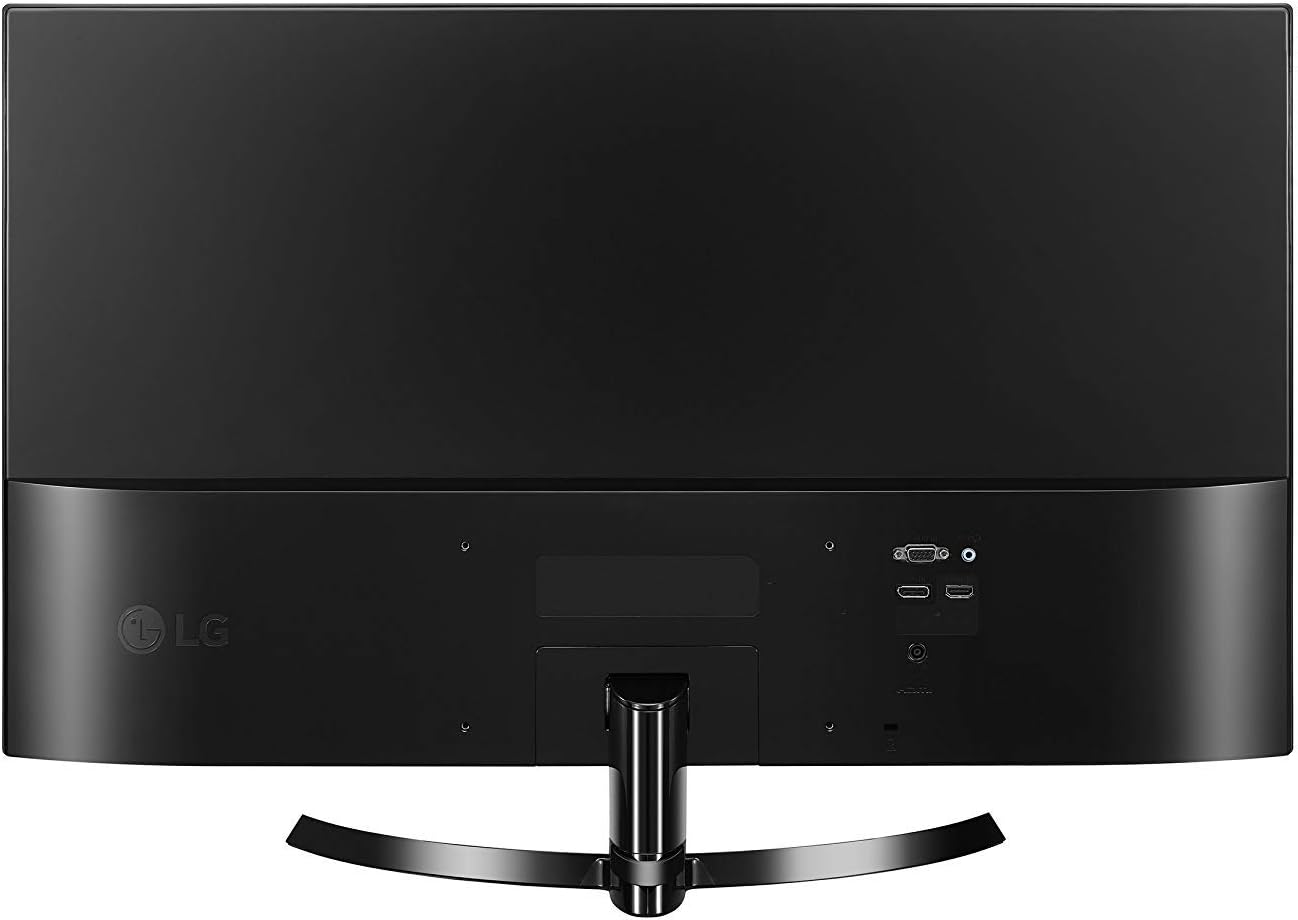
Gambar 2: Tukangeun view tina monitor jeung palabuhan input.
- Sambungan Daya: Connect the power cable to the monitor's DC-IN port and then to a power outlet.
- Sambungan HDMI: Use the provided HDMI cable to connect the monitor's HDMI IN port to your computer's HDMI output.
- Sambungan DisplayPort: Connect a DisplayPort cable (not included) from the monitor's DP-IN port to your computer's DisplayPort output.
- D-Sub Connection: Connect a D-Sub (VGA) cable (not included) from the monitor's D-SUB IN port to your computer's VGA output.
4. Ngoperasikeun Monitor
4.1 Daya Hurung/Pareuman
Press the joystick button located at the bottom center of the monitor to turn it on or off.
4.2 Kontrol Dina Layar (OSC)
The monitor settings can be adjusted using the joystick button. Move the joystick up, down, left, or right to navigate through the On-Screen Control menu.
- Joystick Up: Ngaksés ménu utama.
- Joystick Down: Pareuman monitor.
- Joystick Left: Adjusts volume or accesses specific functions.
- Joystick Right: Selects input source or accesses specific functions.
4.3 Pamilihan Input
To switch between input sources (HDMI, DisplayPort, D-Sub), move the joystick to the right to access the input selection menu, then navigate and select your desired input.
4.4 Pamisahan Layar 2.0
Screen Split 2.0 is a software feature that allows you to divide your screen into multiple sections for efficient multi-tasking. Install the On-Screen Control software from the LG website to utilize this feature. It supports displaying up to four different windows in 14 possible configurations.
4.5 Modeu pamaca
Activate Reader Mode through the On-Screen Control menu to adjust the screen's color temperature and brightness, reducing blue light emissions for comfortable viewing during extended work sessions.
5. Pangropéa
5.1 Ngabersihan Monitor
- Salawasna cabut monitor tina stop kontak sateuacan beberesih.
- Make kaen nu lemes, teu aya lint rada dampDieusian ku cai atanapi pembersih layar anu hampang sareng henteu abrasive.
- Ulah menyemprot cleaner langsung kana layar. Larapkeun heula kana lawon.
- Ulah nganggo bénzéna, thinner, atanapi zat anu gampang nguap, sabab tiasa ngaruksak permukaan layar.
5.2 Perawatan Umum
- Hindarkeun nempatkeun barang beurat dina monitor atanapi kabelna.
- Ulah ngantepkeun monitor ka sinar panonpoé langsung, suhu anu luhur, atanapi kalembaban anu luhur.
- Pastikeun ventilasi nyukupan sabudeureun monitor pikeun nyegah overheating.
6. Cara ngungkulan
If you encounter issues with your monitor, refer to the following troubleshooting tips:
- Henteu aya kakuatan: Pastikeun kabel daya disambungkeun pageuh kana monitor sareng stop kontak. Pariksa naha stop kontakna tiasa dianggo.
- Henteu aya sinyal: Verify that the video cable (HDMI, DisplayPort, or D-Sub) is securely connected to both the monitor and your computer. Ensure the correct input source is selected on the monitor using the On-Screen Control menu.
- Screen Flickering (HDMI 1080i): If the selected resolution is HDMI 1080i 60/50 Hz and the screen is flickering, change the resolution to the recommended 1080P.
- Masalah Kualitas Gambar: Adjust brightness, contrast, and other display settings through the On-Screen Control menu. Ensure your computer's display resolution matches the monitor's native resolution (1920x1080).
7. Spésifikasi
Detailed technical specifications for the LG 32MA70HY-P monitor:
| Fitur | Spésifikasi |
|---|---|
| Ukuran layar | 32 Inci (31.5" Diagonal) |
| Tipe Panel | IPS |
| Resolusi | 1920 x 1080 (HD lengkep) |
| Rasio Aspék | 16:9 |
| Caang | 250 cd/m² |
| Input | 1x DisplayPort, 1x HDMI, 1x D-Sub |
| Item Beurat | 1 pon (kira-kira 0.45 kg) |
| Ukuran produk (kalayan stand) | 28.61 x 8.06 x 19.37 inci (PxLxT) |
| Ukuran produk (tanpa stand) | 28.6 x 3.7 x 16.9 inci (PxLxT) |
| VESA Gunung kasaluyuan | 200 x 100 mm (7.9 x 3.9 inci) |
| Warna | Hideung |
| Sumber Daya | AC |

Figure 3: Monitor dimensions with stand.
8. Garansi jeung Rojongan
For detailed warranty information and technical support, please refer to the warranty card included with your product or visit the official LG website. The LG support website provides comprehensive resources, including FAQs, driver downloads, and contact information for customer service.
Dukungan Online: www.lg.com/us/support