1. Bubuka
Thank you for choosing the Rowenta RH8133WA 750W Vacuum Cleaner. This manual provides essential information for the safe and efficient operation, maintenance, and troubleshooting of your appliance. Please read it thoroughly before first use and keep it for future reference.
2. Parentah Kasalametan penting
Nalika nganggo alat listrik, pancegahan dasar kedah diturutan, kalebet ieu:
- Baca sagala parentah saméméh ngagunakeun vacuum cleaner.
- Entong tinggalkeun alat upami dicolokkeun. Cabut colokan tina stop kontak upami teu dianggo sareng sateuacan ngalayanan.
- Ulah make di luar atawa dina surfaces baseuh.
- Ulah ngantep dipaké salaku cocooan. Perhatian caket diperyogikeun nalika dianggo ku atanapi caket barudak.
- Anggo ngan sakumaha anu dijelaskeun dina manual ieu. Paké ngan kantétan dianjurkeun produsén urang.
- Ulah make jeung ari ruksak atawa colokan. Upami alat henteu jalan sakumaha sakuduna, parantos diturunkeun, ruksak, ditinggalkeun di luar, atanapi murag kana cai, balikkeun deui ka pusat layanan.
- Ulah narik atawa mawa ku ari, make ari salaku cecekelan, nutup panto dina ari, atawa narik ari sabudeureun ujung seukeut atawa juru. Ulah ngajalankeun alat ngaliwatan kabel. Tetep ari jauh ti surfaces dipanaskeun.
- Ulah cabut colokan ku cara narik kana kabel. Pikeun cabut colokan, keupeul colokan, teu ari.
- Ulah nanganan colokan atawa alat ku leungeun baseuh.
- Ulah nempatkeun obyék nanaon kana bukaan. Entong nganggo sareng bukaan anu diblokir; tetep bébas tina lebu, serat, rambut, sareng naon waé anu tiasa ngirangan aliran hawa.
- Jauhkeun buuk, pakean longgar, ramo, sareng sadaya bagian awak tina bukaan sareng bagian anu obah.
- Ulah nyokot naon bae anu kaduruk atawa ngaroko, kayaning roko, korek api, atawa lebu panas.
- Entong dianggo pikeun nyandak cairan anu gampang kaduruk atanapi kaduruk, sapertos béngsin, atanapi dianggo di daérah anu aya.
- Ulah nyokot bahan toksik, kayaning pemutih klorin, amonia, atawa solokan cleaner.
- Ulah make tanpa kantong lebu jeung/atawa saringan di tempat.
- Pareuman sadaya kadali sateuacan cabut colokan.
- Paké perawatan tambahan nalika meresihan dina tangga.
3. Produk Langkungview
The Rowenta RH8133WA is a 750W stick vacuum cleaner designed for efficient cleaning on all floor types. It features a HEPA filter for improved air quality.
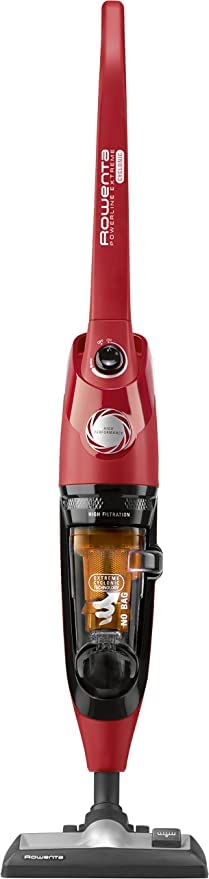
Gambar 1: Rowenta RH8133WA 750W Vacuum Cleaner. This image shows the main unit of the vacuum cleaner, highlighting its compact stick design and primary components.
Komponén Kaasup:
- Unit vakum utama
- Sikat lebu
- Mop (attachment)
- Alat celah
- Kabel listrik
4. Setup jeung Majelis
Follow these steps to assemble your Rowenta RH8133WA vacuum cleaner before first use:
- Ngabongkar komponén: Carefully remove all parts from the packaging. Ensure all included components are present.
- Gantelkeun gagang: Selapkeun gagang kana awak utama vacuum cleaner nepi ka clicks aman kana tempatna.
- Connect Floor Nozzle: Attach the floor nozzle to the bottom of the main unit. Ensure it is firmly connected.
- Install Dust Container/Filter: Verify that the dust container and HEPA filter are correctly installed. Refer to the "Maintenance" section for details on filter installation.
- Sambungan Daya: Cabut kabel listrik teras colokkeun kana stop kontak anu cocog.
5. Parentah Operasi
This section guides you through the basic operation of your vacuum cleaner.
5.1 Powering on / Pareum
- Pikeun ngaktipkeun vacuum cleaner, pencét tombol daya anu aya dina unit utama.
- Pikeun mareuman vacuum cleaner, pencét deui tombol daya.
5.2 Nyaluyukeun kakuatan nyeuseup
The Rowenta RH8133WA features 2 speed settings for varying cleaning needs.
- Use the lower setting for delicate surfaces or light dust.
- Use the higher setting for deep cleaning carpets or heavily soiled areas.
- Refer to the control panel on the handle for specific adjustment buttons.
5.3 Ngagunakeun Kantétan
The vacuum cleaner comes with several attachments for specialized cleaning:
- Dusting Sikat: Ideal for cleaning delicate surfaces, furniture, and blinds.
- Alat celah: Sampurna pikeun ngahontal rohangan anu heureut, juru, sareng sapanjang sisi.
- Lampiran pel: Use for wet cleaning hard floors. Ensure the vacuum is unplugged before attaching or detaching. Follow specific instructions for the mop attachment for water filling and cleaning.
To attach an accessory, ensure the vacuum is off and unplugged. Remove the main floor nozzle if necessary, then firmly push the desired accessory onto the end of the wand or directly onto the main unit's suction inlet.
6. Pangropéa sarta perawatan
Pangropéa rutin ngajamin kinerja anu optimal sareng manjangkeun umur vacuum cleaner anjeun. Salawasna cabut colokan alat sateuacan ngalakukeun perawatan naon waé.
6.1 Ngosongkeun Wadah Lebu
- Pastikeun vacuum cleaner geus unplugged.
- Locate the dust container release button, usually near the handle or main body.
- Press the button to detach the dust container.
- Hold the container over a waste bin and open the bottom flap to empty the contents.
- Close the flap and reattach the dust container to the vacuum cleaner until it clicks into place.
Rekomendasi: Empty the dust container after each use or when it reaches the "MAX" fill line.
6.2 Ngabersihan Filter HEPA
The HEPA filter should be cleaned regularly to maintain suction power and air filtration efficiency.
- With the dust container removed, locate the HEPA filter. It is typically inside the dust container or accessible once the container is removed.
- Taliti miceun saringan.
- Ketok saringan lalaunan kana tempat runtah pikeun miceun lebu anu leupas.
- If the filter is washable, rinse it under cold running water until the water runs clear. Do not use detergents.
- Allow the filter to air dry completely for at least 24 hours before reinstalling. Do not use a hairdryer or other heating devices.
- Reinstall the dry filter and then the dust container.
Rekomendasi: Clean the HEPA filter monthly, or more frequently with heavy use. Replace the HEPA filter annually or if it shows signs of damage.
6.3 Ngabersihan Exterior
Ngusap permukaan luar tina vacuum cleaner ku lemes, damp lawon. Ulah make cleaners abrasive atawa pangleyur.
7. Cara ngungkulan
Sateuacan ngahubungan layanan palanggan, mangga tingal pituduh ngungkulan ieu di handap pikeun masalah umum.
| Masalah | Mungkin Cukang lantaranana | Solusi |
|---|---|---|
| Vacuum cleaner teu hurung. | Not plugged in; power outlet fault; damaged cord/plug. | Ensure plug is firmly in outlet. Test outlet with another appliance. Check cord/plug for damage; if damaged, do not use and contact service. |
| kakuatan nyeuseup low. | Full dust container; clogged filter; blocked hose/nozzle. | Empty dust container. Clean or replace HEPA filter. Check hose, nozzle, and attachments for blockages and remove them. |
| Noise mahiwal salila operasi. | Blockage in brush roll or hose; foreign object inside. | Turn off and unplug. Inspect brush roll and hose for obstructions and remove. If noise persists, contact customer support. |
| Vacuum cleaner panas teuing teras pareum. | Blocked airflow (full dust container, clogged filter, blockage). | Turn off and unplug. Empty dust container, clean filter, and check for blockages. Allow appliance to cool down for at least 30 minutes before restarting. |
8. Spésifikasi
| Fitur | Rincian |
|---|---|
| merek | Rowenta |
| Nomer modél | RH8133WA |
| Kakuatan | 750 Watt |
| Jumlah Speeds | 2 |
| Jenis Filter | Saringan HEPA |
| Fitur husus | HEPA |
| Surface Rekomendasi | Kabéh floors |
| Sumber Daya | Kabel Listrik |
| Komponén Kaasup | Dusting brush, Mop, Crevice tool |
| Tanpa kabel | No |
| Faktor Bentuk | iteuk |
9. Garansi jeung Rojongan
Specific warranty information for the Rowenta RH8133WA vacuum cleaner is typically provided with the product packaging or can be found on the official Rowenta websitus. Punten tahan bukti pameseran anjeun pikeun klaim garansi.
For technical support, spare parts, or service inquiries, please visit the official Rowenta website or contact their customer service department in your region. Contact details are usually available in the product's original documentation or on the manufacturer's websitus.
Catetan: Availability of spare parts information is not provided in the product data.