
1. Bubuka
Thank you for choosing the Andoer Mini 49-LED Camera Video Light. This compact and versatile lighting solution is designed to enhance your photography and videography with bright, dimmable illumination. Featuring 49 high-quality LED beads, a 6000K color temperature, and a CRI of ≥90, it provides natural and soft white light. Its design includes multiple hot shoe bases for interlocking with other lights and a standard hot shoe mount with a 1/4-inch thread for broad compatibility with cameras and light stands.

Gambar 1.1: Hareupeun view of the Andoer Mini 49-LED Camera Video Light.
2. Émbaran Kasalametan
Please read and understand all safety precautions before using this product to prevent damage or injury.
- Ulah ngalaan alat ka cai atawa kalembaban kaleuleuwihan.
- Ulah nepi ka panon kakeunaan lampu LED sacara langsung, sabab éta bisa caang pisan.
- Do not attempt to disassemble or modify the light. Repairs should only be performed by qualified personnel.
- Use only specified AA batteries. Ensure correct polarity when inserting batteries.
- Remove batteries if the light will not be used for an extended period.
- Jauhkeun tina jangkauan barudak.
3. Setélan
3.1 Pamasangan batré
- Locate the battery compartment cover on the back of the light.
- Geser panutupna muka.
- Selapkeun dua (2) batré AA, mastikeun polaritasna bener (+/-) sakumaha dituduhkeun di jero kompartemen.
- Tutup panutup kompartemen batré aman.

Figure 3.1: Open battery compartment for AA battery installation.
3.2 Pasang Lampu
The Andoer Mini 49-LED Camera Video Light offers versatile mounting options:
- Sepatu Panas Dina Kaméra: The light features a standard hot shoe mount at its base. Slide this mount into your camera's hot shoe slot and tighten the locking ring for a secure fit.
- 1/4-inch Thread: The hot shoe mount also includes a 1/4-inch thread, allowing it to be attached to light stands, tripods, or other accessories with a compatible screw.

Figure 3.2: The video light mounted on a DSLR camera's hot shoe.
3.3 Interlocking Multiple Lights
For enhanced lighting effects, multiple Andoer Mini 49-LED lights can be interlocked. The light is equipped with hot shoe bases on three sides (top, left, right).
- Mount the first light onto your camera or stand.
- Take a second light and slide its hot shoe mount into one of the hot shoe bases on the first light.
- Repeat for additional lights as needed.

Figure 3.3: Multiple lights interlocked for broader illumination.
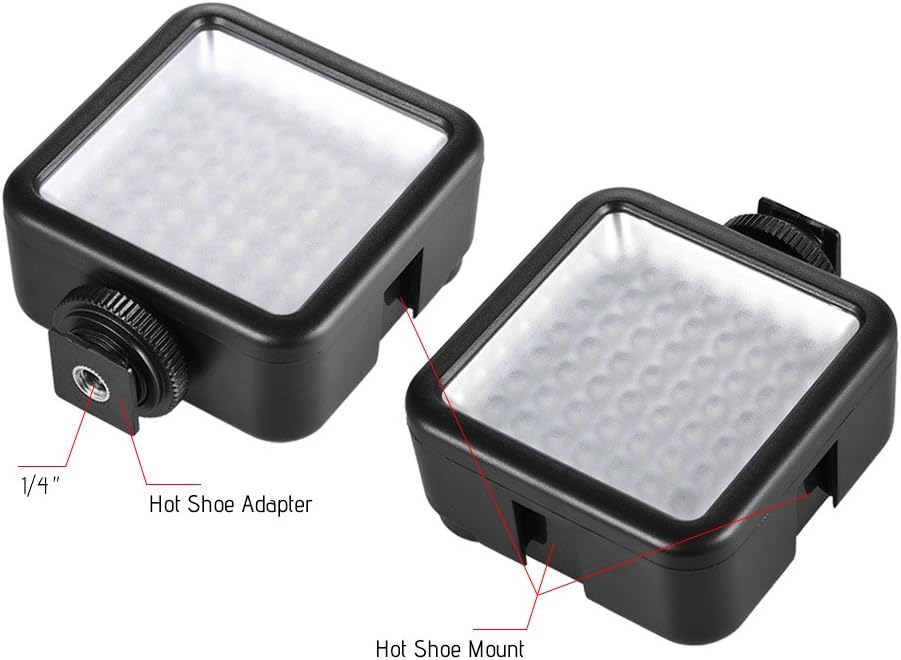
Figure 3.4: Detail of the hot shoe adapter and mount for interlocking.
4. Parentah Operasi
4.1 Daya Hurung / Pareum sareng adjustment Caang
The light features a single rotary knob for both power control and brightness adjustment.
- Daya Hurung: Rotate the knob clockwise from the 'OFF' position. The light will turn on at its lowest brightness setting.
- Saluyukeun Caang: Continue rotating the knob clockwise to increase brightness from 0% to 100%. Rotate counter-clockwise to decrease brightness.
- Pareum listrik: Rotate the knob counter-clockwise until it clicks into the 'OFF' position.

Figure 4.1: The ON/Dimmer rotary knob on the back of the light.

Figure 4.2: Visual representation of 0-100% dimmable brightness.
5. Pangropéa
- beberesih: Use a soft, dry cloth to clean the exterior of the light. Do not use abrasive cleaners or solvents.
- Panyimpenan: Store the light in a cool, dry place away from direct sunlight and extreme temperatures. Remove batteries if storing for extended periods.
- Perawatan batré: Replace batteries when the light output becomes dim or inconsistent. Dispose of used batteries responsibly according to local regulations.
6. Cara ngungkulan
| Masalah | Mungkin Cukang lantaranana | Solusi |
|---|---|---|
| Lampu henteu hurung. | Batré pareum atawa salah dipasang. | Pariksa polaritasna batré. Ganti ku batré AA seger. |
| Light dims quickly or is inconsistent. | Daya batre lemah. | Ganti ku batré AA seger. |
| Lampuna teu dipasang kalawan pageuh. | Mounting knob/ring is loose. | Ensure the hot shoe locking ring is tightened. |
7. Spésifikasi
| Fitur | Spésifikasi |
|---|---|
| Modél | W49 |
| Kuantitas LED | 49 sapotong |
| Kaluaran kakuatan | 5.5W |
| Suhu Warna | 6000K |
| CRI (Indéks Rendering Warna) | ≥90 |
| Rentang Dimming | 0% - 100% |
| Sumber Daya | 2 x batré AA (teu kaasup) |
| Saumur hirup | Nepi ka 50,000 jam |
| Pamasangan | Hot Shoe Mount, 1/4-inch Thread |
| Dimensi produk | 3.15 x 1.22 x 2.56 inci (8 x 3.1 x 6.5 cm) |
| Item Beurat | 3.36 ons (95.25 gram) |

Gambar 7.1: Dimensi produk.
8. Émbaran jaminan
Specific warranty details for the Andoer Mini 49-LED Camera Video Light are typically provided at the point of purchase or within the product packaging. Please retain your proof of purchase for any warranty claims. For detailed warranty terms and conditions, please refer to the documentation included with your product or contact the seller/manufacturer directly.
9. Rojongan
If you encounter any issues or have questions regarding your Andoer Mini 49-LED Camera Video Light that are not covered in this manual, please contact the retailer from whom you purchased the product. Alternatively, you may visit the official Andoer website for further support and contact information.