1. Bubuka
This manual provides comprehensive instructions for the installation, operation, and maintenance of the Planet ISW-500T Industrial 5-Port 10/100TX Compact Ethernet Switch. Designed for robust industrial environments, the ISW-500T offers reliable and fast data transmission with its 5 10/100Mbps auto-negotiation ports. Its IP30-rated compact case and wide-ranging redundant power system ensure stable performance in challenging conditions.
2. Produk Langkungview
The ISW-500T is engineered for industrial applications, featuring a durable design and essential connectivity. Below are key components and their descriptions.

Gambar 2.1: Angled view of the ISW-500T Industrial Ethernet Switch, showing its compact design and front-facing Ethernet ports.
2.1 Panel payun
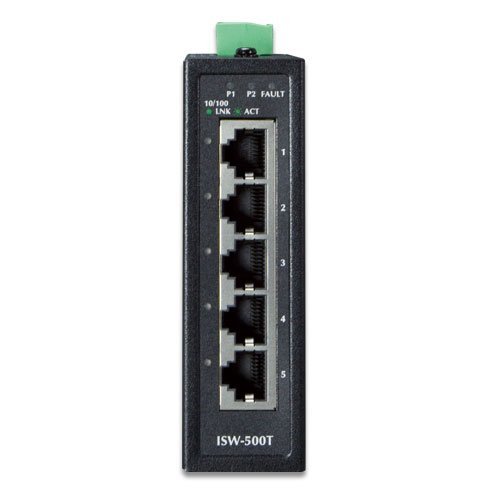
Gambar 2.2: Front panel of the ISW-500T, detailing the five 10/100TX Ethernet ports (labeled 1-5) and LED indicators for power (P1, P2), fault (FAULT), and link/activity (LNK/ACT).
- Port Ethernet (1-5): Five 10/100TX auto-negotiation ports for network connections.
- P1/P2 LEDs: Indicate the status of Power Input 1 and Power Input 2.
- LED kasalahan: Illuminates if a power supply failure is detected.
- LNK/ACT LEDs: Indicate link status and data activity for each Ethernet port.
2.2 Panel Top
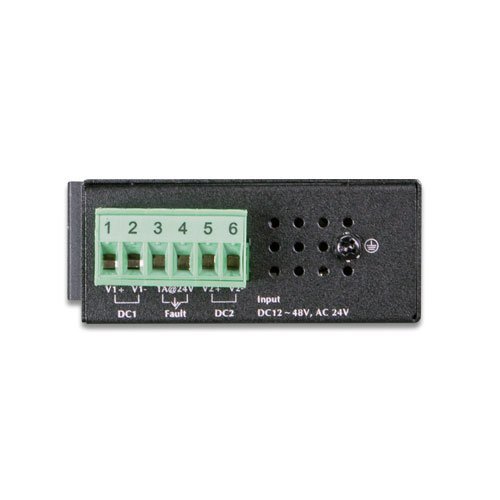
Gambar 2.3: Top panel of the ISW-500T, featuring the removable terminal block for dual redundant power inputs (DC1, DC2) and a fault alarm output.
- Power Input Terminal Block: Supports wide-ranging redundant power inputs (12~48V DC or 24V AC). Includes connections for DC1 (V1+, V1-), DC2 (V2+, V2-), and a fault alarm output (Fault).
- Grounding screw: Pikeun grounding ditangtoskeun tina alat.
3. Fitur konci
- 5 10/100TX Fast Ethernet Ports
- 1Gbps Non-blocking Switch Fabric
- IP30-rated Compact Case
- Wide-ranging Redundant Power System (12~48V DC or 24V AC)
- Operating Temperature Range: -40 to 75°C
- Plug and Play for easy deployment
- Auto Power Saving and IEEE 802.3az Energy Efficient Ethernet (EEE) Protocol
- Dual Power Input System with Hardware Failover
- Ethernet ESD Protection: ±6KV DC contact discharge, ±8KV DC air discharge
- Surge Immunity: ±4KV
4. Setup jeung Instalasi
4.1 Eusi pakét
Pariksa barang-barang ieu kalebet dina pakét anjeun:
- ISW-500T Industrial Ethernet Switch
- Panyambung Blok Terminal
- Quick Installation Guide (if applicable, not provided in input)
4.2 Pamasangan
The ISW-500T is designed for DIN-rail or wall mounting. Ensure the mounting location is stable, well-ventilated, and within the specified operating temperature range (-40 to 75°C).
4.3 Sambungan Daya
- Ensure the power source is off before connecting.
- Connect the 12~48V DC or 24V AC power supply to the appropriate terminals (V1+, V1- for DC1; V2+, V2- for DC2) on the terminal block.
- Tighten screws dina blok terminal pikeun ngamankeun kawat.
- Connect the terminal block to the power input port on the top panel of the ISW-500T.
- For enhanced reliability, connect both DC1 and DC2 inputs to separate power sources. The device supports hardware failover.
- Ensure proper grounding by connecting a ground wire to the grounding screw.
4.4 Sambungan Jaringan
- Connect standard RJ45 Ethernet cables from your network devices (e.g., industrial PCs, IP cameras, PLCs) to any of the five 10/100TX ports on the front panel of the ISW-500T.
- The switch supports auto MDI/MDI-X, so straight-through or crossover cables can be used.
- Verify the LNK/ACT LED for each connected port illuminates, indicating a successful link. A blinking LED indicates data activity.
5. Operasi
The ISW-500T is a 'Plug and Play' device, requiring minimal configuration for basic operation.
5.1 Kakuatan Hurung
Once power is supplied, the P1 and/or P2 LEDs will illuminate, indicating successful power input. The switch will automatically begin forwarding Ethernet traffic between connected devices.
5.2 Pangiriman Data
The switch operates at 10Mbps or 100Mbps, automatically negotiating the speed with connected devices. Data is forwarded efficiently with a 1Gbps non-blocking switch fabric.
5.3 Énergi Énergi
The ISW-500T incorporates Auto Power Saving and IEEE 802.3az Energy Efficient Ethernet (EEE) Protocol. This allows the switch to automatically detect cable link status and network traffic, adjusting power consumption accordingly. It consumes less power when less active, contributing to energy conservation.
5.4 Redundant Power System
The dual power input system ensures continuous operation. If Power Supply 1 fails, the hardware failover function automatically switches to Power Supply 2, maintaining system uptime. The FAULT LED will illuminate if a power supply failure occurs.
6. Pangropéa
To ensure optimal performance and longevity of your ISW-500T switch, follow these maintenance guidelines:
- Kontrol Lingkungan: Ensure the operating environment remains within the specified temperature range (-40 to 75°C) and humidity levels. Avoid exposure to excessive dust, moisture, or corrosive substances.
- beberesih: Periodically clean the exterior of the switch with a soft, dry cloth. Do not use liquid or aerosol cleaners. Ensure ventilation openings are clear of obstructions.
- Manajemén Kabel: Keep network and power cables organized and securely connected to prevent accidental disconnections or damage.
- Pariksa catu daya: Regularly verify the status of the P1 and P2 LEDs to ensure both power inputs are functioning correctly, especially if using redundant power.
- Pembaruan firmware: While this model is 'Plug and Play' and typically does not require user firmware updates, always refer to the manufacturer's official website for any potential advisories or updates.
7. Cara ngungkulan
This section provides solutions to common issues you might encounter with the ISW-500T switch.
| Masalah | Mungkin Cukang lantaranana | Solusi |
|---|---|---|
| No Power (P1/P2 LEDs Off) | Teu aya catu daya, voltase salahtage, loose power connection. |
|
| FAULT LED On | One of the redundant power supplies has failed. |
|
| LNK/ACT LED Off for a Connected Port | No link, faulty cable, device not powered on, incorrect port speed/duplex. |
|
| Kinerja Jaringan anu Leungit | Network congestion, faulty cable, device issues. |
|
8. Spésifikasi
| Atribut | Nilai |
|---|---|
| Nomer modél | ISW-500T |
| Palabuhan | 5 x 10/100TX Fast Ethernet |
| Pindah Kain | 1Gbps / non-blocking |
| Throughput | 0.74Mpps @ 64Bytes |
| Max. Konsumsi Daya | 1.1W / 3.77BTU (power on w/o any connection), 2W / 6.86BTU (full loading) |
| Suhu Operasi | -40 nepi ka 75°C (-40 nepi ka 167°F) |
| Input kakuatan | 12~48V DC or 24V AC (Redundant) |
| Panyalindungan | Ethernet ESD Protection (±6KV DC contact, ±8KV DC air), ±4KV Surge Immunity |
| Ukuran (L x W x H) | 4.09 x 2.76 x 1.18 inci (103.9 x 70.1 x 30 mm) |
| Beurat | 8.78 ons (249 gram) |
| Peunteun IP | IP30 |
9. Garansi jeung Rojongan
For detailed warranty information, technical support, and service inquiries, please refer to the official Planet Technology website or contact your authorized reseller. Warranty terms and conditions may vary by region and product. It is recommended to register your product upon purchase, if applicable, to ensure access to full support services.
Pabrikan: Planét Téhnologi


