1. Setélan
1.1 Pamasangan batré
The Insignia NS-RC03A-13 remote control requires two AAA batteries for operation. Follow these steps to install them:
- Teangan tempat panutup kompartemen batré dina tonggong kadali jauh.
- Geser panutup ka handap atawa pencét kancing pikeun mukakeunana.
- Insert two AAA batteries, ensuring that the positive (+) and negative (-) terminals align correctly with the markings inside the compartment.
- Geser panutup kompartemen batré deui kana tempatna nepi ka klik aman.
Gambar: Tukangeun view of the Insignia NS-RC03A-13 remote control, showing the battery compartment open with two AAA batteries inserted. The remote is black with gray buttons.
2. Parentah Operasi
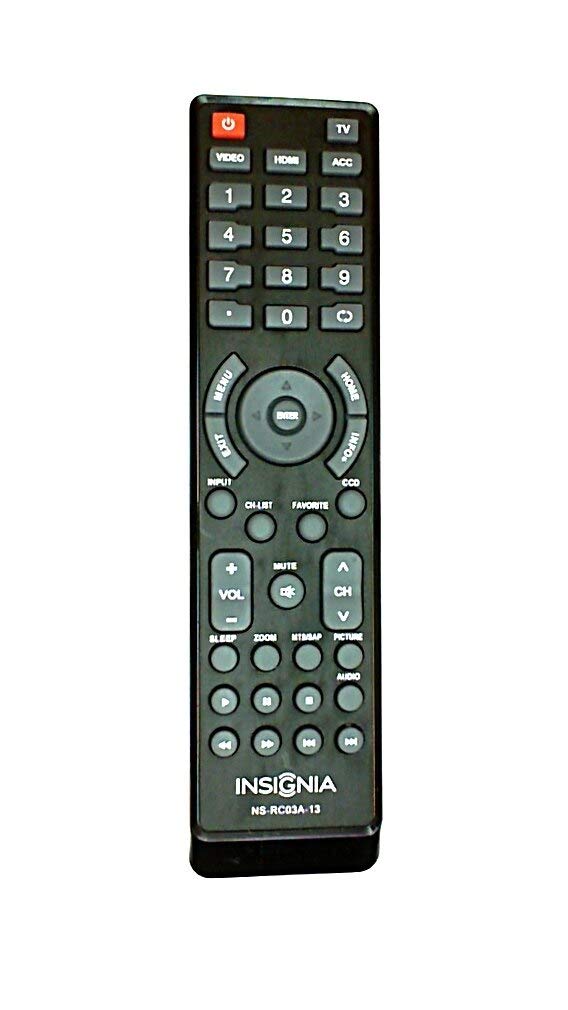
This section details the primary functions and usage of your Insignia NS-RC03A-13 remote control.
Gambar: Hareupeun view of the Insignia NS-RC03A-13 remote control, displaying all buttons and their labels. The remote is black with gray buttons and white text.
2.1 Daya Hurung/Pareuman
Pencét éta POWER button (usually located at the top left) to turn your television on or off.
2.2 Pamilihan Input
To switch between different video sources (e.g., HDMI 1, HDMI 2, Video), press the INPUT button. Continue pressing to cycle through available inputs until your desired source is selected.
2.3 Channel and Volume Control
- Volume: Ngagunakeun éta VOL+ jeung VOL- buttons to increase or decrease the audio volume.
- Jempé: Pencét éta BISA button to instantly silence the television audio. Press it again to restore sound.
- Saluran: Ngagunakeun éta CH + jeung CH - buttons to navigate through television channels.
- Pad Nomer: Directly enter channel numbers using the numeric keypad (0-9).
2.4 Navigasi Menu
Use the directional arrow buttons (Up, Down, Left, Right) around the Asupkeun button to navigate through on-screen menus. Press Asupkeun to confirm a selection. The MENU button typically opens the main menu, and KALUAR nutup eta.
3. Pangropéa
Proper care ensures the longevity and optimal performance of your remote control.
- beberesih: Wipe the remote control with a soft, dry cloth. Avoid using liquid cleaners, abrasive materials, or chemical solvents, as these can damage the surface or internal components.
- Ngagantian batré: Replace batteries when the remote's responsiveness decreases. Always replace both batteries at the same time with new ones of the same type (AAA).
- Panyimpenan: Simpen remote di tempat anu garing, jauh tina sinar panonpoé langsung, suhu anu ekstrim, sareng kalembaban anu luhur.
- Hindarkeun tetes: Lindungi remot kontrol tina benturan fisik, sabab ragrag tiasa ngaruksak sirkuit internal.
4. Cara ngungkulan
Upami anjeun ngalaman masalah sareng kadali jauh anjeun, cobian solusi ieu:
- Jauh teu ngabales:
- Pariksa naha batréna diselapkeun leres kalayan polaritasna anu leres.
- Ganti batré anu lami ku batré AAA anu énggal.
- Ensure there are no obstructions between the remote control and the TV's infrared (IR) receiver.
- Arahkeun remot langsung ka panarima IR TV.
- Tombol husus teu jalan:
- Clean around the unresponsive buttons with a soft, slightly damp cloth to remove any debris or stickiness.
- If cleaning does not resolve the issue, the button mechanism may be faulty, and the remote might require replacement.
- TV teu ngaréspon kana parobahan input:
- Ensure the remote is correctly paired or compatible with your Insignia TV model.
- Coba pencét tombol INPUT button multiple times to cycle through all available sources.
5. Spésifikasi
| Nomer modél | NS-RC03A-13 |
| merek | BADGE |
| Alat nu cocog | Televisi |
| Jumlah Max Alat Dirojong | 1 |
| Batré Diperlukeun | 2 batré AAA |
| Warna | Hideung |
| Fitur husus | Érgonomis |
| Item Beurat | 2.39 ons |
| Ukuran Paket | 7 x 2 x 1 inci |
6. Garansi jeung Rojongan
For detailed warranty information, product registration, or technical support, please visit the official Insignia websitus atanapi ngahubungan departemén layanan palanggan maranéhna. Simpen resi pameseran anjeun salaku bukti pameseran pikeun klaim garansi.
Dukungan Online: www.insigniaproducts.com
Catetan: Sarat jaminan spésifik tiasa béda-béda dumasar daérah sareng pangecér.


