1. Bubuka
Waveshare 2.13 inci E-Ink Display HAT V4 nyaéta modul tampilan résolusi luhur daya rendah anu dirancang pikeun Raspberry Pi sareng mikrokontroler sanésna. Modul ieu ngagaduhan résolusi 250x122 piksel sareng komunikasi ngalangkungan antarmuka SPI, anu ngadukung kamampuan refresh parsial. Tampilan ieu idéal pikeun aplikasi anu meryogikeun visual anu jelas sareng terus-terusan kalayan konsumsi daya minimal, sapertos labél rak éléktronik, instrumen industri, sareng tampilan inpormasi.
Fitur konci:
- Layar E-Ink 2.13 inci: Nyayogikeun pangalaman visual anu jelas sapertos kertas.
- Resolusi 250x122: Nawiskeun téks sareng grafik anu jelas.
- Antarbeungeut SPI: Ngamungkinkeun komunikasi sareng rupa-rupa mikrokontroler.
- Dukungan Refresh Sebagian: Ngamungkinkeun apdet anu langkung gancang pikeun daérah layar khusus.
- Konsumsi Daya Ultra-Hésé: Daya utamana ngan diperyogikeun nalika layar di-refresh.
- Teu aya Lampu Latar: Ngajaga eusi tampilan salamina tanpa daya, nawiskeun rupa-rupa viewdina sudut.
- Lulugu Éksténsi GPIO Raspberry Pi 40PIN Standar: Cocog sareng papan séri Raspberry Pi sareng Jetson Nano.
- Onboard Voltage Penerjemah: Mastikeun kompatibilitas sareng MCU 3.3V/5V.
Pidéo produk resmi anu nunjukkeun fitur sareng aplikasi Topi e-Paper Waveshare 2.13 inci, kalebet konsumsi daya anu handap, lega viewsudut, sareng kompatibilitas sareng Raspberry Pi sareng mikrokontroler anu sanés.
2. Eusi Paket
Pastikeun yén sadaya item anu didaptarkeun di handap kalebet kana pakét anjeun. Lamun aya item nu leungit atawa ruksak, mangga ngahubungan rojongan customer.

Gambar ieu nampilkeun eusi pakét standar pikeun TOPI E-Paper 2.13 inci. Pastikeun anjeun parantos nampi sadaya komponén.
Item kaasup:
- 1x TOPI e-Paper 2.13 inci
- 1x Kabel PH2.0 20cm 8Pin
- 1x Pakét Sekrup RPi (2 pcs)
3. Setélan
Bagian ieu nungtun anjeun dina sambungan fisik E-Ink Display HAT ka alat host anjeun.
3.1 Nyambungkeun ka Raspberry Pi
Topi E-Paper 2.13 inci dirancang pikeun nyambung langsung kana header GPIO 40PIN tina papan séri Raspberry Pi (contona, Raspberry Pi 5/4B/3B/Zero/Zero W/Zero 2W) sareng Jetson Nano. Sejajarkeun Topi sacara saksama sareng pin GPIO teras pencét lalaunan dugi ka dipasang kalayan pageuh.

Topi e-Paper disambungkeun ka Raspberry Pi. Raspberry Pi teu kaasup.
3.2 Nyambungkeun ka Mikrokontroler Séjén (contona, Arduino/STM32)
Pikeun papan kontroler sanés anu henteu gaduh antarmuka HAT langsung, anjeun tiasa nganggo kabel PH2.0 8Pin anu disayogikeun pikeun nyambung ngalangkungan antarmuka SPI. HAT kalebet voltase onboardtage translator, jantenkeun éta cocog sareng mikrokontroler 3.3V sareng 5V.

Diwincik view tina antarmuka kontrol SPI onboard sareng voltage penerjemah pikeun nyambungkeun ka rupa-rupa MCU.
Tingali tabel pinout di handap ieu pikeun kabel anu leres:
| Pin | Katerangan |
|---|---|
| VCC | 3.3V / 5V Power Supply |
| GND | taneuh |
| DIN | SPI MOSI pin |
| CLK | SPI SCK pin |
| CS | Pilihan chip SPI, low aktip |
| DC | Pilihan Data / Paréntah (luhur pikeun data, handap pikeun paréntah) |
| RST | Reset éksternal, aktipna handap |
| SIBUK | Kaluaran status sibuk (luhur pikeun sibuk) |
4. Ngoperasikeun Layar E-Ink
Layar E-Ink Waveshare 2.13 inci beroperasi ku cara ngatur partikel anu dieusi muatan dina mikrokapsul. Nalika medan listrik diterapkeun, partikel-partikel ieu gerak janten katingali, ngagambarkeun cahaya sakurilingna. Téhnologi ieu nyayogikeun tampilan sapertos kertas anu jelas sareng tiasa dibaca dina rupa-rupa kaayaan cahaya tanpa meryogikeun lampu latar.
4.1 Ngamutahirkeun Tampilan
Layarna ngadukung modeu refresh pinuh sareng parsial. Refresh pinuh ngabersihkeun sakumna layar sareng ngagambar deui eusi, biasana peryogi waktos anu langkung lami tapi mastikeun tampilan anu bersih pisan. Refresh parsial ngan ukur ngapdet daérah anu dirobih, ngahasilkeun apdet anu langkung gancang sareng konsumsi daya anu dikirangan, cocog pikeun eusi dinamis sapertos bacaan sénsor atanapi bewara.
4.2 Konsumsi kakuatan
Layar E-Ink dikenal ku konsumsi daya anu handap pisan. Daya utamina dikonsumsi ngan ukur salami siklus refresh layar. Sakali gambar ditampilkeun, éta tetep katingali tanpa input daya salajengna, jantenkeun éta hemat énergi pikeun tampilan inpormasi statis.
4.3 Pemrograman sareng Examples
Waveshare nyayogikeun dokuméntasi online anu éksténsif sareng exampkode pikeun rupa-rupa platform, kalebet Raspberry Pi, Jetson Nano, Arduino, sareng STM32. Sumber daya ieu kalebet diagram sirkuit papan supir sareng program démo pikeun ngabantosan anjeun ngamimitian ngaprogram tampilan. Mangga tingal manual pangguna online Waveshare resmi pikeun panduan sareng conto pamrograman anu lengkep.amples.
5. Pangropéa
Pikeun mastikeun umur panjang sareng kinerja optimal tina Topi Layar E-Ink Waveshare 2.13 inci anjeun, turutan pedoman perawatan ieu:
- beberesih: Lap permukaan layar sacara saksama nganggo lawon anu lemes, garing, sareng henteu ngaganggu. Hindarkeun nganggo bahan anu kasar, pangleyur, atanapi pembersih kimia, sabab ieu tiasa ngaruksak layar.
- Penanganan: Keupeul layar tina sisi-sisina. Ulah masihan tekanan anu kaleuleuwihi kana permukaan layar, anu tiasa nyababkeun karusakan.
- Panyimpenan: Simpen layar dina lingkungan anu tiis sareng garing, jauh tina sinar panonpoé langsung sareng suhu anu ekstrim.
- Kaayaan Lingkungan: Operasikan layar dina rentang suhu sareng kalembaban anu ditangtukeun pikeun nyegah gangguan fungsi.
- Manajemén kakuatan: Sanaos layar E-Ink nahan eusi tanpa daya, siklus daya anu sering atanapi prosedur mareuman anu teu leres tiasa mangaruhan kinerja kana waktosna.
6. Cara ngungkulan
Upami anjeun ngalaman masalah sareng Topi Layar E-Ink Waveshare 2.13 inci anjeun, pertimbangkeun léngkah-léngkah ngungkulan masalah ieu:
- Tampilan Henteu Nyegerkeun:
- Pariksa sadaya sambungan fisik, khususna antarmuka SPI sareng catu daya.
- Pastikeun kode anjeun leres nginisialisasi tampilan sareng ngirim paréntah refresh.
- Pariksa yén catu daya ka papan host anjeun (Raspberry Pi, Arduino, jsb.) stabil sareng cekap.
- Tampilan anu teu lengkep atanapi teu lengkep:
- Pastikeun yén jalur komunikasi SPI (MOSI, SCK, CS, DC, RST, BUSY) parantos dipasang kalayan leres sareng henteu leupas.
- Pariksa naha aya kasalahan parangkat lunak dina supir tampilan atanapi kode aplikasi anjeun.
- Laksanakeun refresh pinuh pikeun ngahapus sésa data gambar.
- Teu Aya Tampilan pisan:
- Pastikeun HAT dipasang kalayan leres dina header GPIO Raspberry Pi atanapi sadaya kabel disambungkeun kalayan leres upami nganggo MCU anu béda.
- Pariksa yén papan host parantos dihurungkeun sareng tiasa dianggo.
- Pariksa aya hubungan pondok atanapi karusakan dina HAT.
- Masalah kasaluyuan:
- Pastikeun yén voltase mikrokontroler host anjeuntage (3.3V atanapi 5V) cocog sareng voltase onboardtage-penerjemah jalan kalawan bener.
- Pastikeun anjeun nganggo driver sareng pustaka anu leres pikeun platform host khusus anjeun sareng vérsi V4 tina tampilan éta.
Kanggo bantosan salajengna, mangga tingali manual pangguna online sareng sumber daya anu disayogikeun ku Waveshare, atanapi hubungi dukungan téknisna.
7. Spésifikasi
Spésifikasi téknis lengkep pikeun Waveshare 2.13 inci E-Ink Display HAT V4:

Leuwihview ngeunaan fitur sareng spésifikasi téknis tampilan.
| Fitur | Nilai |
|---|---|
| Ukuran Layar Ngadeg | 2.13 inci |
| Nomer Modél Item | 2.13 inci e-Paper HAT |
| Item Beurat | 0.352 ons |
| Ukuran produk (L x W x H) | 7.09 x 3.94 x 3.54 inci |
| Warna | 2.13 inci e-Paper HAT |
| Operasi Voltage | 3.3V / 5V |
| Panganteur | 3-kawat SPI, 4-kawat SPI |
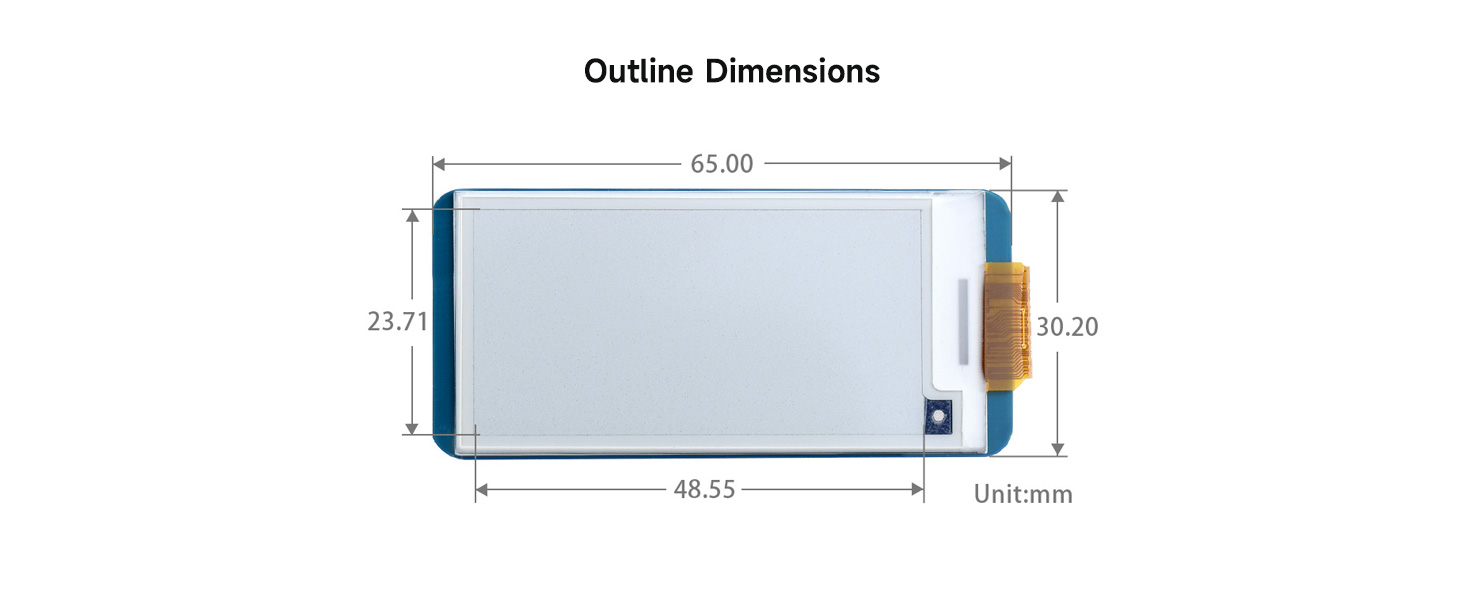
| Outline Dimensi | 65 x 30.2 mm |
| Ukuran tampilan | 48.55 x 23.71 mm |
| Titik Pitch | 0.194 x 0.194 mm |
| Resolusi | 250 x 122 piksel |
| Warna tampilan | Hideung, Bodas |
| Skala kulawu | 2 |
| Waktos Refresh Sebagian | 0.3s |
| Waktos Refresh Pinuh | 2s |
| Kakuatan Refresh | 26.4mW (tipe) |
| Arus sayaga | <0.01uA (ampir euweuh) |
| Viewdina Angle | > 170° |
Diagram Diménsi Garis Besar:
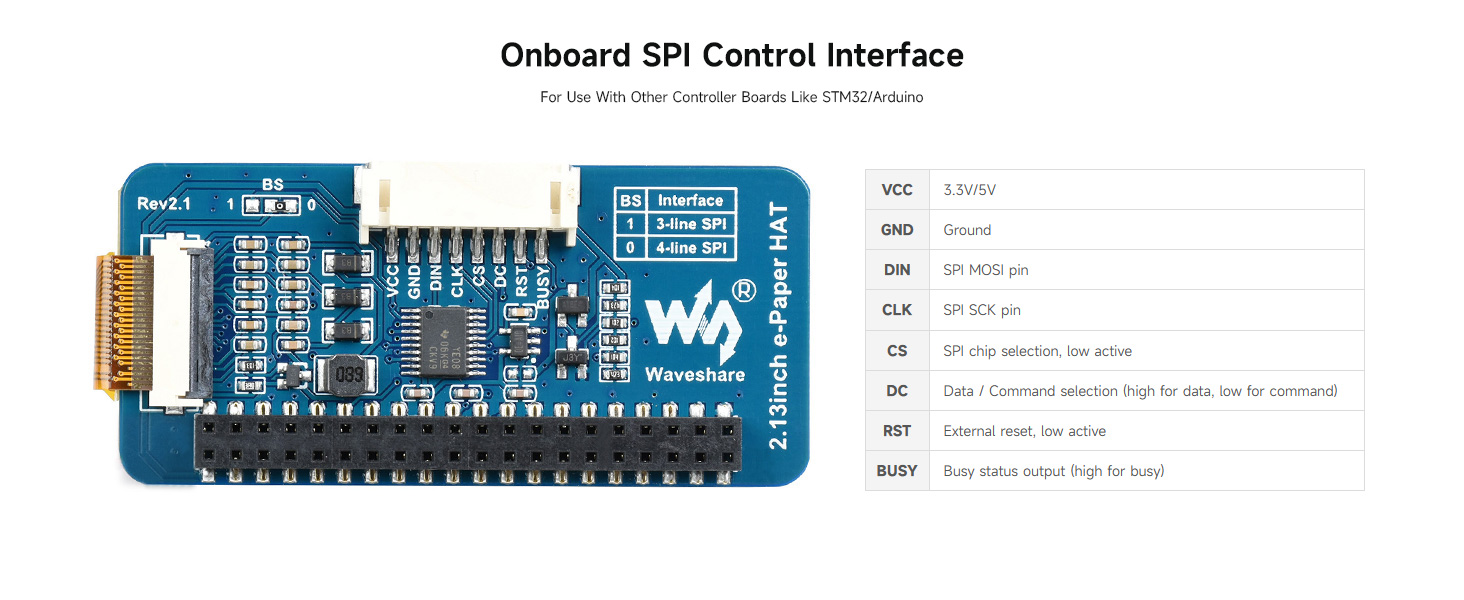
Diagram lengkep anu ngagambarkeun diménsi fisik TOPI e-Paper 2.13 inci dina milimeter.
8. Aplikasi Examples
Topi Layar E-Ink Waveshare 2.13 inci cocog pikeun rupa-rupa aplikasi kusabab ciri unikna:
Visual examples tina e-Paper HAT dina rupa-rupa aplikasi di dunya nyata.
- Labél Rak Éléktronik: Idéal pikeun nampilkeun inpormasi produk sareng harga dina lingkungan ritel.
- Instrumen Industri: Cocog pikeun nampilkeun data dina setélan industri anu dayana handap atanapi anu kasar.
- Aset/Peralatan Tags: Pikeun ngalacak sareng ngaidentipikasi aset nganggo inpormasi anu tetep.
- Ngaran Konferensi Tags: Nyayogikeun idéntifikasi anu jelas sareng tiasa disaluyukeun pikeun acara.
- Layar Imah Pinter: Pikeun nampilkeun inpormasi statis sapertos cuaca, jadwal, atanapi status alat.
9. Rojongan jeung Sumberdaya
Waveshare nyayogikeun sumber daya online anu lengkep pikeun ngabantosan anjeun nganggo E-Ink Display HAT V4 2.13 inci. Sumber daya ieu kalebet manual pangguna anu lengkep, conto pamrogramanamples, sareng dokuméntasi téknis.
Manual pamaké online:
Kanggo inpormasi anu pangénggalna, tutorial anu lengkep, sareng exampPikeun kodeu pikeun rupa-rupa platform (Raspberry Pi, Jetson Nano, Arduino, STM32), mangga tingal manual pangguna online resmi Waveshare. Manual ieu ngawengku diagram sirkuit papan supir sareng pituduh pikeun ngalaksanakeun fungsi refresh gancang.
Anjeun biasana tiasa mendakan sumber daya ieu dina halaman produk Waveshare atanapi wiki resmi na ku cara milarian "2.13inch e-Paper HAT".
Bantosan Téknis:
Upami anjeun peryogi bantosan téknis salajengna atanapi gaduh patarosan anu teu katutupan dina dokuméntasi online, mangga ngahubungi dukungan palanggan Waveshare ngalangkungan layanan palanggan resmi na. websitus.


