1. Bubuka
Thank you for choosing the Audibax Missouri 2000 A Dual VHF Wireless Microphone System. This professional wireless microphone system is designed to deliver clear, interference-free audio for various applications. This manual provides essential information for the safe and efficient use of your new system. Please read it thoroughly before operation and retain it for future reference.
2. Émbaran Kasalametan
- Sumber Daya: Ensure the receiver is connected to a 230V power supply. Use only the provided power adapter.
- Pamakéan batré: Microphones operate on AA batteries. Replace batteries when the low battery indicator appears to ensure optimal performance. Do not mix old and new batteries, or different types of batteries.
- Lingkungan: Avoid exposing the system to water, moisture, extreme temperatures, or direct sunlight. Operate in a well-ventilated area.
- Penanganan: Handle microphones and receiver with care. Avoid dropping or subjecting them to strong impacts.
- Palayanan: Ulah nyobian muka atawa ngalereskeun unit sorangan. Rujuk sadayana jasa ka tanaga anu mumpuni.
3. Eusi Paket
Mangga parios heula sadaya barang anu didaptarkeun di handap ieu kalebet kana pakét anjeun:
- 1x Audibax Missouri 2000 A Receiver Unit
- 2x Audibax Missouri 2000 A Handheld Wireless Microphones
- 1x Power Adapter for Receiver
- 1 x Manual Pamaké
- (AA Batteries for microphones are not included and must be purchased separately)
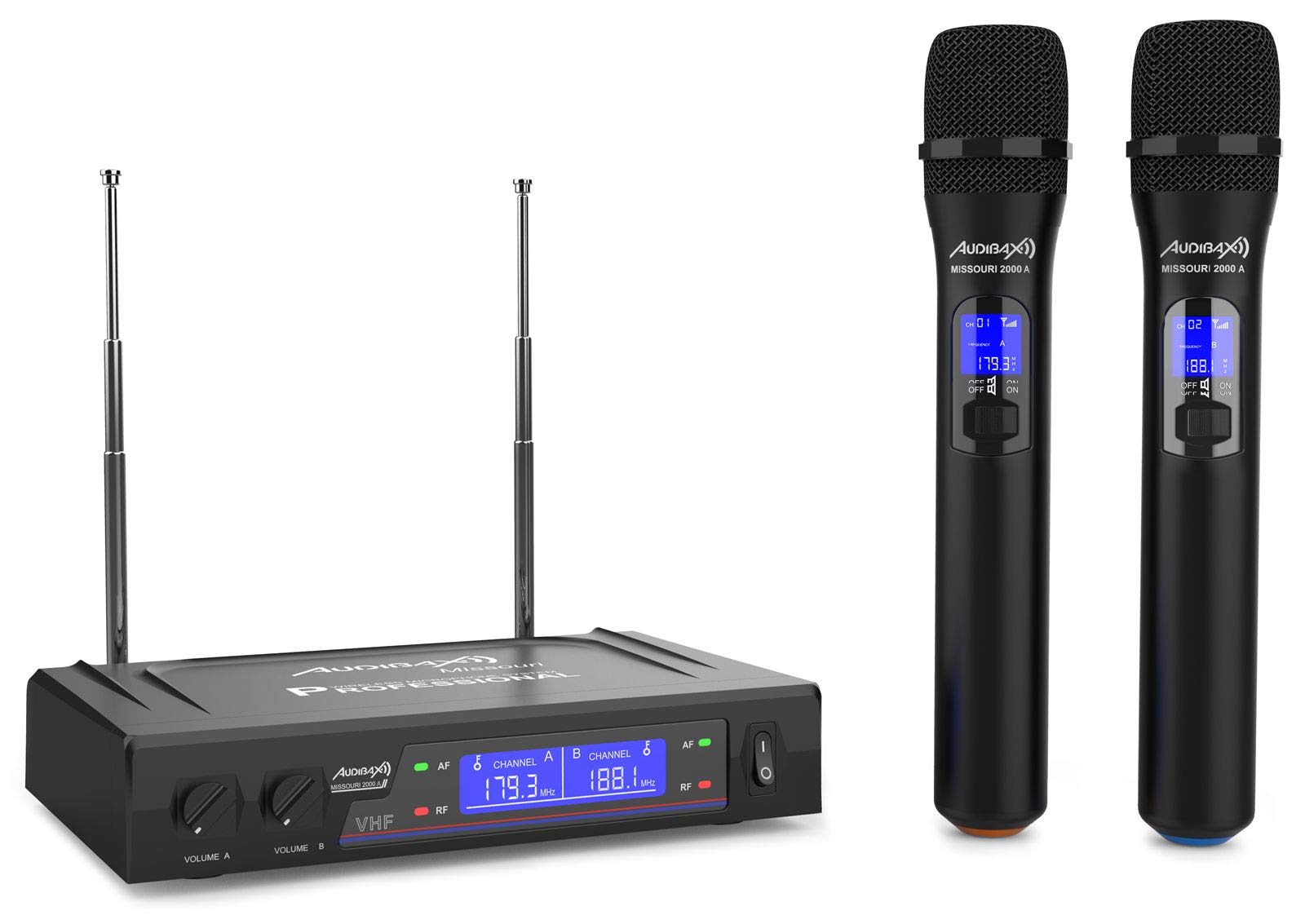
Figure 3.1: Complete Audibax Missouri 2000 A system including receiver and two microphones.
4. Produk Langkungview
The Audibax Missouri 2000 A is a dual VHF wireless microphone system designed for professional audio applications. It features two high-quality handheld wireless microphones and a receiver unit with independent volume controls and RF/AF indicators.
Fitur konci:
- Dual VHF wireless system with 2 handheld microphones.
- Receiver with Diversity antennas for improved signal reception and up to 80 meters coverage.
- Clean sound with a signal-to-noise ratio of 105 dB, minimizing interference.
- Kontrol volume mandiri pikeun unggal mikropon dina panarima.
- RF/AF indicators on the receiver display for monitoring signal status.
- Microphone power via AA batteries, offering extended autonomy.
- Dynamic cardioid microphone capsule for focused sound capture and attenuation of off-axis sounds.
- Output connectors: XLR balanced and auxiliary (MIX) output.

Figure 4.1: Front panel of the receiver unit.

Figure 4.2: Two handheld wireless microphones.
5. Setélan
5.1 Setup panarima
- panempatan: Position the receiver unit on a stable, flat surface, away from potential sources of interference (e.g., computers, Wi-Fi routers). Ensure adequate ventilation.
- Sambungan Antenna: Screw the two included antennas firmly into the ANT A and ANT B connectors on the rear of the receiver. Adjust them vertically for optimal signal reception.
- Sambungan Daya: Connect the provided power adapter to the DC IN port on the rear of the receiver and then plug it into a 230V AC power outlet.
- Kaluaran Audio:
- For a mixed output of both microphones, connect an audio cable (e.g., 6.35mm jack) from the "OUT MIX" port on the receiver to the input of your mixer, amplifier, or sound system.
- For individual balanced outputs, use XLR cables to connect the "BALANCED" XLR output ports (if available on your specific model) to your audio system.
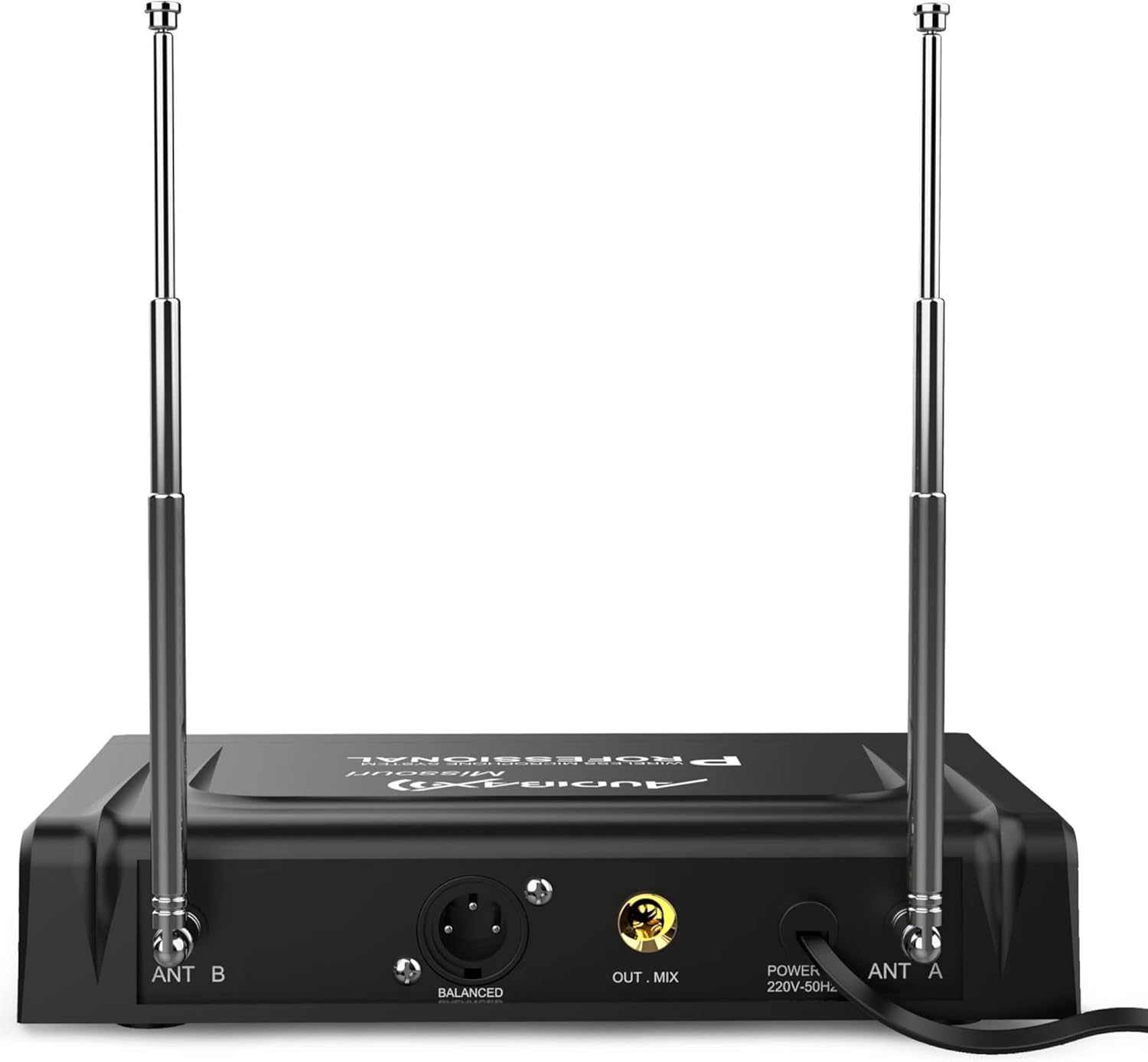
Figure 5.1: Rear panel connections of the receiver unit.
5.2 Setup Mikropon
- Pamasangan batré: Unscrew the bottom part of each microphone to access the battery compartment. Insert two AA batteries, ensuring correct polarity (+/-). Screw the bottom part back on securely.
- Daya Hurung: Slide the ON/OFF switch on each microphone to the "ON" position. The microphone display should illuminate, showing the channel and frequency.
- Fungsi mute: Each microphone has a MUTE switch. Use this to temporarily silence the microphone without turning it off completely.
6. Parentah Operasi
6.1 Ngahurungkeun Sistem
- Ensure all connections (power, audio output) are secure on the receiver.
- Turn on your mixer or amplifier first, with its volume set to minimum.
- Press the power button on the receiver unit. The display will light up.
- Turn on each microphone by sliding its ON/OFF switch to "ON".
- Observe the receiver's display. The "RF" (Radio Frequency) indicator for each channel should light up, indicating a successful connection between the microphone and receiver. The "AF" (Audio Frequency) indicator will light up when sound is detected by the microphone.

Figure 6.1: Receiver display with RF/AF indicators and frequency information.
6.2 Volume Control
- The receiver has independent volume knobs for Microphone A (VOLUME A) and Microphone B (VOLUME B). Adjust these to set the desired output level for each microphone.
- Gradually increase the volume on your mixer or ampnepi ka tingkat déngékeun anu dipikahoyong.
6.3 Frequency Information
The Audibax Missouri 2000 A operates on fixed VHF frequencies. For this specific model, the frequencies are 179.300 MHz and 188.100 MHz. These frequencies are displayed on both the receiver and microphone units.
7. Pangropéa
7.1 beberesih
- Always disconnect the receiver from the power outlet before cleaning.
- Use a soft, dry cloth to wipe the surfaces of the receiver and microphones.
- Ulah nganggo pembersih cair, aerosol, atanapi pelarut, sabab ieu tiasa ngaruksak lapisan atanapi komponén internal.
7.2 Ngagantian batré
- When the microphone's display indicates low battery, replace both AA batteries immediately to avoid interruption during use.
- Pastikeun polaritasna bener nalika masang batré anyar.
- Buang batré anu dipaké sacara tanggung jawab nurutkeun peraturan lokal.
7.3 Panyimpenan
- When not in use for extended periods, remove batteries from the microphones to prevent leakage.
- Simpen sistem di tempat anu tiis sareng garing, jauh tina sinar panonpoé langsung sareng suhu anu ekstrim.
8. Cara ngungkulan
| Masalah | Mungkin Cukang lantaranana | Solusi |
|---|---|---|
| Teu aya sora ti mikropon |
|
|
| Sora atanapi sinyal anu pareum sacara berkala |
|
|
| Kualitas sora goréng / Distorsi |
|
|
| RF indicator not lighting up |
|
|
9. Spésifikasi
| Fitur | Rincian |
|---|---|
| merek | Audibax |
| Ngaran modél | Missouri 2000 A |
| Nomer modél | 10107904 |
| Téhnologi konektipitas | Wireless (VHF), XLR |
| Faktor Bentuk Mikropon | Dicekel |
| Pola Polar | Saarah (Cardioid) |
| Réspon Frékuénsi | 40 Hz - 18 KHz |
| Rasio Signal-to-Noise | 105 dB |
| Sensitipitas Audio | 105 Desibel |
| Tingkat Noise | 103 Desibel |
| Receiver Frequencies | 179.300 MHz / 188.100 MHz |
| Sumber Daya | Receiver: 230V AC; Microphones: AA Batteries (not included) |
| Jumlah Saluran | 2 |
| Rentang Operasi | Nepi ka 80 méter (garis pandang) |
| Ukuran produk (L x W x H) | 39 x 31 x 8 cm |
| Item Beurat | 1.04 kg |
| Dianjurkeun Mangpaat | Videoconferencing, Karaoke |
| Komponén Kaasup | Microphones, Receiver, User Manual |
10. Garansi jeung Rojongan
For warranty information and technical support, please refer to the documentation provided with your purchase or contact Audibax customer service directly. Keep your proof of purchase for any warranty claims.


