Bubuka
This manual provides essential information for the safe and efficient operation of your Sony SHAKEX10 High Power Home Audio System with Bluetooth. Please read this manual thoroughly before using the system and retain it for future reference.
The SHAKEX10 system is designed to deliver powerful audio with features like Bluetooth connectivity, LED speaker lights, DJ effects, and karaoke functions.
Émbaran Kasalametan penting
- Pastikeun ventilasi ditangtoskeun pikeun nyegah overheating.
- Entong ngalaan unit kana hujan atanapi beueus pikeun ngirangan résiko seuneu atanapi shock listrik.
- Avoid placing objects filled with liquids, such as vases, on the apparatus.
- Do not install in a confined space, such as a bookcase or built-in cabinet.
- Rujuk sadayana jasa ka tanaga jasa anu mumpuni.
Naon dina Box
Upon unpacking your Sony SHAKEX10 system, please verify that all components are present:
- Main Unit (SHAKEX10)
- Speaker Units (2)
- Antena FM
- Kadali jauh
- Kabel listrik
- Petunjuk Operasi (manual ieu)
Guide Setup
1. Panempatan
Place the main unit and speaker units on a stable, flat surface. Ensure there is adequate space around the unit for proper ventilation. Avoid direct sunlight, heat sources, and excessive dust or moisture.

Image: The Sony SHAKEX10 system, consisting of a main unit and two speakers, set up in a room with ambient lighting.

Gambar: A komprehensif view of the Sony SHAKEX10 High Power Home Audio System, showcasing its main unit and two large speaker components.
2. Nyambungkeun Speaker
Connect the speaker cables from the main unit to the corresponding terminals on each speaker. Ensure correct polarity (red to red, black to black) for optimal sound quality.

Gambar: A close-up view of the speaker terminals, showing the connection points for audio cables.
3. Sambungan Daya
Connect the power cord to the AC IN jack on the rear of the main unit, then plug it into a wall outlet.
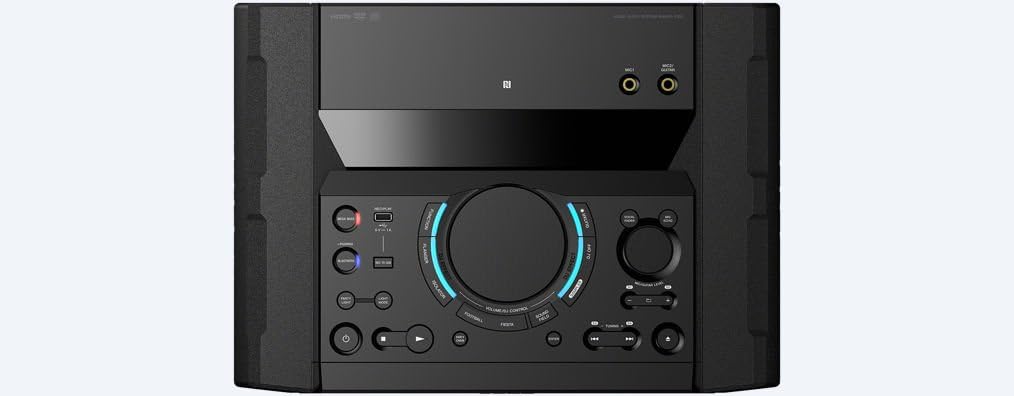
Image: The rear panel of the main unit, displaying various input and output ports, including the power input.
4. Sambungan Antena FM
Connect the supplied FM antenna to the FM ANTENNA terminal on the rear of the unit for radio reception.
Parentah Operasi
1. Daya Hurung / Pareum
Pencét éta POWER tombol dina Unit utama atawa kadali jauh pikeun ngahurungkeun atawa mareuman sistem.
2. Pilihan Sumber
Ngagunakeun éta FUNGSI button to cycle through available input sources such as CD, USB, Bluetooth, FM, and Audio In.

Image: The main control panel of the audio system, featuring buttons for power, function selection, volume, and DJ effects.
3. Konektipitas Bluetooth
Pikeun nyambungkeun alat Bluetooth:
- Pilih nu BLUETOOTH function on the system.
- Aktipkeun Bluetooth dina telepon pinter atanapi tablet anjeun.
- Select "SHAKEX10" from the list of available devices.
- For one-touch pairing, touch your NFC-compatible device to the NFC logo on the system.
The system supports LDAC, AAC, A2DP (SINK), AVRCP (Ver1.5), and SPP Bluetooth profiles for high-quality streaming.

Image: A smartphone being tapped against the NFC logo on the audio system, demonstrating the one-touch pairing feature.
4. LED Speaker Lights
Enhance your audio experience with dynamic LED speaker lights. Use the MODE CAHAYA button on the remote or main unit to select different lighting patterns and colors.

Image: A close-up of one of the speaker units, highlighting its illuminated LED lights, creating a vibrant visual effect.

Image: A group of people dancing and enjoying music with the Sony SHAKEX10 system, demonstrating its party atmosphere capabilities.
5. DJ Effects and Karaoke
The system includes built-in DJ effects to customize your tracks. Additionally, a guitar input and karaoke features allow for interactive entertainment.
- Connect a microphone or guitar to the dedicated input jacks.
- Use the DJ effect controls on the main unit to add various sound effects.

Image: A person's hands interacting with the DJ effect controls on the main unit, demonstrating the system's creative audio manipulation features.

Image: A person singing into a microphone, utilizing the karaoke feature of the Sony SHAKEX10 system.
6. Using Sony Music Center & Fiestable Apps
Download the Sony Music Center and Fiestable apps to your compatible smartphone for enhanced control and additional features, including advanced sound settings and party functions.
Pangropéa
Ngabersihkeun Unit
Wipe the exterior surfaces of the unit with a soft, dry cloth. For stubborn stains, use a cloth lightly dampened with a mild detergent solution, then wipe dry. Avoid using abrasive pads, scouring powder, or solvents such as alcohol or benzene, as these may damage the finish.
Kamanusaan sarta Studi Speaker
Keep the speaker cones free from dust and debris. Do not press on the speaker cones as this can cause damage.

Gambar: A lengkep view of a speaker cone, illustrating its construction and material.
Pamérésan masalah
If you experience issues with your SHAKEX10 system, please consult the following common solutions before contacting customer support:
- Henteu aya kakuatan: Ensure the power cord is securely connected to both the unit and the wall outlet.
- Henteu aya sora: Check speaker connections, volume level, and selected input source.
- Masalah Nyapasangkeun Bluetooth: Make sure the system is in Bluetooth pairing mode and your device's Bluetooth is enabled and discoverable. Try restarting both devices.
- Resepsi Radio goréng: Saluyukeun posisi anteneu FM.
For more detailed troubleshooting, refer to the comprehensive guide available on the Sony support websitus atanapi ngahubungan rojongan customer.
spésifikasi
| Fitur | Rincian |
|---|---|
| Ukuran produk (L x W x H) | 42.25 x 15.44 x 21.81 inci |
| Item Beurat | 75 pon |
| Nomer modél | SHAKEX10 |
| Téhnologi konektipitas | Bluetooth, NFC |
| Alat nu cocog | Smartphone, Tablet |
| Bluetooth Profiles | LDAC, AAC, A2DP (SINK), AVRCP (Ver1.5), SPP |
| Rentang Tuning FM | 87.5-108 MHz / 100 kHz |
| Konsumsi Daya | 0.5 W (Siaga) |
| Produsén | Sony |
| Tanggal Kahiji Sadia | 11 Juni 2017 |
Garansi sareng Rojongan
For warranty information, product registration, or technical assistance, please visit the official Sony support website or contact Sony customer service. Details can typically be found in the separate warranty document included with your product.
Online support resources may include FAQs, software updates, and additional troubleshooting guides.


