Bubuka
The BOND Bridge is a smart device designed to integrate your remote-controlled ceiling fans, fireplaces, and motorized shades with your smartphone and smart home assistants like Amazon Alexa and Google Home. It allows you to activate devices, control speeds, and switch lights on or off directly from your mobile device, replicating the functions of your original remote control.

Figure 1: The BOND Bridge device, featuring a sleek black design with a prominent blue LED ring indicating its status.
Spésifikasi produk
| Spésifikasi | Rincian |
|---|---|
| merek | beungkeutan |
| Ngaran modél | BD-1000 |
| Warna | Hideung |
| Dimensi produk | 3.8 "D x 3.8" W x 1.1" H |
| Item Beurat | 7.2 ons (0.45 pon) |
| Sumber Daya | AC |
| Konektipitas Wi-Fi | 2.4 GHz |
| RF Reach | Nepi ka 2,500 sq. |
| Device Control Capacity | Up to 30 devices per BOND Bridge |
| Métode kontrol | App, Remote, Voice (Alexa, Google Home) |
| Komponén Kaasup | BOND Bridge Unit, AC adapter, USB cable, Manual |
| Produsén | Olibra LLC |
| UPC | 612520601607, 860509000402 |

Figure 2: Detailed product specifications for the BOND Bridge.
Guide Setup
- Daya Hurung: Plug in the BOND Bridge device using the provided AC adapter and USB cable. The device will power on and its LED ring will indicate readiness.
- Unduh Aplikasi: Download the official BOND Home app from the Google Play Store (pikeun Android) atanapi Apple App Store (pikeun ios).
- Ngadamel akun: Open the app and follow the on-screen instructions to create a new BOND account or log in if you already have one.
- Nyambung ka Wi-Fi: The app will guide you through connecting the BOND Bridge to your home's 2.4 GHz Wi-Fi network. Ensure your Wi-Fi is working correctly.
- Tambahkeun Alat: Once connected, select "Add Device" in the app. Choose the type of device you wish to control (e.g., Ceiling Fan, Electric Fireplace, Motorized Shades).
- Program Remote: Point your existing remote control for the device at the BOND Bridge. The app will instruct you to press a button on your remote to allow the BOND Bridge to learn its signal. The BOND Bridge can learn and transmit both RF (radio frequency) and IR (infrared) signals.
- Fungsi tés: After programming, test the functions within the app to ensure all commands (e.g., fan speed, light dimmer settings) are correctly recognized and operational.

Figure 3: Simple setup process: plug in, download the app, and program your remote control.
Parentah Operasi
Using the BOND Home App:
- Kontrol alat: Open the BOND Home app. Your configured devices will be listed. Tap on a device to access its control interface.
- Kontrol kipas: For ceiling fans, you can typically control power, fan speeds (e.g., Speed 1, 2, 3), and reverse motor direction (if supported by your fan).
- Kontrol cahaya: For devices with lights, you can turn lights on/off and adjust brightness (dimmer up/down) if your original remote supports these functions.
- Jadwal: Set schedules for your devices to turn on/off or adjust settings automatically based on time or day/dusk.
- Pangkelompok: Grup sababaraha alat babarengan pikeun kontrol sakaligus.
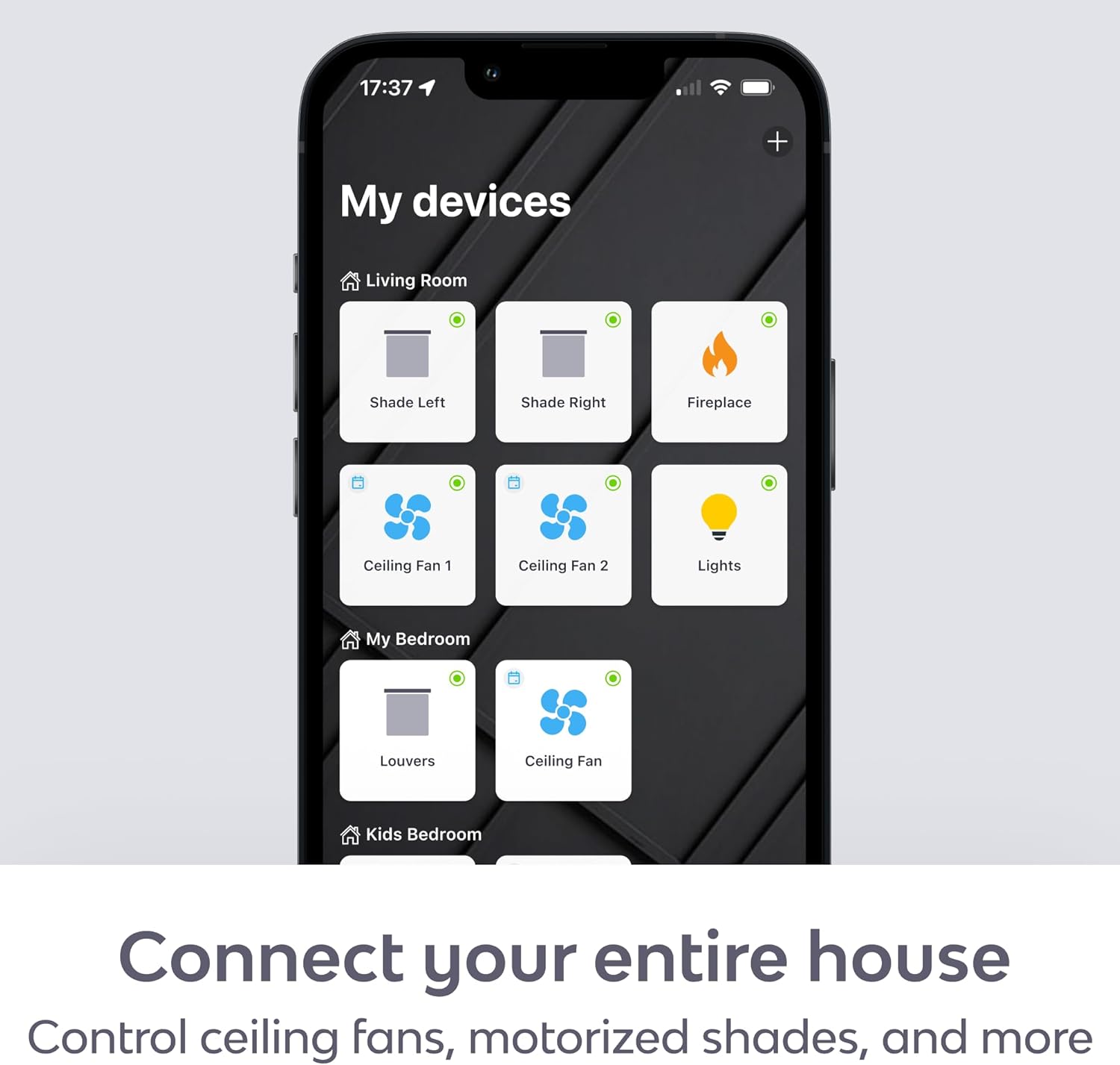
Figure 4: The BOND Home app provides a centralized interface for all your connected devices.
Kontrol Sora (Alexa & Google Home):
- Linking Accounts: Enable the BOND skill in your Amazon Alexa or Google Home app and link your BOND account.
- Paréntah sora: Use simple voice commands to control your devices. Examples:
- "Alexa, turn on the living room fan."
- "Hey Google, set the bedroom fan to speed 3."
- "Alexa, turn off the fireplace."
- "Hey Google, dim the dining room light."
Pangropéa
- beberesih: Wipe the BOND Bridge with a soft, dry cloth. Do not use liquid cleaners or aerosol sprays.
- Pembaruan firmware: Ensure your BOND Bridge firmware is up to date through the BOND Home app to receive the latest features and performance improvements.
- panempatan: For optimal performance, place the BOND Bridge in a central location within the area where your remote-controlled devices are located. It has an RF reach of up to 2,500 sq. ft., but physical obstructions can affect signal strength. Consider adding additional BOND Bridges for extended coverage in larger homes.

Figure 5: Multiple BOND Bridges can be used to expand coverage in larger homes.
Pamérésan masalah
- Alat Teu Ngabales:
- Ensure the BOND Bridge is powered on and connected to your Wi-Fi network (check the LED indicator).
- Verify that the BOND Bridge is within range of the device you are trying to control.
- Re-program the remote signal for the device in the BOND Home app.
- Check if the original remote control is working correctly.
- Paréntah sora teu jalan:
- Confirm that your Amazon Alexa or Google Home account is correctly linked to your BOND account in their respective apps.
- Ensure your smart speaker is online and functioning.
- Cobi manggihan deui alat dina aplikasi Alexa atanapi Google Home anjeun.
- Masalah Konektipitas Wi-Fi:
- Ensure your Wi-Fi router is powered on and broadcasting a 2.4 GHz network.
- Move the BOND Bridge closer to your Wi-Fi router if signal strength is an issue.
- Restart your Wi-Fi router and the BOND Bridge.
- Fireplace Turns On/Off by Itself:
- If your fireplace turns on or off unexpectedly, try removing the batteries from its original factory remote control. This can prevent conflicting signals.
Garansi sareng Rojongan
For warranty information and technical support, please refer to the official BOND website or contact Olibra LLC directly. The BOND Bridge comes with a standard manufacturer's warranty covering defects in materials and workmanship.
Sumberdaya Online:
For further assistance, you can reach out to BOND customer support through the app or their websitus.


