Bubuka
This manual provides detailed instructions for the safe and proper installation, operation, and maintenance of your Insignia NS-HTVMT1702-C Tilting TV Wall Mount. Please read all instructions carefully before beginning installation to ensure correct setup and to prevent damage to the product or injury.
The Insignia NS-HTVMT1702-C is designed to securely mount flat panel televisions ranging from 33 to 46 inches in size, with a maximum weight capacity of 55 kg (121 lbs). Its tilting feature allows for optimal viewing angle adjustment and easier access to TV ports.
Émbaran Kasalametan
WARNING: Improper installation or use of this product can result in serious injury or property damage. If you do not understand these instructions or have doubts about the safety of the installation, consult a qualified professional installer.
- Pastikeun permukaan pemasangan tiasa nahan beurat gabungan tina dudukan sareng televisi kalayan aman.
- Ulah ngaleuwihan kapasitas beurat maksimum 55 kg (121 lbs).
- produk ieu dimaksudkeun pikeun pamakéan indoor wungkul.
- Use only the hardware provided or specified by the manufacturer.
- Salawasna gaduh sahenteuna dua jalmi kanggo pamasangan pikeun nyegah cilaka atanapi karusakan.
- Verify that there are no hidden electrical wires, plumbing, or gas lines in the wall before drilling.
Eusi pakét
Carefully unpack the box and ensure all components are present and undamaged. If any parts are missing or damaged, do not attempt to install the mount. Contact customer service for assistance.

Gambar: Hareupeun view of the Insignia NS-HTVMT1702-C Tilting TV Wall Mount, showing the wall plate and two vertical TV brackets with pull cords.
Paket biasana kalebet:
- Wall Plate (main horizontal bar for wall attachment)
- TV Brackets (two vertical bars that attach to the TV)
- Mounting Hardware (various screws, washers, spacers for wall and TV attachment)
- Manual Pitunjuk (dokumén ieu)
spésifikasi
| Fitur | Spésifikasi |
|---|---|
| Nomer modél | NS-HTVMT1702-C |
| Kasaluyuan Ukuran TV | 33" - 46" flat panel TVs |
| Kamampuh beurat maksimum | 55 kg (121 lbs) |
| Pola Pemasangan VESA | 200x200, 400x200, 400x300, 400x400, 600x400 |
| Tipe Gunung | Miring Tembok Gunung |
| Rentang Dengdekkeun | Adjustable (specific degrees not provided, but generally up/down) |
Setup sareng Instalasi
Alat Diperlukeun (Teu Kaasup):
- Panyungsi stud
- Bor kalawan bit bor luyu
- Tingkat
- Obeng sirah Phillips
- rengkuh stop kontak
- Pensil
- Pita ukur
Step 1: Prepare the TV Brackets
- Sacara ati-ati tempatkeun TV anjeun nyanghareup ka handap dina permukaan anu lemes sareng bersih pikeun nyegah karusakan layar.
- Identipikasi liang pamasangan VESA dina tonggong TV anjeun.
- Select the correct screws, washers, and spacers from the provided hardware that fit your TV's mounting holes. Ensure the screws are not too long, which could damage internal components.
- Attach the two vertical TV brackets to the back of your TV using the selected hardware. Ensure they are securely fastened and evenly spaced. The pull cords should hang freely below the TV.
Lengkah 2: Gunung Tembok Plate
- Determine the desired height for your TV. Mark the center of where the TV will be.
- Use a stud finder to locate two adjacent wooden studs in your wall. Mark their centers. The wall plate must be mounted to at least two studs for secure installation.
- Hold the wall plate against the wall at the desired height, aligning its center with your TV's desired center, and ensuring the mounting holes align with the marked stud centers. Use a level to ensure the wall plate is perfectly horizontal.
- Mark the drill points through the wall plate's holes onto the wall.
- Drill pilot holes into the studs at the marked locations. The size of the drill bit should match the lag bolts provided.
- Secure the wall plate to the wall using the lag bolts and washers. Tighten them firmly with a socket wrench, but do not overtighten.
Lengkah 3: Ngagantung TV
- Kalayan bantosan, angkat TV kalayan ati-ati nganggo braket anu napel.
- Hook the TV brackets onto the top edge of the wall plate. Ensure both brackets are securely seated on the wall plate.
- Gently lower the TV until the brackets engage with the wall plate. The automatic safety lock mechanism will secure the TV in place. You should hear a click or feel it lock.
- Pull the release cords (hanging below the TV) to ensure they are functional and can disengage the lock if needed. Release the cords to re-engage the lock.
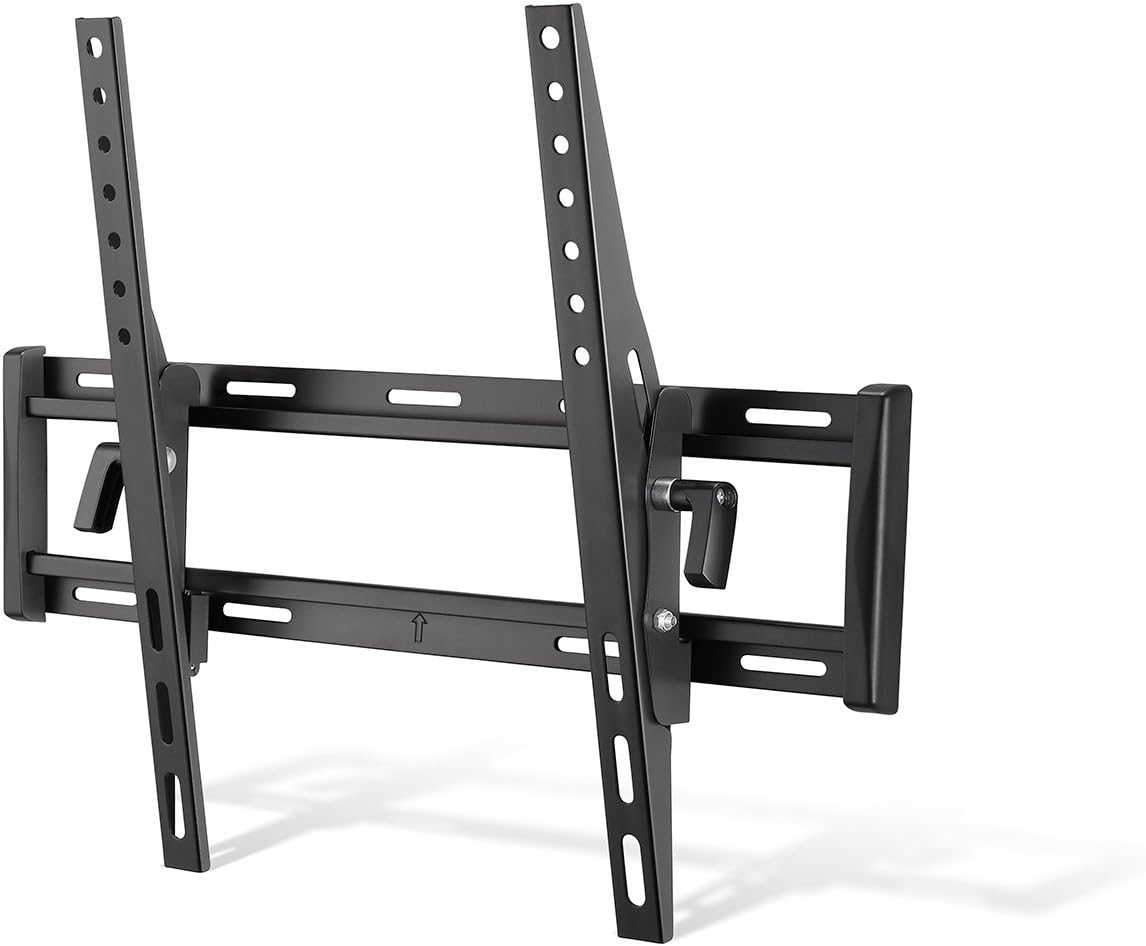
Gambar: Angled view of the mounted TV brackets on the wall plate, illustrating how the TV hooks onto the mount and the tilting pivot point.
Operating the Tilting Feature
The Insignia NS-HTVMT1702-C mount allows you to adjust the vertical viewing angle of your TV without tools.
- To tilt the TV, simply grasp the top or bottom edge of the TV and gently push or pull to achieve the desired angle.
- The friction-based tilting mechanism will hold the TV in position once released.
- This feature is particularly useful for reducing glare or optimizing viewing from different seating positions, especially if the TV is mounted higher on the wall.

Gambar: Sisi profile of the TV wall mount, demonstrating the downward tilt capability of the television.
Penyesuaian lateral:
After installation, the TV can be adjusted laterally (left or right) along the wall plate to fine-tune its horizontal position. Simply slide the TV gently along the wall plate until it is centered as desired.
Pangropéa
- beberesih: Ngusap gunung ku lawon lemes, garing. Ulah make cleaners abrasive atawa pangleyur.
- Cék périodik: Pariksa sadaya sekrup sareng baut sacara berkala pikeun mastikeun éta tetep pageuh sareng aman. Kana waktu, geteran atanapi gerakan tiasa nyababkeun pangiketna leupas.
- Ruksakna: If any part of the mount becomes damaged, discontinue use and contact customer support.
Pamérésan masalah
Problem: TV is not level.
Solusi: Ensure the wall plate was installed perfectly level. If the wall plate is level, some mounts allow for minor post-installation leveling adjustments on the TV brackets. Refer to the specific design of your TV brackets for this possibility. If not, the wall plate may need to be re-adjusted.
Problem: TV does not tilt smoothly or stays in position.
Solusi: The tilting mechanism is friction-based. Ensure no cables are obstructing the movement. If the tilt is too loose or too stiff, check if there are any adjustable tension bolts on the tilting arms (refer to the physical mount for specific adjustment points, if any). This model is designed for tool-free adjustment, so excessive force should not be required.
Problem: TV cannot be removed from the wall plate.
Solusi: Ensure the safety release cords are fully pulled downwards to disengage the locking mechanism. If the cords are stuck, gently wiggle the TV while pulling the cords. Do not force the TV off the mount.
Garansi sareng Rojongan
For warranty information and customer support, please refer to the warranty card included with your product or visit the official Insignia websitus. Simpen resi pameseran anjeun salaku bukti pameseran pikeun klaim garansi.
For technical assistance or inquiries, please contact Insignia customer service.


