
Bubuka
The Casio CTK-2550 Digital Keyboard is a versatile 61-key portable piano designed for beginners and enthusiasts. It offers a wide array of sounds, rhythms, and learning features to enhance your musical journey. This manual provides essential information for setting up, operating, and maintaining your keyboard.

Gambar: Hareupeun view of the Casio CTK-2550 61-Key Portable Piano Keyboard, showcasing its black body, white and black keys, control panel, and built-in speakers.
Fitur konci
- 61 Standard Keys: Provides a full range for playing various musical pieces.
- 400 Tones: A diverse selection of instrument sounds, including pianos, electric pianos, organs, guitars, basses, synths, and drum kits.
- 100 Irama: Accompaniment patterns across various genres like 8 Beat, 16 Beat, Ballad, Dance, Pops, Rock, Jazz, European, Latin, World, and Piano Rhythms.
- 50 Dance Music Patterns: Dedicated mode for creating electronic dance music, including EDM, House, and Hip-Hop styles.
- 60 Song Bank: Built-in songs for listening and learning, categorized into World, Event, Piano/Classics, and User Songs.
- Step-Up Lesson System: An integrated learning system to help users practice and master songs.
- Toél Tanggapan: Keys respond to playing dynamics, allowing for expressive performances.
- Pitch Bend Roda: For adding expressive pitch variations to notes.
- Chordana Play App Integration: Connects with the Chordana Play app for expanded learning and functionality.
- Desain portabel: Lightweight and can be battery-powered for on-the-go use.
Disetél
1. Unpacking sarta komponén
Carefully remove all components from the packaging. Ensure you have the Casio CTK-2550 keyboard, the included power supply, and the music stand.
2. Attaching the Music Stand
Locate the wire-frame music stand. Insert its prongs into the designated slots at the top rear of the keyboard. This stand is used to hold sheet music or a tablet.
3. Ngahurungkeun Kibor
The CTK-2550 can be powered in two ways:
- Adaptor AC: Connect the included AC adapter to the DC 9.5V power input jack on the rear panel of the keyboard and then plug it into a wall outlet.
- Batré: For portable use, the keyboard can be powered by six AA-size alkaline batteries. Open the battery compartment on the underside of the keyboard and insert the batteries, ensuring correct polarity.
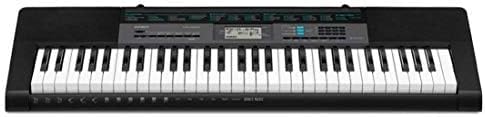
Image: Close-up of the rear panel of the Casio CTK-2550, showing the power input, audio in, phones/output, USB, and sustain pedal jacks.
Parentah Operasi
1. Hurung/Pareum sareng Volume
- Pencét éta POWER tombol pikeun ngaktipkeun atanapi mareuman kibor.
- Saluyukeun volume master nganggo tombol VOLUME slider located on the left side of the control panel.
2. Selecting Tones (Sounds)
The CTK-2550 features 400 built-in tones. To select a tone:
- Pencét éta NADA kancing.
- Use the number pad or the + / - buttons to enter the desired tone number. A list of tones is printed on the keyboard's panel.
Examples of Tone Categories: Piano (001-014), Electric Piano (015-028), Organ (043-064), Guitar (065-078), Bass (079-088), Synth-Lead (166-202), Drum Set (395-400).
3. Playing Rhythms (Accompaniment)
The keyboard includes 100 rhythms for automatic accompaniment. To use rhythms:
- Pencét éta RHYTHM/SONG BANK CONTROLLER kancing.
- Use the number pad or + / - buttons to select a rhythm.
- Pencét Mimitian / STOP to begin the rhythm.
- Atur tempo nganggo TEMPO kancing.
Examples of Rhythm Categories: 8 Beat (001-003), Dance (011-015), Rock (021-026), Jazz (027-033), World (054-087), Piano Rhythms (091-100).
4. Dance Music Mode
Engage the Dance Music Mode to create and play along with 50 electronic dance music patterns.
- Pencét éta DANCE MUSIC kancing.
- Select a pattern (e.g., EDM 01-35, House 36-45, Hip-Hop 46-50).
- Use the keys to trigger different phrases and build your track.
5. Song Bank and Lesson System
The 60-song bank allows you to listen to pre-recorded songs or use the Step-Up Lesson System to learn them.
- Pencét éta BANK LAGU kancing.
- Select a song using the number pad or + / - kancing.
- Ngagunakeun éta DUNGEUN, TURUN, atawa FRASA functions to engage with the lesson system.
6. Touch Response and Pitch Bend
- The keys are touch-sensitive, meaning the volume and tone will change based on how hard or soft you press them.
- Ngagunakeun éta PITCH BEND wheel on the left side of the keyboard to smoothly raise or lower the pitch of notes while playing.
Konektipitas
The rear panel of the CTK-2550 offers several connection options:
- PHONES/OUTPUT (Standard Stereo Jack): Connect headphones for private practice or connect to an external PA system/ampliifier pikeun ampsora ngagedekeun.
- AUDIO IN (3.5mm Stereo Mini Jack): Connect an external audio player (like a smartphone or tablet) to play along with your favorite music through the keyboard's speakers.
- SUSTAIN Jack: Connect an optional sustain pedal for extended note decay, similar to a traditional piano.
- USB (Tipe B): Connect the keyboard to a computer or smart device (Android/Apple) for MIDI data transfer, allowing use with digital audio workstation (DAW) software or educational apps like Chordana Play.
spésifikasi
| Fitur | Rincian |
|---|---|
| merek | Casio |
| Ngaran modél | CTK-2550 |
| Jumlah konci | 61 |
| Polifoni | 48 catetan |
| Nada | 400 AHL Tones |
| Wirahma | 100 Wirahma |
| Dance Music Patterns | 50 |
| Song Bank | 60 Lagu |
| Lesson Function | Step-Up Lesson System |
| Konektipitas | USB (MIDI), Audio In, Phones/Output, Sustain |
| Sumber Daya | AC Adapter (9.5V DC) or 6x AA Batteries |
| Item Beurat | 7.3 pon |
| Item Dimensi | 12.09 x 37.24 x 3.62 inci |
Pangropéa
- beberesih: Lap kibor ku lawon anu lemes sareng garing. Pikeun kokotor anu bandel, anggo saeutikamp lawon teras garingkeun tuntas. Hindarkeun pembersih atanapi pelarut anu abrasif.
- Panyimpenan: Simpen kibor di tempat anu tiis sareng garing, jauh tina sinar panonpoé langsung, suhu anu ekstrim, sareng kalembaban anu luhur.
- Penanganan: Avoid dropping the keyboard or subjecting it to strong impacts. Do not place heavy objects on the keys.
- Perawatan batré: Upami nganggo batré, cabut batré upami kibor moal dianggo kanggo waktos anu panjang pikeun nyegah bocor.
Pamérésan masalah
- Henteu aya sora:
- Pariksa naha dayana hurung sareng volume na digedekeun.
- Ensure headphones are not plugged in if you intend to use the speakers.
- Verify that the correct tone is selected.
- Konci Teu Ngabales:
- Pariksa catu daya.
- If using batteries, ensure they are fresh and correctly inserted.
- Sora distort:
- Turunkeun polumeu.
- Ensure external audio devices connected to AUDIO IN are not set too high.
- Masalah Konektipitas Aplikasi:
- Pastikeun kabel USB disambungkeun aman.
- Check app settings and device compatibility.
Garansi sareng Rojongan
The Casio CTK-2550 comes with a Bagian 1 taun sareng jaminan tenaga kerja. For technical support, service, or warranty claims, please refer to the contact information provided in your product's warranty card or visit the official Casio websitus.
Pikeun sumberdaya tambahan sarta informasi produk, mangga buka Toko Casio di Amazon.