Bubuka
Thank you for choosing the SECA 787-M Column Scale. This manual provides essential information for the safe and effective use of your new scale. Please read these instructions carefully before operating the device and keep them for future reference. Proper setup, operation, and maintenance will ensure accurate measurements and extend the lifespan of your scale.
Émbaran Kasalametan
- Always place the scale on a firm, level surface to ensure accurate readings. Uneven surfaces can lead to measurement inaccuracies.
- Do not expose the scale to excessive moisture, extreme temperatures, or direct sunlight.
- Avoid dropping the scale or subjecting it to strong impacts, as this may damage internal components.
- Keep the scale clean and dry. Use a soft, damp cloth for cleaning; do not use abrasive cleaners or immerse the scale in water.
- Ensure that the power supply is correct for the device. Refer to the specifications section for power requirements.
- This device is intended for weighing purposes only. Do not use it for any other applications.
Eusi pakét
Punten parios yén sadaya barang aya sareng henteu ruksak nalika ngabongkar:
- SECA 787-M Column Scale Base
- Column with Display Unit
- Adaptor kakuatan
- Manual Pitunjuk (dokumén ieu)
- Assembly Hardware (screws, tools if required)
Disetél
1. Unpacking na panempatan
Carefully remove all components from the packaging. Choose a stable, level, and non-vibrating surface for the scale. Ensure there is sufficient space around the scale for safe operation and access.
2. Majelis
Follow these steps to assemble your SECA 787-M Column Scale:
- Attach the column to the scale base using the provided hardware. Ensure it is securely fastened.
- Connect the display unit to the column, ensuring all cables are properly routed and secured.
- Plug the power adapter into the designated port on the scale and then into a suitable electrical outlet.
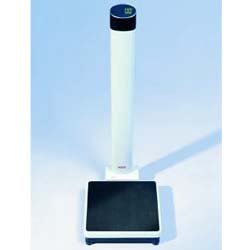
Gambar 1: Assembled SECA 787-M Column Scale. This image shows the complete scale with its base, column, and integrated display unit, ready for use.
Parentah Operasi
Operasi Dasar
- Daya Hurung: Locate the power switch at the back of the head unit and switch it to the 'ON' position. The display will illuminate.
- tampilan: The display features an emerald-colored backlight for clear visibility of readings.
- Nol Reset: The scale automatically resets to zero after each use, preparing it for the next measurement.
- Timbangan: Step onto the scale platform carefully. Stand still until the measurement stabilizes and is displayed.
- Kapasitas: Ensure the weight does not exceed the maximum capacity of 440 lbs (200 kg).
- wisuda: Readings are provided with a graduation of 0.2 oz (100 gm).
- Pareum listrik: After use, switch the power off at the back of the head unit to conserve energy.
Pangropéa
beberesih
- Ngusap beungeut skala ku lemes, damp cloth. A mild, non-abrasive cleaning agent can be used if necessary.
- Do not use harsh chemicals, abrasive pads, or solvents, as these can damage the finish and electronic components.
- Ensure no liquid enters the display unit or other openings.
Panyimpenan
- Store the scale in a dry, cool place away from direct sunlight and extreme temperatures.
- If storing for an extended period, disconnect the power adapter.
Pamérésan masalah
If you encounter issues with your SECA 787-M Column Scale, refer to the table below for common problems and solutions.
| Masalah | Mungkin Cukang lantaranana | Solusi |
|---|---|---|
| Skala teu hurung | Power switch off, power adapter disconnected, no power from outlet | Ensure power switch is ON. Check power adapter connection. Verify outlet has power. |
| Bacaan teu akurat | Uneven surface, scale not zeroed, weight exceeds capacity | Place scale on a firm, level surface. Allow scale to auto-zero before use. Do not exceed 440 lbs (200 kg). |
| Layarna némbongkeun 'Err' | Overload, internal error | Remove weight from scale. Power cycle the device (turn off, then on). If error persists, contact support. |
| Tampilanna taram atawa kedip-kedip | Low power, faulty connection | Check power adapter connection. Ensure stable power supply. |
spésifikasi
Detailed technical specifications for the SECA 787-M Column Scale:
| Fitur | Rincian |
|---|---|
| Nomer modél | 787-M |
| merek | seca |
| Kapasitas | 440 pon / 200 kg |
| wisuda | 0.2 oz / 100 gm |
| tampilan | Emerald colored backlit |
| Sumber Daya | Powered by a switch at the back of the head (AC adapter) |
| Item Beurat | 15.5 pon |
| Fungsi Otomatis | Automatically resets to zero after each use |
Garansi sareng Rojongan
For warranty information and technical support, please refer to the documentation provided with your purchase or visit the official seca website. If you require assistance with troubleshooting or have questions not covered in this manual, please contact seca customer service.


