1. Bubuka
This manual provides essential information for the safe and efficient operation of your DNP DS820A Professional Dye-Sublimation Printer. The DS820A is designed for high-quality photo printing, offering a resolution of 300 x 600 dpi and supporting various print sizes up to 8x32 inches. It features a high-speed print mode, producing 8x10 inch glossy photos in approximately 29.3 seconds, and supports multiple surface options including Glossy, Luster, Matte, and Fine Matte.
Please read this manual thoroughly before using the printer to ensure proper setup, operation, and maintenance.

Gambar 1: Hareup angled view of the DNP DS820A printer.
2. Émbaran Kasalametan
Observe the following safety precautions to prevent injury and damage to the printer:
- Salawasna sambungkeun printer ka stop kontak kakuatan grounded.
- Do not block ventilation openings on the printer. Ensure adequate space around the unit for proper airflow.
- Jauhkeun printer tina cai atanapi kalembaban anu kaleuleuwihi.
- Ulah nyobian ngabongkar atanapi ngalereskeun printer nyalira. Hubungi petugas servis anu mumpuni.
- Use only DNP-approved media and ribbons.
3. Eusi Paket
Pastikeun yén sadaya item aya dina bungkusan:
- DNP DS820A Printer Unit
- Kabel Daya
- Kabel USB
- Dulang Média
- Quick Start Guide and Documentation
Media (paper and ribbon) is typically sold separately.
4. Setélan
4.1 Ngabongkar sareng Nempatkeun
- Cabut printer sacara saksama tina bungkusanna.
- Place the printer on a stable, level surface with sufficient space for ventilation and media loading/unloading.
- Remove all protective tapes and packing materials.
4.2 Nyambungkeun Printer
- Connect the power cable to the printer's power input and then to a grounded electrical outlet.
- Connect the USB cable to the printer's USB port and to your computer.
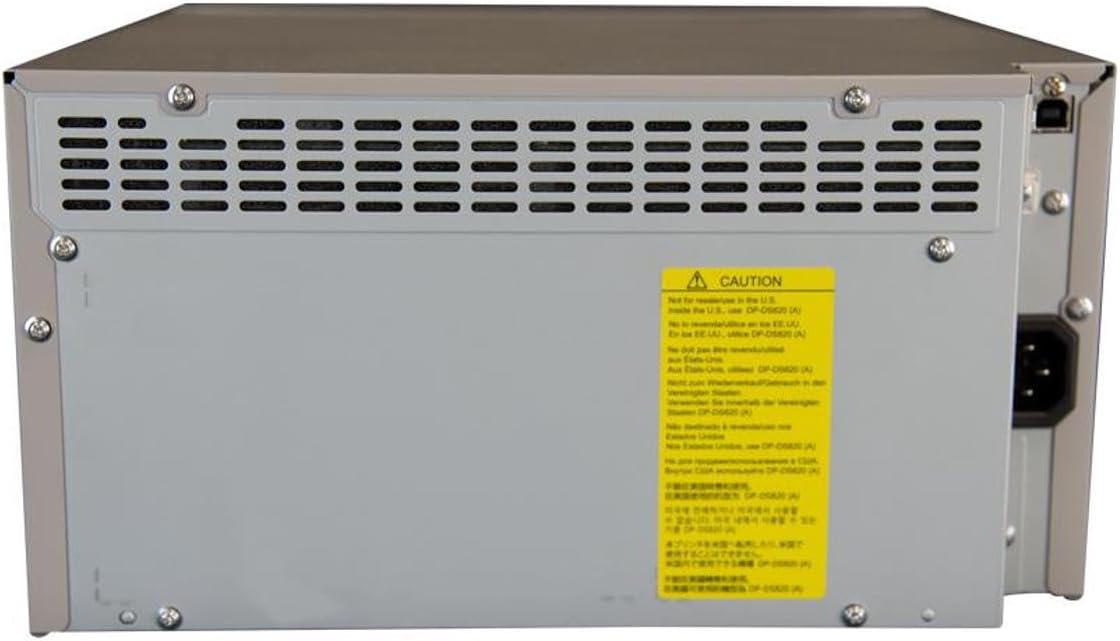
Gambar 2: Tukangeun view of the DNP DS820A, highlighting connectivity ports.
4.3 Pamasangan Supir
Install the latest printer drivers from the DNP website. The printer is compatible with Windows and Mac OS X/macOS operating systems.
4.4 Loading Media (Paper and Ribbon)
The DS820A uses a roll-fed media system. Refer to the specific instructions provided with your DNP media for detailed loading procedures. Generally, this involves opening the front panel, inserting the ribbon cassette, and then loading the paper roll into its designated slot.
5. Parentah Operasi
5.1 Powering on / Pareum
Locate the power switch on the front or side of the printer. Flip the switch to the 'On' position to power on the printer. To power off, flip the switch to the 'Off' position.
5.2 Lampu Indikator
The printer features several indicator lights on the front panel to communicate its status:
- kakuatan: Nunjukkeun printer diaktipkeun.
- ON/Siaga: Indicates operational status or standby mode.
- RIBBON: Illuminates when the ribbon needs replacement or is incorrectly installed.
- Kertas: Illuminates when paper needs replacement or is incorrectly loaded.
- ERROR: Indicates a general error. Refer to the troubleshooting section or driver software for details.

Figure 3: Front control panel with status indicator lights.
5.3 Prosés percetakan
- Pastikeun printer parantos dihurungkeun sareng nyambung ka komputer anjeun.
- Open the image or document you wish to print on your computer.
- Select the DNP DS820A from your printer options.
- Adjust print settings such as print size, resolution (300x600 dpi recommended for color), and surface type (Glossy, Luster, Matte, Fine Matte) in the printer driver settings.
- Initiate the print job. The printer will process and output the photo.
6. Pangropéa
6.1 Ngabersihan Printer
Beberesih rutin ngabantosan ngajaga kualitas citak sareng manjangkeun umur printer.
- Luar: Wipe the exterior with a soft, dry, lint-free cloth. Do not use abrasive cleaners or solvents.
- Interior: Periodically open the front panel and gently remove any dust or debris from the media path using a soft brush or compressed air.
6.2 Ngaganti Media
When the RIBBON or PAPER indicator lights illuminate, it's time to replace the respective media. Open the front access panel to replace the ribbon cassette and paper roll according to the instructions provided with the DNP media.
7. Cara ngungkulan
Bagian ieu ngabahas masalah umum anu anjeun tingali.
| Masalah | Mungkin Cukang lantaranana | Solusi |
|---|---|---|
| Printer teu hurung | Power cable disconnected; Power switch off | Pariksa sambungan kabel daya; Pastikeun saklar daya ON. |
| RIBBON light on | Ribbon empty or incorrectly installed | Replace ribbon; Reinstall ribbon correctly. |
| PAPER light on | Paper roll empty or incorrectly loaded | Replace paper roll; Re-load paper correctly. |
| ERROR lampu hurung | Kasalahan printer umum | Turn printer off and on; Check computer for specific error messages; Consult DNP support. |
| Kualitas cetak goréng | Dirty print head; Incorrect driver settings; Low quality image source | Clean printer interior; Verify print settings (DPI, media type); Use high-resolution images. |
If you encounter issues not covered here, or if solutions do not resolve the problem, contact DNP customer support.
8. Spésifikasi
| Fitur | Spésifikasi |
|---|---|
| Ngaran modél | DS820A |
| Téhnologi percetakan | Pewarnaan Sublimasi |
| Resolusi Print Warna maksimum | 300 x 600 dpi |
| Maksimum Hideung Bodas Resolusi Print | 300 x 300 dpi or 300 x 600 dpi |
| Ukuran Media Dirojong | 5 x 7 inches, 8 x 10 inches, 8 x 12 inches, up to 8 x 32 inches (panoramic) |
| Jinis Média Print | Glossy photo paper, Luster, Matte, Fine Matte |
| Print Speed (8x10 Glossy) | Kurang leuwih 29.3 detik |
| Max Input Lambaran Kamampuh | 250 sheets (depending on media type) |
| Kapasitas Lambaran Kaluaran | 250 lembar |
| Jumlah Baki | 2 |
| Téhnologi konektipitas | USB 2.0 |
| Panganteur Hardware | USB |
| Métode kontrol | App |
| Kaluaran printer | Color; Monochrome |
| Item Beurat | 36 pon (16.33 kg) |
| Ukuran produk (L x W x H) | 19.25 x 17.25 x 12 inci (48.9 x 43.8 x 30.5 cm) |
| Produsén | DNP |
| UPC | 650415905867 |
9. Garansi jeung Rojongan
The DNP DS820A printer comes with a full warranty. For specific warranty terms and conditions, please refer to the documentation included with your product or visit the official DNP websitus.
For technical assistance, troubleshooting beyond this manual, or to inquire about service, please contact DNP customer support directly. Contact information can typically be found on the DNP websitus atanapi dina bungkusan produk anjeun.


