1. Bubuka
This manual provides instructions for the safe and effective use of the Velleman AIM6010A-VP Analog DC Current Panel Meter. This device is designed for measuring direct current (DC) in various electronic instruments, switchboards, test bench panels, and vehicles. It features a moving coil indication system and a zero adjustment screw for precise readings.
2. Émbaran Kasalametan
WARNING: Electrical shock hazard. Always disconnect power before installation or maintenance.
- Ensure all wiring is performed by qualified personnel and complies with local electrical codes.
- Do not exceed the specified maximum current rating of 10A DC.
- Avoid installing the meter in environments with excessive moisture, dust, or corrosive gases.
- Do not open the meter casing; euweuh bagian-pamaké-serviceable jero.
- Verify correct polarity when connecting the meter in a DC circuit.
3. Produk Langkungview
The Velleman AIM6010A-VP is an analog panel meter designed for clear and accurate current measurement. Below is an illustrative image of a typical analog panel meter, highlighting its key components.
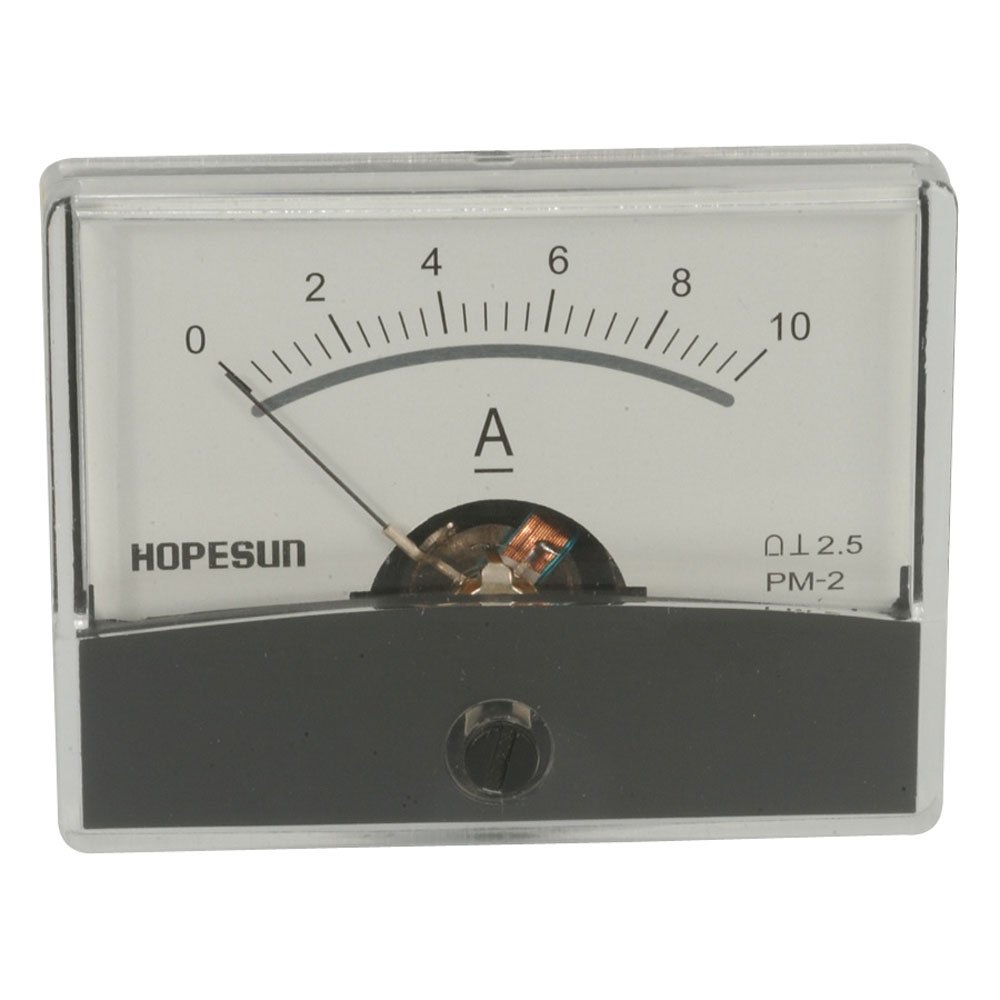
Figure 1: Analog Panel Meter Front View
This image displays the front of an analog panel meter. Key features include a clear scale marked from 0 to 10 Amperes (A), a black needle indicating the current value, and a small screw at the bottom center for zero adjustment. The meter is housed in a transparent plastic casing with a dark gray base.
Komponén konci:
- Skala: Marked from 0 to 10 Amperes (A), indicating the measurement range.
- Jarum: A pointer that moves across the scale to indicate the measured current.
- Zero Adjustment Screw: Located at the bottom center, used to set the needle to zero when no current is applied.
- Terminal: (Located at the rear, not visible in image) For electrical connections to the circuit.
4. Spésifikasi
| Parameter | Nilai |
|---|---|
| Nomer modél | AIM6010A-VP |
| Rentang pangukuran | 0 - 10A DC |
| Kelas akurasi | 2.5 |
| Ukuran (W x H x D) | 2.4" x 1.8" x 1.3" (kira-kira 61mm x 46mm x 33mm) |
| Tipe Pamasangan | Panel Gunung |
5. Instalasi jeung Setup
5.1 Pamasangan Panel
- Select a suitable location on your panel for mounting the meter.
- Cut a rectangular opening in the panel according to the meter's dimensions (approximately 2.2" x 1.6" or 56mm x 41mm for a snug fit, verify actual cutout size if available).
- Insert the meter into the opening from the front of the panel.
- Secure the meter using the provided mounting clips or screws from the rear of the panel.
5.2 Sambungan Listrik
The AIM6010A-VP is an ammeter and must be connected in series with the load to measure current. Ensure the power supply to the circuit is disconnected before making any connections.
- Identify the positive (+) and negative (-) terminals on the rear of the meter.
- Connect the positive (+) terminal of the meter to the positive side of the circuit where current is to be measured.
- Connect the negative (-) terminal of the meter to the negative side of the load, completing the series circuit.
- Double-check all connections for correct polarity and secure fastening.
CAUTION: Incorrect wiring can damage the meter or the circuit.
6. Operasi
6.1 Nol adjustment
Before applying power, ensure the meter's needle rests precisely on the '0' mark. If it does not, use a small flat-head screwdriver to gently turn the zero adjustment screw (located at the bottom center of the meter face) until the needle aligns with zero.
6.2 Nyandak Pangukuran
- Ensure the meter is correctly installed and wired in series with the circuit.
- Larapkeun kakuatan ka sirkuit.
- Observe the needle's position on the scale. The value indicated by the needle is the current in Amperes (A).
- Pikeun bacaan anu akurat, view the meter face directly to avoid parallax error.
7. Pangropéa
- beberesih: Use a soft, dry cloth to clean the meter's face and casing. Ulah make cleaners abrasive atawa pangleyur.
- Pamariksaan: Periodically inspect the meter for any signs of physical damage or loose connections.
- Panyimpenan: Store the meter in a dry, dust-free environment when not in use.
8. Cara ngungkulan
| Masalah | Mungkin Cukang lantaranana | Solusi |
|---|---|---|
| No reading / Needle not moving |
|
|
| Bacaan salah |
|
|
9. Garansi jeung Rojongan
For warranty information and technical support, please refer to the documentation provided with your purchase or visit the official Velleman websitus. Simpen bukti pameseran anjeun pikeun klaim garansi.
Velleman Official Websitus: www.velleman.eu


