Buku Panduan Pangguna Kalkulator Percetakan Sharp SH-EL1750V
1. Bubuka
This manual provides comprehensive instructions for the proper setup, operation, and maintenance of your Sharp SH-EL1750V Printing Calculator. Please read this manual thoroughly before using the calculator to ensure optimal performance and longevity of the device.
The Sharp SH-EL1750V is designed for efficient and accurate calculations, featuring a 12-digit display and a built-in printer for a permanent record of your computations. Its compact design makes it suitable for various office and personal accounting needs.
2. Eusi Paket
Pastikeun yén sadaya item anu didaptarkeun di handap kalebet kana pakét produk anjeun:
- Sharp SH-EL1750V Printing Calculator
- Starter size paper roll
- 4 AAA batteries (pre-installed or included separately)
- Manual pangguna (dokumén ieu)
Note: An optional power adapter is not included and must be purchased separately if AC power operation is desired.
3. Produk Langkungview
The Sharp SH-EL1750V Printing Calculator features an angled 12-digit display for easy viewing and a clear, well-spaced keypad for comfortable operation. The integrated printer provides a physical record of calculations.

Gambar 3.1: Angled view of the Sharp SH-EL1750V Printing Calculator, showing the display, keypad, and paper roll.
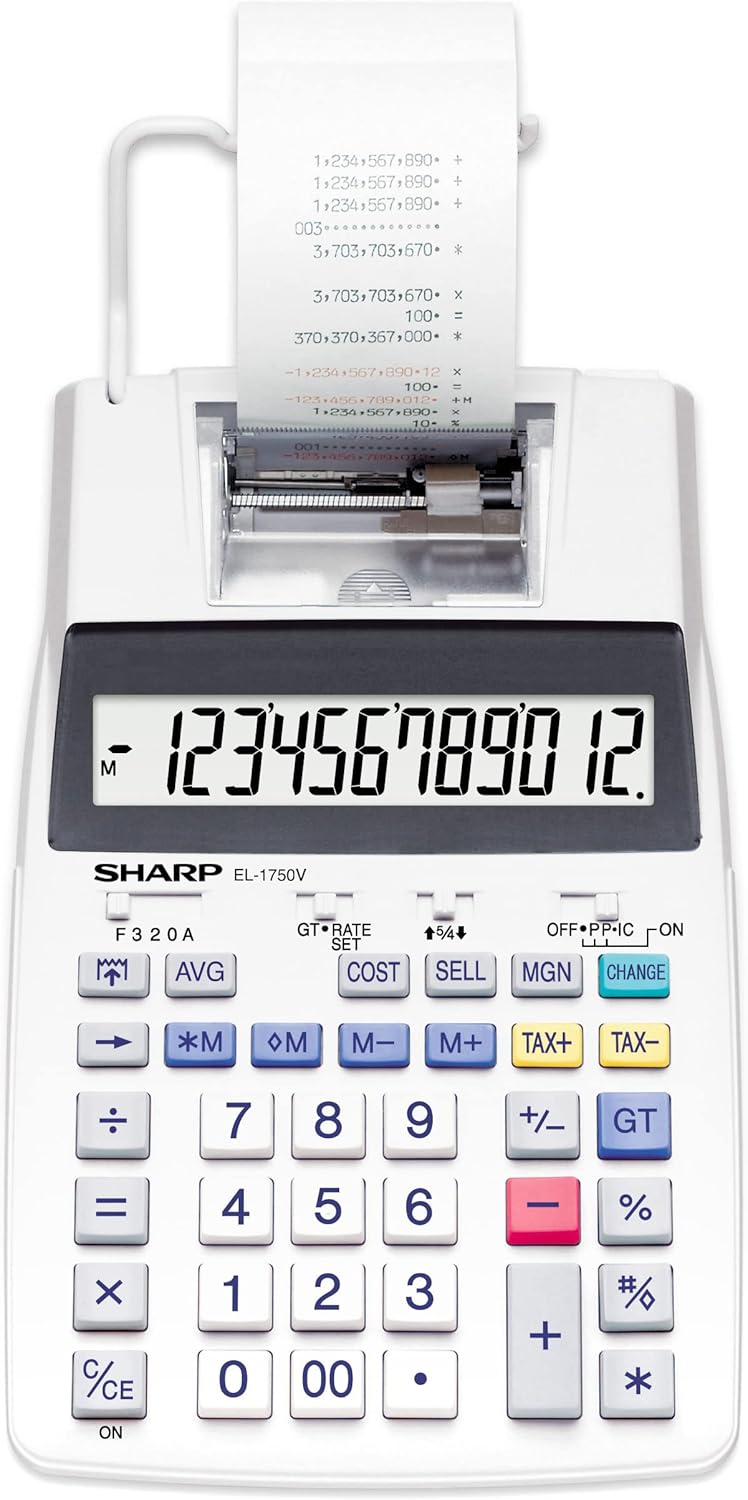
Gambar 3.2: Hareupeun view of the Sharp SH-EL1750V Printing Calculator, highlighting the full keypad layout.

Figure 3.3: The calculator positioned on a wooden desk, demonstrating its compact size in a typical office environment.

Figure 3.4: A user's hands interacting with the calculator's keypad, showing the ergonomic design.
4. Setélan
4.1. Pamasangan batré
The calculator operates on 4 AAA batteries, which are included. If the display is dim or unresponsive, replace the batteries.
- Panggihan panutup kompartemen batréna di handapeun kalkulator.
- Geser panutupna muka.
- Pasangkeun 4 batré AAA, pastikeun polaritasna (+/-) leres sapertos anu dituduhkeun di jero kompartemenna.
- Ganti panutup kompartemen batré.
4.2. Pamasangan Gulungan Kertas
A starter paper roll is included. For continuous printing, ensure a new roll is properly installed.
- Lift the paper roll arm located at the back of the calculator.
- Place the new paper roll onto the arm, ensuring the paper feeds from the bottom of the roll towards the front of the calculator.
- Feed the leading edge of the paper into the printer slot until it catches and begins to feed automatically.
- Pull a small amount of paper through the printer to ensure it is aligned.
4.3. Power Adapter (Optional)
The calculator can also be powered by an optional AC adapter (not included). To use the adapter:
- Locate the DC input jack on the side or back of the calculator.
- Connect the AC adapter to the DC input jack.
- Colokkeun adaptor AC kana stop kontak standar.
5. Parentah Operasi
The Sharp SH-EL1750V offers a range of functions for various calculations. Familiarize yourself with the keypad and function switches.
5.1. Itungan Dasar
Perform addition, subtraction, multiplication, and division using the respective keys (+, -, ×, ÷).
- Enter the first number.
- Press the desired operation key.
- Lebetkeun angka kadua.
- Press the equals key (=) to display the result.
5.2. Fungsi Husus
- Ongkos/Jual/Itungan Margin: Use the COST, SELL, and MGN keys to perform profit margin calculations.
- Itungan Pajak: Utilize the TAX+ and TAX- keys for adding or subtracting tax. The tax rate can be set using the RATE SET switch.
- Fungsi mémori: M+, M-, *M (Memory Recall), and M (Memory Clear) keys allow for storing and recalling values.
- Setélan desimal: Adjust the decimal point setting using the F 3 2 0 A switch to control the number of decimal places or floating decimal.
- Total Jumlah (GT): The GT key accumulates the results of calculations for a grand total.
5.3. Printing Functionality
The calculator can print a record of your calculations. The print function is controlled by a switch, typically labeled OFF P IC or similar, allowing you to select between printing, non-printing, or item count modes.
- Set the print switch to 'P' for printing all calculations.
- Set the print switch to 'IC' for printing with item count.
- Set the print switch to 'OFF' to disable printing.
6. Fitur konci
The Sharp SH-EL1750V Printing Calculator includes the following features:
- Angled 12-digit display for enhanced readability.
- Cost/Sell/Margin calculation functions.
- Tax calculation with adjustable rate.
- Memory functions (M+, M-, *M, M).
- Dual power source: battery and optional AC adapter.
- Ukuran kompak: 230 x 150 x 52 mm.
- Lightweight design: approximately 500 g.
7. Pangropéa
7.1. beberesih
Pikeun ngajaga penampilan sareng fungsi kalkulator:
- Ngusap bagian luar ku kaén anu lemes sareng garing.
- Pikeun kokotor bandel, make kaen hampang dampened with water and mild soap, then wipe dry immediately.
- Do not use abrasive cleaners, solvents, or spray directly onto the calculator.
7.2. Paper Roll Replacement
Replace the paper roll when it runs out or the print becomes faint. Refer to Section 4.2 for installation instructions.
7.3. Ngagantian batré
Replace the AAA batteries when the display dims or the calculator ceases to function. Refer to Section 4.1 for installation instructions.
8. Cara ngungkulan
If you encounter issues with your calculator, refer to the following common problems and solutions:
- No Display/Calculator Not Turning On:
- Check battery installation and ensure correct polarity.
- Replace batteries if they are depleted.
- Ensure the ON/OFF switch is in the 'ON' position.
- If using an AC adapter, ensure it is properly connected and the power outlet is functional. - Faint or No Print:
- Check if the paper roll is installed correctly and not empty.
- Ensure the print switch is set to 'P' or 'IC'.
- The ink roller might need replacement (refer to separate instructions for ink roller replacement, if applicable). - Incorrect Calculation Results:
- Verify that the decimal setting switch (F 3 2 0 A) is set appropriately for your calculations.
- Ensure correct input of numbers and operations.
9. Spésifikasi
Technical specifications for the Sharp SH-EL1750V Printing Calculator:
| Fitur | Rincian |
|---|---|
| Nomer modél | SH-EL1750V |
| tampilan | 12-digit Angled LCD |
| Ukuran (L x W x H) | 9.06 x 5.91 x 2.05 inci (230 x 150 x 52 mm) |
| Item Beurat | 1.17 pon (530 g) |
| Sumber Daya | 4 AAA batteries (included), Optional AC adapter (not included) |
| Tipe Kalkulator | Financial Printing Calculator |
| Ukuran layar | 4 inci |

Figure 9.1: Dimensions of the Sharp SH-EL1750V Printing Calculator.
10. Garansi jeung Rojongan
Sharp products are manufactured to high-quality standards. For information regarding warranty coverage, terms, and conditions, please refer to the warranty card included with your purchase or visit the official Sharp website. For technical support or service inquiries, please contact Sharp customer service through their official support channels.


