1. Bubuka
The Fostex PM04C-B is a high-quality active and passive speaker system designed for various audio applications, including post-production, broadcast TV, and recording studios. This manual provides essential information for the proper setup, operation, and maintenance of your PM04C-B monitor speakers.

Gambar: Hareupeun view of the Fostex PM04C-B Active Monitor Speaker System.
Fitur konci:
- Personal active speaker system with 4-inch glass fiber woofer diaphragm.
- 3/4-inch diameter dome tweeter generates rich, natural sound at high frequencies.
- Compact rear-bass reflector type wooden enclosure for natural, deep bass sound.
- 2-way configuration of woofer (low range) and tweeter (high range).
2. Eusi Paket
Punten pastikeun sadaya item di handap ieu kalebet dina pakét anjeun:
- Fostex PM04C-B Active Monitor Speaker (Pair)
- Kabel listrik
- Bare wire speaker cable
- Dual RCA to dual 1/4" audio cable
3. Setup Guide
3.1 Ngabongkar bungkusan
Carefully remove the speakers and all accessories from the packaging. Retain the original packaging for future transport or storage.
3.2 Nempatkeun
For optimal sound reproduction, place the speakers on a stable, flat surface. Position them equidistant from your listening position, forming an equilateral triangle. Avoid placing them directly against a wall to prevent excessive bass buildup, or adjust their distance to fine-tune the bass response.
3.3 Sambungan
The PM04C-B system consists of one active speaker (with amplifier) and one passive speaker. Connect them as follows:
- Connect the Passive Speaker: Use the provided bare wire speaker cable to connect the active speaker's "OUTPUT TO LEFT" terminals to the passive speaker's input terminals. Ensure positive (+) to positive (+) and negative (-) to negative (-) connections.
- Sambungkeun Sumber Audio: Use the dual RCA to dual 1/4" audio cable to connect your audio source (e.g., laptop, desktop, audio interface) to the "INPUT" RCA jacks on the active speaker. The red jack is for the right channel, and the white jack is for the left channel.
- Sambungkeun Kakuatan: Plug the power cord into the "AC IN" inlet on the active speaker, then plug the other end into a suitable AC power outlet.
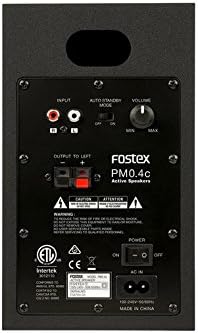
Image: Rear panel connections of the Fostex PM04C-B Active Speaker.
4. Parentah Operasi
4.1 Powering on / Pareum
Locate the "POWER" switch on the rear panel of the active speaker. Flip the switch to the "ON" position to power on the speakers. The Fostex logo on the front of the active speaker will illuminate. Flip the switch to "OFF" to power down.
4.2 Volume Control
The "VOLUME" knob on the rear panel of the active speaker controls the overall output level. Turn clockwise to increase volume and counter-clockwise to decrease it. Start with the volume at a low setting before playing audio to avoid sudden loud sounds.
4.3 Auto Standby Mode
The "AUTO STANDBY MODE" switch allows you to enable or disable the automatic standby function. When enabled, the speakers will enter a low-power standby mode after a period of no audio input. They will automatically wake up when an audio signal is detected.
5. Pangropéa
5.1 beberesih
Pikeun ngabersihkeun kabinet spiker, anggo lawon anu lemes sareng garing. Pikeun tanda anu bandel, anggo lawon anu rada kandelamp cloth can be used, followed by a dry cloth. Do not use abrasive cleaners, waxes, or solvents as they may damage the finish. Avoid spraying liquids directly onto the speakers.
5.2 Panyimpenan
If storing the speakers for an extended period, disconnect them from power and audio sources. Store them in a cool, dry place, ideally in their original packaging, to protect them from dust and physical damage.
6. Cara ngungkulan
If you encounter any issues with your Fostex PM04C-B speakers, please refer to the table below for common problems and their solutions.
| Masalah | Mungkin Cukang lantaranana | Solusi |
|---|---|---|
| Teu aya sora ti panyatur | Power off; incorrect connections; audio source issue; volume too low. | Ensure power is ON; check all cable connections (power, audio, speaker wire); verify audio source is playing; increase volume. |
| Sora distort | Volume too high; faulty cable; audio source distortion. | Reduce volume; try a different audio cable; check audio source settings. |
| Ngan hiji speaker anu tiasa dianggo | Speaker cable issue; audio source balance; faulty speaker. | Check speaker wire connection to the non-working speaker; verify audio source balance settings; test with a different audio source. |
| Speakers not entering/exiting standby | Auto standby mode disabled; constant low-level noise. | Check the "AUTO STANDBY MODE" switch on the rear panel; ensure no background noise is preventing standby. |
7. Spésifikasi Téknis
Detailed specifications for the Fostex PM04C-B Active Monitor Speaker System:
| Spésifikasi | Nilai |
|---|---|
| Ngaran modél | PM04C-B |
| Tipe Speaker | Ngawaskeun |
| Speaker AmpTipe Lification | Aktif |
| Diaméterna Woofer | 4 inci |
| Diaméter Tweeter | 19 Milimeter (3/4 Inci) |
| Speaker Maksimum Kaluaran Power | 600 Watt (Puncak) |
| Mode Kaluaran Audio | Stereo |
| Téhnologi konektipitas | Coaxial |
| Protokol konektipitas | RCA |
| Sumber Daya | Kabel Listrik |
| Masukan Voltage | 100 volt |
| Product Dimensions (Each Speaker) | 12.6 "D x 11.4" W x 15.5" H |
| Beurat Barang (Pasangan) | 13.7 pon |
| Warna | Hideung |
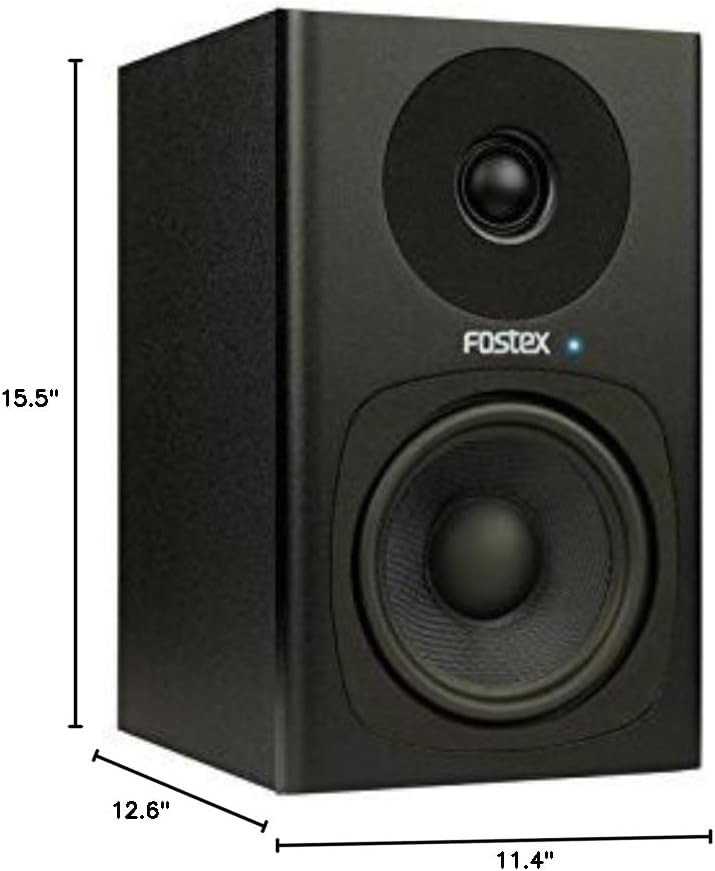
Image: Dimensions of the Fostex PM04C-B Speaker.
8. Émbaran jaminan
The Fostex PM04C-B Active Monitor Speaker System comes with a limited warranty. Please refer to the warranty card included in your product packaging or visit the official Fostex websitus pikeun istilah jeung kaayaan lengkep ngeunaan sinyalna jaminan na jasa.
9. Rojongan Palanggan
For further assistance, technical support, or inquiries not covered in this manual, please contact Fostex customer support through their official website or the contact information provided with your purchase. Always provide your product model number (AMS-PM04C-B) when seeking support.


