
Bubuka
This manual provides detailed instructions for the use and maintenance of your Strong SRT 7404 HD remote control. This remote is designed as an original replacement for the Strong SRT 7404 HD FRANSAT receiver, ensuring full compatibility and functionality.
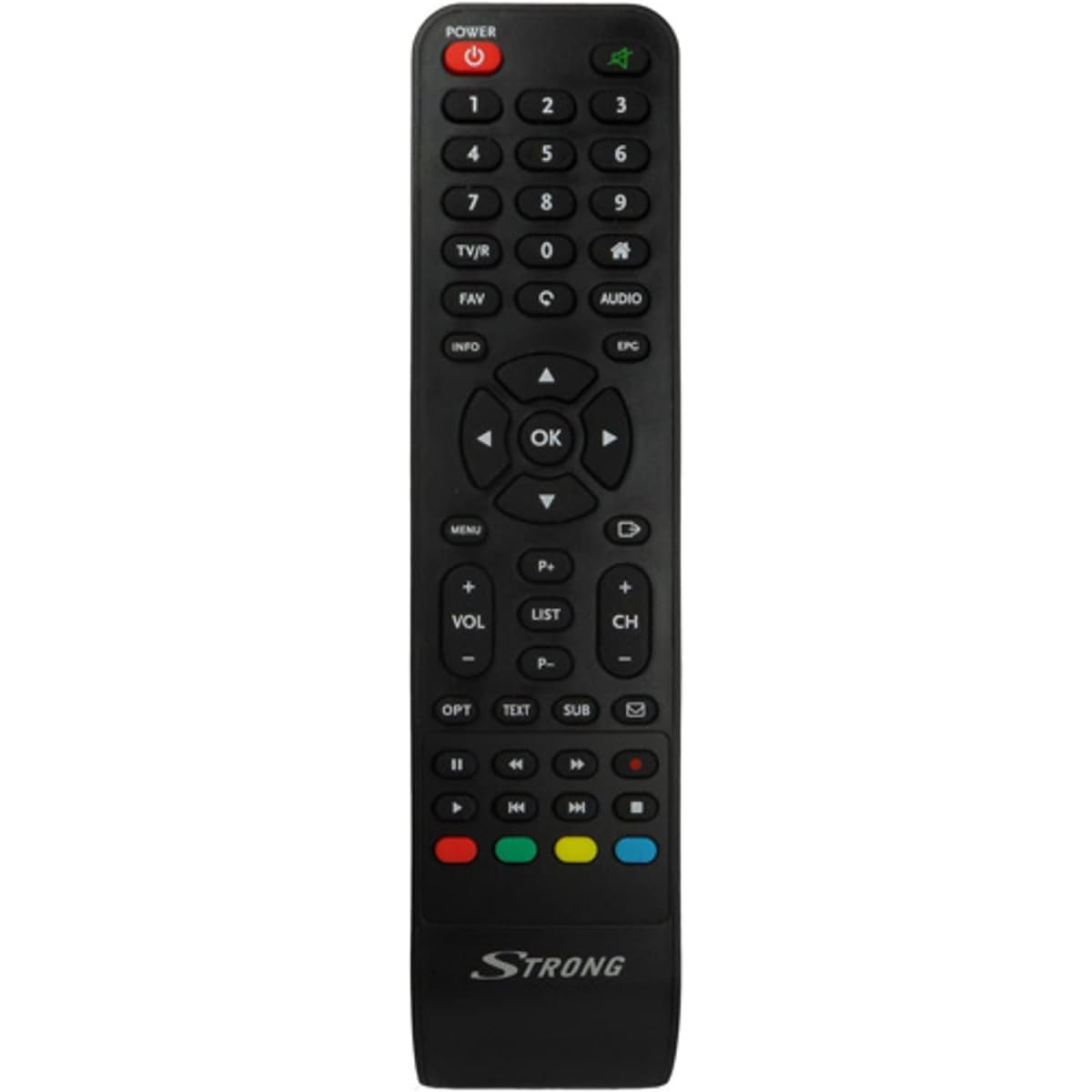
Image: The Strong SRT 7404 HD remote control, black in color, featuring various control buttons for television and receiver functions.
Disetél
1. Pamasangan batré
- Panggihan kompartemen batré dina tonggong kadali jauh.
- Geser panutup batre ka handap atawa dina arah nu dituduhkeun ku panah pikeun mukakeunana.
- Insert two AAA alkaline batteries (not included), ensuring the positive (+) and negative (-) terminals align correctly with the markings inside the compartment.
- Ganti panutup batre ku cara ngageser deui kana posisina nepi ka ngaklik aman.
Note: Always use new alkaline batteries for optimal performance. Do not mix old and new batteries, or different types of batteries.
2. Pamakéan awal
The Strong SRT 7404 HD remote control is an original replacement and is pre-programmed for the Strong SRT 7404 HD FRANSAT receiver. No additional setup or pairing is typically required. Simply install the batteries and point the remote control towards your receiver to begin operation.
Parentah Operasi
This section outlines the basic functions of the remote control buttons.
- Tombol Daya: Ngahurungkeun atanapi mareuman panarima.
- Saluran luhur/handap: Navigates through television channels.
- Volume Kaluhur/Turun: Saluyukeun polumeu audio.
- Tombol Bisu: Silences or restores the audio.
- Tombol Jumlah (0-9): Directly selects channels or enters numerical data.
- Tombol Menu: Accesses the receiver's main menu.
- Tombol Navigasi (Kaluhur, Turun, Kénca, Katuhu, OK): Dipaké pikeun nganapigasi ménu jeung mastikeun selections.
- Exit/Back Button: Mulih ka layar saméméhna atawa kaluar hiji ménu.
- Tombol Inpo: Némbongkeun informasi program.
- Tombol Warna (Beureum, Héjo, Konéng, Biru): Functions vary depending on the on-screen menu or application.
Refer to your Strong SRT 7404 HD FRANSAT receiver's manual for specific functions related to its menu system and advanced features.
Pangropéa
beberesih
Pikeun ngabersihkeun kadali jauh, usap pabeungeutannana kalayan lembut sareng kaen garing. Keur kokotor bandel, rada dampen the cloth with water. Avoid using abrasive cleaners, solvents, or alcohol, as these can damage the remote's finish or internal components.
Ngagantian batré
Replace batteries when the remote control becomes unresponsive or its range decreases significantly. Follow the battery installation steps outlined in the "Setup" section. Dispose of used batteries according to local regulations.
Panyimpenan
Lamun teu dipaké pikeun période nambahan, cabut accu pikeun nyegah leakage, nu bisa ngaruksak kadali jauh. Nyimpen remote di tempat anu tiis, garing jauh tina sinar panonpoé langsung sareng suhu anu ekstrim.
Pamérésan masalah
- Remote Control Teu Ngabales:
- Check if the batteries are correctly inserted with the correct polarity (+/-).
- Ganti batré anu lami ku batré alkali anu énggal.
- Ensure there are no obstructions between the remote control and the receiver's infrared sensor.
- Pastikeun anjeun aya dina jarak operasi efektif (dugi ka 10 méter).
- Arah remote langsung ka receiver.
- Tombol Spésifik Teu Gawé:
- Bersihkeun permukaan remot kontrol, khususna di sabudeureun tombol anu teu ngaréspon, pikeun miceun kokotor atanapi runtah anu ngahalangan kontak anu leres.
- If cleaning and battery replacement do not resolve the issue, the button or remote may be faulty.
spésifikasi
| Fitur | Rincian |
|---|---|
| merek | KUAT |
| Ngaran modél | 7404 |
| Fitur husus | Enteng |
| Warna | Hideung |
| Alat anu Dirojong Max | 1 |
| Alat nu cocog | TV Decoder (Strong SRT 7404 HD FRANSAT Receiver) |
| Téhnologi konektipitas | Frékuénsi Radio |
| Jumlah Kancing | 5 |
| Tipe Controller | Kadali jauh |
| Rentang maksimum | 10 méter |
| Jenis Batré | Alkaline (AAA, not included) |
| Negara asal | Cina |
Garansi sareng Rojongan
Émbaran jaminan
This Strong SRT 7404 HD remote control comes with a 2-year warranty from the date of purchase. This warranty covers manufacturing defects under normal use. Please retain your proof of purchase for warranty claims.
Rojongan Palanggan
For further assistance, technical support, or warranty inquiries, please contact Strong customer service. Contact details can typically be found on the official Strong websitus atawa ngaliwatan pangecér produk Anjeun.
You can visit the official Strong brand store for more information: Strong Brand Store