
1. Bubuka
This manual provides essential information for the installation, operation, and maintenance of your EVGA GeForce GTX 1050 Ti SC GAMING graphics card. Please read these instructions carefully before proceeding with installation to ensure proper functionality and to prevent damage to your system components.
The EVGA GeForce GTX 1050 Ti SC GAMING is a high-performance graphics card designed for an enhanced computing experience, featuring NVIDIA Pascal architecture and 4GB of GDDR5 memory. It is optimized for gaming at 1080p resolution and supports multiple display outputs.
2. Sarat Sistim
- motherboard PCI Express-patuh jeung hiji slot grafik x16.
- Catu daya sistem minimum 300W atanapi langkung ageung (kalayan minimum 18A dina rel +12V).
- 350MB of available hard-disk space.
- 4GB system memory (6GB or higher recommended).
- Microsoft Windows 10, Windows 8, or Windows 7 (32/64-bit).
- Drive CD-ROM/DVD-ROM atanapi sambungan internét pikeun pamasangan driver.
3. Instalasi Hardware
- Nyiapkeun Sistim anjeun: Power off your computer and disconnect the power cable from the wall outlet. Open your computer case.
- Manggihan slot PCI Express: Identify an available PCI Express x16 slot on your motherboard. This is typically the longest slot.
- Cabut panutup slot: Cabut panutup slot logam tina tonggong casing komputer anjeun anu saluyu sareng slot PCI Express anu dipilih.
- Pasang Kartu Grafis: Carefully align the graphics card with the PCI Express x16 slot. Press down firmly and evenly until the card is securely seated in the slot. Ensure the retention clip on the slot engages.
- Ngamankeun Kartu: Use a screw to fasten the graphics card's mounting bracket to the computer case.
- Sambungkeun kabel tampilan: Connect your monitor(s) to the appropriate video output ports on the graphics card (DisplayPort, HDMI, or DVI-D).
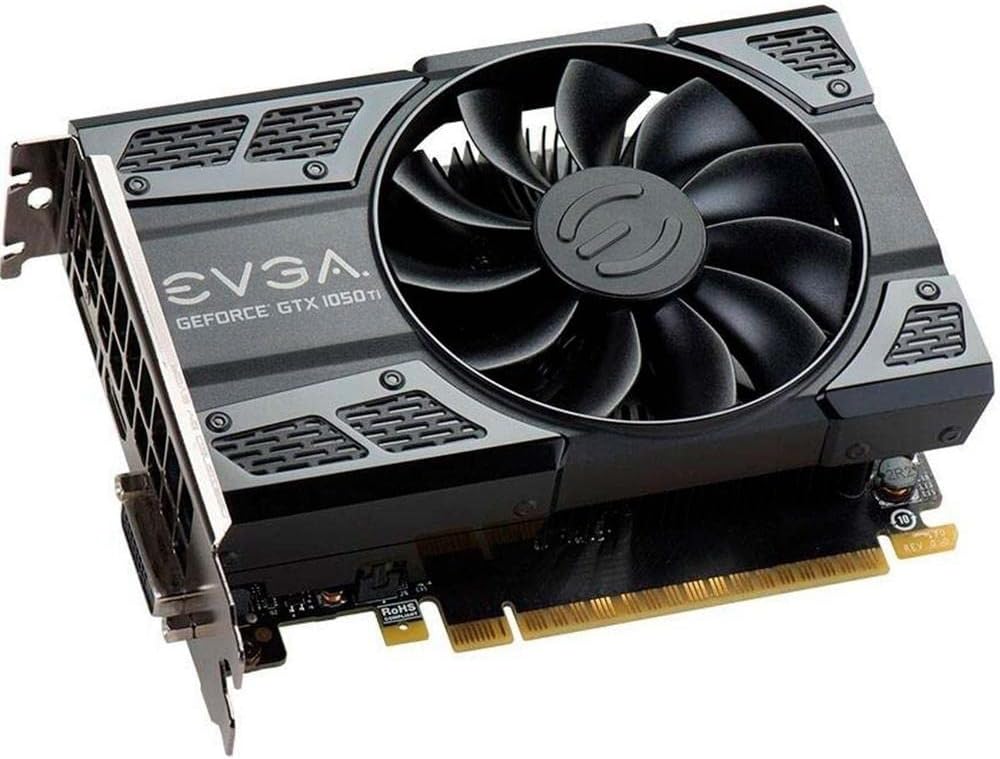
This image shows the front of the EVGA GeForce GTX 1050 Ti SC GAMING graphics card, highlighting its single cooling fan and EVGA branding.
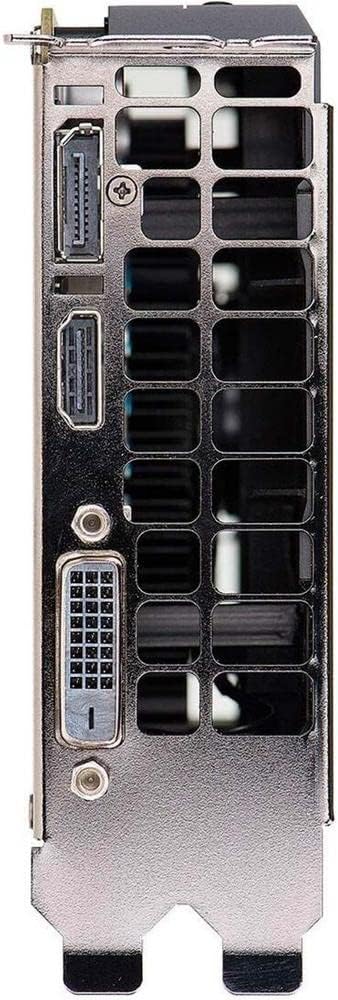
This image displays the video output ports on the graphics card, including DisplayPort, HDMI, and DVI-D connectors.
- Tutup Case sareng Hurungkeun: Tutup wadah komputer anjeun, sambungkeun deui kabel listrik, sareng hurungkeun sistem anjeun.
4. Pamasangan supir
After hardware installation, the operating system may install generic drivers. For optimal performance and full functionality, install the latest drivers from EVGA or NVIDIA.
- Unduh Supir: Visit the official EVGA websitus (www.evga.com/drivers/) atanapi NVIDIA websitus (www.nvidia.com/drivers).
- Pilih Produk: Choose your graphics card model (GeForce GTX 1050 Ti) and operating system.
- Download and Run: Download the recommended driver package and run the installer.
- Turutan ajakan dina layar: Follow the instructions provided by the driver installer. A system restart may be required to complete the installation.
Consider installing EVGA Precision XOC software for advanced monitoring, overclocking, and fan control features, which supports DX12 OSD (On-Screen Display).
5. Ngoperasikeun Kartu Grafis Anjeun
Once drivers are installed, your EVGA GeForce GTX 1050 Ti SC GAMING graphics card is ready for use. It will automatically handle graphics processing for applications and games. Ensure your display settings are configured correctly for resolution and refresh rate.
- Setélan tampilan: Access your operating system's display settings to set the desired resolution (up to 1080p for optimal performance) and refresh rate (up to 240 Hz max).
- Setup Multi-Monitor: The card supports up to three monitors simultaneously. Configure extended desktop or duplicate display modes through your operating system's display settings or the NVIDIA Control Panel.
- Kaulinan: For gaming, ensure your game settings are optimized for your system's capabilities to achieve smooth frame rates.
6. Pangropéa
Pangropéa rutin ngabantosan mastikeun umur panjang sareng kinerja optimal tina kartu grafik anjeun.
- Pembaruan supir: Periodically check for and install the latest graphics drivers from EVGA or NVIDIA. Driver updates often include performance improvements, bug fixes, and support for new games.
- beberesih lebu: Over time, dust can accumulate on the fan and heatsink, reducing cooling efficiency. Carefully clean the fan and heatsink using compressed air. Ensure the system is powered off and unplugged before cleaning. Avoid touching the fan blades directly.
- Tiupan hawa: Ensure your computer case has adequate airflow to prevent overheating. Keep the area around your computer clear of obstructions.
7. Cara ngungkulan
If you encounter issues with your graphics card, refer to the following troubleshooting steps:
- Henteu aya kaluaran tampilan:
- Ensure the monitor is powered on and the display cable is securely connected to both the graphics card and the monitor.
- Verify the graphics card is fully seated in the PCI Express slot.
- Uji nganggo kabel tampilan atanapi monitor anu béda upami mungkin.
- Pariksa naha monitor anjeun disetel ka sumber input anu leres.
- Masalah supir:
- If you experience crashes or display artifacts, try reinstalling the graphics drivers. Use a clean installation option if available in the driver installer.
- Ensure you have downloaded the correct drivers for your specific graphics card model and operating system.
- Masalah Kinerja:
- Ensure your system meets the recommended requirements for the applications or games you are running.
- Monitor GPU temperatures using software like EVGA Precision XOC. High temperatures can lead to performance throttling.
- Tutup aplikasi latar tukang anu teu perlu pikeun ngosongkeun sumber daya sistem.
- Instabilitas Sistim:
- Pastikeun unit catu daya (PSU) anjeun nyumponan wat minimumtage syarat.
- Check for any loose connections inside your computer case.
8. Spésifikasi
| Fitur | Spésifikasi |
|---|---|
| Grafik Coprocessor | NVIDIA GeForce GTX 1050 Ti |
| merek | EVGA |
| Nomer modél | 04G-P4-6253-KR |
| Ukuran RAM Grafis | 4 GB GDDR5 |
| Panganteur Kaluaran Video | DVI-D, DisplayPort, HDMI |
| Pabrikan Prosesor Grafis | NVIDIA |
| Jam Dasar | 1354 MHz |
| Naekeun Jam | 1468 MHz |
| Panganteur | PCI Express 3.0 |
| Monitor Max anu Dirojong | 3 |
| Laju Anyarkeun Max | 240 Hz |
| Dimensions (Height x Length) | 4.4 inch x 5.7 inch (Compact Size) |
| Rojongan System Operasi | Windows 10 (32/64bit), Windows 8 (32/64bit), Windows 7 (32/64bit) |
9. Garansi jeung Rojongan
For warranty information, technical support, and additional resources, please visit the official EVGA website or contact EVGA customer service. Keep your proof of purchase for warranty claims.
EVGA Official Websitus: www.evga.com