
Bubuka
This manual provides essential information for the proper installation, operation, and maintenance of your Sony CDX-G1200U Car Stereo Receiver. Please read this manual thoroughly before using the unit and retain it for future reference.
The Sony CDX-G1200U is designed to enhance your in-car audio experience, offering versatile connectivity and powerful sound. Key features include:
- 55 watt x 4 Dynamic Reality Amplifier for clear and powerful sound.
- Enhanced smartphone connectivity with AOA 2.0 (Android Open Accessory Protocol version 2.0) for seamless control of music from compatible Android devices.
- Advanced sound customization with EQ10 (10-band equalizer), EXTRA Bass function, and HPF/LPF (High-Pass Filter/Low-Pass Filter) crossovers.
- Front AUX and USB inputs for connecting and charging MSC/MTP (Mass Storage Class/Media Transfer Protocol) compatible devices.
- Support for MP3, WMA, and FLAC music file playback via USB.
Émbaran Kasalametan
PERHATOSAN: Pikeun nyegah bahaya seuneu atanapi shock, tong ngalaan unit hujan atanapi beueus. Pikeun nyingkahan kejutan listrik, tong muka kabinet. Tingali ngalayanan ka tanaga mumpuni waé.
- Always operate the vehicle safely. Distraction from operating the audio system can lead to accidents.
- Jaga volume mobil tetep dina tingkat anu ngamungkinkeun anjeun tetep ngadangu sora ti luar, sapertos sirene kendaraan darurat.
- Do not disassemble or modify the unit. This can cause accidents, fire, or electric shock.
- Consult your car dealer or a qualified technician for installation. Incorrect installation can cause damage to the unit or vehicle.
Eusi pakét
Pastikeun yén sadaya item aya dina bungkusan:
- Sony CDX-G1200U Car Stereo Receiver Unit
- Trim Ring (Collar) (Black)
- Diiringkeun kabel
- Manual Pitunjuk (dokumén ieu)
- Kartu Garansi
Pamasangan
Pamasangan anu leres penting pisan pikeun kinerja sareng kaamanan anu optimal. Upami anjeun teu yakin kana léngkah naon waé, konsultasi ka installer profésional.
Sateuacan Instalasi
- Disconnect the negative terminal of the car battery to prevent short circuits.
- Ensure you have the necessary tools and wiring adapters for your specific vehicle.
Sambungan Wiring
Refer to the wiring diagram provided with the unit and the rear view image below for correct connections. Incorrect wiring can damage the unit or vehicle electrical system.

Gambar: Tukangeun view of the Sony CDX-G1200U receiver, illustrating the wiring harness connector, RCA pre-outputs (Rear/Sub), remote control input, and fuse location.
- Sambungan Daya: Sambungkeun kawat konéng kana 12V konstan, kawat beureum kana aksésori 12V, sarta kawat hideung kana taneuh.
- Sambungan Speaker: Connect speaker wires according to their polarity (+/-) to the corresponding vehicle speakers.
- Sambungan Antenna: Connect the car's antenna cable to the unit's antenna input.
- Kaluaran RCA: Pikeun nyambungkeun éksternal amplifiers (Rear/Sub).
- Jauh Masukan: For connecting a wired remote control or steering wheel control interface (if applicable).
Pamasangan Unit
Install the unit into the dashboard opening using the supplied mounting sleeve and trim ring. Secure the unit firmly to prevent vibration and movement.
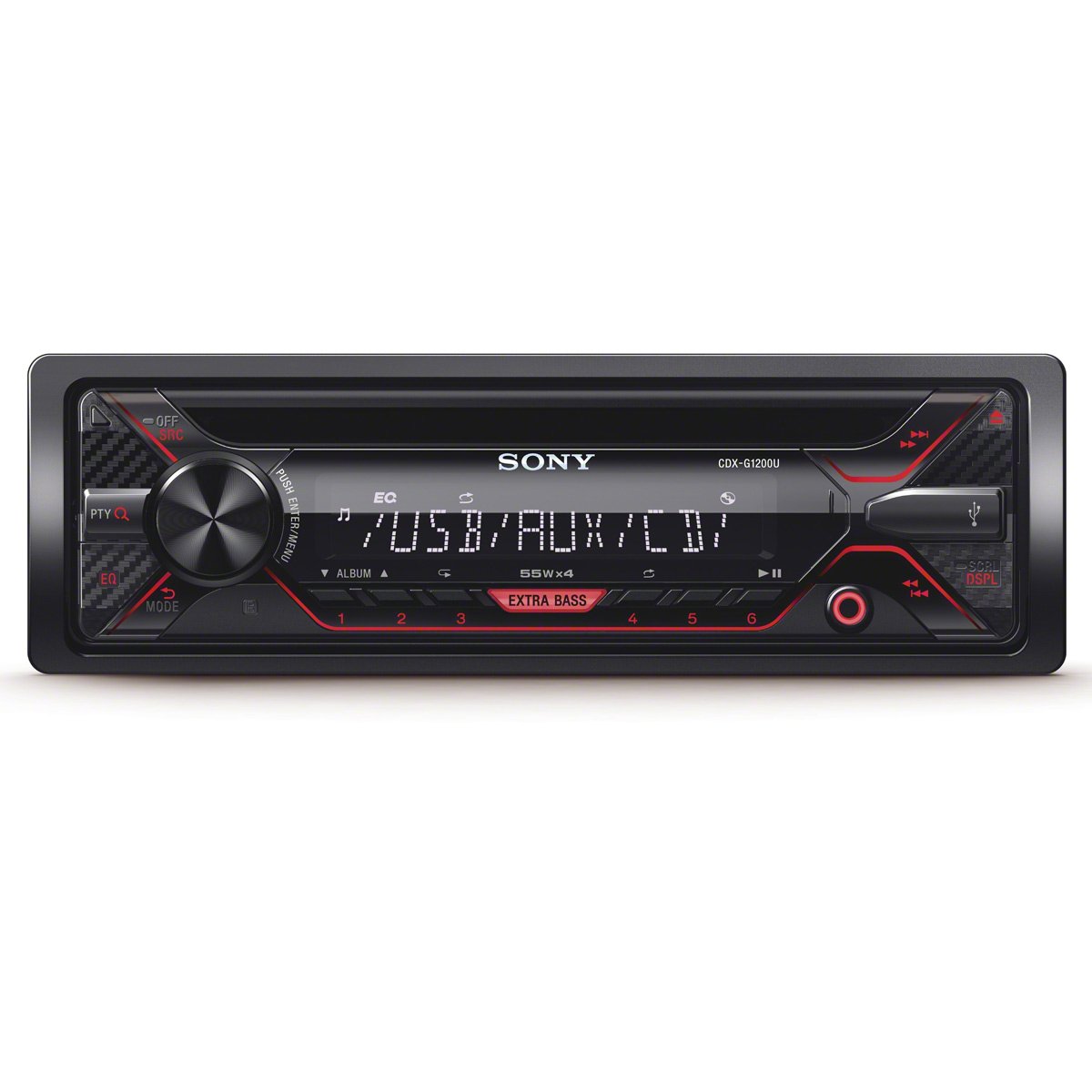
Gambar: Hareupeun view of the Sony CDX-G1200U car stereo receiver, showing the display, control knob, buttons for source selection, EQ, EXTRA BASS, and USB/AUX inputs.
Parentah Operasi
Familiarize diri jeung kadali panel hareup pikeun operasi gampang.

Image: A hand adjusting the controls on the Sony CDX-G1200U receiver, which is installed in a car's dashboard, demonstrating typical user interaction.
Operasi Dasar
- Hurungkeun/Pareuman: Press the SRC/OFF button to turn the unit on. Press and hold to turn off.
- Pilihan Sumber: Press the SRC button repeatedly to cycle through available sources (Tuner, CD, USB, AUX).
- Kontrol volume: Puter kenop sentral pikeun nyaluyukeun tingkat polumeu.
Tuner (Radio) Operation
- Pilihan Band: Press the BAND button to select FM1, FM2, FM3, AM.
- Tuning Manual: Press the SEEK +/- buttons briefly to tune step-by-step.
- Tuning otomatis: Press and hold the SEEK +/- buttons to automatically search for the next strong station.
- Stasion prasetél: Store your favorite stations by pressing and holding a number button (1-6) after tuning to a station. Recall by pressing the number button briefly.
Putereun CD/USB
- Nyelapkeun CD: Gently insert a CD into the disc slot with the label side up. The unit will automatically begin playback.
- Nyambungkeun USB: Insert a USB device into the front USB port. The unit will automatically switch to USB source and begin playback.
- Puter / Reureuh: Pencét tombol PLAY/PAUSE.
- Skip Track: Press the SEEK +/- buttons briefly.
- Maju gancang / Mundur: Press and hold the SEEK +/- buttons.
- Napigasi polder: Use the FOLDER +/- buttons to navigate through folders on USB devices.
Input AUX
Connect an external audio player (e.g., MP3 player) to the front AUX input using a 3.5mm stereo mini-plug cable. Select AUX as the source to listen to audio from the connected device.
Setélan sora
- EQ10: Press the EQ button to access the 10-band equalizer. Use the control knob to select and adjust frequency bands for customized sound.
- EXTRA Bass: Press the EXTRA BASS button to activate or deactivate the bass boost function.
- HPF/LPF Crossovers: Access these settings through the menu to optimize audio output for connected speakers and subwoofers.
Smartphone Connectivity (AOA 2.0)
Connect your compatible Android smartphone via the USB port. With AOA 2.0, you can control music playback directly from the receiver, including track selection and basic app control for supported applications.
Pangropéa
Ngabersihkeun Unit
- Wipe the front panel with a soft, dry cloth. Do not use abrasive pads, scouring powder, or solvents such as alcohol or benzene.
- Pikeun noda nekad, dampen the cloth with a mild detergent solution and wipe gently.
CD Care
- Nanganan CD dina edges maranéhna pikeun nyegah sidik dina beungeut maén.
- Bersihkeun CD nganggo lawon anu lemes sareng henteu buluan, usap ti tengah ka luar.
- Do not use solvents or abrasive cleaners on CDs.
Pamérésan masalah
Upami anjeun ngalaman masalah sareng unit anjeun, tingali masalah sareng solusi umum ieu:
| Masalah | Mungkin Cukang lantaranana / Solusi |
|---|---|
| Henteu aya kakuatan / Unit henteu hurung. | Check the car battery connection. Verify the fuse is not blown. Ensure wiring harness is correctly connected. |
| Taya sora. | Check speaker connections. Ensure volume is not muted or set too low. Verify source selection is correct. |
| CD does not play / Disc error. | Disc may be dirty, scratched, or inserted incorrectly. Try a different CD. Ensure the disc format is supported. |
| alat USB teu dipikawanoh. | Ensure the USB device is formatted correctly (FAT16/FAT32). The device may not be compatible or requires too much power. Try a different USB device. |
| Cannot connect iPhone via USB. | This unit's AOA 2.0 feature is designed for Android devices. iPhone connectivity via USB for music control is not supported. Use the AUX input for iPhone audio. |
| panarimaan radio goréng. | Pariksa sambungan anteneu. Pastikeun anteneu dipanjangkeun sapinuhna (upami tiasa dianggo). Pindah ka daérah anu sinyalna langkung saé. |
spésifikasi
| Fitur | Spésifikasi |
|---|---|
| merek | Sony |
| Nomer modél | CDX-G1200U |
| Daya Kaluaran | 55 Watts x 4 channels (max) |
| Téhnologi konektipitas | Alat bantu, USB |
| Alat nu cocog | Smartphone (Android via AOA 2.0) |
| Mode Kaluaran Audio | Stereo |
| Format Audio anu Dirojong (USB) | MP3, WMA, FLAC |
| Supported Audio Formats (CD) | CD-DA, MP3, WMA |
| Item Beurat | 2.6 pon |
| Fitur husus | Steering Wheel Control Ready, EQ10, EXTRA Bass, HPF/LPF Crossovers, AOA 2.0 |
| Métode kontrol | Remote, Unit Controls |
| UPC | 027242900905 |
Garansi sareng Rojongan
Your Sony CDX-G1200U Car Stereo Receiver comes with a manufacturer's warranty. Please refer to the included Warranty Card for detailed terms, conditions, and duration of coverage.
For technical support, service, or warranty claims, please contact Sony customer support or visit the official Sony website. Keep your proof of purchase and the product's serial number handy when contacting support.