Denso BHT-825Q Handy Terminal Mobile Computer User Manual
Model: BHT-825Q
Bubuka
This manual provides essential information for the safe and efficient operation of your Denso BHT-825Q Handy Terminal Mobile Computer. Please read this manual thoroughly before using the device and keep it for future reference. The BHT-825Q is a robust mobile computer designed for data capture, featuring a 2D imager, a 2.6-inch color screen, and a 27-key keypad, running on a basic operating system.
Produk Leuwihview
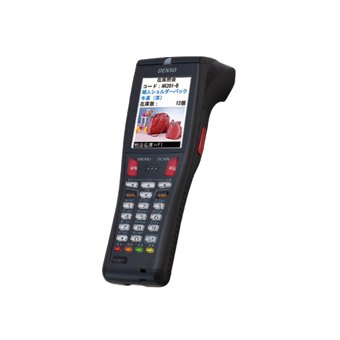
Gambar 1: Denso BHT-825Q Handy Terminal Mobile Computer. This image displays the front view of the device, showing its ergonomic design, the 2.6-inch color screen, and the 27-key alphanumeric keypad. The device is black with red accents on some keys.
The Denso BHT-825Q is engineered for reliable performance in various data collection environments. Its key features include:
Basic OS: Optimized for efficient data processing.
Batch/IrDA Communication: Pikeun mindahkeun data.
Gambar 2D: Capable of reading various 1D and 2D barcodes.
27 konci: A comprehensive keypad for data entry and navigation.
Layar Warna 2.6 inci: Provides clear display of information.
Disetél
1. Ngecas Batré
Before initial use, fully charge the device's battery. Connect the charging cable to the charging port on the device and plug the adapter into a power outlet. The charging indicator light will typically show the charging status.
2. Powering on / Pareum
Pikeun Ngahurungkeun: Press and hold the Power button (usually located on the side or top) until the screen illuminates.
Pikeun mareuman: Press and hold the Power button until a power-off menu appears, then select "Power Off" or "Shut Down".
3. Konfigurasi awal
Upon first power-on, you may be prompted to set basic configurations such as date, time, and language. Follow the on-screen instructions to complete these settings.
Ngoperasikeun Alat
1. Napigasi Interface
Use the directional keys (up, down, left, right) and the Enter key to navigate through menus and select options on the 2.6-inch color screen. The keypad allows for alphanumeric input.
2. Nyeken barkod
Point the 2D imager at the barcode you wish to scan.
Pencét tombol picu scan (biasana aya di sisi alat).
Ensure the barcode is within the imager's field of view. A successful scan will usually be indicated by an audible beep or a visual confirmation on the screen.
3. Data Entry
Utilize the 27-key keypad for manual data input. The keys include numbers, letters, and function keys. Refer to the on-screen prompts for specific data entry requirements within applications.
4. Data Transfer (Batch/IrDA)
The BHT-825Q supports batch data transfer and IrDA (Infrared Data Association) communication. Consult your system administrator or application guide for specific instructions on how to transfer collected data to a host system.
Pangropéa
1. Ngabersihan Alat
Make kaen nu lemes, teu aya lint rada dampened with water or a mild, non-abrasive cleaning solution to wipe the exterior of the device.
Ulah nganggo bahan kimia, pangleyur, atanapi pembersih anu kasar.
Ensure no liquid enters the device's ports or openings.
For the imager window, use a lens cleaning cloth to avoid scratches.
2. Kaperawatan batré
Hindarkeun sering-sering ngeusi batre.
Simpen alat dina tempat anu tiis sareng garing upami henteu dianggo kanggo waktos anu lami.
Use only Denso-approved charging accessories.
3. Apdet parangkat lunak
Periodically check with your system administrator or Denso support for available software or firmware updates to ensure optimal performance and security.
Pamérésan masalah
Masalah
Mungkin Cukang lantaranana
Solusi
Alat teu hurung.
Batré lemah atawa béak.
Charge the battery for at least 30 minutes. Ensure the charger is properly connected.
Try scanning a different barcode. Clean the imager lens. Adjust the scanning angle and distance. Ensure the barcode symbology is enabled.
Layar kosong atawa beku.
Software error; Device crash.
Perform a soft reset (refer to device documentation for specific key combination, often holding power button for 10+ seconds). If issue persists, contact support.
Masalah mindahkeun data.
Incorrect settings; Connection problem.
Verify communication settings (e.g., IrDA alignment). Check cables if using a cradle. Consult your system administrator.
If the problem persists after attempting these solutions, please contact Denso customer support.
spésifikasi
Fitur
Rincian
Nomer modél
BHT-825Q
Sistem operasi
Sistem Operasi Dasar
Tipe Imager
2D Imager
Papan tombol
27 Konci
tampilan
Layar Warna 2.6 inci
Komunikasi
Batch/IrDA
Ukuran Paket
12 x 6 x 4 inci
Item Beurat
1 pon
Produsén
Denso
Tanggal Kahiji Sadia
14 Séptémber 2016
Garansi sareng Rojongan
Émbaran jaminan
The Denso BHT-825Q Handy Terminal Mobile Computer is covered by Denso's standard limited warranty. Please refer to the warranty card included with your product or visit the official Denso websitus kanggo syarat sareng katangtuan anu lengkep ngeunaan panutup garansi, durasi, sareng prosedur klaim.
Rojongan Palanggan
For technical assistance, troubleshooting beyond this manual, or service inquiries, please contact Denso customer support:
Websitus: Visit the official Denso websitus pikeun sumber rojongan, FAQs, sarta formulir kontak.
Telepon: Refer to the Denso websitus pikeun nomer telepon rojongan régional.
Surélék: Specific email contacts may be available on the Denso support page.
When contacting support, please have your product model number (BHT-825Q) and serial number ready.
Dokumén Patali - BHT-825Q
DENSO Spark Plugs: Ngajalajah Téhnologi Ignition Canggih jeung Performance Jelajahi pituduh komprehensif DENSO pikeun téknologi spark plug, ngajéntrékeun inovasi sapertos Iridium Power, Iridium TT, sareng desain U-groove. Diajar kumaha busi DENSO ningkatkeun kinerja mesin, ékonomi bahan bakar, sareng kontrol émisi pikeun aplikasi otomotif.
DENSO Automotive Katalog: A / C Compressors & komponén Manggihan komprehensif DENSO 2014 Katalog Otomotif pikeun compressors A / C sareng komponenana. Pituduh ieu nawiskeun data aplikasi éksténsif, naséhat ngungkulan, sareng detil produk pikeun suku cadang kendaraan aftermarket. Manggihan ngagantian kualitas OE ti DENSO.
DENSO Spark Colokkeun Panungtun Cross-Rujukan pikeun Motor Jepang Milarian nomer suku cadang busi DENSO anu leres pikeun rupa-rupa modél motor Honda, Kawasaki, Suzuki, sareng Yamaha. Pituduh komprehensif ieu nyederhanakeun pilihan bagian pikeun pangropéa sareng perbaikan.
Denso A / C System Troubleshooting Bagan jeung Guide Panungtun ngungkulan komprehensif pikeun sistem A/C otomotif Denso, ngawengku masalah umum kawas noise abnormal, masalah compressor, malfunctions clutch, sarta faults klep ékspansi kalawan detil sabab na remedies.
DENSO N04C-# Engine Common Rail System (CRS) Service Manual: Operation Comprehensive service manual detailing the operation of DENSO's Common Rail System (CRS) for N04C-# engines, applicable to Toyota Dyna, Toyota Coaster, and Hino Dutro vehicles. Includes system overview, component details, and diagnostic information.