1. Bubuka
Thank you for choosing the Soundmaster FUR 5005 PLL-FM Clock Radio. This device combines a modern clock radio with essential features for your daily routine. It includes a PLL-FM radio with automatic station storage, dual alarm settings, snooze function, sleep timer, and a clear LED display with adjustable brightness. This manual will guide you through the setup, operation, and maintenance of your new clock radio.
2. Émbaran Kasalametan penting
- Sumber Daya: Anggo ngan ukur adaptor kakuatan anu ditangtukeun. Pastikeun voltage cocog catu daya lokal Anjeun.
- Cai sareng Uap: Ulah ngantep alat ieu kakeunaan hujan, kalembaban, atanapi cairan anu netes/nyiprat. Ulah neundeun barang-barang anu dieusi cairan, sapertos vas, dina alat ieu.
- Ventilasi: Pastikeun ventilasi nyukupan. Ulah meungpeuk bukaan ventilasi.
- Panas: Jauhkeun alat tina sumber panas sapertos radiator, register panas, kompor, atanapi aparat sanésna (kalebet ampLiifiers) anu ngahasilkeun panas.
- beberesih: Cabut colokan alat sateuacan dibersihkeun. Anggo lawon anu lemes sareng garing. Entong nganggo pembersih cair atanapi pembersih aerosol.
- Palayanan: Entong nyobian ngalayanan produk ieu nyalira. Rujuk sadayana ngalayanan ka tanaga jasa anu mumpuni.
3. Eusi Paket
Punten parios yén barang-barang ieu kalebet kana pakét anjeun:
- Soundmaster FUR 5005 PLL-FM Clock Radio
- Adaptor Daya (AC)
- Instruksi Manual
- Note: CR2032 backup battery is not included and must be purchased separately.
4. Produk Langkungview
Familiarize yourself with the components and controls of your Soundmaster FUR 5005.

Gambar 4.1: Hareupeun view of the Soundmaster FUR 5005 Clock Radio, showing the large LED display and control knobs.

Gambar 4.2: Diwincik view of the control panel, including buttons for 'Mem. Set', 'Preset', 'Dimmer', 'Snooze', 'Sleep', 'AL1', 'AL2', and rotary knobs for tuning and volume.
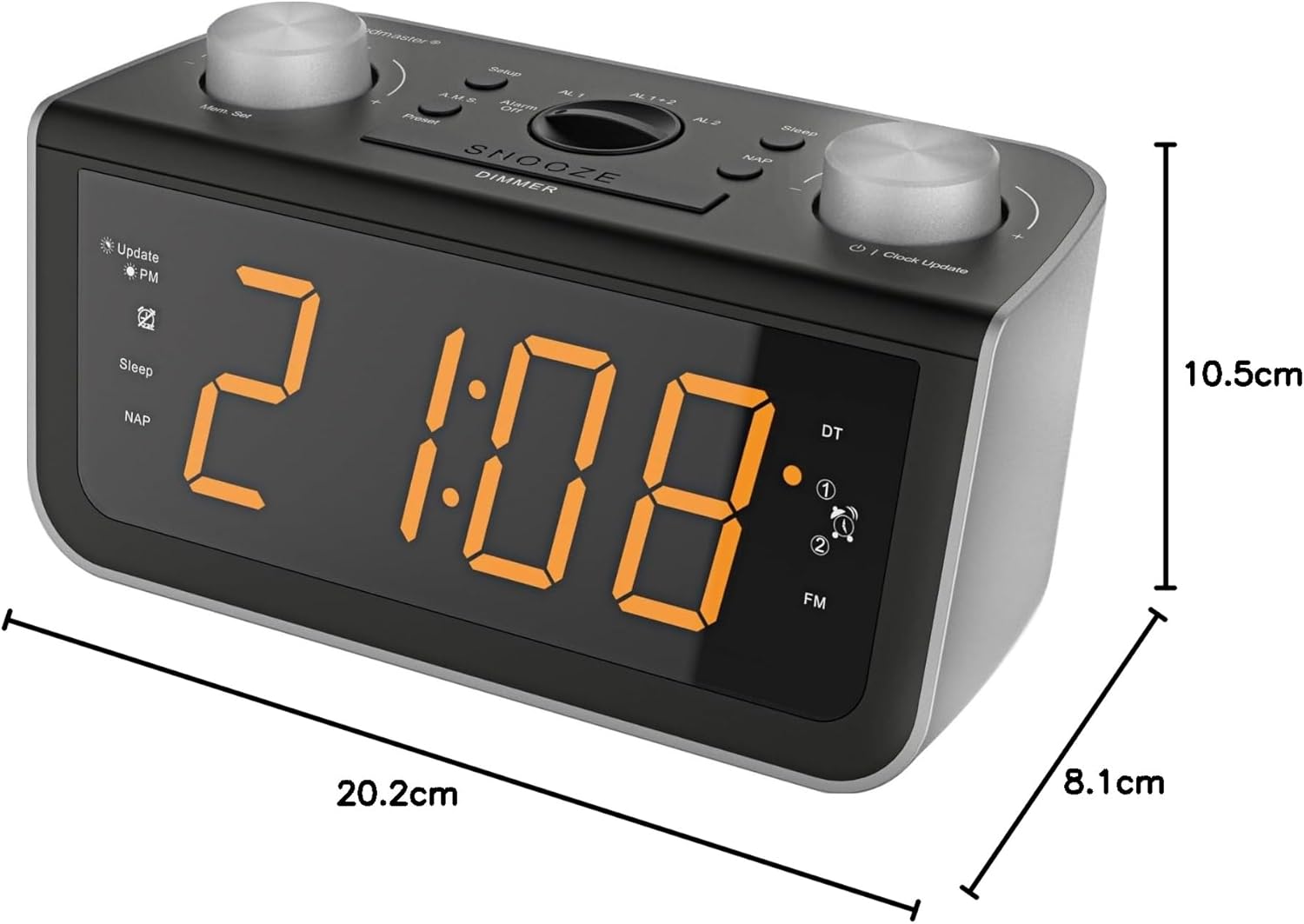
Gambar 4.3: Samping view of the clock radio illustrating its compact dimensions.
4.1 Kadali Panel hareup
- Témbong LED: Shows time, frequency, and alarm status.
- Rotary Knobs (Left & Right): Typically for tuning/setting and volume/adjusting.
- Mem. Set / Preset: For storing and recalling radio stations.
- Dimmer: Adjusts LED display brightness (3-step).
- Snooze / Sleep: Aktipkeun snooze salami alarm atanapi nyetél timer sare.
- AL1 / AL2: Buttons for setting and activating Alarm 1 and Alarm 2.
4.2 Panel tukang
- Input kakuatan: Nyambung ka adaptor kakuatan AC.
- Anteneu FM: Wire antenna for FM reception.
- Kompartemen batré: For CR2032 backup battery (not included).
5. Setélan
5.1 Sambungan Daya
- Uncoil the FM wire antenna located at the back of the unit for optimal reception.
- Insert a CR2032 button cell battery (not included) into the battery compartment on the rear of the unit. This battery provides backup power for time and alarm settings during power outages.
- Connect the supplied AC power adapter to the DC IN jack on the rear of the clock radio.
- Colokkeun adaptor kakuatan kana stop kontak témbok standar. Pintonan bakal hurung.
5.2 Automatic Time Setting (RDS)
The clock radio features automatic time and calendar day setting via RDS (Radio Data System) signal. Once powered on and receiving a strong FM signal with RDS, the time and date should set automatically.
- Ensure the FM antenna is fully extended.
- The clock will attempt to synchronize with the RDS time signal. This may take a few minutes.
- If the time does not set automatically, you may need to manually set it (refer to section 6.1).
6. Parentah Operasi
6.1 Nyetél Waktos Manual
- Pencét jeung tahan tombol WAKTU WAKTU tombol nepi ka angka jam flash.
- Ngagunakeun éta HR (Jam) jeung MIN (Menit) tombol pikeun nyaluyukeun waktos.
- Pencét WAKTU WAKTU deui pikeun ngonfirmasi sareng kaluar.
6.2 Radio Operation (PLL-FM)
- Pencét éta POWER tombol pikeun ngahurungkeun radio.
- Ngagunakeun éta TUN +/- buttons or the rotary tuning knob to select your desired FM station.
- Saluyukeun polumeu nganggo VOL +/- buttons or the rotary volume knob.
- To automatically scan and store stations, press and hold the MEM. SET button. The radio will scan and save available stations to presets.
- Pikeun nginget deui stasiun anu tos disetel, pencét PRESET tombol sababaraha kali.
6.3 Nyetél Alarm (Alarm Ganda)
The device features two independent alarms (AL1 and AL2).
- Pencét jeung tahan tombol AL1 or AL2 tombol nepi ka waktu alarm hurung.
- Ngagunakeun éta HR jeung MIN tombol pikeun ngeset waktos alarm nu dipikahoyong.
- Pencét AL1 or AL2 deui pikeun milih sumber alarm: Radio or Buzzer.
- Pencét AL1 or AL2 sakali deui pikeun mastikeun sareng ngaktipkeun alarm. Ikon alarm bakal muncul dina tampilan.
6.4 Fungsi Tunda
Sawaktos alarm disada, pencét tombol SNOOZE button to temporarily silence it. The alarm will sound again after a short interval (typically 9 minutes, check specific model for exact duration).
6.5 Timer Saré
Timer sare ngamungkinkeun anjeun bobo ku radio, anu bakal otomatis pareum saatos sababaraha waktos.
- Nalika radio nuju diputer, pencét tombol SARE Pencét tombol ieu sababaraha kali pikeun ngalingkungan waktos sare anu sayogi (contona, 10, 20, 30, 60, 90 menit, atanapi OFF).
- Radio bakal diputer salami durasi anu dipilih teras otomatis pareum.
6.6 tampilan Dimmer
Atur kacaangan layar LED sakumaha anu dipikahoyong.
- Pencét éta DIMMER button repeatedly to cycle through the 3 brightness levels (High, Medium, Low).
7. Pangropéa
- beberesih: Always unplug the device from the power outlet before cleaning. Use a soft, dry, lint-free cloth to wipe the surfaces. Do not use abrasive cleaners, waxes, or solvents as they may damage the finish.
- Perawatan Antenna: Handle the FM wire antenna carefully. Do not pull or excessively bend it.
- Ngagantian batré: If the backup battery (CR2032) is depleted, replace it with a new one to ensure time and alarm settings are retained during power interruptions. Dispose of old batteries responsibly.
8. Cara ngungkulan
| Masalah | Mungkin Cukang lantaranana | Solusi |
|---|---|---|
| Henteu aya kakuatan / tampilan pareum | Power adapter not connected or faulty. Power outlet not active. | Ensure the power adapter is securely connected to both the unit and a working wall outlet. Try a different outlet. |
| Panarimaan FM Goréng | FM antenna not fully extended or positioned incorrectly. Interference from other electronic devices. | Panjangkeun sareng pindahkeun deui posisi anteneu kabel FM sacara lengkep. Pindahkeun unitna jauh ti alat éléktronik anu sanés. |
| Alarm teu disada | Alarm not activated. Alarm volume too low. Incorrect alarm time set. | Verify that the alarm icon is displayed. Check alarm volume. Re-set the alarm time. |
| Time/Date not setting automatically (RDS) | Weak FM signal with RDS. No RDS signal available in your area. | Ensure good FM reception. Manually set the time if RDS is unavailable or unreliable. |
| Setélan leungit sanggeus kakuatan outage | Backup battery (CR2032) is missing or depleted. | Install a new CR2032 backup battery. |
9. Spésifikasi
| merek | Tukang sora |
| Modél | FUR5005 |
| Téhnologi Tuner | PLL-FM |
| Band Radio Dirojong | FM, PLL |
| Téknologi tampilan | LED |
| Tipe tampilan | Digital |
| Fitur husus | Adjustable brightness, Radio |
| Sumber Daya | AC (Mains Power) |
| Batré Cadangan | CR2032 (teu kaasup) |
| Jenis Bahan | palastik |
| Téhnologi konektipitas | AUX (3.5mm Audio) |
| Ukuran (approx.) | 20.2 cm (P) x 8.1 cm (D) x 10.5 cm (H) |
10. Garansi jeung Rojongan
Soundmaster products are designed and manufactured to the highest quality standards. In the unlikely event that you experience any problems with your product, please refer to the warranty information provided with your purchase or contact Soundmaster customer support for assistance.
For further support, visit the official Soundmaster websitus atanapi ngahubungan pangecér lokal Anjeun.


