
1. Bubuka
Thank you for choosing the Baseus Encok S16 Neck Hung Bluetooth Wireless In-Ear Earphone. This manual provides detailed instructions for setup, operation, and maintenance to ensure optimal performance and longevity of your device. Please read this manual thoroughly before use.
2. Eusi Paket
Pastikeun yén sadaya item aya dina bungkusan:
- 1 x Baseus Encok S16 Wireless Earphone
- 1 x Kabel Ngecas
- 1 x Manual Pamaké
- 1 x Kartu Garansi

Image: Contents of the Baseus Encok S16 earphone package, showing the earphones, charging cable, user manual, and warranty card.
3. Produk Langkungview
The Baseus Encok S16 earphones feature a neck-hung design for comfortable and secure wear. Key features include:
- Fiksasi magnét: Earbuds can be magnetically joined when not in use, preventing tangling and loss.
- Adjustable Coils: The earphone line length can be adjusted by sliding for a customized fit.
- High Fidelity Sound: Equipped with a dynamic speaker unit, composite diaphragm, and independent tune trope structure for clear audio.
- Daya Éfisién: Utilizes a British CSR chip and 120mAh battery for low power consumption and extended battery life.
- Kasaluyuan Universal: Smartly matches with smartphones and tablet PCs, compatible with all Bluetooth 4.0 enabled devices.

Image: Close-up of the Baseus Encok S16 earbuds demonstrating their magnetic connection capability.
4. Setélan
4.1 Ngecas Earphone
- Connect the provided charging cable to the charging port on the earphone's control unit.
- Sambungkeun tungtung nu sejen tina kabel ngecas ka sumber kakuatan USB (misalna port USB komputer, adaptor témbok USB).
- The indicator light will illuminate during charging and turn off or change color when fully charged.
- Ngecas pinuh biasana peryogi waktos sakitar 1.5 dugi ka 2 jam.
4.2 Nyapasangkeun Bluetooth
- Pastikeun yén earphone dicas pinuh.
- Press and hold the Power button on the control unit until the indicator light flashes red and blue alternately, indicating pairing mode.
- Dina smartphone Anjeun atawa alat Bluetooth-diaktipkeun, buka setélan Bluetooth.
- Milarian pikeun available devices and select "Baseus Encok S16" from the list.
- Once connected, the indicator light will flash blue slowly or turn solid blue.
- Upami dipenta pikeun kecap akses, lebetkeun "0000".
5. Parentah Operasi
5.1 Kadali Dasar
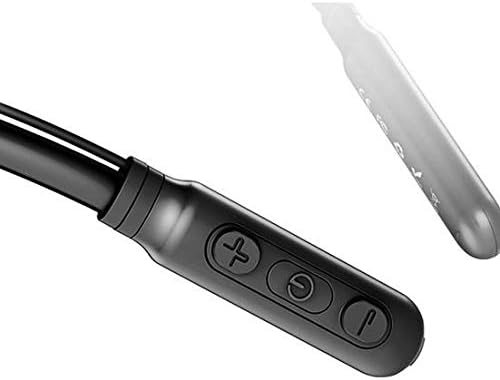
Image: Close-up of the Baseus Encok S16 earphone's inline control unit, showing the power/multi-function button, volume up, and volume down buttons.
| Tombol | Fungsi |
|---|---|
| Tombol Daya (Tengah) |
|
| Volume Naik (+) |
|
| Volume Turun (-) |
|
5.2 Maké Earphone
Place the neckband around your neck, ensuring the control unit is easily accessible. Insert the earbuds comfortably into your ears. Adjust the earphone line length using the sliding coils for a secure and comfortable fit.
6. Pangropéa
- Clean the earbuds and control unit regularly with a soft, dry cloth.
- Avoid exposing the earphones to extreme temperatures, humidity, or corrosive liquids.
- Store the earphones in a cool, dry place when not in use. The magnetic earbuds can help prevent tangling during storage.
- Do not attempt to disassemble or repair the earphones yourself, as this will void the warranty.
7. Cara ngungkulan
| Masalah | Solusi |
|---|---|
| Teu tiasa hurung | Ensure the earphones are fully charged. Press and hold the Power button for 3 seconds. |
| Teu tiasa dipasangkeun sareng alat |
|
| Teu aya sora atanapi volume handap |
|
| sambungan intermittent |
|
8. Spésifikasi
| Fitur | Rincian |
|---|---|
| merek | Baseus |
| Nomer modél | FWP-E-S16 |
| Téhnologi konektipitas | Bluetooth |
| Vérsi Bluetooth | 4.0 (compatible with devices enabling Bluetooth 4.0) |
| Faktor Bentuk | In Ear, Neck Hung |
| Tipe Kontrol | Voice Control, Touch (via buttons) |
| Kapasitas batré | 120 mah |
| Beurat | 30 gram |
| Komponén Kaasup | Wireless Earphone, Charging Cable, User Manual, Warranty Card |
9. Garansi jeung Rojongan
This product comes with a Limited Warranty. Please refer to the included Warranty Card for detailed terms and conditions regarding coverage and duration.
For technical support or warranty claims, please contact your retailer or visit the official Baseus websitus pikeun inpormasi layanan palanggan.
Nomer Idéntifikasi Perdagangan Global (GTIN): 06953156264489