1. Bubuka
This manual provides essential information for the safe and effective use of your Panasonic AG-AC30 Full-HD AVCCAM Handheld Camera. Please read this manual thoroughly before using the product and retain it for future reference. The AG-AC30 is designed for high-quality video recording with advanced features for professional and enthusiast users.
2. Émbaran Kasalametan
- Do not expose the camera to rain, moisture, or extreme temperatures.
- Hindarkeun leupaskeun atanapi tundukkeun kaméra kana tabrakan anu kuat.
- Paké ngan asesoris Panasonic-disatujuan jeung adaptor kakuatan.
- Jauhkeun kaméra tina médan magnét anu kuat.
- Cabut catu daya sateuacan dibersihkeun atanapi upami teu dianggo salami lami.
3. Eusi Paket
Pastikeun yén sadaya item aya dina bungkusan:
- Camcorder
- (Other accessories such as power adapter, battery, lens hood, microphone, and cables may be included depending on the specific package.)
4. Kaméra Langkungview
Familiarize yourself with the main components of your AG-AC30 camcorder.

Gambar 4.1: Hareup jeung sisi view of the Panasonic AG-AC30 camcorder. This image illustrates the ergonomic design for handheld operation, highlighting the lens, handle, and primary controls accessible during use.

Gambar 4.2: Sudut hareup view of the Panasonic AG-AC30 camcorder, showcasing the attached microphone, lens hood, and audio input ports. This view emphasizes the camera's readiness for professional audio and video capture.
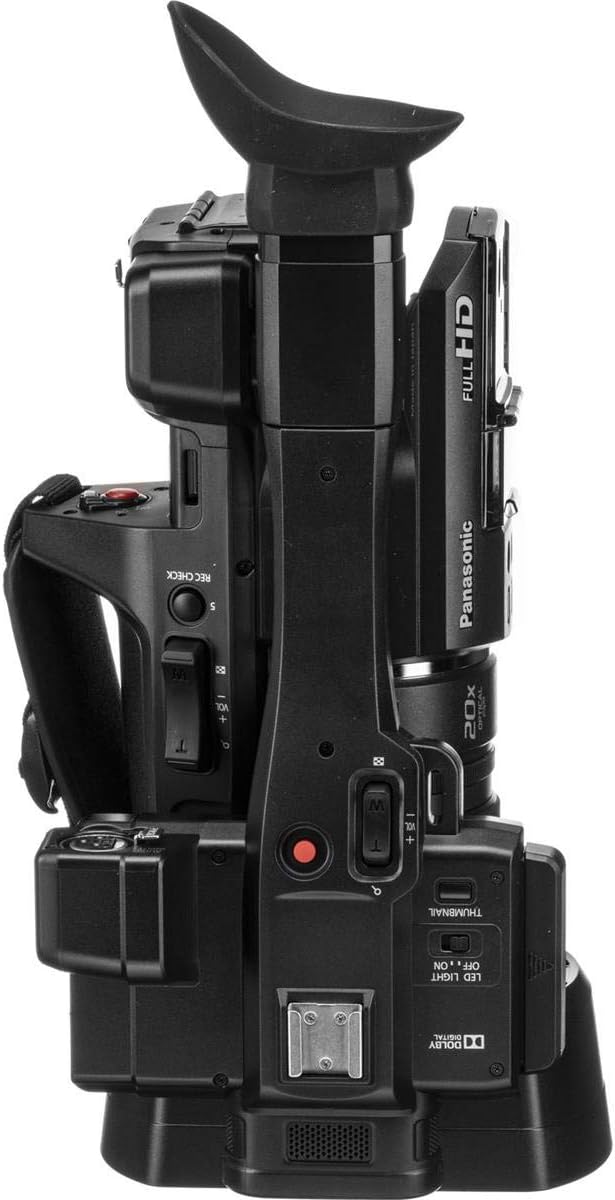
Gambar 4.3: Puncak view of the Panasonic AG-AC30 camcorder. This perspective highlights the integrated handle, electronic viewfinder (EVF), and various control buttons for recording, zoom, and menu navigation.

Gambar 4.4: Handapeun view of the Panasonic AG-AC30 camcorder. This image displays the standard tripod mounting screw hole and the location of the battery compartment, essential for stable shooting and power management.
5. Setélan
5.1. Pamasangan batré
- Pastikeun kaméra dipareuman.
- Open the battery compartment cover, typically located at the rear or bottom of the camera.
- Insert the battery pack, aligning it with the terminals, until it clicks into place.
- Tutup panutup kompartemen batré aman.
5.2. SDXC Card Insertion
The AG-AC30 features dual SDXC card slots for extended recording and backup.
- Locate the SD card slot cover, usually on the side of the camera.
- Open the cover and gently insert an SDXC card into the slot with the label facing the correct direction until it locks.
- Close the SD card slot cover. Repeat for the second slot if using two cards.
5.3. Ngalampirkeun Asesoris
- Tiung lénsa: Pasangkeun tudung lénsa ka payuneun lénsa ku cara ngajajarkeun tanda-tandana sareng puteran dugi ka ngonci.
- Mikropon: Secure the external microphone to the cold shoe mount on the handle and connect it to the audio input port (XLR inputs are available).
- Tali taktak: Attach the shoulder strap to the designated loops for comfortable carrying.
6. Ngoperasikeun kaméra
6.1. Daya Hurung / Pareum
Slide the POWER switch to the ON position to turn on the camera. To power off, slide the switch to OFF.
6.2. Rekaman Dasar
- Set the camera to recording mode using the mode dial.
- Frame your shot using the 0.24" EVF or the 3" LCD Touch Screen.
- Press the REC START/STOP button to begin recording. Press it again to stop.
- The camera records Full HD (1920 x 1080) video at up to 59.94p.
6.3. Operasi zum
The AG-AC30 features a 20x optical zoom lens. Use the zoom rocker on the handle or the individual zoom ring on the lens for precise control.
6.4. Focus, Iris, and Gain Control
Adjust focus, iris (aperture), and gain using the dedicated rings on the lens and control buttons on the camera body. The individual focus, zoom, and iris lens rings allow for manual adjustments.
6.5. Using the Built-in LED Light
Activate the built-in LED light for illumination in low-light conditions. The control for the LED light is typically located near the light unit.
6.6. Stabilisasi Gambar
The 5-Axis Hybrid O.I.S. (Optical Image Stabilization) helps to reduce camera shake during handheld shooting. Ensure this feature is enabled in the camera settings for smoother footage.
7. Pangropéa
7.1. beberesih
- Awak kaméra: Anggo kaén anu lembut sareng garing pikeun ngusap awak kaméra. Keur kokotor bandel, rada dampen lawon ku cai lajeng ngusap garing.
- Lensa: Use a lens brush or blower to remove dust. For smudges, use a specialized lens cleaning solution and a microfiber cloth.
- Layar LCD: Gently wipe the LCD screen with a soft, lint-free cloth. Avoid pressing too hard.
7.2. Panyimpenan
When not in use, store the camera in a cool, dry place, away from direct sunlight and excessive humidity. Remove the battery if storing for an extended period.
8. Cara ngungkulan
| Masalah | Mungkin Cukang lantaranana | Solusi |
|---|---|---|
| Kaméra teu hurung | Battery depleted or incorrectly inserted; Power adapter not connected | Charge battery or insert correctly; Connect power adapter |
| Cannot record video | SDXC card full or not inserted; Write protection enabled on card | Insert new card or delete files; Disable write protection; Format card (data will be lost) |
| Gambar kabur | Out of focus; Lens dirty; Image stabilization off | Adjust focus; Clean lens; Enable 5-Axis Hybrid O.I.S. |
| Taya rékaman audio | Microphone not connected or muted; Audio settings incorrect | Check microphone connection and volume; Adjust audio input settings |
9. Spésifikasi
| Fitur | Rincian |
|---|---|
| Nomer modél | AG-AC30PJ |
| Dimensi produk | 7.87 x 7.87 x 7.87 inci |
| Item Beurat | 5.5 pon |
| Téhnologi Sénsor Poto | BSI MOS |
| Resolusi Capture Video | 1080 p |
| Panjang Fokus Maksimum | 29 mm |
| Aperture maksimum | 1.8 f |
| Tipe Mémori Flash | SDXC |
| Format Capture Video | MPEG-4 |
| Format Audio Dirojong | AAC |
| Ukuran layar | 30 Inches (LCD Touch Screen) |
| Téhnologi konektipitas | USB |
| Zoom optik | 20x |
| Stabilisasi Gambar | 5-Axis Hybrid O.I.S. |
10. Garansi jeung Rojongan
Kanggo inpormasi garansi sareng dukungan pelanggan, mangga tingal kartu garansi anu kalebet dina produk anjeun atanapi kunjungan ka Panasonic resmi websitus. Simpen resi pameseran anjeun salaku bukti pameseran pikeun klaim garansi.
Dukungan Pelanggan Panasonic: https://na.panasonic.com/us/support


