1. Bubuka
This manual provides essential information for the installation, operation, and maintenance of the Juniper EX2300-C-12T Ethernet Switch. The EX2300-C-12T is a compact, high-density, and cost-effective solution designed for small network environments where space and power efficiency are critical. It is ideal for access-layer deployments in micro branches, retail, and workgroup environments, as well as for converged network access in larger networks.
The EX2300-C-12T features 12 10/100/1000BASE-T ports and supports IEEE 802.3af Power over Ethernet (PoE) or 802.3at PoE+ for powering attached network devices. It also includes optional front panel 10GbE uplink ports for connections to higher-layer devices. This model supports Juniper's Virtual Chassis technology, allowing up to four switches to be interconnected and managed as a single logical device. It can also function as a satellite device in a Juniper Junos Fusion Enterprise deployment.
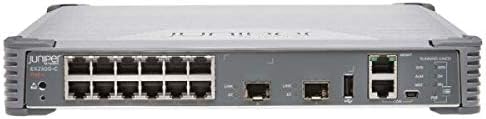
Gambar 1: Hareupeun view of the Juniper EX2300-C-12T Ethernet Switch. This image displays the compact design of the switch, highlighting its 12 Gigabit Ethernet ports, two SFP+ uplink ports, and various console and USB ports on the front panel. The device is grey with black ports and a Juniper logo on the left.
2. Setup jeung Instalasi
Before beginning installation, ensure you have all necessary components and that the installation environment meets the product specifications.
2.1 Eusi pakét
- Juniper EX2300-C-12T Ethernet Switch
- Kabel listrik
- Mounting Kit (Rack-mountable, Magnetic Mount, or Wall Mountable options)
- Dokuméntasi (Panduan Mimitian Gancang, Inpormasi Kasalametan)
2.2 Syarat Lingkungan
- Suhu: Ensure the operating environment temperature does not exceed 100 degrees Fahrenheit (37.8 degrees Celsius).
- Kalembaban: Maintain appropriate humidity levels to prevent condensation.
- Ventilasi: Ensure adequate airflow around the switch for proper cooling. Do not block ventilation openings.
- Sumber Daya: Connect to a stable power source within the specified voltage rentang.
2.3 Pilihan pamasangan
The EX2300-C-12T offers flexible mounting options:
- Rack-mountable: Use the provided rack-mount kit to install the 1U high switch in a standard equipment rack.
- Gunung Magnét: Utilize the magnetic mounting feature for easy attachment to metal surfaces.
- Tembok dipasang: Secure the switch to a wall using the appropriate wall-mount brackets.
2.4 Sambungan Awal
- Connect the power cord to the switch and a grounded electrical outlet.
- Connect an Ethernet cable from your management workstation to any of the 12 network ports on the switch.
- For initial configuration, you may need to connect a console cable to the console port.
- Power on the switch. Observe the system status indicators for proper boot-up.
3. Ngoperasikeun Switch
The Juniper EX2300-C-12T is a managed switch, offering extensive configuration capabilities through its operating system.
3.1 Operasi Dasar
- Hurungkeun/Pareuman: Connect or disconnect the power cord. There is no dedicated power button.
- Port Connectivity: Connect network devices (computers, servers, other switches) to the 12 10/100/1000BASE-T ports using standard Ethernet cables.
- Palabuhan Uplink: Use the 10GbE SFP+ uplink ports for high-speed connections to core network devices or other switches.
- PoE/PoE+: The switch provides Power over Ethernet capabilities on its ports, allowing compatible devices (e.g., IP phones, wireless access points) to receive power directly through the Ethernet cable.
3.2 Antarmuka Manajemén
The switch can be managed via:
- Antarmuka Jalur Komando (CLI): Access via console port (RJ-45) or SSH for detailed configuration.
- Web-based Interface (J-Web): A graphical user interface for easier management (requires initial IP configuration via CLI).
- SNMP: For network monitoring and management systems.
3.3 Virtual Chassis Technology
The EX2300-C-12T supports Juniper's Virtual Chassis technology, allowing up to four compatible EX Series switches to operate as a single logical device. This simplifies management and increases network resilience. Refer to the Juniper Networks documentation for detailed configuration steps for Virtual Chassis.
4. Pangropéa
Regular maintenance ensures optimal performance and longevity of your Juniper EX2300-C-12T switch.
4.1 beberesih
- Jaga saklar sareng liang ventilasina bébas tina lebu sareng runtah.
- Use a soft, dry cloth for external cleaning. Do not use liquid cleaners or aerosols.
- Periodically use compressed air to clear dust from ventilation grilles.
4.2 Apdet firmware
Pariksa périodik rojongan Juniper Networks website for the latest firmware updates. Applying updates can provide new features, performance improvements, and security patches. Follow the instructions provided by Juniper for safe firmware upgrade procedures.
4.3 Pemantauan Lingkungan
Continuously monitor the operating environment to ensure it remains within specified temperature and humidity ranges. Excessive heat can significantly reduce the lifespan of electronic components.
5. Cara ngungkulan
This section provides basic troubleshooting steps for common issues. For more complex problems, refer to the official Juniper Networks documentation or contact technical support.
5.1 Masalah kakuatan
- Henteu aya kakuatan:
- Pastikeun kabel listrik disambungkeun sacara aman ka saklar sareng stop kontak listrik anu tiasa dianggo.
- Verify the electrical outlet is supplying power.
5.2 Masalah Konektipitas Jaringan
- Tautan Pelabuhan Turun:
- Pariksa sambungan kabel Ethernet dina duanana tungtung.
- Coba kabel Ethernet béda.
- Pastikeun alat nu disambungkeun dihurungkeun tur fungsina leres.
- Check the port status via the management interface.
- Teu Aya Aksés Jaringan:
- Pariksa konfigurasi alamat IP dina saklar jeung alat disambungkeun.
- Pariksa konfigurasi VLAN upami tiasa.
- Pastikeun routing dikonpigurasi leres upami alat aya dina subnet anu béda.
5.3 Masalah Performance
- Lambat Jaringan:
- Check for duplex mismatches between the switch port and the connected device.
- Monitor port utilization for congestion.
- Pastikeun firmware up to date.
6. Spésifikasi Téknis
| Fitur | Spésifikasi |
|---|---|
| Nomer modél | EX2300-C-12T |
| merek | Jaringan Juniper |
| Jumlah Palabuhan | 12 (10/100/1000BASE-T) |
| slot ékspansi | 2 (for 10GbE SFP+ uplinks) |
| Pindah Tipe | Managed, Multi-Layer, PoE Switch |
| Tipe panganteur | PoE (IEEE 802.3af/at) |
| Ukuran (L x W x H) | 10.98 x 9.41 x 1.73 inci (27.89 x 23.90 x 4.39 cm) |
| Item Beurat | 5.47 pon (2.48 kg) |
| Bahan Kasus | logam |
| Warna | kulawu |
| Peunteun Suhu luhur | 100°F (37.8°C) |
| Ukuran Mémori Flash | 2000 MB |
| Pilihan Pamasangan | Rack-mountable, Magnetic Mount, Wall Mountable |
| UPC | 832938070912 |
| Tanggal Kahiji Sadia | 31 Agustus 2016 |
7. Émbaran jaminan
The Juniper EX2300-C-12T Compact Ethernet Switch comes with a Garansi kawates saumur hirup. This warranty covers defects in materials and workmanship under normal use and service. For full details regarding warranty terms, conditions, and limitations, please refer to the official Juniper Networks warranty policy documentation available on their website or contact Juniper Networks support.
Punten tahan bukti pameseran anjeun pikeun klaim garansi.
8. Rojongan Téknis
For technical assistance, product inquiries, or to report issues, please contact Juniper Networks technical support. Before contacting support, it is recommended to have your product model number (EX2300-C-12T) and serial number readily available.
You can find support resources, FAQs, and contact information on the official Juniper Networks websitus: www.juniper.net/support


