
Techage 6708FN-4*BT508-20SC/P
Techage Full HD 1080p PoE CCTV Security Camera System User Manual
Model: 6708FN-4*BT508-20SC/P
1. Bubuka
This manual provides detailed instructions for the installation, operation, and maintenance of your Techage Full HD 1080p PoE CCTV Security Camera System. This system is designed for reliable surveillance with high-definition video capture, suitable for both indoor and outdoor environments.
2. Eusi Paket
Mangga parios heula sadaya barang anu didaptarkeun di handap ieu kalebet kana pakét anjeun. Upami aya barang anu leungit atanapi ruksak, mangga ngahubungi layanan palanggan.
Gambar: Leuwihview of the package contents, including the NVR, cameras, cables, power adapter, mouse, and user guide.
- 1 x 4-Channel 1080p NVR (Network Video Recorder) with built-in 4 PoE ports
- 4 x 2.0 Megapixel 1080p Bullet IP Cameras (Outdoor/Indoor Waterproof)
- 4 x 20-meter CAT5 Network Cables (Plug and Play for camera video)
- 1 x Power Supply for NVR
- 1 x USB Mouse for NVR operation
- 1 x Manual Pamaké
- Note: Hard drive for NVR storage is not included.
3. Fitur Produk
NVR (Network Video Recorder) Features:
- Resolusi luhur: Supports 1080p (1920x1080) video recording.
- PoE (Power over Ethernet): Built-in 4 PoE ports for simplified camera connection and power.
- Multi-channel Recording: Simultaneous real-time recording across multiple channels.
- Modeu Rekaman: Supports manual, alarm, dynamic detection (motion detection), and timed recording.
- Panyimpenan: Supports 1 SATA hard drive (up to 6TB per disk, hard drive not included).
- Kaluaran: VGA and HDMI full HD output.
- Panganteur pamaké: True color 16-bit graphical menu interface with mouse operation.
- Fungsi Jaringan: Cloud technology support, network penetration, alarm information push to mobile devices.
IP Camera Features:

Image: A close-up of a Techage IP camera, highlighting its IP66 waterproof rating and resistance to rain and snow.
- Resolusi: 2.0 Megapixel (1080p) with 2400TVL.
- Sénsor: 1/6.9 inch F02 CMOS sensor.
- Visi Peuting: Clear night vision with IR-cut filter for continuous clarity in low light.
- Tahan cuaca: IP66 rated for outdoor and indoor use, resistant to water and snow.
- ONVIF Support: Compatible with ONVIF standards for integration with third-party NVRs.
- Mobile Surveillance: Supports multiple mobile surveillance platforms (iOS, Android).
4. Setup Guide
4.1 Diagram Sambungan Sistim
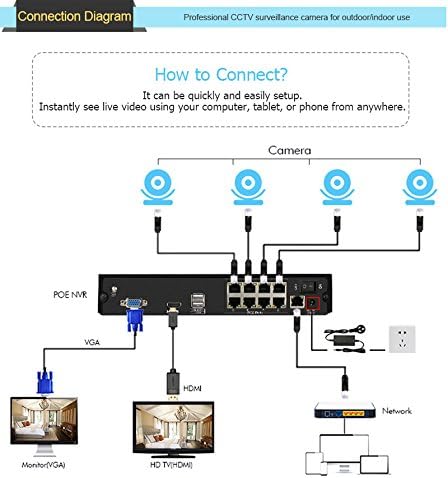
Follow the diagram below to connect your NVR and cameras. The PoE ports simplify wiring by providing both power and video transmission through a single Ethernet cable.

Image: A visual guide showing how to connect the PoE NVR to cameras, a monitor (via VGA or HDMI), and a network router.
- Connect the IP cameras to the PoE ports on the back of the NVR using the provided network cables.
- Connect the NVR to a monitor or TV using either the VGA or HDMI port.
- Connect the NVR to your network router using an Ethernet cable for remote viewkamampuhan.
- Connect the power adapter to the NVR and plug it into a power outlet.
- Sambungkeun beurit USB ka port USB NVR pikeun navigasi.
4.2 Pamasangan Kaméra
The cameras are designed for both indoor and outdoor use. Choose a location that provides optimal viewing angles and is within the range of the provided network cables. Ensure the cameras are securely mounted.
4.3 Telepon sélulér Viewdina Setup
Ka view your security feed remotely on your smartphone, follow these steps:
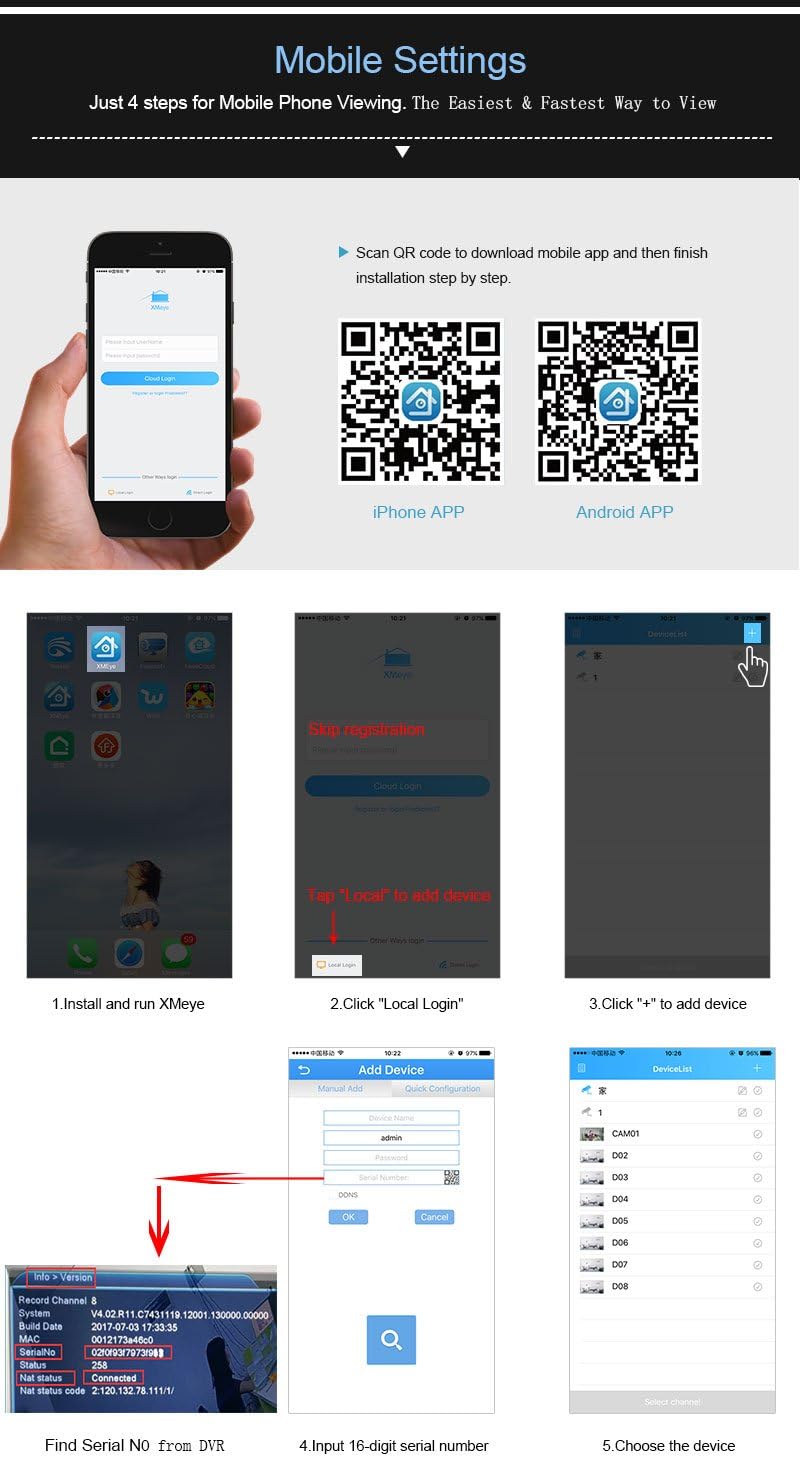
Image: A step-by-step visual guide for setting up the xmeye mobile application, including QR codes for iOS and Android app downloads, and instructions for adding devices.
- Unduh Aplikasi: Scan the QR code below or visit the respective app store to download the xmeye mobile application.
iOS App Store Link
Android APK Download Link - Install and Run: Install the app on your smartphone and launch it.
- Local Login: Tap "Local" to proceed without registration.
- Tambahkeun Alat: Ketok ikon "+" pikeun nambahkeun alat anyar.
- Find Serial Number: Locate the 16-digit serial number (SN) from your NVR's system information.
- Input SN: Enter the 16-digit serial number into the app.
- Pilih Alat: Choose the device from the list to start viewing.
5. Parentah Operasi
5.1 Modeu ngarékam
NVR ngadukung rupa-rupa modeu rékaman:
- Ngarekam Manual: Mimitian sareng eureunkeun ngarékam sacara manual.
- Rékam alarem: Recording triggered by external alarm inputs (if connected).
- Ngarekam Deteksi Gerak: Recording starts automatically when motion is detected in the camera's view.
- Timed Recording: Schedule specific times for continuous recording.
5.2 Jauh Viewing jeung Bewara
Once the mobile app is set up, you can view eupan langsung sareng foo anu dirékamtage from anywhere with an internet connection. The system also supports push notifications for events like motion detection.
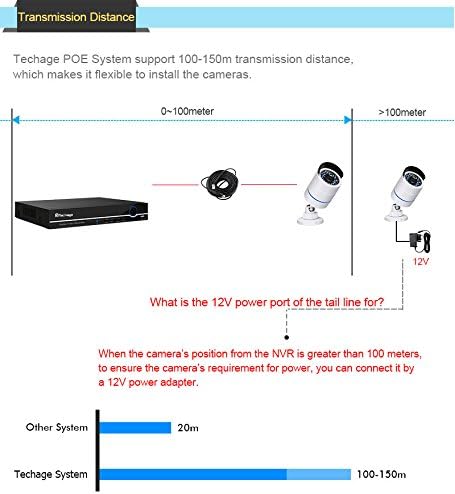
Image: Illustration of the motion detection feature, showing how the system can send email notifications with screenshots to your smartphone when motion is detected.
To enable email notifications for motion detection, navigate to the NVR's menu: Main Menu > Alarm > Motion Detect. Configure the detection area, sensitivity, and enable email alerts with screenshots.
6. Pangropéa
Pangropéa rutin mastikeun kinerja anu optimal sareng umur panjang sistem kaamanan anjeun.
- Lénsa Kaméra: Bersihkeun lénsa kaméra sacara berkala nganggo lawon anu lemes sareng henteu ngaganggu pikeun mastikeun kualitas gambar anu jelas. Hindarkeun pembersih anu kasar.
- Sambungan kabel: Check all cable connections (PoE, network, power) regularly to ensure they are secure and free from damage.
- Ventilasi NVR: Pastikeun NVR disimpen di tempat anu ventilasina saé pikeun nyegah panas teuing. Jaga ventilasi tetep bébas tina lebu sareng halangan.
- Apdet parangkat lunak: Pariksa produsén urang website periodically for firmware updates for the NVR and cameras to ensure the latest features and security patches.
- Cadangan Data: Rutin nyadangkeun video foo pentingtage ka alat panyimpenan éksternal.
7. Cara ngungkulan
This section addresses common issues you might encounter with your Techage security system.
No Video Display on Monitor:
- Pastikeun NVR hurung sareng adaptor daya disambungkeun kalayan pageuh.
- Check the VGA or HDMI cable connection between the NVR and the monitor/TV.
- Verify the monitor/TV input source is correctly selected (VGA/HDMI).
Henteu aya gambar kaméra:
- Check if the camera's network cable is securely connected to the NVR's PoE port.
- Ensure the camera is receiving power (check if IR LEDs illuminate in the dark).
- Verify the camera is enabled in the NVR's channel settings.
- If the camera is more than 100 meters from the NVR, ensure a 12V power adapter is used for the camera's tail line power port.
Jauh ViewTeu Jalan:
- Ensure the NVR is connected to your router via an Ethernet cable and has internet access.
- Pastikeun smartphone anjeun gaduh sambungan internét anu stabil.
- Double-check the serial number entered in the mobile app.
- Ensure the xmeye app has necessary network permissions on your phone.
Deteksi Gerakan Teu Bisa Dipicu:
- Check the motion detection settings in the NVR menu (sensitivity, detection area).
- Ensure the recording schedule for motion detection is correctly configured.
- Pastikeun lensa kaméra beresih jeung bebas tina halangan.
8. Spésifikasi
| Fitur | Spésifikasi |
|---|---|
| Jumlah modél produk | 6708FN-4*BT508-20SC/P |
| Saluran NVR | 4 CH |
| NVR Video Output | VGA, HDMI (Full HD) |
| NVR Hard Drive Support | 1 SATA (up to 6TB) |
| Resolusi kaméra | 2.0 MP (1920x1080p) |
| Sensor Kaméra | 1/6.9 inch F02 CMOS |
| Camera Minimum Illumination | 0.1Lux @ F1.2 (Color), 0.01Lux @ F1.2 (Black/White) |
| Camera Ingress Protection | IP66 (Tahan cai) |
| Camera Power Input | DC12V/2A (via PoE or separate adapter) |
| Camera Main Stream Output | 1920*1080 (15fps), 1280*720 |
| Camera Sub-stream Output | 704*576 |
| Dimensi Sistim | 37.46 x 25.4 x 22.61 cm |
| Beurat Sistim | 4.99 kg |
9. Garansi jeung Rojongan
For warranty information and technical support, please refer to the documentation included with your purchase or visit the official Techage websitus. Simpen resi pameseran anjeun salaku bukti pameseran pikeun klaim garansi.
Ask a question about this manual
Ask about setup, troubleshooting, compatibility, parts, safety, or missing instructions. Manuals+ will review the question and use this page’s manual context to help answer it.