Bubuka
This manual provides detailed instructions for the proper use and maintenance of your ELECTRA RC7 Air Conditioner Remote Control. Please read this manual thoroughly before operating the device to ensure optimal performance and longevity. The RC7 remote control is designed for specific Airwell, Emailair, and Electra air conditioning units.
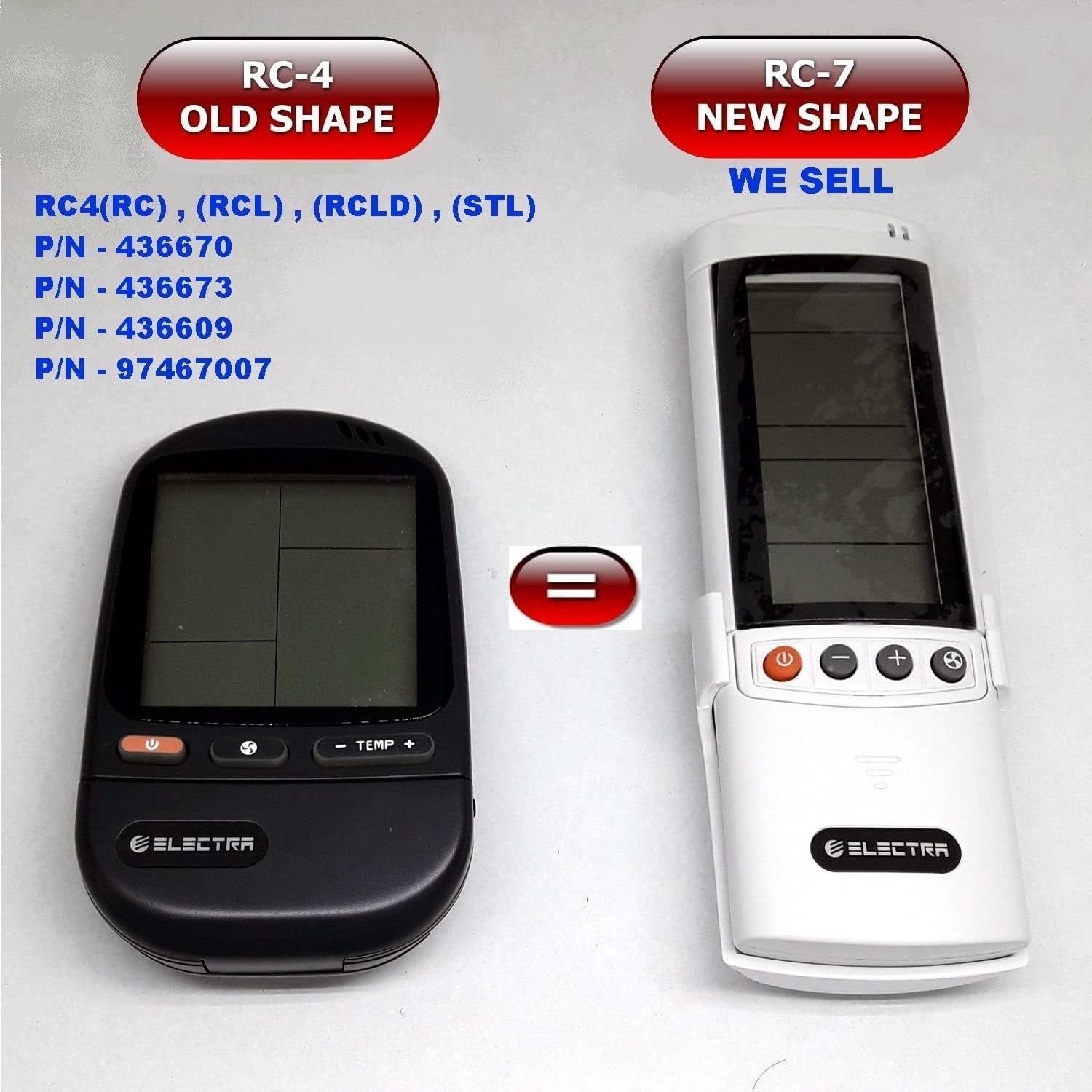
Image: Comparison of the older RC-4 model and the newer RC-7 model. This image helps users identify the correct remote control for their air conditioning unit.
Eusi pakét
- 1 x ELECTRA RC7 Air Conditioner Remote Control
- 1 x Wall Mount Holder (optional, may vary by package)

Image: The ELECTRA RC7 remote control shown alongside its accompanying wall mount holder, illustrating the complete package contents.
Produk Leuwihview
The ELECTRA RC7 remote control features an ergonomic design with clearly labeled buttons and a digital display for easy operation. Familiarize yourself with the layout below.
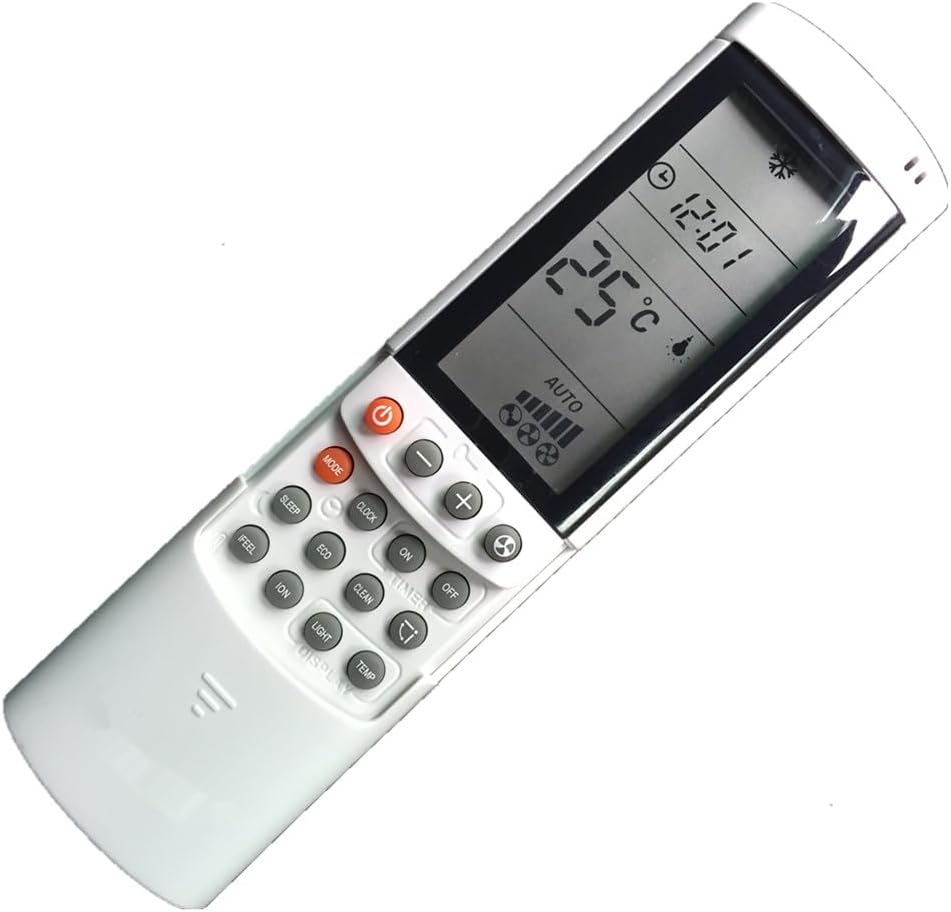
Gambar: A lengkep view of the ELECTRA RC7 remote control, highlighting the digital display and various function buttons for air conditioner operation.
Fungsi Tombol:
- kakuatan (⏻): Turns the air conditioner unit On or Off.
- MODÉ: Siklus ngaliwatan mode operasi (misalna Cool, Panas, Kipas angin, garing, Otomatis).
- SET: Used for confirming settings or entering specific menus.
- Temperature Up (+) / Down (-): Adjusts the desired temperature.
- Laju Kipas (☁): Nyaluyukeun kecepatan kipas (contona, Handap, Sedeng, Luhur, Otomatis).
- TIMER: Sets the timer for automatic On/Off operation.
- SARE: Activates or deactivates sleep mode for comfortable night operation.
- JELAS: Clears current settings or cancels a function.
- NGARASA: Activates a specific comfort mode based on ambient conditions.
- KAMAR: Displays or sets the room temperature.
- CAHAYA: Controls the display light on the indoor unit.
- TAMPILAN: Toggles the remote's display backlight or unit's display.
- ECO: Activates energy-saving mode.
- BERESIH: Initiates a self-cleaning function for the indoor unit.
- ION: Activates the ionizer function (if available on the AC unit).
- ayun (⇄): Controls the louver swing direction.
Disetél
Pamasangan batré:
- Teangan tempat panutup kompartemen batré dina tonggong kadali jauh.
- Geser panutup ka handap atawa pencét kancing pikeun mukakeunana.
- Insert two (2) AAA batteries, ensuring the positive (+) and negative (-) terminals match the markings inside the compartment.
- Ganti panutup kompartemen batré, mastikeun eta clicks aman kana tempatna.
Catetan: Salawasna anggo batré anyar sareng gentos duanana batré dina waktos anu sami. Ulah nyampur batré lami sareng énggal atanapi jinis batré anu béda.
Parentah Operasi
Ensure the remote control is pointed directly at the air conditioner's receiver when sending commands.
Operasi dasar:
- Hurungkeun/Pareuman: Pencét éta Kakuatan button once to turn the unit on. Press it again to turn the unit off.
- Pilihan Mode: Pencét éta MODÉ button repeatedly to cycle through available operating modes (e.g., Auto, Cool, Dry, Fan, Heat). The selected mode will be displayed on the remote's screen.
- Nyaluyukeun Suhu: Ngagunakeun éta Temperature Up (+) or Turun (-) tombol pikeun nyetél suhu anu anjeun pikahoyong.
- Nyaluyukeun Laju Kipas: Pencét éta Laju kipas button to cycle through different fan speed settings (e.g., Auto, Low, Medium, High).
Fungsi canggih:
- Fungsi Timer: Pencét éta TIMER button to set a specific time for the unit to turn on or off. Follow the on-screen prompts to adjust the time using the temperature buttons and confirm with SET.
- Modeu Bobo: Pencét éta SARE button to activate sleep mode, which typically adjusts temperature and fan speed for quiet, comfortable sleep.
- Mode Eco: Pencét éta ECO button to engage energy-saving operation, which optimizes settings to reduce power consumption.
- Fungsi ayun: Pencét éta Ayun button to activate or adjust the automatic louver swing, distributing air evenly.
Pangropéa
Ngabersihan Remote Control:
- Ngusap beungeut kadali jauh ku lawon lemes, garing.
- Keur kokotor bandel, enteng dampen lawon jeung cai sarta detergent hampang, teras usap garing langsung.
- Ulah nganggo pembersih abrasif, alkohol, atanapi pangleyur kimia, sabab ieu tiasa ngaruksak permukaan atanapi komponén internal remote.
Ngagantian batré:
Replace batteries when the remote's display becomes dim or the remote fails to operate the air conditioner from a normal distance. Refer to the "Battery Installation" section under Setup for detailed instructions.
penting: Cabut batré upami kadali jauh henteu dianggo kanggo waktos anu panjang pikeun nyegah bocor sareng karusakan.
Pamérésan masalah
- Jauh teu ngabales:
- Check if the batteries are correctly inserted with the correct polarity.
- Ganti batré heubeul ku nu anyar.
- Pastikeun teu aya halangan antara remot sareng panarima AC.
- Confirm the remote is pointed directly at the air conditioner.
- Tampilan taram atanapi kosong:
- Batré bisa jadi low. Gantina.
- Limited operating range:
- Batteries may be weak. Replace them.
- Ensure no strong light sources (e.g., direct sunlight) are interfering with the signal.
spésifikasi
- model: RC7
- merek: ELECTRA (Compatible with Airwell, Emailair, Electra)
- Jenis Controller: Tombol Control
- Fitur husus: Desain ergonomis
- warna: Bodas
- Jumlah Max Alat anu Dirojong: 1 (per remot)
- Rentang maksimum: Approximately 10 Meters (33 feet)
- Sumber Daya: 2 x Batré AAA (teu kalebet)
Garansi sareng Rojongan
For warranty information or technical support, please refer to the documentation provided with your air conditioning unit or contact the original seller or manufacturer of the ELECTRA RC7 remote control. Keep your purchase receipt as proof of purchase.


