Bubuka
This manual provides detailed instructions for the setup, operation, and maintenance of your UNIC UC30 LED Mini Projector. Please read this manual thoroughly before using the projector to ensure proper functionality and to prevent damage.
Émbaran Kasalametan
- Ulah ngahalangan liang ventilasi. Pastikeun aya rohangan anu cekap di sakitar proyéktor pikeun aliran hawa anu lancar.
- Ulah nempo langsung kana lensa projector lamun lamp dihurungkeun. Cahya caang bisa ngabalukarkeun karuksakan panon.
- Jauhkeun proyéktor tina cai atanapi cairan sanésna. Ulah dianggo dina lingkungan anu lembab.
- Paké ngan adaptor kakuatan disadiakeun kalawan projector.
- Ulah nyobian ngabongkar atanapi ngalereskeun proyéktor nyalira. Serahkan sadaya perawatan ka tanaga anu mumpuni.
- Teundeun projector dina permukaan stabil, datar pikeun nyegah ragrag.
Eusi pakét
Mangga parios eusi bungkusan nalika dibuka. Upami aya barang anu leungit atanapi ruksak, hubungi padagang anjeun.
- UNIC UC30 LED Mini Projector
- Adaptor kakuatan
- AV kabel
- Kadali jauh
- Manual pangguna (dokumén ieu)

Image: The UNIC UC30 projector, its power adapter, an AV cable, and the remote control, laid out to show the complete package contents.
Produk Leuwihview
Biasakeun diri anjeun sareng rupa-rupa bagian sareng sambungan proyéktor anjeun.
Hareup sareng Sisi View

Gambar: Sisi hareup view of the UNIC UC30 projector, highlighting the main projection lens and the ventilation grilles on the side.
- Lensa proyéksi: Emits gambar.
- Ring Fokus: Saluyukeun seukeutna gambar.
- Tombol Koreksi Keystone: Ngalereskeun distorsi gambar trapezoidal.
- Grilles ventilasi: Essential for heat dissipation. Do not block.
Port Tukang jeung Samping
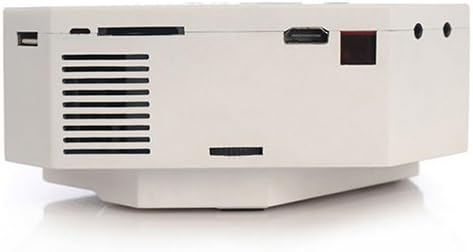
Gambar: Hiji sisi view of the UNIC UC30 projector, clearly showing the USB port, SD card slot, HDMI port, and other audio/video input jacks.
- Port VGA: Connects to computers.
- Port HDMI: Connects to HDMI-enabled devices (laptops, gaming consoles, media players).
- Port USB: Nyambungkeun alat panyimpenan USB pikeun muterkeun média.
- Slot Kartu SD: Nyelapkeun kartu SD pikeun muterkeun média.
- Input AV: Connects to devices using the included AV cable (RCA composite).
- Jack headphone: Pikeun kaluaran audio éksternal.
- Input kakuatan: Nyambungkeun adaptor kakuatan.
Panel Kontrol Top

Gambar: A luhur-handap view of the UNIC UC30 projector, displaying the integrated control panel with navigation buttons and source selection keys.
- Tombol Daya: Hurungkeun/pareuman proyektor.
- Tombol Sumber: Selects input source (HDMI, VGA, AV, USB, SD).
- Tombol Menu: Accesses projector settings.
- Tombol Navigasi (Kaluhur/Turun/Kénca/Katuhu): Navigates menus and adjusts settings.
- Tombol OK/Lebetkeun: Konfirmasi pilihan.
- Return/Exit Button: Goes back or exits menus.
Disetél
1. Panempatan
Place the projector on a stable, flat surface. Ensure there is sufficient space around the projector for ventilation. The ideal projection distance is between 1 to 3.5 meters, yielding a picture size of 30 to 120 inches.
Image: The UNIC UC30 projector positioned on a flat surface, illustrating a typical setup scenario.
2. Sambungan Daya
- Connect the power adapter to the "Power Input" port on the projector.
- Colokkeun tungtung nu sejen adaptor kakuatan kana stop kontak témbok.
- Lampu indikator daya dina proyéktor kedahna hurung.
3. Alat Sambungkeun
Projector ngarojong sababaraha sumber input:
- HDMI: Connect an HDMI cable from your device (e.g., laptop, DVD player, game console) to the projector's HDMI port.
- VGA: Sambungkeun kabel VGA tina komputer anjeun ka port VGA proyéktor.
- OF: Use the provided AV cable to connect to devices with RCA composite outputs (e.g., older DVD players, set-top boxes).
- USB: Insert a USB flash drive into the USB port for direct media playback.
- Kartu SD: Insert an SD card into the SD card slot for direct media playback.
Parentah Operasi
1. Powering on / Pareum
- Pikeun Ngahurungkeun: Press the Power button on the projector's top panel or the remote control. The projector will start up.
- Pikeun mareuman: Pencét deui tombol Daya. Konfirmasi mareuman upami dipenta.
2. Nyaluyukeun Fokus sareng Keystone
- fokus: Puterkeun ring fokus sabudeureun lensa nepi ka gambar anu diproyeksikan jelas tur seukeut.
- Koreksi Keystone: Upami gambar katingalina trapesium (langkung lega di luhur atanapi handap), saluyukeun dial koreksi keystone dugi ka gambarna pasagi panjang.
3. Milih Sumber Input
Pencét éta Sumber button on the projector or remote control to cycle through available input sources (HDMI, VGA, AV, USB, SD). Select the source corresponding to your connected device.
4. Putereun Média (USB/SD)
When a USB drive or SD card is inserted, the projector will typically prompt you to select the media type (Photo, Music, Movie, Text). Navigate using the arrow keys and press OK pikeun milih.
Dirojong File Bentuk:
- Encoding Formats: MPEG1/MPEG2/MPEG4/DivX/Xvid
- Format pidéo: AVI/MOV/VOB/DAT/MPEG/MPG/RM/RMVB
- Format audio: MP3/WMA/WAV
- Format gambar: JPEG/BMP/GIF/PNG
- Format E-book: TXT
Pangropéa
- Ngabersihan lensa: Anggo lawon anu lemes sareng henteu lint anu dirancang khusus pikeun lénsa optik pikeun ngusap lembut lénsa proyektor. Ulah make cleaners abrasive atawa gaya kaleuleuwihan.
- Ventilasi: Regularly check that the ventilation grilles are free from dust and debris. Use a soft brush or compressed air to clean them. Never block the vents during operation.
- Panyimpenan: Upami henteu dianggo salami lami, simpen proyéktor di tempat anu tiis, garing, sareng kajaga tina lebu.
Pamérésan masalah
| Masalah | Solusi anu mungkin |
|---|---|
| Taya gambar projected. |
|
| Gambar blur. |
|
| Gambarna trapesium. | Adjust the keystone correction dial on the projector. |
| Taya sora. |
|
| Kadali jauh teu jalan. |
|
spésifikasi
| Fitur | Rincian |
|---|---|
| merek | Itech |
| Ngaran modél | UC30 |
| Nomer modél | VP02W |
| Téknologi tampilan | LCD |
| Resolusi pribumi | 480 x 320 piksel |
| Caang | 150 LUX |
| Babandingan Kontras | 300:1 |
| Ukuran Gambar | 30-120 inci |
| Jarak proyéksi | 1-3.5 méter |
| Projection Model | Front/Rear projection |
| Panganteur Hardware | VGA, USB, HDMI |
| Speaker | 2.0W *2 |
| Wattage | 60 watt |
| Fitur husus | Portable, Keystone Correction |
| Tipe Pamasangan | Tabletop Gunung |
Garansi sareng Rojongan
Kanggo inpormasi garansi sareng dukungan téknis, mangga tingali dokuméntasi anu disayogikeun nalika mésér atanapi hubungi pangecér anjeun. Simpen resi pameseran anjeun salaku bukti pameseran.


